

iphone boot up and recovery image. This tool was very easy
to use but the tool is currently for mac only.

Apple logo with retro shade and with my 'nick'...

Have Fun
This post has been edited by hackdplanet: May 8 2008, 09:44 AM
Pwnage Your iPhone, Change iphone boot up and recovery image
|
|
 May 8 2008, 09:41 AM, updated 18y ago May 8 2008, 09:41 AM, updated 18y ago
Return to original view | Post
#1
|
 
Junior Member
91 posts Joined: May 2008  
|
Today, I just test the latest version of pwnage tool to change
iphone boot up and recovery image. This tool was very easy to use but the tool is currently for mac only.
Apple logo with retro shade and with my 'nick'... Have Fun This post has been edited by hackdplanet: May 8 2008, 09:44 AM |
|
|
|
|
|
May 8 2008, 06:35 PM
Return to original view | Post
#2
|
|
Junior Member
91 posts Joined: May 2008
|
It was easy to enter the recovery mode after Pwnage iPhone.
No need to press and hold home button and power switch, just press home button and hold it while plugging the usb connector and it will enter the recovery mode. If the iPhone was switch off, it will automatic switch on if you place it on the dock. |
|
|
May 8 2008, 06:50 PM
Return to original view | Post
#3
|
|
Junior Member
91 posts Joined: May 2008
|
QUOTE(frozzbyte @ May 8 2008, 07:43 PM) Errr ... u can do that without pwning the phone. Or am I wrong? I not sure about it.   . .Coz i don't notice anything like that after I ziphone it. Maybe iliberty or other 3rd party app. BTW, have you receive my PM abt the case?? Thankx This post has been edited by hackdplanet: May 8 2008, 06:54 PM |
|
|
May 8 2008, 09:12 PM
Return to original view | Post
#4
|
|
Junior Member
91 posts Joined: May 2008
|
QUOTE(frozzbyte @ May 8 2008, 08:52 PM) If not mistaken ... u can put the phone to restore mode just by doing so. It doesn't matter what kind of software we use to hack it. Btw I'll be doing the pwning process using the winpwn program this weekend after backing up important stuff. Thankx.Yeah I did ... I'll inform u if anything came up with the case. anyway, i never perform backup for pwning coz i just want to change the boot up and recovery picture. I need some tips here to make the custom recovery boot picture... dont know y all my custom made recovery picture fail with pwnage but i make success with the boot up.  Here the custom boot i just made by pixelmator. i'm not artist so i dont understand how to use photoshop cs3: 
thankx to UnUsUaL for the "Bape Apple.png" and this is the recovery picture that i FAIL with: 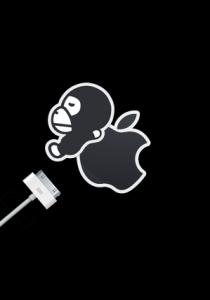
Hope someone can make it work. Download the working logo.img2 here  logo.img2.zip ( 84.19k )
Number of downloads: 40
logo.img2.zip ( 84.19k )
Number of downloads: 40Sorry guys.. wrong file.. it was a fail recovery logo.. this is the right one. Have Fun Added on May 8, 2008, 11:21 pmI just notice that all my custom recovery img2 are working. The file size (logo.img2 + recovery.img2) in pwnagetool.app/contents/resources/iPwner folder cannot exceed 105kb (in my experimental right now) to make it work. This post has been edited by hackdplanet: May 8 2008, 11:24 PM |
|
|
May 12 2008, 09:39 AM
Return to original view | Post
#5
|
|
Junior Member
91 posts Joined: May 2008
|
QUOTE(frozzbyte @ May 12 2008, 03:52 AM) @hackdplanet This is the file bro:bro ... can u save the pics in png format. Malas want to decrypt the img2 file. Pwnage tool for mac have a strict rules for the boot/restore image. Did u follow the instructions when creating it? Yeah the file need to be less than 100kb in size and most have alpha layers or something like it (not good in photoshop but i can manage).
BapeApple_BootnRecPng.zip ( 40.48k )
Number of downloads: 17Still cant manage to make this 2 images to be less in 100k in total size in img2 format. |
|
|
May 12 2008, 07:06 PM
Return to original view | Post
#6
|
|
Junior Member
91 posts Joined: May 2008
|
QUOTE(UnUsUaL @ May 12 2008, 02:48 PM) Yo, didn't seek my permission 1st? Opss.. Sorry...Maybe its too late to ask for u permission right now. May I use your bape appple png? HDP Added on May 12, 2008, 7:28 pm QUOTE(frozzbyte @ May 12 2008, 12:32 PM) @hackdplanet Thanks for the png files but i cant use it with my Pwnage Tool. Bro ... here's the file i already mod for u. Test and see if its working. Error accour: "Sorry, but that doesn't appear to be the proper PNG file"  Now I can only use the custom boot logo + default iphone rec. logo or default iphone boot logo + custom rec. logo or as long as the logo.img2 + recovery.img2 = <100kb This post has been edited by hackdplanet: May 12 2008, 07:28 PM |
|
|
|
|
|
May 12 2008, 08:57 PM
Return to original view | Post
#7
|
|
Junior Member
91 posts Joined: May 2008
|
can u send me both of the img2 files?
I cant combine this 2 boot logo to <100kb in size in img2 format Thankx This post has been edited by hackdplanet: May 12 2008, 09:12 PM |
|
|
May 12 2008, 09:27 PM
Return to original view | Post
#8
|
|
Junior Member
91 posts Joined: May 2008
|
QUOTE(frozzbyte @ May 12 2008, 09:13 PM) btw did u follow this guide to make the boot logo? yup, i did follow the guide. only i can't manage to get the size to <100k in img2 format. I think it only can be done if i can reduce the both png files to 20kb in total.QUOTE Which img2 files? after you use the ipsw builder you can rename the *.ipsw to *.zip and extract it. Inside the folder you will find the /firmware/all_flash/all_flash.xxxx/applelogo.img2 and recoverymode.img2. That was the boot and recovery logo.If you can manage to get the size <100kb in total for the both file (applelogo.img2 + recoverymode.img2 = <100kb) it will work for me for sure. Thankx This post has been edited by hackdplanet: May 12 2008, 09:35 PM |
|
|
May 13 2008, 05:48 PM
Return to original view | Post
#9
|
|
Junior Member
91 posts Joined: May 2008
|
QUOTE(frozzbyte @ May 13 2008, 03:14 PM) Here u go dude ... hope this u can use. Thankx for the files bro.I Just test it and it doesn't work coz the files size is more than 100kb in total. applelogo.img = 88kb recoverymode.img2=96kb Total Size is 184kb Maybe I should try pwnage for win at my opis... hhehehehe Anyway, Thank you very much... u r very kind and helpful. Thankx HDP This post has been edited by hackdplanet: May 13 2008, 05:48 PM |
|
|
May 13 2008, 08:18 PM
Return to original view | Post
#10
|
|
Junior Member
91 posts Joined: May 2008
|
yup 100kb for both in img2 format. (the default img2 files size is 72kb - applelogo.img2 = 16kb and recoverymode.img2 = 56kb)
and of coz for png file it must be <100kb each to make it work. I dont use photoshop... Im using pixelmator. Now i'm looking for working png compressor for leopard. Thankx |
|
Topic ClosedOptions
|
| Change to: |  0.0197sec 0.0197sec
 0.16 0.16
 7 queries 7 queries
 GZIP Disabled GZIP Disabled
Time is now: 6th December 2025 - 06:12 PM |
 Quote
Quote