Outline ·
[ Standard ] ·
Linear+
Windows 2008 x86/x64, Free trial 60days (240days max)
|
linkinstreet
|
 Apr 30 2008, 10:33 AM Apr 30 2008, 10:33 AM
|
Red Bull Addict


|
dude. formatting every 8 month is NEVER reccomended. It will shorten ur HDD life. And besides, Vista ran fine on my old AMD Athlon 1.8GHz 512MB system during my beta testing days. And Server 2008 if you enable all the things that vista has, uses just teh same resources. Been there and done that.
And the fact that server 2008 won't have ALL the functions of the desktop OS. it won't for instance support all the latest DirectX, just the basic functions, while some drivers works, not all are 100% compatible. Media functions are limited. Useful Vista accessories, like Fax & Scan and the Windows Sidebar, are MIA, while some 3rd party tools are just plain broken (Skype newer than 3.2 WILL NEVER WORK on it). Not all menus and preferences are available. The reason that Server 2008 seems (and I do say seems) faster is that by default, Desktop Windows Management on Vista are set at Best Appearance for while Server 2008 is for Best Performance. Setting Vista to Best Performance does makes it faster than Server 2008. Honestly the difference between them are just the services running, with Vista running more services that caters for desktop users. Server 2008 for instance WON'T run these by default.
Computer Browser
Offline Files
Portable Device Enumerator
Program Compatibility Assistant
ReadyBoost
Security Center
SSDP Discovery
Superfetch
UPNP Device Host
Windows Connect
Windows Image Acquisition
Windows Search
And some of those I always use for my desktop computing. Turning them on in Server 2008 slows it down thus I have to disable them as IIS will lag if I don't.
And the main fact remains. It still a server OS, good for IIS, good for multiple penetration connections from client, and is priced to do just that. It's up for ppl to judge the OS, and for me, in consumerism point of view, it's pointless. We don't need virtualisation in a desktop OS, and remember, the 60 day trial period and it's follow up ARE NOT SUPPORTED BY MICROSOFT SUPPORT. So if something do f*** up ur PC, it's bye bye bye. Trial period is never meant to be misused, it's meant for you to test the OS before you buy it.
This post has been edited by linkinstreet: Apr 30 2008, 10:34 AM
|
|
|
|
|
|
linkinstreet
|
May 2 2008, 08:32 AM
|
Red Bull Addict
|
works on my server IIRC, altho we changed to NOD32 last month
|
|
|
|
|
|
FollowN
|
May 2 2008, 02:00 PM
|
|
|
QUOTE dude. formatting every 8 month is NEVER reccomended. It will shorten ur HDD life. If your point is concerning the movement of platter arms/motor parts during reformatting sessions in a hdd, I'm afraid you might have your facts wrong. How does reformatting shorten a hdd's lifespan? Care to explain? |
|
|
|
|
|
fesick
|
May 2 2008, 10:32 PM
|
|
|
it might shorten the hdd life but no one know when..~
by the time the hdd dies sure you`ll have a new one..
This post has been edited by fesick: May 2 2008, 10:35 PM
|
|
|
|
|
|
mystical zero
|
May 2 2008, 11:31 PM
|
|
|
QUOTE(fesick @ May 2 2008, 10:32 PM) it might shorten the hdd life but no one know when..~ by the time the hdd dies sure you`ll have a new one.. Another common thing people mistaken for. Formatting a hard drive frequently will not in any way shorten its lifespan. How can formatting -- preparing a filesystem has anything to do with reducing a hdd lifespan? Anyway, back to the topic. Vista SP1 and Server 2008 share the same kernel. Everything from I/O and memory management should be same in terms of performance. Well, of course, if you take into account the features enabled by default on Vista, you would probably say Vista performs slower. |
|
|
|
|
|
BuLaNaR
|
May 6 2008, 05:25 PM
|
|
|
how to get full license, will release???
|
|
|
|
|
|
TSkitsuna
|
May 7 2008, 01:05 AM
|
Getting Started

|
manage to run 3dmark vantage on 2008  seems the online database detect 2008 as vista  |
|
|
|
|
|
adriankhoo153
|
May 7 2008, 08:32 AM
|
|
|
Format eveery 8 month? Hmmm hmm
|
|
|
|
|
|
dopodplaya
|
May 7 2008, 09:00 AM
|
|
|
seriously, you got the benchmark/info wrong, TS.
Server line of Windows OS was not meant to play games and run your multimedia applications. It was intended to run Internet and networking application servers. Even though you may run those programs, the functionality was intended for servers, not desktops.
Windows Server 2008 is an enterprise server edition of kernel 6.0.6001 release. It is based on the same kernel as Vista SP1, but it was not intended to run on your desktop. For server line, fancy desktop, multimedia and all those eye candies are not needed to be run on desktop application. This is to reduce the load, so your server applications may have more resources and CPU time.
Anyways, Windows Server 2008 has good install options
1) Server Core - good for minimal Internet and networking server management, intended to run via remote management console or simply command lines. Good for administrators who love simplisitic environment.
2) Full Installation - intended for full-featured Windows server line with Explorer as desktop shell, Microsoft .NET Framework and Management consoles. More services available if full installation is chosen.
Put it in a simple way - Windows Server 2008 is not replacement for Vista.
This post has been edited by dopodplaya: May 7 2008, 09:02 AM
|
|
|
|
|
|
TSkitsuna
|
May 7 2008, 09:42 AM
|
Getting Started
|
2008 is 100% not be vista replacement, thats why i put "Vista replacement?"
i just want people to give 2008 a try, its up to them to choose
for me, it is fun to play around with 2008, since the feel almost like linux where you can enable/disable either server service or desktop service
This post has been edited by kitsuna: May 7 2008, 09:45 AM
|
|
|
|
|
|
dopodplaya
|
May 7 2008, 09:51 AM
|
|
|
QUOTE(kitsuna @ May 7 2008, 09:42 AM) 2008 is 100% not be vista replacement, thats why i put "Vista replacement ?" i just want people to give 2008 a try, its up to them to choose for me, it is fun to play around with 2008, since the feel almost like linux where you can enable/disable either server service or desktop service er... you can also disable services in Vista. Just like, exception for Home Basic and Home Premium, which you may download MMC separately or use the command line sc or msconfig (for non-technical users). Windows Server 2008 isn't Linux, and doesn't feel like Linux-based operating system at all  Still you are too far off about the replacement matter. Windows Server 2008 was meant to replace Windows Server 2003, not Windows Vista. Hints: 1) New server OS replaces old server OS 2) New desktop OS replaces old desktop OS This post has been edited by dopodplaya: May 7 2008, 09:56 AM |
|
|
|
|
|
TSkitsuna
|
May 7 2008, 09:59 AM
|
Getting Started
|
obviously 2008 is not like linux just the additional server service that me thinks feel like linux, that also have additional server service no more than that  |
|
|
|
|
|
dopodplaya
|
May 7 2008, 10:07 AM
|
|
|
QUOTE(kitsuna @ May 7 2008, 09:59 AM) obviously 2008 is not like linux just the additional server service that me thinks feel like linux, that also have additional server service no more than that clearly you need to learn more, but hey, I am experimenting Windows Server 2008 at home and office. Try Server Core features, you can learn more about networking and remote maintenance, you know. For gaming stick to Windows Vista or Windows XP  This post has been edited by dopodplaya: May 7 2008, 10:07 AM This post has been edited by dopodplaya: May 7 2008, 10:07 AM |
|
|
|
|
|
TSkitsuna
|
May 7 2008, 10:21 AM
|
Getting Started
|
im already jammed with 2008 as my main os for gaming n multimedia if gonna downgrade, most likely go to 2003 at most  n thanks for the tips also but slowly learning the server side function too This post has been edited by kitsuna: May 7 2008, 10:22 AM |
|
|
|
|
|
sniper69
|
May 7 2008, 12:48 PM
|
|
|
|
|
|
|
|
|
SUSdattebayo
|
May 7 2008, 02:17 PM
|
|
|
vista replacement is windows se7en TS u wanna set up home server meh
Added on May 7, 2008, 2:22 pmQUOTE(linkinstreet @ Apr 30 2008, 10:33 AM) dude. formatting every 8 month is NEVER reccomended. It will shorten ur HDD life. then the defragmenting, superfetch, massive disk I/O will do equal harm to HDD should ur theory is correct even the harm is there, but there are many other factors to end a HDD's life prematurely This post has been edited by dattebayo: May 7 2008, 02:22 PM |
|
|
|
|
|
TSkitsuna
|
May 7 2008, 03:59 PM
|
Getting Started
|
QUOTE(sniper69 @ May 7 2008, 12:48 PM) install need 2gb, if not mistaken |
|
|
|
|
|
sniper69
|
May 7 2008, 04:48 PM
|
|
|
QUOTE(kitsuna @ May 7 2008, 03:59 PM) install need 2gb, if not mistaken ok... i deleted the hibernation that cost up to 3GB of space  anyway, i tried play games like Tom Clancy's Rainbow Six Vegas 2 (latest version), Crysis, Company of Heroes (retail... (you know why...)) will try some other games too as well as 3DVantage » Click to show Spoiler - click again to hide... « 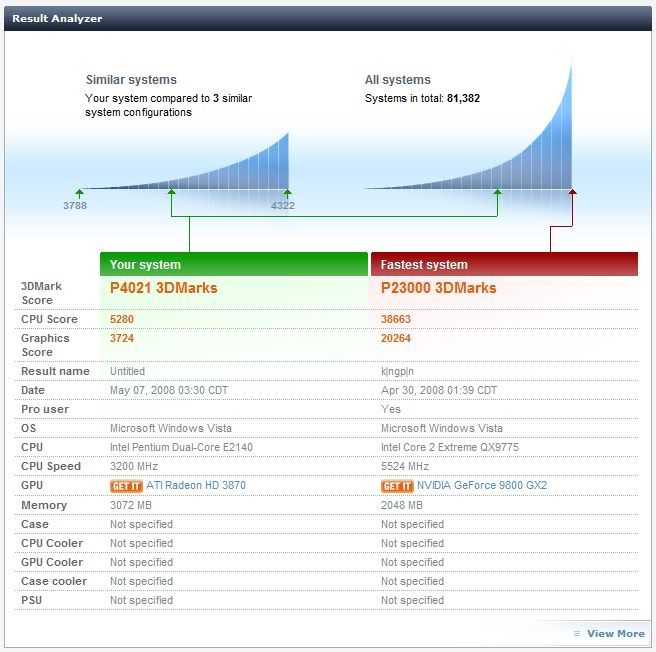 one issue is, i can't install Kaspersky Internet Security 7.01.325 says that not supported OS  - help me on this... btw, i can't use any other theme such as black aero and so on?  This post has been edited by sniper69: May 7 2008, 05:04 PM This post has been edited by sniper69: May 7 2008, 05:04 PM |
|
|
|
|
|
TSkitsuna
|
May 7 2008, 06:19 PM
|
Getting Started
|
since using server, need antivirus for server/business version *cough*cough*
black aero maybe already been strip out, need to be add from external source
|
|
|
|
|



 Quote
Quote

 , is Kasperky Internet Security 7.0.1.325 isn't compatible with Windows Server 2008 or Vista?



 0.0216sec
 0.12
0.12
 6 queries
 GZIP Disabled