QUOTE(JasLyn @ Aug 27 2008, 08:44 AM)
Which .plist would that be and where? or i need to create one n dump inside particular theme folder so font glow will change everytime i change themes....? TQ
The .plist is in the theme.
1) Copy Saurik's theme to your HD.
2) Rename the .theme to .zip
3) Unzip and a folder will be created.
4) Click on the folder and look for Info.plist.
5) Use a txt editor to view the Info.plist.
6) Copy the string code white; text-shadow: Navy 2px 2px 3px</string> after color: and paste.
<string>/*font-family: monospace; */ font-size: 12px; color: white; text-shadow: Navy 2px 2px 3px</string>
7) Save the Info.plist.
8) Rename the folder (Any name you like) and set it back to .theme. You can however remain it as a folder if you don't wanna the .theme. Works both ways.
9) Upload to your phone.
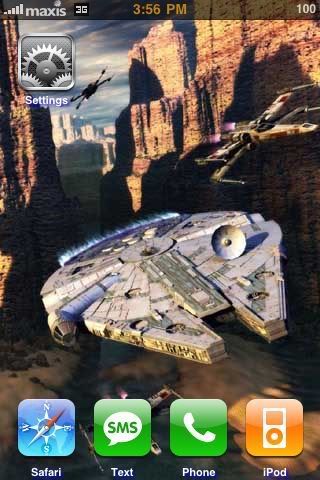
I have uploaded a Star Wars theme for you as a reference.
*You can replace the wallpaper with your own picture as long is 320x480 and rename as Wallpaper.png.
This post has been edited by davidgary73: Aug 27 2008, 12:02 PM 

 Aug 26 2008, 02:02 PM


 Quote
Quote










 0.0227sec
 0.43
0.43
 6 queries
 GZIP Disabled