


Summerboard Theme, @_@
Summerboard Theme, @_@
|
|
 Jul 18 2008, 01:20 PM Jul 18 2008, 01:20 PM
Return to original view | Post
#1
|
 
VIP
4,903 posts Joined: Jul 2008 
|
Simple Transformers Screenshot
|
|
|
|
|
|
Jul 19 2008, 04:06 PM
Return to original view | Post
#2
|
|
VIP
4,903 posts Joined: Jul 2008
|
Hi Jimi7, you need summerboard 3.2. Then you can change any theme you wan. Cheers
|
|
|
Aug 7 2008, 09:20 PM
Return to original view | Post
#3
|
|
VIP
4,903 posts Joined: Jul 2008
|
Winterboard is really cool.
The latest version of Winterboard comes with Saurik's theme. This theme has 2 pictures fading in and out. If you wanna have your own pictures. Try this. 1. go to /Library/Themes/Saurik 2. make a backup of it to your HD. Make another copy and rename the folder to your liking. 3. Click on the folder. In the folder, there's 2 folders. a) Bundles b) Private Private is where the pictures are stored. 4. Open the wallpaper.html with safari, firefox etc and view the source code. 5. Copy the source code to a txt editor. 6. Look for this code. </head><body style="color: black"> <img src="Rock.png" id="rock"/> <img src="Plant.png" id="plant"/> <script> var fade_in = rock; var fade_out = plant; Do take note on the big and small letters used. Rename them according to your picture names. (your pictures has to been in 320X480 png format) Example: </head><body style="color: black"> <img src="Picturea.png" id="picturea"/> <img src="Pictureb.png" id="pictureb"/> <script> var fade_in = picturea; var fade_out = pictureb; 7. Put your png pictures to the Private folder. 8. Save the txt file as Wallpaper.html and place it to your folder. Preview it on your browser before uploading it to your phone and see the fades. 9. upload and place it in /Library/Themes/ 10. Select your theme and respring. This post has been edited by davidgary73: Aug 8 2008, 03:44 PM |
|
|
Aug 13 2008, 04:02 PM
Return to original view | Post
#4
|
|
VIP
4,903 posts Joined: Jul 2008
|
Hey JasLyn, try downloading a theme. For example, in cydia, look for Time of Day theme (automatically switches between five wallpapers based on the time of day! It determines the time of day based on the time set on your iPhone). Install and see if it appears in winterboard.
Cuba try test the theme and see if it works. |
|
|
Aug 13 2008, 04:58 PM
Return to original view | Post
#5
|
|
VIP
4,903 posts Joined: Jul 2008
|
Hmmm..let try this. If you have any themes in your Pc HD, SSH into /Library/Themes/
Launch Winterboard and see if the theme you uploaded is there. Here's the saurik's theme. This post has been edited by davidgary73: Aug 13 2008, 05:07 PM |
|
|
Aug 14 2008, 12:05 PM
Return to original view | Post
#6
|
|
VIP
4,903 posts Joined: Jul 2008
|
@JasLyn
The main themes actually should reside in root/Library/Themes/ For this : /private/var/stash/Themes/ i think is a copy of the themes.. btw, i have attached the themes and do SSH them to the root/Library/Themes/ |
|
|
|
|
|
Aug 14 2008, 03:02 PM
Return to original view | Post
#7
|
|
VIP
4,903 posts Joined: Jul 2008
|
So susah wan..anyway, i use the 1st Gen iPhone1,1_2.0.1_5B108_Restore.ipsw. Custom root partition to 600MB v Cydia 2, Installer4 and ori boot logo. Restore phone as new and resync back contacts, vids and mp3's.
|
|
|
Aug 14 2008, 03:31 PM
Return to original view | Post
#8
|
|
VIP
4,903 posts Joined: Jul 2008
|
The apps is awesome man and is really good for you guys who are kaki kereta. The video is really cool too.
|
|
|
Aug 18 2008, 06:25 PM
Return to original view | Post
#9
|
|
VIP
4,903 posts Joined: Jul 2008
|
@wei
A big fan of Resident Evil (BioHazard) you are. Nice. Love the game accept for the movies. Good work on the Biohazard theme. Cheers This post has been edited by davidgary73: Aug 18 2008, 06:28 PM |
|
|
Aug 19 2008, 03:26 PM
Return to original view | Post
#10
|
|
VIP
4,903 posts Joined: Jul 2008
|
Welcome Acquiesce. Glad you got to fw 2.0.1.
Cheers |
|
|
Aug 25 2008, 11:42 AM
Return to original view | Post
#11
|
|
VIP
4,903 posts Joined: Jul 2008
|
@frozzbyte
Was experimenting with Winterbaord too. Totally amazing app. Only thing is, i'm trying to change the system font on the springboard and still finding the way around it. Theming battery, dock, status bar, wallpaper is so much more easier..Saurik is briliant. |
|
|
Aug 25 2008, 11:51 AM
Return to original view | Post
#12
|
|
VIP
4,903 posts Joined: Jul 2008
|
I did checked the Saurik .plist but failed to change the fonts as i am trying to use the MarkerFelt font but to no avail.
Colors and size is pretty simple.. |
|
|
Aug 25 2008, 12:08 PM
Return to original view | Post
#13
|
|
VIP
4,903 posts Joined: Jul 2008
|
It's resides in Fonts/Cache folder. Hmm...let me go figure out how to go about this..experiment and research time.
|
|
|
|
|
|
Aug 25 2008, 04:06 PM
Return to original view | Post
#14
|
|
VIP
4,903 posts Joined: Jul 2008
|
Still experimenting..
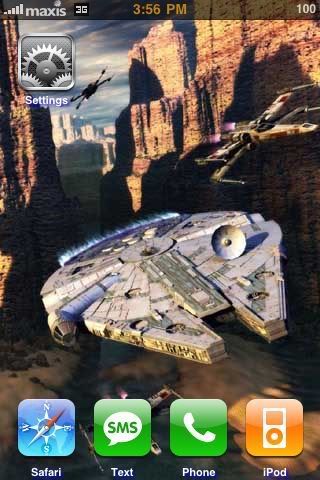 Manage to add text-shodow under the text icons with color. |
|
|
Aug 25 2008, 04:21 PM
Return to original view | Post
#15
|
|
VIP
4,903 posts Joined: Jul 2008
|
Ya..u can get it via Cydia called No Page Dots and i did replace the spinning loader with fading apple loaders.
The only lack now is font changing as the iphone fonts are pretty limited. Just revamp the theme with semi transparent icons. 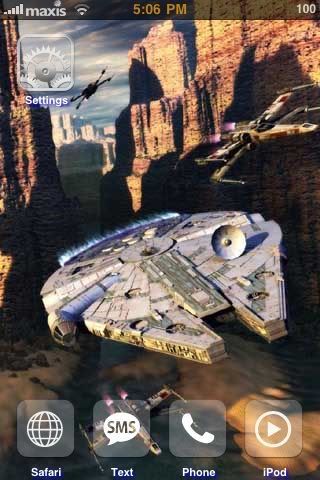 This post has been edited by davidgary73: Aug 25 2008, 10:17 PM |
|
|
Aug 25 2008, 05:46 PM
Return to original view | Post
#16
|
|
VIP
4,903 posts Joined: Jul 2008
|
@ gengstapo and frozzbyte
iThemeit software iThemeit! is a free iphone theme application/program for PC made to help users mix and match icons, backgrounds, wallpapers and different style themes to send to their iphone with the single click of a button. Themes created are also saved on your PC so you can always re-use what you created or share your themes with others. iThemeiT is designed to help you quickly create beautiful and creative themes to personalize your iphone. No experience is needed just drag and drop icons and backgrounds or use our theme creator built into iTools to make any images (icons,backgrounds and much more) instantly for your iphone. iThemeit Download Link Found this site but not sure if it comes in handy. Talks about iPhone GUI PSD. http://teehanlax.com/blog/?p=447 This post has been edited by davidgary73: Aug 25 2008, 06:27 PM |
|
|
Aug 26 2008, 02:46 PM
Return to original view | Post
#17
|
|
VIP
4,903 posts Joined: Jul 2008
|
@JasLyn
Glad you got it working. Now you can eksen too..hahaha.. |
|
|
Aug 26 2008, 08:00 PM
Return to original view | Post
#18
|
|
VIP
4,903 posts Joined: Jul 2008
|
QUOTE(JasLyn @ Aug 26 2008, 03:00 PM) How do u do that? can make d font shiny lah Is called the "Glow Text". Here's how you can do this by add the string to the .plist   After the color:<space><space>white; text-shadow: Navy 2px 2px 3px</string> You can use any color you like. Example: <string>/*font-family: monospace; */ font-size: 12px; color: white; text-shadow: Navy 2px 2px 3px</string> <string>/*font-family: monospace; */ font-size: 12px; color: white; text-shadow: Red 2px 2px 3px</string> <string>/*font-family: monospace; */ font-size: 12px; color: white; text-shadow: Orange 2px 2px 3px</string> Have fun.. Cheers This post has been edited by davidgary73: Aug 26 2008, 08:02 PM |
|
|
Aug 27 2008, 11:42 AM
Return to original view | Post
#19
|
|
VIP
4,903 posts Joined: Jul 2008
|
QUOTE(JasLyn @ Aug 27 2008, 08:44 AM) Which .plist would that be and where? or i need to create one n dump inside particular theme folder so font glow will change everytime i change themes....? TQ The .plist is in the theme.1) Copy Saurik's theme to your HD. 2) Rename the .theme to .zip 3) Unzip and a folder will be created. 4) Click on the folder and look for Info.plist. 5) Use a txt editor to view the Info.plist. 6) Copy the string code white; text-shadow: Navy 2px 2px 3px</string> after color: and paste. <string>/*font-family: monospace; */ font-size: 12px; color: white; text-shadow: Navy 2px 2px 3px</string> 7) Save the Info.plist. 8) Rename the folder (Any name you like) and set it back to .theme. You can however remain it as a folder if you don't wanna the .theme. Works both ways. 9) Upload to your phone. I have uploaded a Star Wars theme for you as a reference. *You can replace the wallpaper with your own picture as long is 320x480 and rename as Wallpaper.png. This post has been edited by davidgary73: Aug 27 2008, 12:02 PM |
|
|
Aug 27 2008, 12:45 PM
Return to original view | Post
#20
|
|
VIP
4,903 posts Joined: Jul 2008
|
QUOTE(Masamune @ Aug 27 2008, 12:19 PM) Hey how u make ur maxis logo so nice? Hskoon made this. You can download it here.Got the globe on top summore.. http://forum.lowyat.net/topic/752226 QUOTE(gengstapo @ Aug 27 2008, 12:25 PM) @JasLyn gengstapo... just create empty image & named as StatusBar.png in ur /theme folder.. thats the trick btw, ive done something.. hehee   » Click to show Spoiler - click again to hide... «  |
|
Topic ClosedOptions
|
| Change to: |  0.0233sec 0.0233sec
 0.69 0.69
 7 queries 7 queries
 GZIP Disabled GZIP Disabled
Time is now: 4th December 2025 - 06:36 PM |
 Quote
Quote

