

This post has been edited by ujang_je: Jul 3 2008, 11:37 AM
GPRS MMS Activate Setting For Hotlink DiGi Celcom, Useful info!!
|
|
 Jul 3 2008, 11:29 AM Jul 3 2008, 11:29 AM
|
 
Junior Member
217 posts Joined: Aug 2007 From: Johore   
|
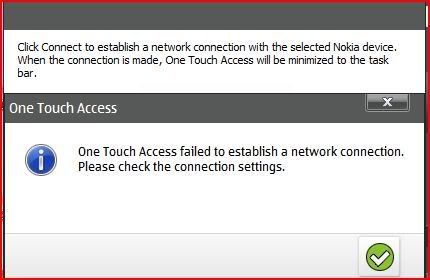
Hii all.i faced a prob about using N73 as a modem to connect to Celcom Broadband,but there is some error message "one touch access failed to established a netwrok connections,please check the connections seting,",then i changed d card into K800i,the connections success,any body know whats wrong with my N73 config?? really stuck here,for info i'm using Win XP SP2,tested it with Vista oso got same result.
This post has been edited by ujang_je: Jul 3 2008, 11:37 AM |
|
|
|
|
|
Jul 15 2008, 10:14 AM
|

Junior Member
20 posts Joined: Jul 2008
|
QUOTE(allscania @ Jun 30 2008, 08:42 PM) ME TOO!!!!!!!!!!!!! Hi i'm new here but i can help you with this problem anyone face this problem, My maxis 3G sim card has been using all this while for 3G data. But i am Using N95. setting remain the same and unchange. Got this error "Packet Data : Connection now allowed!" Please help ME!   Normally for this error prompt it was due to APN Control was enable in your phone. Follow the steps below  Nokia Step 1: Select MENU Step 2: Select Tools Step 3: Select Settings Step 4: Select Connection Step 5: Select APN Control Step 6: Select Options Step 7: Select Deactivate restrictions Hope it helps  |
|
|
Jul 16 2008, 07:38 AM
|

Senior Member
1,227 posts Joined: Jul 2007
|
is there possible to get setting for china tv phone?
Added on July 16, 2008, 7:39 amis there possible to get setting for china tv phone? This post has been edited by carloompunk: Jul 16 2008, 07:39 AM |
|
|
Jul 16 2008, 04:55 PM
|

Senior Member
1,215 posts Joined: Nov 2007 From: Pontian Johor 
|
you can look at the #1. try to use i-mobile setting. mostly works for me
|
|
|
Jul 22 2008, 12:03 AM
|

Senior Member
1,269 posts Joined: Dec 2007 From: MoD ParaDisE 
|
i have a problem, can some one help?
Problem : Cannot add new setting account for mms/wap/gprs - account full - 70 something bblabla bla.. phone : nokia 6300 type : Digi Postpaid. how?  |
|
|
Jul 22 2008, 12:16 AM
|

Junior Member
469 posts Joined: Mar 2005 From: Earth
|
QUOTE(m2n-e @ Jul 22 2008, 12:03 AM) i have a problem, can some one help? Well maybe u can go to settings there look for access point delete everything inside it and re send those settings again la.hope this works for u..Problem : Cannot add new setting account for mms/wap/gprs - account full - 70 something bblabla bla.. phone : nokia 6300 type : Digi Postpaid. how? |
|
|
|
|
|
Jul 22 2008, 12:22 AM
|
|
Senior Member
1,269 posts Joined: Dec 2007 From: MoD ParaDisE
|
i'll try
update : i've delete all access point, then re-send setting from digi this message was pop up only 70 sets allowed. setting discarded..  how?? how??This post has been edited by m2n-e: Jul 22 2008, 12:34 AM |
|
|
Jul 22 2008, 09:44 AM
|
|
Senior Member
1,215 posts Joined: Nov 2007 From: Pontian Johor
|
QUOTE(m2n-e @ Jul 22 2008, 12:22 AM) i'll try try format ur phone. press *#7370#. but you need to backup all you data first.update : i've delete all access point, then re-send setting from digi this message was pop up only 70 sets allowed. setting discarded.. how?? |
|
|
Jul 24 2008, 07:21 AM
|
|
Senior Member
1,269 posts Joined: Dec 2007 From: MoD ParaDisE
|
did that but nothings happen, yesterday bring that phone to my fren shop, he said the firmware/system files corrupted and need to reflash @ update to latest version v6.01.
|
|
|
Jul 28 2008, 03:48 AM
|

Senior Member
1,361 posts Joined: Nov 2005 From: Melaka/Perth
|
QUOTE(panda_putih @ Jun 17 2008, 10:02 AM) Why my phone cant use mms and gprs,my phone is i-mobile 609i. me 2 having the same prob.. using hotlink.. and im using maxis..anybody can help me solve the problem???please help me...urgent.  |
|
|
Aug 8 2008, 07:33 PM
|

Senior Member
1,008 posts Joined: Aug 2008
|
hello there...
i want to ask simple question... can i surf internet when my credit is expired? because when i use shortcut key to internet (on my phone), i can go online at several pages/links there (of course there are links that cannot being accessed, it said out of prepaid credit)... do my credit will be deducted when i recharge my credit? or is it several links are allowed to surf for free? thanks for your help.. |
|
|
Aug 8 2008, 07:43 PM
|
|
Junior Member
20 posts Joined: Jul 2008
|
Some page is free and some are not. You can't access a page that requires credit if you dont have any. Thus answer to your question is: your credit will not be deducted when you recharge later since it does not allow you in the first place
Added on August 12, 2008, 11:07 am QUOTE(jakesean @ Jul 28 2008, 03:48 AM) me 2 having the same prob.. using hotlink.. Hi, I dont really know the phone but these are the standardize/generic parameters that u must key in to use Maxis network if your phone does not available in the Maxis website. WAP Connection Name: Maxis 3G WAP Data bearer: Packet data Access point name: unet User name: maxis Password: wap Domain: [leave it blank] Homepage: http://wap.maxis.com.my Connection type: http Proxy server: 202.75.133.49 Port: 80 MMS Connection Name: Maxis 3G MMS Data bearer: Packet data Access point name: unet User name: maxis Password: wap Domain: [leave it blank] Homepage: http://172.16.74.100:10021/mmsc Connection type: http Proxy server: 202.75.133.49 Port: 80 all you need to do is find the menu in which you can enter all the parameters above  Good luck!!! This post has been edited by allytom: Aug 12 2008, 11:07 AM |
|
|
Aug 12 2008, 05:58 PM
|

Junior Member
172 posts Joined: Jan 2003 From: Puchong / k el / kuching
|
hi guys, i've activated my wap and gprs long long time ago. while using er nokia 3650 ...
now im using se k850i and wanna use the trackid feature but always cant. also i cant surf the net. keep tell me to check my internet setting or contact operator. i get settings from digi cs, SE site, Digi web based, Digi sms all no avail. any chance to be able to set manually ? thx. |
|
|
|
|
|
Aug 15 2008, 03:13 PM
|

Junior Member
26 posts Joined: Mar 2007 From: KL 
|
hi. i can send mms and surf internet using my nokia 6120.
but i cannot send email. how to do the email setting? i'm using celcom 3g. |
|
|
Aug 16 2008, 11:07 AM
|

Senior Member
828 posts Joined: Apr 2005 From: Sendai, JAPAN.
|
Setup Configuration Of 3G, GPRS, EDGE, MMS For Maxis, Celcom & DiGi
Final Updates - February 2008 This could help you to configure your mobile phone (sony ericsson, nokia, siemens etc). This guide is example and you must do the option yourself. Note that IPv4 (may) doesn't exist in SE or siemens. Certain mobile doesn't support OTA. So, I sent a manual configuration. Sorry, no 3G setup for Celcom except you use Nokia, you can get it at a website below. For OTA: Nokia (all): https://nokiags.wdsglobal.com/standard?siteLanguageId=118 Maxis (all): http://www.maxis.com.my/3G/about3G.asp Digi (MMS, GPRS & EDGE): http://www.digi.com.my/data_services/gprs/...fig.do?page=web Celcom (MMS & GPRS): http://www.celcom.com.my/cep/productservic...RSMMS/main.html Maxis OTA at http://www.maxis.com.my/3G/about3G.asp and choose option 3G Phone Configuration Manual WAP Settings • On Desk, tab Control Panel -> Internet setup. (or similar) • Tab New access pt. and tab No, then tab Next and key in the following: Connection name: Maxis GPRS Data bearer: GPRS • Tab Next Network type: IPv4 Auto-retrieve access point: (Unchecked) Access point: net • Tab Next and key in the following. Prompt password at every login: (Unchecked) Username: maxis Password: wap • Tab Next then tab Finish and OK to complete the setup. • Homepage: http://wap.maxis.com.my/wml/index.wml • Session Mode: Permanent • IP adress: 202.075.133.049 • Login Type: Automatic, • Authentication Type: Normal MMS Settings OTA at http://www.maxis.com.my/3G/about3G.asp and choose option 3G Phone Configuration • On Desk, tab Messaging and then press the Menu key -> Tools -> Message settings -> Multimedia message…(or similar) • Tab Internet setup, then tab Next and key in the following: Internet settings name: Maxis MMS Data bearer: GPRS • Tab Next Network type: IPv4 Auto-retrieve access point: (Unchecked) Access point: net • Tab Next and key in the following. Prompt password at every login: (Unchecked) Username: maxis Password: wap • Tab Next then tab Advanced, under Proxies, key in the following: Protocol: HTTP Use proxy: (Checked) Proxy server address: 202.75.133.49 Port number: 80 • Tab OK then Finish • Under Homepage, key in http://172.16.74.100:10021/mmsc and tab OK to complete the setup. • To send a MMS, under the Messaging menu, tab New multimedia msg. Added on August 16, 2008, 11:08 amDiGi OTA at http://www.digi.com.my/data_services/gprs/...fig.do?page=web Manual WAP Settings • On Desk, tab Control Panel -> Internet setup. (or similar) • Tab New access pt. and tab No, then tab Next and key in the following: Connection name: DiGi GPRS Data bearer: GPRS • Tab Next Network type: IPv4 Auto-retrieve access point: (Unchecked) Access point: digiwap • Tab Next and key in the following. Prompt password at every login: (Unchecked) Username: digi Password: digi • Tab Next then tab Finish and OK to complete the setup. MMS Settings OTA at http://www.digi.com.my/data_services/gprs/...fig.do?page=web • On Desk, tab Messaging and then press the Menu key -> Tools -> Message settings -> Multimedia message… (or similar) • Tab Internet setup, then tab Next and key in the following: Internet settings name: DiGi MMS Data bearer: GPRS • Tab Next Network type: IPv4 Auto-retrieve access point: (Unchecked) Access point: digimms • Tab Next and key in the following. Prompt password at every login: (Unchecked) Username: mms Password: mms • Tab Next then tab Advanced, under Proxies, key in the following: Protocol: HTTP Use proxy: (Checked) Proxy server address: 203.92.128.160 Port number: 80 • Tab OK then Finish • Under Homepage, key in http://mms.digi.com.my/servlets/mms and tab OK to complete the setup. • To send a MMS, under the Messaging menu, tab New multimedia msg. Added on August 16, 2008, 11:08 amCelcom Celcom (MMS & GPRS): http://www.celcom.com.my/cep/productservic...RSMMS/main.html Go to Write Message. • Type gprspre (for prepaid) send to 95000 or b Type gprspost (for postpaid) send to 95000 • You will receive the settings & save / install all settings. • You will be charge SMS send RM0.15 and SMS received RM0.40 Or refer to manual at http://www.channelx.com.my/mdp/gprs/wap_config.jsp and http://www.celcom.com.my/cep/productservic...RSMMS/main.html • Manual WAP GPRS Settings • On Desk, tab Control Panel -> Internet setup.(or similar) • Tab New access pt. and tab No, then tab Next and key in the following: Connection name: Celcom GPRS Data bearer: GPRS • Tab Next Network type: IPv4 Auto-retrieve access point: (Unchecked) Access point: celcom.net.my (Postpaid) Access point: celcom (Prepaid) • Tab Next and key in the following. Prompt password at every login: (Unchecked) Username: (Blank) Password: (Blank) • Tab Next then tab Finish and OK to complete the setup. MMS Settings Or refer to manual at http://www.channelx.com.my/mdp/gprs/wap_config.jsp and http://www.celcom.com.my/cep/productservic...RSMMS/main.html • On Desk, tab Messaging and then press the Menu key -> Tools -> Message settings -> Multimedia message…(or similar) • Tab Internet setup, then tab Next and key in the following: Internet settings name: Celcom MMS Data bearer: GPRS • Tab Next Network type: IPv4 Auto-retrieve access point: (Unchecked) Access point: mms.celcom.net.my (Postpaid) Access point: celcom (Prepaid) • Tab Next and key in the following. Prompt password at every login: (Unchecked) Username: (Blank) Password: (Blank) • Tab Next then tab Advanced, under Proxies, key in the following: Protocol: HTTP Use proxy: (Checked) Proxy server address: 10.128.1.242 Port number: 8080 • Tab OK then Finish • Under Homepage, key in http://mms.celcom.net.my and tab OK to complete the setup. • To send a MMS, under the Messaging menu, tab New multimedia msg. For celcom user, dial 1111 for 3G. If you use Nokia, get the 3G setup at: https://nokiags.wdsglobal.com/standard?siteLanguageId=118 Added on August 16, 2008, 11:09 amDowload the offline version here: http://www.xtremevault.com/48523244-3G__GP...lcom___DiGi.pdf This post has been edited by sakuraguy: Aug 16 2008, 12:42 PM |
|
|
Aug 18 2008, 12:04 PM
|
|
Junior Member
20 posts Joined: Jul 2008
|
QUOTE(sakuraguy @ Aug 16 2008, 11:07 AM) Maxis Please note that the blue color addition is for 3G Settings OTA at http://www.maxis.com.my/3G/about3G.asp and choose option 3G Phone Configuration Manual WAP Settings • On Desk, tab Control Panel -> Internet setup. (or similar) • Tab New access pt. and tab No, then tab Next and key in the following: Connection name: Maxis GPRS / Maxis 3G Data bearer: GPRS • Tab Next Network type: IPv4 Auto-retrieve access point: (Unchecked) Access point: net / unet • Tab Next and key in the following. Prompt password at every login: (Unchecked) Username: maxis Password: wap • Tab Next then tab Finish and OK to complete the setup. • Homepage: http://wap.maxis.com.my/wml/index.wml • Session Mode: Permanent • IP adress: 202.075.133.049 • Login Type: Automatic, • Authentication Type: Normal MMS Settings OTA at http://www.maxis.com.my/3G/about3G.asp and choose option 3G Phone Configuration • On Desk, tab Messaging and then press the Menu key -> Tools -> Message settings -> Multimedia message…(or similar) • Tab Internet setup, then tab Next and key in the following: Internet settings name: Maxis MMS Data bearer: GPRS • Tab Next Network type: IPv4 Auto-retrieve access point: (Unchecked) Access point: net / unet • Tab Next and key in the following. Prompt password at every login: (Unchecked) Username: maxis Password: wap • Tab Next then tab Advanced, under Proxies, key in the following: Protocol: HTTP Use proxy: (Checked) Proxy server address: 202.75.133.49 Port number: 80 • Tab OK then Finish • Under Homepage, key in http://172.16.74.100:10021/mmsc and tab OK to complete the setup. • To send a MMS, under the Messaging menu, tab New multimedia msg. |
|
|
Aug 21 2008, 11:19 AM
|
|
Senior Member
828 posts Joined: Apr 2005 From: Sendai, JAPAN.
|
Thnx bro
|
|
|
Aug 22 2008, 11:07 PM
|

Senior Member
6,437 posts Joined: Jan 2003 From: -Destiny Island- Status:Online 
|
wanna ask
wat if my phone is not listed in the CHOOSE YOUR PHONE MODEL im using nokia 5220 xpress music but i chose 5310 express music then i save the configuration and can surf the internet will it spoil my phone? for choosing wrong model? This post has been edited by kueks: Aug 22 2008, 11:09 PM |
|
|
Aug 22 2008, 11:21 PM
|
|
Senior Member
828 posts Joined: Apr 2005 From: Sendai, JAPAN.
|
QUOTE(kueks @ Aug 22 2008, 11:07 PM) wanna ask Nopewat if my phone is not listed in the CHOOSE YOUR PHONE MODEL im using nokia 5220 xpress music but i chose 5310 express music then i save the configuration and can surf the internet will it spoil my phone? for choosing wrong model? |
|
|
Aug 22 2008, 11:25 PM
|
|
Senior Member
6,437 posts Joined: Jan 2003 From: -Destiny Island- Status:Online
|
QUOTE(sakuraguy @ Aug 22 2008, 11:21 PM) Nope oh okay thanksbut if it wont affect anything y they want us to choose phone model ? jus curious |
| Change to: |  0.0289sec 0.0289sec
 0.48 0.48
 6 queries 6 queries
 GZIP Disabled GZIP Disabled
Time is now: 24th December 2025 - 12:59 AM |
 Quote
Quote