Welcome Guest ( Log In | Register )

17 Pages « < 10 11 12 13 14 > » Bottom

Outline · [ Standard ] · Linear+

 D.I.Y. Lowerping, Do it at home setup

views
     
e2bitz
post Jan 26 2008, 08:46 AM

Getting Started
**
Junior Member
79 posts

Joined: Dec 2007


QUOTE(smiley.kambing @ Jan 25 2008, 08:23 PM)
sorry dude.. didnt try that out.. so cant help u.. :s
*
no prob..did it already..lol..last time used XP to check..so cannot do anything..
with vista, it just direct install..thanks anyway for the reply..


Added on January 26, 2008, 10:07 am
QUOTE(Sichiri @ Dec 17 2007, 09:49 AM)
Registry fix gave me 300-400ms constant, down from 500-700ms

sweet.
*
did you used Vista or Xp?
Vista also can?


This post has been edited by e2bitz: Jan 26 2008, 10:07 AM
smiley.kambing
post Jan 26 2008, 11:55 AM

Getting Started
**
Junior Member
97 posts

Joined: May 2006
From: Cyberjaya


QUOTE(Jas2davir @ Jan 26 2008, 04:04 AM)
okay now that i did like what u said a new thing poped up like 7 things and then now when i did the step 22 it still shows that "the requested operation requires elevation"
*
did you re-do step number 20?
that is to get the vm ip..

also.. can you please post the output for the step 20..
and please also post here what you typed for step 22..
smile.gif

Illusive
post Jan 26 2008, 03:55 PM

New Member
*
Junior Member
5 posts

Joined: Dec 2005
guys, a friend of mine said whenever he puts my wow server ip which is 12-129-225-103 in , it says 'host / network not found' but the ip is correct and gotten from the tcpview. why is that ?

This post has been edited by Illusive: Jan 26 2008, 03:59 PM
smiley.kambing
post Jan 26 2008, 04:37 PM

Getting Started
**
Junior Member
97 posts

Joined: May 2006
From: Cyberjaya


change that ip to :

12.129.225.103
Jas2davir
post Jan 27 2008, 02:48 AM

Casual
***
Junior Member
461 posts

Joined: Oct 2007
From: Kuala Mud
ok let me explain what happens on the step 19 part 2(this is what appears)
I setting option "tcp-nodelay" to 1
I setting option "fork" to 1
I setting option "so-resueaddr" to 1
I setting option "substuser" to 65534
I starting accept loop
N listening on AF=2 0.0.0.0:3724

then at step 20
inet addr:192.168.1.3

then at step 22
route -p ADD 12.129.225.103 MASK 255.255.255.255 192.168.1.3

so am i doing it rite?


Added on January 27, 2008, 2:48 amillusive ur friend playing on jubei thos??

logged into wow still lagging 3k+lat but no delay shocking.gif

This post has been edited by Jas2davir: Jan 27 2008, 02:53 AM
Illusive
post Jan 27 2008, 05:06 AM

New Member
*
Junior Member
5 posts

Joined: Dec 2005
» Click to show Spoiler - click again to hide... «


yup, i play in jubei too
joeboto
post Jan 27 2008, 04:06 PM

insert title
*****
Senior Member
913 posts

Joined: Jun 2006


QUOTE(Jas2davir @ Jan 27 2008, 02:48 AM)
ok let me explain what happens on the step 19 part 2(this is what appears)
I setting option "tcp-nodelay" to 1
I setting option "fork" to 1
I setting option "so-resueaddr" to 1
I setting option "substuser" to 65534
I starting accept loop
N listening on AF=2 0.0.0.0:3724

then at step 20
inet addr:192.168.1.3

then at step 22
route -p ADD 12.129.225.103 MASK 255.255.255.255 192.168.1.3

so am i doing it rite?
*
that should be right. do u have something like 'I transferred xxx bytes from x to x' spam after u login into ur character?
Jas2davir
post Jan 27 2008, 06:16 PM

Casual
***
Junior Member
461 posts

Joined: Oct 2007
From: Kuala Mud
no spams at all and i still cannot do step
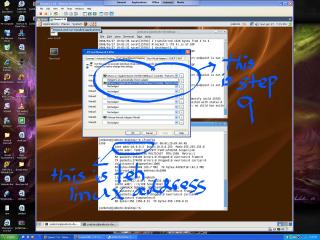
8>Once that is done click host then virtual network settings->click host virtual network mapping
9>for vMnet0 choose your network adaptor u connect to the net with then leave the rest as they are ->click ok. (choose adapter that connects ur PC to router)
this is the only step that i cant do. so the cmd part is rite? even tough the msg is weird?
joeboto
post Jan 27 2008, 07:11 PM

insert title
*****
Senior Member
913 posts

Joined: Jun 2006


where did u typed this?

route -p ADD 12.129.225.103 MASK 255.255.255.255 192.168.1.3

in linux or windows cmd?


Added on January 27, 2008, 7:19 pmand could u please post screenshot for the step 9 of your vmware? i post mine.

This post has been edited by joeboto: Jan 27 2008, 07:20 PM


Attached thumbnail(s)
Attached Image
Jas2davir
post Jan 27 2008, 08:07 PM

Casual
***
Junior Member
461 posts

Joined: Oct 2007
From: Kuala Mud
ok ill try to ss my step 9 and i type
route -p ADD 12.129.225.103 MASK 255.255.255.255 192.168.1.3
in windows cmd and im using vista is that a problem??
joeboto
post Jan 27 2008, 09:02 PM

insert title
*****
Senior Member
913 posts

Joined: Jun 2006


QUOTE(Jas2davir @ Jan 27 2008, 08:07 PM)
ok ill try to ss my step 9 and i type
route -p ADD 12.129.225.103 MASK 255.255.255.255 192.168.1.3
in windows cmd and im using vista is that a problem??
*
should be okay i guess. try ss it.
Jas2davir
post Jan 28 2008, 03:18 AM

Casual
***
Junior Member
461 posts

Joined: Oct 2007
From: Kuala Mud
tryed to ss it but cannot lol >< but i give u the exact words
"the requested operation requires elevation" and suprisingly tmnut's connection today was FREAKING good.....300+ms latency.....no joke....


Added on January 28, 2008, 3:27 amnow i dont even have the tool bar any more on my vmware...zzzz...lol

aww i cannot post photos... mad.gif

This post has been edited by Jas2davir: Jan 28 2008, 03:38 AM
smiley.kambing
post Jan 28 2008, 12:28 PM

Getting Started
**
Junior Member
97 posts

Joined: May 2006
From: Cyberjaya


try sending the ss via email to joe or me..
i believe its the step 9 that's bugging u..
tongue.gif

also.. please make ss of your network adapters under device manager..
( right click "My Computer" > "Properties" > "Hardware" > "Device Manager" )
Jas2davir
post Jan 28 2008, 01:44 PM

Casual
***
Junior Member
461 posts

Joined: Oct 2007
From: Kuala Mud
k trying to find the ss'es dam vista is hard to use
TSTentris
post Jan 28 2008, 01:58 PM

New Member
*
Junior Member
8 posts

Joined: Jun 2006


QUOTE(Jas2davir @ Jan 28 2008, 03:18 AM)
tryed to ss it but cannot lol >< but i give u the exact words
"the requested operation requires elevation"


You are using Vista.

Go to the Control Panel > Users.

From there select your admin ID, and play around with the options until you find one options that allows you to disable some security setting (cant remember what). Once you disable the setting, reboot, then you will be able to type in the command to route your traffic to the linux server.

xpresside
post Jan 28 2008, 08:42 PM

Regular
******
Senior Member
1,982 posts

Joined: Aug 2005
From: TTDI


using this i get 400ms
lowerping 200ms

rclxub.gif doh.gif

so each time reboot, need to type those command lines again?

This post has been edited by xpresside: Jan 28 2008, 08:42 PM
virphirod
post Jan 29 2008, 12:46 AM

Getting Started
**
Junior Member
129 posts

Joined: Jul 2005
From: Mareshia
QUOTE(Jas2davir @ Jan 28 2008, 03:18 AM)
tryed to ss it but cannot lol >< but i give u the exact words
"the requested operation requires elevation" and suprisingly tmnut's connection today was FREAKING good.....300+ms latency.....no joke....


Added on January 28, 2008, 3:27 amnow i dont even have the tool bar any more on my vmware...zzzz...lol

aww i cannot post photos... mad.gif
*
Right click command prompt and pick "Run as administrator"
smiley.kambing
post Jan 29 2008, 10:28 AM

Getting Started
**
Junior Member
97 posts

Joined: May 2006
From: Cyberjaya


QUOTE(xpresside @ Jan 28 2008, 08:42 PM)
using this i get 400ms
lowerping 200ms

rclxub.gif  doh.gif

so each time reboot, need to type those command lines again?
*
yep.. everytime..
but there's a way to save the text and paste it in the console..
please read the first page of this thread..
Quazacolt
post Jan 29 2008, 11:02 AM

Riding couple
*******
Senior Member
5,367 posts

Joined: Jan 2007
From: KL Malaysia


QUOTE(smiley.kambing @ Jan 29 2008, 10:28 AM)
yep.. everytime..
but there's a way to save the text and paste it in the console..
please read the first page of this thread..
*
HDD install your vm ware, and make a notepad like text file saving the commands. so i just copy and paste the commands everytime i start my vm linux
xpresside
post Jan 29 2008, 12:19 PM

Regular
******
Senior Member
1,982 posts

Joined: Aug 2005
From: TTDI


QUOTE(smiley.kambing @ Jan 29 2008, 10:28 AM)
yep.. everytime..
but there's a way to save the text and paste it in the console..
please read the first page of this thread..
*
QUOTE(Quazacolt @ Jan 29 2008, 11:02 AM)
HDD install your vm ware, and make a notepad like text file saving the commands. so i just copy and paste the commands everytime i start my vm linux
*
yea the problem is that instruction in page 1 is too vague

so ok, i've clicked on the safer option, then what?follow the prompt eh, if i choose different prompt, the script will exit
after trial and error it says installed, after i boot, it goes in dos menu, stuck in POST screen rclxub.gif

im getting
XIO: fatal IO error 104 (Connection reset by peer) on X server ":0.0
T_T

This post has been edited by xpresside: Jan 29 2008, 12:50 PM

17 Pages « < 10 11 12 13 14 > » Top
 

Change to:
| Lo-Fi Version
0.0261sec    0.37    6 queries    GZIP Disabled
Time is now: 8th December 2025 - 01:50 PM