

sorry for the noob questions
im using win xp, and wanted to have linux (ubuntu) with it. so, i have to dload VMware for windows or for linux?
D.I.Y. Lowerping, Do it at home setup
D.I.Y. Lowerping, Do it at home setup
|
|
 Dec 20 2007, 03:10 AM Dec 20 2007, 03:10 AM
Return to original view | Post
#1
|
 
Senior Member
913 posts Joined: Jun 2006  
|
sorry for the noob questions
im using win xp, and wanted to have linux (ubuntu) with it. so, i have to dload VMware for windows or for linux? |
|
|
|
|
|
Dec 20 2007, 08:21 AM
Return to original view | Post
#2
|
|
Senior Member
913 posts Joined: Jun 2006
|
QUOTE(RapTalk @ Dec 20 2007, 03:56 AM) for window ty!    |
|
|
Dec 26 2007, 07:43 PM
Return to original view | Post
#3
|
|
Senior Member
913 posts Joined: Jun 2006
|
the linux thingy works with direct connection (sh1tmyx modem -----> PC)?
Added on December 26, 2007, 8:46 pmomg need help a.s.a.p how to revert back all these config to normal? i mean the one we edit in winxp/vista command editor. 'route -p ADD wowipaddress MASK 255.255.255.255 192.168.1.30' i cant connect to the server i wrote in above command now. btw, im using direct connection from modem to PC. This post has been edited by joeboto: Dec 26 2007, 08:46 PM |
|
|
Dec 26 2007, 09:14 PM
Return to original view | Post
#4
|
|
Senior Member
913 posts Joined: Jun 2006
|
ok nice, thx
hmmm it seems like my debian/vmware cant connect to internet. |
|
|
Dec 27 2007, 09:30 AM
Return to original view | Post
#5
|
|
Senior Member
913 posts Joined: Jun 2006
|
QUOTE(Quazacolt @ Dec 26 2007, 09:59 PM) ur dsl modem need to set it to router mode to have the connections routed (tmnut modems usually have crappy built in routers) hmm. ok. using router mode now. can u teach me using feather? (just downloaded feather)pure direct connection im not sure how it would work, but you'd have to change some settings in ur linux VM id assume. Added on December 27, 2007, 9:51 amwell nvm, IT WORKS OMG!!! feather is much more easier than debian. This post has been edited by joeboto: Dec 27 2007, 09:51 AM |
|
|
Dec 27 2007, 12:24 PM
Return to original view | Post
#6
|
|
Senior Member
913 posts Joined: Jun 2006
|
another p.i.t.a thing happens...
i play 2 wow server, so its kinda lazy to type alllllll the command again. is there any script in feather to do it? offtopic:theres a rumor saying deluge (a torrent dloader in linux) can bypass all the stupidsh throttling, is there any deluge version for feather? (theres one for ubuntu, debian, but cant find any for feather.  ) ) |
|
|
|
|
|
Jan 16 2008, 04:39 PM
Return to original view | Post
#7
|
|
Senior Member
913 posts Joined: Jun 2006
|
thaurissan new ip
12.129.225.87 |
|
|
Jan 18 2008, 12:10 PM
Return to original view | Post
#8
|
|
Senior Member
913 posts Joined: Jun 2006
|
not good.
after thaurissan ip changed, my ping with linux fix (already change 'your.wow.server.ip' to new one) never gets below 600ms. without linux fix, 500ms.  |
|
|
Jan 18 2008, 07:46 PM
Return to original view | Post
#9
|
|
Senior Member
913 posts Joined: Jun 2006
|
settled. ping 300-450ms.
using ubuntu for now, v7.10 looks KEWL.. now im interested in linux.... hmmmm... |
|
|
Jan 22 2008, 01:14 AM
Return to original view | Post
#10
|
|
Senior Member
913 posts Joined: Jun 2006
|
quote from the first page, refine for easier method for some ppl who wanna connect it my way. this feather method works for me. and it should work for u too.
 This method require router which means : telephone line ---> ADSL modem ----> router ---> PC Stuff you will need. feather-0.7.5.iso http://mymirrors.homelinux.org/linux/feather-linux/ vmware server http://www.vmware.com/download/server/ TcpView for windows http://www.microsoft.com/technet/sysintern...es/TcpView.mspx 1>Once vmware server is installed, open it up and click local host->then ok 2>Then click file. 3>Then click new->virtual machine click next 4>choose typical ->next->linux->version->(drop down menu)other version 2.4xkernel->next 5>Choose a name for it and the place u want to store the virtual machine 6>click next->use bridge networking->next 7>i did 1gb for disk capacity (you can make it smaller) then click finish. 8>Once that is done click host then virtual network settings->click host virtual network mapping 9>for vMnet0 choose your network adaptor u connect to the net with then leave the rest as they are ->click ok. (choose adapter that connects ur PC to router) 10>In the inventory window in vmware server right click on the virtual machine, click settings then click memory choose 128mb. 11>Then click cd-rom, click use iso image and point that to the feather-0.7.5.iso you downloaded, click ok. 12>Now time to boot feather linux right click on the virtual machine in the inventory and click power on. It takes a few seconds for it to start up. 13>For the setup routine choose the 2nd option xfdev press enter. 14>For the mouse choose no to usb mouse then yes to the next option. 15>Test to make sure your internet connection is working on the vm machine right click on desktop apps->net->firefox. go to yahoo.com or whatever, if u can access the internet in this linuxs' firefox, GOOD. 16>Now to get the ip for your wow server log a character into wow (leave vmware open) 17>alt+tab to desktop and run tcpview.exe scroll down until u find wow and right click and copy the ip address.and paste it into notepad or something. 18>Then close wow. 19>Go back into vmware linux and open console (its on the desktop) and type these CODE sudo iptables -t nat -A PREROUTING -p tcp -d your.wow.server.ip.address --dport 3724 -j REDIRECT --to-ports 3724 press enter, and type this CODE sudo socat -d -d -d TCP4-LISTEN:3724,nodelay,fork,reuseaddr,su=nobody TCP4:your.wow.server.ip.address:3724,nodelay enter again 20>now open up a new console window and type ifconfig, now in eth0 look for your inet addr, that is the ip address of the virtual machine (vm.machine.ip). write this address down somewhere. 21>Now go back into windows click start menu click run type cmd then ok. 22>type this CODE route -p ADD wow.server.ip MASK 255.255.255.255 vm.machine.ip 23>login to wow. after load screen, alt+tab, go to console in feather, there should be spamming text about transferring data bla bla bla. this means GOOD. now get back to your game and enjoiii!!  24>if u have trouble to connect like stuck at success, something is wrong with routing above. read carefully. if u dc-ed right after success, try login again. (i sometimes dc-ed once). and if u have no problem connecting but still having high ping, that means ur internet connection is bad. try reconnect with ur usual good ip. hopefully this helps. credits to those who invented this fix, and those who mentioned it.  This post has been edited by joeboto: Jan 22 2008, 01:15 AM |
|
|
Jan 22 2008, 01:49 PM
Return to original view | Post
#11
|
|
Senior Member
913 posts Joined: Jun 2006
|
QUOTE(Jas2davir @ Jan 22 2008, 03:12 AM) ok so at step 19 onwards every time we are required to type in wow server ip,rite but what if we play multiple servers? if u play multiple server, do this. 1>never turn off the feather linux, if u wanna quit, just click X on top, choose suspend. 2>to write the wow server ip, close the first console which have (let say) Thaurissan ip, open up new console, press the keyboard button up twice, it should brings u to the first sudo command. 3>change the ip from Thaurrisan ip to whatever server ip there. press enter 4>press keyboard button up again till u get to the second sudo command, change the ip, then press enter. 5>try login, if the console have the transferring etc etc, good. enjoi! QUOTE Added on January 22, 2008, 9:18 amand i also cannot do this step 9>for vMnet0 choose your network adaptor u connect to the net with then leave the rest as they are ->click ok. (choose adapter that connects ur PC to router) coz every time i change it the ok button dosent highlight at all lol...any suggestions ?.? i cant help with that since i cant imagine what happened lol. hows ur current connection to internet? is it like telephone line ---> ADSL modem ----> router ---> PC? if it is, just click the dropdown menu, choose ur current network card. Added on January 22, 2008, 1:54 pm QUOTE(Tentris @ Jan 22 2008, 10:37 AM) Joe's guide is very good. remember when i said i cant ping google.com thru debian before? I use Debian though, couldn't really figure out how to use feather linux properly. The installation is a bit more complicated with Debian coz a lot of command line settings. Even with the linux fix, connection this past week has been poor. Every 1 min or so got 2-3 lag. Thats nuts. How to raid like that? the solution is to change the eth0 dropdown menu to the current network card. pretty weird coz nitro didnt mention it. probably only my pc need to config that. did u change that setting too? QUOTE Added on January 22, 2008, 11:02 amI think we can make a business out of this, eh, Raoph! We create a CD and very detailed PDF guide, show step by step with screenshots etc. You show the feather linux installation, i show debian. put all the programs on a CD, together with our guide, then sell the CD for RM15 + postage. sure sell like hotcakes! woot.  hahahahhaa!! hahahahhaa!!i need monehhh! anyway, the guides in this thread already said what should be done. especially the feather one, so easy meh. This post has been edited by joeboto: Jan 22 2008, 01:54 PM |
|
|
Jan 22 2008, 03:39 PM
Return to original view | Post
#12
|
|
Senior Member
913 posts Joined: Jun 2006
|
try to use lan cable version first. if the dropdown menu is available for that lan cable, good. if doesnt have, gg.
|
|
|
Jan 22 2008, 07:26 PM
Return to original view | Post
#13
|
|
Senior Member
913 posts Joined: Jun 2006
|
huih, im in terengganu. uber far.
did u try the cable wire? |
|
|
|
|
|
Jan 27 2008, 04:06 PM
Return to original view | Post
#14
|
|
Senior Member
913 posts Joined: Jun 2006
|
QUOTE(Jas2davir @ Jan 27 2008, 02:48 AM) ok let me explain what happens on the step 19 part 2(this is what appears) that should be right. do u have something like 'I transferred xxx bytes from x to x' spam after u login into ur character?I setting option "tcp-nodelay" to 1 I setting option "fork" to 1 I setting option "so-resueaddr" to 1 I setting option "substuser" to 65534 I starting accept loop N listening on AF=2 0.0.0.0:3724 then at step 20 inet addr:192.168.1.3 then at step 22 route -p ADD 12.129.225.103 MASK 255.255.255.255 192.168.1.3 so am i doing it rite? |
|
|
Jan 27 2008, 07:11 PM
Return to original view | Post
#15
|
|
Senior Member
913 posts Joined: Jun 2006
|
where did u typed this?
route -p ADD 12.129.225.103 MASK 255.255.255.255 192.168.1.3 in linux or windows cmd? Added on January 27, 2008, 7:19 pmand could u please post screenshot for the step 9 of your vmware? i post mine. This post has been edited by joeboto: Jan 27 2008, 07:20 PM Attached thumbnail(s) 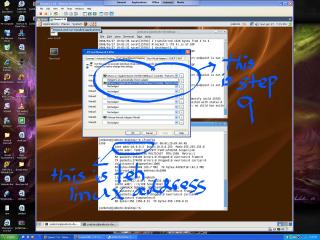
|
|
|
Jan 27 2008, 09:02 PM
Return to original view | Post
#16
|
|
Senior Member
913 posts Joined: Jun 2006
|
QUOTE(Jas2davir @ Jan 27 2008, 08:07 PM) ok ill try to ss my step 9 and i type should be okay i guess. try ss it.route -p ADD 12.129.225.103 MASK 255.255.255.255 192.168.1.3 in windows cmd and im using vista is that a problem?? |
|
|
Jan 29 2008, 02:29 PM
Return to original view | Post
#17
|
|
Senior Member
913 posts Joined: Jun 2006
|
QUOTE(raptar_eric @ Jan 29 2008, 01:36 PM) even normal surfing on a linux is much more faster compared to windows powered browsers.... QFTi suft net thru linux now, even youtube load faster than windows one.  |
|
|
Jan 29 2008, 06:34 PM
Return to original view | Post
#18
|
|
Senior Member
913 posts Joined: Jun 2006
|
QUOTE(smiley.kambing @ Jan 29 2008, 03:05 PM) sry.. off topic here.. if using ubuntu, can. just right click on the file, copy, go to windows, paste. hmmm.. thinking of downloading through linux (torrent / direct download).. but if i save the file in linux OS.. is it possible to copy that file into Windows? dunno for feather, haven tried yet. |
|
|
Jan 29 2008, 10:39 PM
Return to original view | Post
#19
|
|
Senior Member
913 posts Joined: Jun 2006
|
QUOTE(smiley.kambing @ Jan 29 2008, 06:45 PM) ah ok.. it works, but have to config to start the sudo socat thingy. i didnt remember the steps, but what i did was, if stuck at 'socat not installed', google ubuntu socat install, found solution, install, ctinue the usual steps. if stuck again, google again. ill check out ubuntu then.. btw.. will ubuntu works for this diy lower ping? QUOTE(Jas2davir @ Jan 29 2008, 07:45 PM) funny thing happend in my wow....my latency to server is 500+(normal 4 me) but on www.speedtest.net my lat is 900+ to cali server is my vm working? there isnt any spams....or is it just tm net on best behaviour? to see whether vm working or not, just watch the console where u typed socat thingy, if it spams with transferred etc etc, means it works.one of my guildmember get uber low ping without using any services, lucky them. but for me, same ip without linux fix = constant 600ms. with linux fix = 300ms hell yeahhh! p/s: huh, i wonder how wow gameplay with <100ms. those americans still QQ'ing when they hit 150ms. (OMG MY PING IS DAMN HIGH, ITS 150ms!!1!11!!eleven!satu!!) |
|
|
Jan 30 2008, 02:59 AM
Return to original view | Post
#20
|
|
Senior Member
913 posts Joined: Jun 2006
|
ah, i do install it, dunno if it didnt work without it.
|
| Change to: |  0.0268sec 0.0268sec
 0.59 0.59
 7 queries 7 queries
 GZIP Disabled GZIP Disabled
Time is now: 7th December 2025 - 08:56 PM |
 Quote
Quote