Welcome Guest ( Log In | Register )

5 Pages < 1 2 3 4 5 >Bottom

Outline · [ Standard ] · Linear+

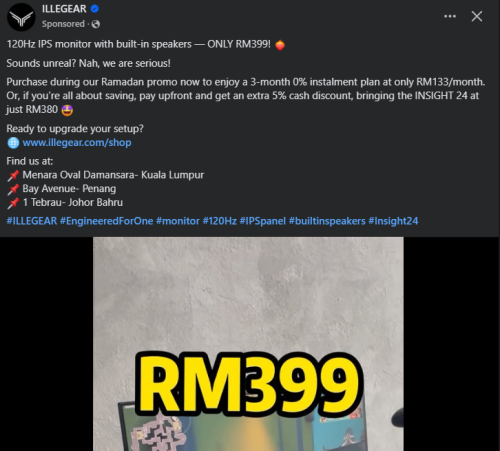
 I bought a 120hz HDR monitor less than RM 400

views
     
lolzcalvin
post May 24 2025, 03:27 PM

shibe in predicament
******
Senior Member
1,596 posts

Joined: Mar 2014
From: 75°26'11.6"S, 136°16'16.0"E


QUOTE(piscesguy @ May 24 2025, 02:23 PM)
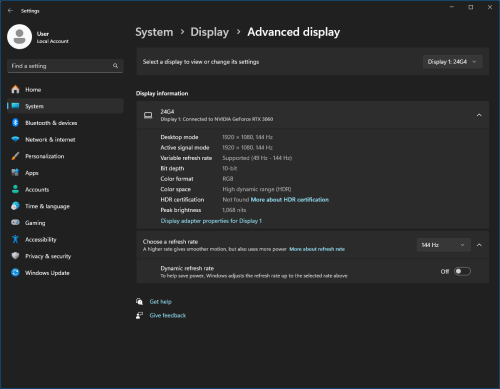
Windows 11 display information.  whistling.gif
*
the reason why windows display information show like that is because windows read ur display EDID (Extended Display Identification Data)

vendors can put whatever info into their monitors' EDID and let windows read it. this also means that ur display will be able to receive HDR input. but, ur display cannot, and will never output proper HDR, hence it is not capable of HDR and it's not HDR ready, and it's HDR ready only because vendors like to deceive ppl. this behaves the same as my old LG 27GL850, a HDR400 monitor, but can never output proper HDR.
also seems like ur display's 6-bit+FRC manage to fool windows into thinking it's a 10-bit monitor thru EDID.

anyhow u bought the monitor, regardless if u want to believe it can do HDR or learn that it can't, best just enjoy it since it's a bargain
roarus
post May 24 2025, 03:29 PM

Regular
******
Senior Member
1,042 posts

Joined: Jan 2003
300 nits

hdr

hahaha
LegendLee
post May 24 2025, 03:35 PM

><3LG3|\|D
Group Icon
Elite
2,725 posts

Joined: Mar 2006


QUOTE(piscesguy @ May 24 2025, 10:59 AM)
can get Dell Ultrasharp.  brows.gif
*
Dell does not have a 27" 5K ultrasharp if I am not mistaken.
5K 27" is still pretty pricey. Might have to go for a 4K monitor instead.

Currently thinking between the AW2725Q or a U2725QE
But also open for anything with similar spec but cheaper....

This post has been edited by LegendLee: May 24 2025, 03:37 PM
terradrive
post May 24 2025, 03:40 PM

RRAAAWWRRRRR
******
Senior Member
1,943 posts

Joined: Apr 2005


QUOTE(lolzcalvin @ May 24 2025, 03:27 PM)
the reason why windows display information show like that is because windows read ur display EDID (Extended Display Identification Data)

vendors can put whatever info into their monitors' EDID and let windows read it. this also means that ur display will be able to receive HDR input. but, ur display cannot, and will never output proper HDR, hence it is not capable of HDR and it's not HDR ready, and it's HDR ready only because vendors like to deceive ppl. this behaves the same as my old LG 27GL850, a HDR400 monitor, but can never output proper HDR.
also seems like ur display's 6-bit+FRC manage to fool windows into thinking it's a 10-bit monitor thru EDID.

anyhow u bought the monitor, regardless if u want to believe it can do HDR or learn that it can't, best just enjoy it since it's a bargain
*
QUOTE(roarus @ May 24 2025, 03:29 PM)
300 nits

hdr

hahaha
*
Really need good oled panels to enjoy proper HDR

but high nits is not the issue for cheap HDR monitors, it's the dark area's quality. HDR400 on games already hurts my eyes on some scenes because it's quite bright when the monitor is used inside the house and not outside with direct sunlight... But dark areas still really sux on HDR400 IPS monitors (the contrast ratio)
TaylorS8
post May 24 2025, 03:44 PM

Getting Started
**
Junior Member
72 posts

Joined: May 2014

Bought it 1 yr ago for less than 320
PJng
post May 24 2025, 03:45 PM

10k Club
********
All Stars
12,061 posts

Joined: Oct 2017


https://forum.lowyat.net/index.php?showtopi...ost&p=110948318

HDR really washout, i don want use
GregPG01
post May 24 2025, 03:47 PM

Look at all my stars!!
*******
Senior Member
4,966 posts

Joined: Nov 2008
QUOTE(piscesguy @ May 24 2025, 08:27 AM)
I plan to have dual monitor setup, I bought another Dell monitor that will deliver to me on 27 May.  brows.gif
*
Should.get exact same monitors for dual setup.
lj0000
post May 24 2025, 03:47 PM

Look at all my stars!!
*******
Senior Member
2,209 posts

Joined: Jan 2003
Any good deal for 27 and 32?
Coldf3ar
post May 24 2025, 03:49 PM

On my way
****
Junior Member
520 posts

Joined: Jul 2008
cheap. i buy samsung 24" g30d pun rm460 dy.
180hz tho.
TSpiscesguy
post May 24 2025, 04:02 PM

私の名前はりゅうです
*******
Senior Member
3,965 posts

Joined: Nov 2006
QUOTE(LegendLee @ May 24 2025, 03:35 PM)
Dell does not have a 27" 5K ultrasharp if I am not mistaken.
5K 27" is still pretty pricey. Might have to go for a 4K monitor instead.

Currently thinking between the AW2725Q or a U2725QE
But also open for anything with similar spec but cheaper....
*
if u use 4k on Mac OS, then the UI resolution will be recommended to 1080p.
TSpiscesguy
post May 24 2025, 04:05 PM

私の名前はりゅうです
*******
Senior Member
3,965 posts

Joined: Nov 2006
QUOTE(PJng @ May 24 2025, 03:45 PM)
u have to use windows hdr calibration app to calibrate it properly so that the highlights will not exposed. brows.gif

then it will create a new profile to replace the default profile.

https://support.microsoft.com/en-us/windows...02-9eabebd23f19
TSpiscesguy
post May 24 2025, 04:09 PM

私の名前はりゅうです
*******
Senior Member
3,965 posts

Joined: Nov 2006
QUOTE(GregPG01 @ May 24 2025, 03:47 PM)
Should.get exact same monitors for dual setup.
*
I m used to use Dell as my main monitor, this one just buy for gaming. laugh.gif
TSpiscesguy
post May 24 2025, 04:13 PM

私の名前はりゅうです
*******
Senior Member
3,965 posts

Joined: Nov 2006
QUOTE(roarus @ May 24 2025, 03:29 PM)
300 nits

hdr

hahaha
*
I feel it's so much brighter... brows.gif

rtk73
post May 24 2025, 05:32 PM

Getting Started
**
Junior Member
223 posts

Joined: Jan 2023

QUOTE(JimbeamofNRT @ May 24 2025, 11:08 AM)
I got cheaper bro - RM329 excluding voucher. if use voucher might be cheaper

MSI Pro MP251 E2 24.5inch FHD 120Hz Flat Cye Care Monitor


*
I got it for 326... For MP252
Owaiii

This post has been edited by rtk73: May 24 2025, 05:33 PM
LegendLee
post May 24 2025, 10:09 PM

><3LG3|\|D
Group Icon
Elite
2,725 posts

Joined: Mar 2006


QUOTE(piscesguy @ May 24 2025, 04:02 PM)
if u use 4k on Mac OS, then the UI resolution will be recommended to 1080p.
*
At 4k, the font will either be too small (100%) or too large (200%).
If I set at 150% it won’t be as crispy.

But that’s ok. Price difference between a 4k and 5k monitor is too large to justify just for “crispy system text”.

This post has been edited by LegendLee: May 24 2025, 10:09 PM
terradrive
post May 24 2025, 10:18 PM

RRAAAWWRRRRR
******
Senior Member
1,943 posts

Joined: Apr 2005


QUOTE(piscesguy @ May 24 2025, 04:13 PM)
I feel it's so much brighter... brows.gif
*
I tried LG hdr sample video, this monitor's bright areas lost quite some detail, the sky doesn't looked like well displayed compared to my asus in my memory, I should try again when i get my asus back

SUSeds2
post May 24 2025, 10:26 PM

Getting Started
**
Junior Member
101 posts

Joined: Jul 2022
From: Kelantan

user posted image
PJng
post May 24 2025, 11:39 PM

10k Club
********
All Stars
12,061 posts

Joined: Oct 2017


user posted image

the HDR effect is not same like on phone
TSpiscesguy
post May 25 2025, 06:01 AM

私の名前はりゅうです
*******
Senior Member
3,965 posts

Joined: Nov 2006
QUOTE(terradrive @ May 24 2025, 10:18 PM)
I tried LG hdr sample video, this monitor's bright areas lost quite some detail, the sky doesn't looked like well displayed compared to my asus in my memory, I should try again when i get my asus back
*
give me the link of the LG hdr sample video.
cms
post May 25 2025, 06:53 AM

Enthusiast
*****
Junior Member
763 posts

Joined: Jan 2003
Any1 knows more or less same price better model ?

AOC ker, Acer ker ? High refresh rate than my 75hz mon now

5 Pages < 1 2 3 4 5 >Top
 

Change to:
| Lo-Fi Version
0.0213sec    0.37    5 queries    GZIP Disabled
Time is now: 22nd December 2025 - 12:09 AM