Welcome Guest ( Log In | Register )

19 Pages < 1 2 3 4 5 > » Bottom

Outline · [ Standard ] · Linear+

 Official TM UniFi High Speed Broadband Thread V43, READ 1ST PAGE FOR RELEVANT WIFI INFO!

views
     
kwss
post May 31 2025, 06:42 AM

Regular
******
Senior Member
1,207 posts

Joined: Aug 2018
Anime4000
Care posting a traceroute to both ipv4 and ipv6 of the domain?

How do you do speedtest with DiGi Sri Kembangan?
I only got:
Kuala Lumpur
Petaling Jaya
Subang Jaya
Shah Alam
Penang

Mind getting me the speedtest server ID?

Did the Skyworth or D-Link works without PLOAM password too? This is strange
kwss
post May 31 2025, 07:02 AM

Regular
******
Senior Member
1,207 posts

Joined: Aug 2018
Anime4000
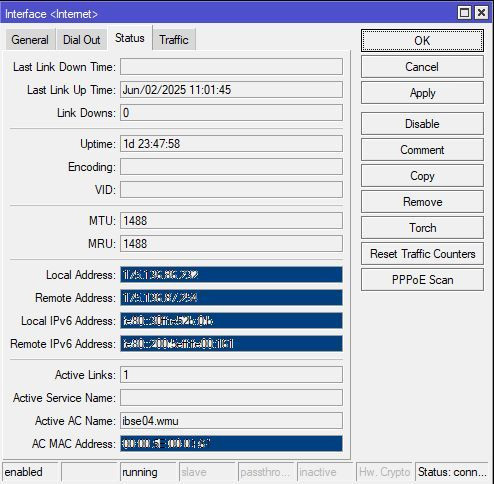
How did you fix the MTU? It fix by itself when you try 1492?

Looks like the BNG you are using is overloaded or shitty. Everything after your BNG has elevated latency.

Compare to mine:
CODE

traceroute to 2001:4458:4000:8446::2 (2001:4458:4000:8446::2), 30 hops max, 80 byte packets
1  2001:e68:5427:15ea::f (2001:e68:5427:15ea::f)  0.501 ms  0.563 ms  0.631 ms
2  2001:e68:402c:8001::6c (2001:e68:402c:8001::6c)  4.992 ms  5.035 ms  5.049 ms
3  2001:e68::1:113d (2001:e68::1:113d)  8.374 ms  7.710 ms  7.649 ms
4  2001:de8:10::6 (2001:de8:10::6)  6.223 ms  6.272 ms  6.281 ms
5  2001:4458:4000:402::ac15:2fb (2001:4458:4000:402::ac15:2fb)  6.267 ms 2001:4458:4000:402::ac15:2f9 (2001:4458:4000:402::ac15:2f9)  6.658 ms 2001:4458:4000:402::ac15:16c (2001:4458:4000:402::ac15:16c)  6.621 ms
6  2001:4458:4000:8446::1 (2001:4458:4000:8446::1)  7.295 ms  5.036 ms  5.039 ms
7  2001:4458:4000:8446::2 (2001:4458:4000:8446::2)  4.929 ms  4.257 ms *

kwss
post Jun 1 2025, 03:47 AM

Regular
******
Senior Member
1,207 posts

Joined: Aug 2018
QUOTE(Anime4000 @ Jun 1 2025, 03:20 AM)
kwss
it's happening again, even under L3 QoS fq_codel, ibse02.rsh is useless and unstable
user posted image

hsbb
Skyworth S/N cannot change
D-Link cannot leave S/N blank

but, I try blank PLOAM and NIJK24000001 as S/N, it works
*
It continues to happen with or without maximizing your upload / download?

OK I got a wild idea, can you get me the output of:
traceroute 218.100.44.182

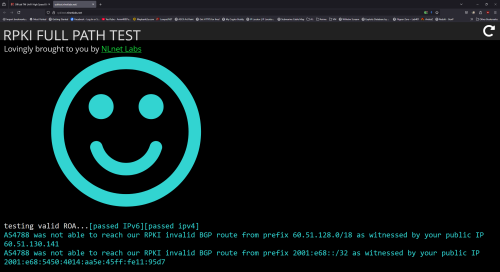
Also screenshot me this website
https://rpkitest.nlnetlabs.net/

This post has been edited by kwss: Jun 1 2025, 03:47 AM
kwss
post Jun 1 2025, 04:19 AM

Regular
******
Senior Member
1,207 posts

Joined: Aug 2018
QUOTE(Anime4000 @ Jun 1 2025, 04:09 AM)
user posted image

user posted image

user posted image

gg?
*
Not gg... Everything is working correctly. TM have moved all their BNG to default-free routing from my observation and turned on RPKI check.
Initially I thought your lone BNG is configured incorrectly because mine still cannot do 1492 MTU and I must use PLOAM password.

So I was kind of guessing something f'ked up and TM just recreate everything. But since OLT configuration is location based, I supposed they just temporary allow all connected ONU to continue operating by just registering their SN. It is just a theory.

Did you fill up your uplink to cause the disconnect or it just disconnect by itself?
kwss
post Jun 1 2025, 04:38 AM

Regular
******
Senior Member
1,207 posts

Joined: Aug 2018
QUOTE(Anime4000 @ Jun 1 2025, 04:25 AM)
Just disconnect it self,
Possible someone do checking on BNG late night at weekend? but I don't think they work this late
*
OK, I got a different theory.
I lean towards problem with the BNG and not the last mile distribution network based on the following facts:
1. OLT cannot do HQoS
2. OLT is purely layer 2 and cannot differentiate IPv4 and IPv6
3. Given your problem only occurs with IPv4 but not IPv6 on all ONU regardless of PPTP and VEIP, it cannot be layer 2 issue.
4. Only BNG do layer 3

My guess is...
Since this is a new BNG, maybe they didn't configure the TCAM partitioning correctly. Now I don't know the hardware and the spec, or even if it uses TCAM or HBM. But let's just assume it is classic service router and uses TCAM.

The IPv4 routing table is very large and if the TCAM partition is configured incorrectly, it will overflow and the BNG will fallback to software processing. The only way to know for sure is check the BNG log for TCAM exception. At least on Cisco that's what shows up in log.
On IPv6, the routing table is much smaller and it will have no problem and packet just flies through.

Now if this actually happens, it is in an undefined behavior territory. They might get route flapping. Will PPPoE disconnect? Not sure, it is undefined behavior when the system is overloaded.

There might be another cause, CGNAT state tracking. Even if you have a public IP, there might still be state tracking. Maybe it is configuration issue, maybe it is software bug, maybe it is just how it works. But I really haven't come across CGNAT state tracking issue causing PPP session to be killed.

Or maybe the supervisor / line card is just broken. Everything is just a guess.
But main focus would be on BNG based on what happened to you.

EDIT:
Just to mention, at least on a Cisco, if TCAM is overflowed, latency did increase and bandwidth did drop. Exactly like what you observe.

This post has been edited by kwss: Jun 1 2025, 04:45 AM

kwss
post Jun 2 2025, 03:26 AM

Regular
******
Senior Member
1,207 posts

Joined: Aug 2018
QUOTE(Anime4000 @ Jun 2 2025, 02:48 AM)
hsbb kwss aneip tng55 touch n go rm55

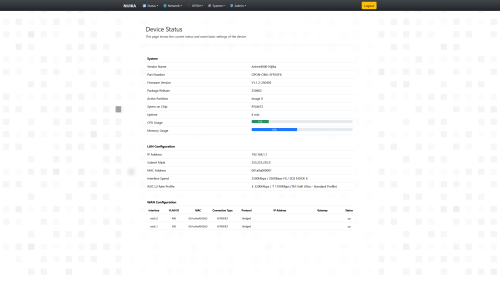
because TM make my bandwidth crap and PPPoE slow, I had to rebuild the PON Stick Firmware to address this issue

due to tc not available, the SoC and SDK has ASIC bandwidth, can say it like Layer 1.5 which L2 not used? but it operate at hardware level instead

so, I make few mode to address this issue, with minimal Flow Control which router side need to support it, like TP-Link Archer BE550 work well and understand PPPoE Flow Control

user posted image

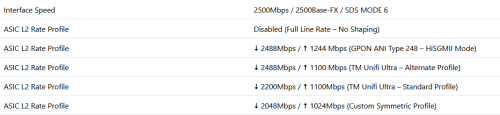
the modes:
0 = Disabled (Full Line Rate – No Shaping)
1 = ⬇️ 2488 Mbps / ⬆️ 1244 Mbps (GPON ANI Type 248 – HiSGMII Mode)
2 = ⬇️ 2488 Mbps / ⬆️ 1100 Mbps (TM Unifi Ultra – Alternate Profile)
3 = ⬇️ 2200 Mbps / ⬆️ 1100 Mbps (TM Unifi Ultra – Standard Profile)
4 = ⬇️ 2048 Mbps / ⬆️ 1024 Mbps (Custom Symmetric Profile)

user posted image
*
Okay, so the SoC allow packet pacing on the ASIC.
But does this solve your random disconnect issue or the IPv4 speed issue?
kwss
post Jun 2 2025, 03:45 AM

Regular
******
Senior Member
1,207 posts

Joined: Aug 2018
QUOTE(Anime4000 @ Jun 2 2025, 03:35 AM)
so far no pppoe die on RB5009,
thing is, the RB5009 SFP to 2.5G Ethernet seem have bug, the ROS 7.20 beta has address this issue, but I not sure in long term
but, stress test on TP-Link Archer BE550 (via converter) seem stable on full blast upload

so I thought, RB5009 thing? the 88E6393 switch chip bug or Mikrotik firmware?
just to be safe, use Queue Tree

in other hand, IPv4 still slow regardless ranting.gif
*
I honestly think packet pacing has nothing to do with the pppoe disconnect. Maybe TM fixed it or something. Maybe it is just by chance.
For many decades nobody needs packet pacing to keep pppoe alive. Not during dial-up era. Not during DSL era. Not during FTTP era. Today won't be the day we need this. Like seriously...

Packet pacing is useful if you don't want to overrun buffer, especially from higher speed interface to lower speed interface. That's about it. I cannot wrap my head around how it can solve all the problems you are facing.
kwss
post Jun 2 2025, 04:15 AM

Regular
******
Senior Member
1,207 posts

Joined: Aug 2018
QUOTE(Anime4000 @ Jun 2 2025, 04:07 AM)
I not sure which at fault,

at least my PON Stick has address this issue, now I going to use it, put aside all ONU ONR
no matter what ONU I use, as long LCP echo not reach either way, disconnect

use old ONU 1GbE, still facing dropped packet due to 1GbE
use newer ONU 2.5GbE, LAN to GPON has bottleneck, if not handle properly, LCP echo lost

well, I limiting my self now via QoS
hope TM fix this seem very thin hope

No hope on Ease on LCP echo loss
No RFC4638 on their Huawei PPPoE-AC
No hope to solve IPv4 slow issue on ibse02.rsh

There some area still on Juniper Network that handle PPPoE and no issue like this

since Huawei BRAS going all VM Cloud now, I sure there fault somewhere on their VXLAN
*
Don't get me wrong. Having new feature for your product is definitely good. Giving user control is a good thing.

Just saying none of this can solve TM problem. I tried MTU 1492 and it didn't work. I still need PLOAM password for my ONU to work.
I don't know what is happening to your area.
Maybe just ask the Elite team to move you off that BNG.
Cursed IP address might not be a thing, but I think cursed BNG is real.
At least tng55 have a track record of moving off a broken BNG.

EDIT:
I recalled one encounter with an ex-customer. His mantra is this: If something is broken, buying a new one will surely fix it.

This post has been edited by kwss: Jun 2 2025, 04:18 AM
kwss
post Jun 3 2025, 01:50 AM

Regular
******
Senior Member
1,207 posts

Joined: Aug 2018
QUOTE(Anime4000 @ Jun 2 2025, 11:34 PM)
hsbb kwss aneip tng55

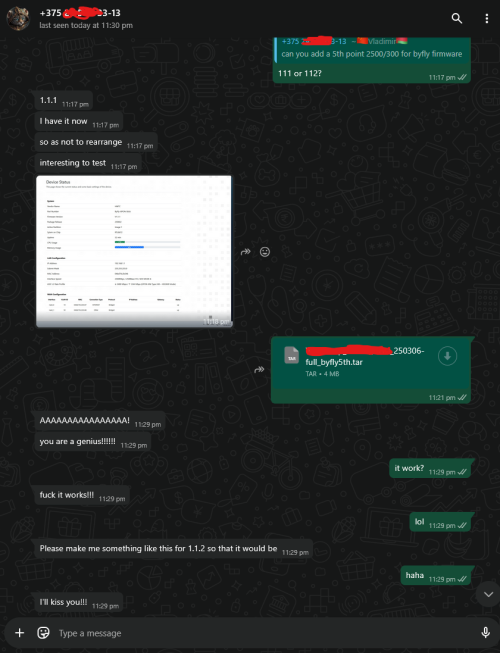
you know what, my team test the ASIC/Layer 1.5 Egress/Ingress test at Belarus Byfly ISP 2Gbps/300Mbps (Huawei OLT)

user posted image

it works, no more dropped packet, so my Nijika Stick not the fault haha
*
You mean what kind of packet? LCP-Echo or just the dropped packet counter of the interface?
If you pace the transmit and it never overrun the buffer then no packet will be dropped. It is expected.
But for a shared infrastructure, you never know how much is the current utilization, that's why congestion control algorithm is a thing. Then again there's algorithm like BBR which tries to gain an unfair advantage of using up the pipe by blasting it and accepting high transmit retry as normal business.
kwss
post Jun 3 2025, 02:29 AM

Regular
******
Senior Member
1,207 posts

Joined: Aug 2018
Anime4000 Your kind of jam.
How to bring data centre-like connectivity to your home with IPTTTH
https://blog.apnic.net/2025/05/26/how-to-br...me-with-ipttth/
kwss
post Jun 4 2025, 01:20 PM

Regular
******
Senior Member
1,207 posts

Joined: Aug 2018
QUOTE(ahlong @ Jun 4 2025, 10:54 AM)
ya i thought so too. but i try the max value first until the errors gone.

user posted image
*
Set MRU to 1500. It will massively decrease the chance of website breakage.

I have confirmed return path can actually do 1500 for IPv4.
For IPv6, it will get blocked by the BNG if anything is more than 1492. This is some cheap dirty trick to workaround those stupid router TM gave that have stupid IPv6 setup.
kwss
post Jun 4 2025, 01:42 PM

Regular
******
Senior Member
1,207 posts

Joined: Aug 2018
QUOTE(jusbella @ Jun 4 2025, 12:07 AM)
In mikrotik log. Not sure helpful not?
*
This is some shenanigan done by TM. Long time back, TM will not broadcast RA but I don't know what convinced them this is such a great idea.
No properly configured router will accept RA. Mikrotik by default will never accept RA.
Accepting RA is a security issue as it means anyone on the L2 network can poison your upstream route.

The correct way is do it using DHCPv6 IA_NA. However for some reason, if you try to configure it like this, you get nothing. Not even the prefix.

Conclusion: TM still don't fully understand IPv6.
kwss
post Jun 4 2025, 03:11 PM

Regular
******
Senior Member
1,207 posts

Joined: Aug 2018
QUOTE(Anime4000 @ Jun 4 2025, 02:58 PM)
kwss tng55 hsbb blacktubi

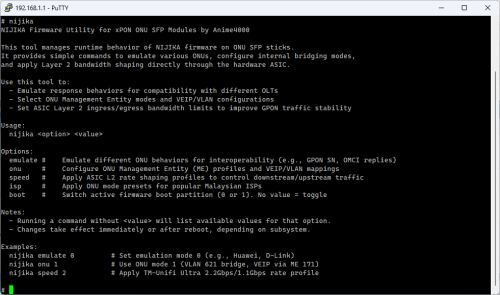
I created NIJIKA Firmware Utility, this allow set command quickly and safely

for example, one of my customer switch from Unifi to TIME, want to reuse NIJIKA stick, just execute "nijika isp time", then put PPPoE Password as PLOAM Password and S/N, reboot, enjoy...

calling "nijika isp time" will modify internal behavior like, using SFU mode, OMCI, Huawei Proprietary ME, etc...

user posted image

CODE

# nijika onu
Unsupported or missing mode ID:
Usage: /bin/onu_mode [mode]

Supported mode:
 0 | sfu      Apply Single Family Unit mode
 1 | hgu      Apply Home Gateway Unit mode
 2 | compat   Apply Compatibility / Bridge-only mode (bridge all VLANs)
 3 | manage   Apply VLAN Managed Bridge-only mode (bridge all VLANs)

# nijika isp
Available ISPs for quick configuration:
 unifi    Telekom Malaysia (Unifi, ZTEG/ALCL/HWTC/FHTT OLT)
 maxis    Maxis Communications (HSBA or Own Infra)
 time     TIME dotCom Bhd (Huawei OLT only)
 allo     Allo Technology (ALCL or HWTC OLT)

Example: nijika isp unifi

# nijika speed
Supported mode:
 0.   Disabled (Full Line Rate – No Shaping)
 1.   Dn 2488 Mbps / Up 1244 Mbps (GPON ANI Type 248 – HiSGMII Mode)
 2.   Dn 2488 Mbps / Up 1100 Mbps (TM Unifi Ultra – Alternate Profile)
 3.   Dn 2200 Mbps / Up 1100 Mbps (TM Unifi Ultra – Standard Profile)
 4.   Dn 2048 Mbps / Up 1024 Mbps (Custom Symmetric Profile)
 5.   Dn 2488 Mbps / Up  300 Mbps (byfly 2488/300Mbps Standard Profile)

# _


command "nijika speed" to solve issue at bad area, by default, it use Mode 1,

all these exist as my past experience, improve and we gather all OLT quirks, thus V2.0 exist
*
Actually I am just wondering. Would it be better to just shape upstream?
Reason is this:
If the OLT transmit the packet and your ONU already received it, then there is no reason to pace it. Dropping the packet will only cause higher layer protocol to perform a retransmit.

It is even more chronic in congested last mile because in PON network, all downstream traffic reaches every single ONUs.
kwss
post Jun 4 2025, 03:20 PM

Regular
******
Senior Member
1,207 posts

Joined: Aug 2018
QUOTE(Anime4000 @ Jun 4 2025, 03:17 PM)
this need patch the kernel, it only disable or enable (with value), can't disable Downstream side atm
*
If that is the case, then I think having 2488 for all the options is the best.
This way, it will not cause anything to be dropped.
What do you think?
kwss
post Jun 5 2025, 09:59 AM

Regular
******
Senior Member
1,207 posts

Joined: Aug 2018
QUOTE(Anime4000 @ Jun 4 2025, 09:08 PM)
apparently during understanding proprietary kernel that fetched from Realtek SVN server

"packet pace" is wrong, no pace inside

and it operate at Layer 1, thus eth0 and br0 not effected.
since it operate at Layer 1, it just use Layer 1 Egress and Ingress,

UNI: Rx GbE, Tx 2.5GbE
ANI: Rx 2.5G, Tx GbE
+ Asynchronous Flow Control

also he did compensate Ethernet + VLAN + PPPoE header (1502 = 1514 - 4 - 8)
there are hard limit for UNI, he patch the UNI so Ethernet can have 2000 bytes
and ANI side just 2000 bytes fixed size~
*
I have to say I don't understand now.
So that number is a byte value for Layer 1? And it's a representative of frame size? Excluding the preamble?
But then your calculation is actually Layer 2.

So then using the largest number is the best right? Or just leave it as default?
kwss
post Jun 6 2025, 09:11 PM

Regular
******
Senior Member
1,207 posts

Joined: Aug 2018
Malaysia orders telecoms firms to hand over user data, raising privacy concerns
The government claims it’s for a mobile project, but critics cite data security risks.

The Malaysian government has ordered the country’s telecommunications firms to hand over detailed records of phone calls and internet usage, according to industry sources, raising concerns about the state’s use of data as it broadens its controls over online activity.

In April, the Malaysian Communications and Multimedia Commission sent a letter to telecoms companies instructing them to send detailed call and internet logs for the first three months of this year, apparently for the government’s Mobile Phone Data project, two industry sources confirmed.

Non-compliance would be considered an offence under the Communications and Multimedia Act, which carries a penalty of a 20,000 ringgit (US$4,700) fine or six months' jail, the commission said in the letter seen by This Week in Asia.

“They are asking for call records, IP call records, location, latitude and longitude,” one source said. “We have asked MCMC about transparency and accountability for the use of the data. We don’t know if MCMC will make a public statement that such an exercise is under way.”

The MCMC did not immediately respond to a request for comment.

Prime Minister Anwar Ibrahim’s administration imposed mandatory licensing for social media platforms in January in a bid to stamp out scams, online gambling and child sex exploitation targeted at Malaysians.

Also posted on Kopitiam
https://forum.lowyat.net/topic/5526338/
kwss
post Jun 6 2025, 10:57 PM

Regular
******
Senior Member
1,207 posts

Joined: Aug 2018
QUOTE(PRSXFENG @ Jun 6 2025, 09:54 PM)
Insert Here we go again meme here
*
Actually I predict this time it will go on smoothly.
The reason is simple. 99% of the user don't care as long as they don't see breakage.

The previous time, they went so hard to break not only porn but also third party DNS.
Then TM went even further to forge TLS certificate and kill Cloudflare Zero Trust with all their BGP hijacking.

They surely learnt from their mistake and be quiet this round. You don't see Farkmee say anything too.
kwss
post Jun 6 2025, 11:32 PM

Regular
******
Senior Member
1,207 posts

Joined: Aug 2018
QUOTE(Anime4000 @ Jun 6 2025, 11:21 PM)
still, need protect online activity, DoH + TLS1.3 (ECH) would be good

and again discord group for this crap: https://discord.gg/DGaCEYvhpy
I still run DNS over WG
*
Yes DoH + HTTP/3 is the bare minimum to at least counter some of these government "project".

I still have my full blown anti-censorship system online and standby. Just need to pay AWS for IPv4 address and I'm good to go.
kwss
post Jun 7 2025, 12:54 AM

Regular
******
Senior Member
1,207 posts

Joined: Aug 2018
QUOTE(Kadaj @ Jun 7 2025, 12:45 AM)
I don't feel surprise too. It's expected.
They'll never give up to control everything.

Surfing the internet without a VPN is like running naked on street.
*
Actually we all know they are targeting political enemy. Think about it, nobody cares if you watch porn.

Previously they announce to mainstream media, hence they have to come out with a we are trying to protect you and your kids kind of narrative.
Now they just do it quietly and skip the mass censorship part. I'm sure that will come later, it's a powerful weapon during election.

In reality, those who need protection the most don't get it. They just don't have access to people with that technical skills.
Think about all the kidnapped cases, when someone in power is about to lose it.
kwss
post Jun 7 2025, 10:58 AM

Regular
******
Senior Member
1,207 posts

Joined: Aug 2018
QUOTE(LostAndFound @ Jun 7 2025, 09:10 AM)
Targetting political enemy is always the case.

But that second sentence tells me you are not Muslim. A lot of people care (no need to get into details about why, or whether it is right/wrong) about this sort of thing. Not everyone is a western-style individualist.
*
Your religion is between you and your creator.
You are free to turn off the Internet. It saves you money too.

Also, go read The Art of Thinking Clearly by Rolf Dobelli.

19 Pages < 1 2 3 4 5 > » Top
 

Change to:
| Lo-Fi Version
0.0319sec    0.59    7 queries    GZIP Disabled
Time is now: 2nd December 2025 - 01:08 PM