Welcome Guest ( Log In | Register )

5 Pages < 1 2 3 4 5 >Bottom

Outline · [ Standard ] · Linear+

 Official TM UniFi High Speed Broadband Thread V43, READ 1ST PAGE FOR RELEVANT WIFI INFO!

views
     
sam240
post Aug 11 2025, 09:33 PM

Look at all my stars!!
*******
Senior Member
3,657 posts

Joined: Jan 2003


QUOTE(Tirek @ Aug 11 2025, 08:36 PM)
Hi. Currently my unifi plan is 300mbps at RM130 (before tax).

I'm interested with the SWU 5.0 500mbps at RM90.

1. That price RM90 valid forever or just a short period of time, like 6 months only after that back to a original price ?

2. That RM90 plan does it include free phone call ?

3. That RM90 plan, if i got the offer, does TM tehcnician will come to my house for a new installation kit set or it just online upgrade ?

4. Is there a combo with unifiTV plan, let say add few bucks, like maybe add RM20 got free any unifiTV plan ?

5. That RM90 will get me a free TV ?

6. If I want to try get the offer, should I say that i got better offer from other ISP or just says want to terminate only ? If I say got offer, should I say got offer thru telephone call or offer from sales kiosk at shopping mall or from agent social media like fb ?

7. Whats the catch ya? I mean other than TM keep me as their customer, is there any hidden things that I dont know ? Maybe like, the new supposely upgraded speed will reroute me to slowing international cable ? or ping when I play video game will be high ?

Thank you
*

My previous package was 100Mbps @ RM89 now 500Mbps @ RM90
1) No free and permanent RM90
2) My previous plan do not come with free call. I got free 1st 600min call on this new SWU 5.0 (you can ask when they call you to confirm)
3) Depends, my old router kena replace so they come and setup combo (WiFi-6) for me. But I use back my old ONU + WiFi-5 Asus router
4) SWU 5.0 got free 1 year for Disney+ Hotstar
5) No. Free TV should be other package, not under SWU.
6) No really need tell so details, just tell them you got offer...bla..bla..
7) Sorry, no comment
sam240
post Aug 12 2025, 11:20 PM

Look at all my stars!!
*******
Senior Member
3,657 posts

Joined: Jan 2003


QUOTE(Tirek @ Aug 12 2025, 12:44 PM)
3. Did TM give you new wifi 6 router ? Does the router better than your previous wifi 5 router ?
*
The TM new combo (ONU+WiFi Router) not a lot of setting, sorry not really test run on it. No confidence with it run with my mini server (NAS x2, POE CCTV, mini 24/7 PC) sweat.gif
My old Asus had more options and no issue to get 500Mbps and my main + sub PC are running on LAN cable.

QUOTE(tng55 @ Aug 12 2025, 02:30 PM)
tm give new wifi router is crappy
my answer my old ONU + WiFi-5 Asus router batter then new wifi 6 router
due TM WIFI 6 Low Spec compare  WiFi-5 Asus router higher Spec then TM Router Low spec
*
Thanks for the comment. I think the combo box TM may okay for 1 or 2 person with "normal" expectation rolleyes.gif

This post has been edited by sam240: Aug 13 2025, 07:47 AM
sam240
post Aug 13 2025, 11:38 AM

Look at all my stars!!
*******
Senior Member
3,657 posts

Joined: Jan 2003


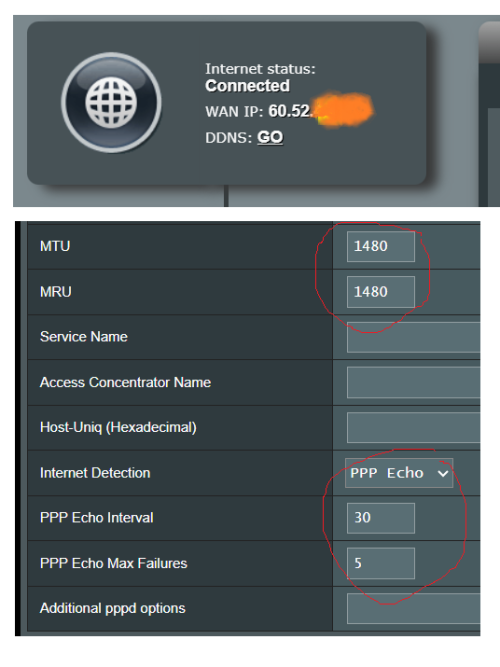
Reboot my ONU and router for a fresh today, the WAN IP show up 60.x.x.x, never notice Unifi WAN IP, is this normal?
Try to ping google and found out there are some missing pieces (broken) and I assume Unifi line not stable or because of IP.

Wondering what is normally Unifi IP, I'm using the SWU 5.0 package.

Also quick check for the setting for MTU/MRU, PPP Echo Interval/ Echo Max Failures ... am I set correctly? (screenshot as show below)

» Click to show Spoiler - click again to hide... «

sam240
post Aug 20 2025, 01:10 AM

Look at all my stars!!
*******
Senior Member
3,657 posts

Joined: Jan 2003


QUOTE(hsbb @ Aug 18 2025, 04:22 PM)
Mind to share the phone number that call y'all about 500mbps RM90 offer?
*
Combined all:
03-2021 7625
03-2021 7915
03-2021 7927
03-2021 7930

QUOTE(cklove96 @ Aug 19 2025, 11:22 PM)
Reminder to SWU termination user : TM will contact the phone number registered to the account, not the number you fill on the termination form. If you dont receive the call from Tm please make sure your phone number is registered to the account. Phone number you fill on the termination form basically is for FUN only.
*
Seriously? How to check the "register" phone number?

This post has been edited by sam240: Aug 20 2025, 01:13 AM
sam240
post Aug 21 2025, 06:18 PM

Look at all my stars!!
*******
Senior Member
3,657 posts

Joined: Jan 2003


QUOTE(Azamat_Bagatov @ Aug 21 2025, 05:18 PM)
Well cheapskate to buy a router is part of it
The bigger part is because their customer service really not helpful at all
Technician came problem not solved, second appointment still want to charge rm80

celaka
I terminate TIME and apply Unifi terus
If router later got problem only change
*
TIME service so teruk ah? Wondering which area hmm.gif

sam240
post Aug 22 2025, 11:40 AM

Look at all my stars!!
*******
Senior Member
3,657 posts

Joined: Jan 2003


user posted image
I received this msg today, look like 500Mbps RM90 become standard package?
Not sure Unifi will offer 300Mbps RM80 or not, then how much will be for 100Mbps... hmm.gif RM69 ?
sam240
post Aug 22 2025, 11:15 PM

Look at all my stars!!
*******
Senior Member
3,657 posts

Joined: Jan 2003


QUOTE(blacktubi @ Aug 22 2025, 02:23 PM)
Yup, that's what I recall too

No longer possible to have 2 provider simultaneously
*
huh? why not allow 2 fiber go into same house? I tot no such limitation for end user.


QUOTE(JayceOoi @ Aug 22 2025, 04:47 PM)
2 weeks here still nothing...  console.gif
*
You're ok to submit 2 tickets; some ppl submitted even up to 3 tickets sweat.gif

sam240
post Aug 23 2025, 11:12 AM

Look at all my stars!!
*******
Senior Member
3,657 posts

Joined: Jan 2003


Anyone know about the package come with free call, are included all below, right?
i) M'sia fixed line
ii) any M'sia Telco mobile number
iii) 1800-xxx
iv) 1300-xxx

This post has been edited by sam240: Aug 23 2025, 11:13 AM
sam240
post Aug 23 2025, 05:12 PM

Look at all my stars!!
*******
Senior Member
3,657 posts

Joined: Jan 2003


QUOTE(jusbella @ Aug 23 2025, 12:07 PM)
Any calls beyond 600 minutes, charges will be as per below:

- Free calls from fixed to fixed; and
- RM0.10 from fixed to mobile.
- 1-800 is toll free
- 1-300 is chargeable, can't recall how much per minute, if not wrong it's should be RM0.15 per minutes.
*
oh the fixed to fixed free call forever? I tot within that 600min quota sweat.gif Thx for the info.

sam240
post Aug 29 2025, 10:33 PM

Look at all my stars!!
*******
Senior Member
3,657 posts

Joined: Jan 2003


QUOTE(Mr Leo @ Aug 29 2025, 08:16 PM)
I requested first termination during end of July and wait until last week no call. Then I requested second termination last week. And now my account suddenly suspended by them. I got no outstanding.....
*
Seriously? so it really terminate after 30 days before phone call confirmation with you? OMG shocking.gif

This post has been edited by sam240: Aug 29 2025, 10:33 PM
sam240
post Aug 30 2025, 12:00 AM

Look at all my stars!!
*******
Senior Member
3,657 posts

Joined: Jan 2003


QUOTE(Mr Leo @ Aug 29 2025, 11:39 PM)
Different people different case lo. After chatting with TM via online and now my account back to Active instead of suspended. And TM asked me whether I would like to cancel the termination request, I have to say yes. No choice... bangwall.gif
*
Sound like the trick not going to work confused.gif .. You recover your account by live chatting with TM?
Maybe you submit another new ticket next or next 2 week? blush.gif

sam240
post Sep 9 2025, 12:41 PM

Look at all my stars!!
*******
Senior Member
3,657 posts

Joined: Jan 2003


QUOTE(wadafak @ Sep 8 2025, 08:34 PM)
whole day .. im working from home.. so i have been monitoring this about a week.. from morning, noon midnite
*
wondering how you guys notice the internet is slow?
example:
- Specify website will more obviously slow?
- Online video streaming slow down?
- you run speedtest every day to monitor?

Want to ask:
I'm using ZTE GPON ONT, ZXHN F620 (ONU) + own router, so far working stable.
I get a FOC Huawei GPON (HG8240H5) from my fren, I plug in fiber and connect LAN cable to LAN1, my router cannot connect to internet.
Is there any setting for the Huawei? Of Huawei unit had been locked to the specific ISP?
Which is better between these 2 GPON? ZTE or Huawei?

This post has been edited by sam240: Sep 9 2025, 12:41 PM
sam240
post Sep 9 2025, 02:19 PM

Look at all my stars!!
*******
Senior Member
3,657 posts

Joined: Jan 2003


QUOTE(k!nex @ Sep 9 2025, 02:13 PM)
Did you configure the ONT authentication for your replacement ONU ?
It is not plug and play you know ? This is not Streamyx.
*
I remember last time I did try on another ONU, if not mistaken is plug-n-play (pnp).
Thanks for the screenshot.
what's the info (password) that I need to keyin ? where is the serial number I can get from?
use PC connect with LAN cable into LAN1 on that Huawei ?

This post has been edited by sam240: Sep 9 2025, 02:21 PM
sam240
post Sep 9 2025, 03:57 PM

Look at all my stars!!
*******
Senior Member
3,657 posts

Joined: Jan 2003


QUOTE(k!nex @ Sep 9 2025, 02:32 PM)
The password is ONU password. Not the same as the PPPOe authentication password.
Last time i manage to get the password from my old ONU. If not , its quite difficult to get it from TM even if you call their helpline, they wont give you easily.
I didnt set the serial number. It is by default there already.
Maybe you can have a look at this tutorial.
[YOUTUBE LINK]
*
Thanks for the tips. Now I need to get ONT authentication code.
I never know need a code for ONU, wondering how to get the code? Call Unifi? Ask the technician who just setup for my new Combo Box?


QUOTE(cHiLdHo0drEaMz @ Sep 9 2025, 02:42 PM)
Just to clarify on the IP matters again,

100Mbps - private IP
300Mbps - private IP
500Mbps - public IP or private IP ?
1Gbps - public IP
2Gbps - public IP

Just to clarify once again , kindly advice  notworthy.gif

Because I do have plan to switch to SWU but my concern is for the IP as my streaming stuffs requires public IP. Currently I'm on 1Gbps (Pro Upgrade) RM239 Without Contract
*
How to identifiy that my IP is public or Private?
Each time router reboot, I'll get new IP = Is public?


sam240
post Sep 9 2025, 05:07 PM

Look at all my stars!!
*******
Senior Member
3,657 posts

Joined: Jan 2003


QUOTE(shirogane @ Sep 9 2025, 04:48 PM)
Does this come with basic Unifi TV package?
*
no, but some ppl get the free 600min call with that SWU 5.0.

sam240
post Sep 9 2025, 05:49 PM

Look at all my stars!!
*******
Senior Member
3,657 posts

Joined: Jan 2003


QUOTE(fruitie @ Sep 9 2025, 05:26 PM)
Only if their existing package comes with free 600 minutes, then it will be grandfathered, else it won't.
*

oh, my previous package don't have, but when get the SWU 5.0, I asked and get the free 600min included. I tot is standard package for all 500Mbps.

QUOTE(k!nex @ Sep 9 2025, 05:43 PM)
Call Unifi and tell them your ONU not working. Let the tech come and setup for you if you cannot manage to get your ONT authentication password . Dont tell them you got a replacement ONU. Kasi con them come to your house , see your huawei ONU not working , then let them configure.

What package you use ? If 500mbps and above is public IP.  300mbps and below all private IP for Unifi.
If Maxis , anyhow u just need to add 10 bucks every month to get public IP .
To confirm whether you have public IP , just login to your router . See that IP address that the router shows match the IP address that speedtest.net shows you. If they are the same, means you get public ip. If different means you get private IP.
*
Really thanks for your tips (I like it rclxms.gif ) Well, I just get the 500Mbps and technician just setup for me with new Combo Box last month. If now report my ONU not working, then technician come and found out how come is Huawei not combo box sweat.gif As I know, if not Unifi fault, they will charge for us if the fault is at our side, right?

About the public IP, my previous package was 100Mbps, each time reboot router, will get new IP.
My current 500Mbps also same. So these all called as public IP, I tot called dynamic IP.

For Private IP will be all the time same IP, right?

Which one is better? public IP will better? Not easy to trace ? Just wondering hmm.gif

This post has been edited by sam240: Sep 9 2025, 05:52 PM
sam240
post Sep 9 2025, 08:49 PM

Look at all my stars!!
*******
Senior Member
3,657 posts

Joined: Jan 2003


QUOTE(msacras @ Sep 9 2025, 06:25 PM)
Mind to share the contact of the agent? Had been paying for phone calls all these years cause my parents are old timer whom can’t do without homeline.

As a backup incase I didn’t get offered anything by them from this termination request sweat.gif
*
oh, when I get call from Unifi for the SWU 5.0 offer, I asked what I will get, then she told me I got 500Mbps RM90 permanently, Free 1yr Disnet+ Hotstar 1, Free 600min calls also get a new router replacement. For my case, the call is from Unifi offically, not outside agent.

sam240
post Sep 10 2025, 12:13 PM

Look at all my stars!!
*******
Senior Member
3,657 posts

Joined: Jan 2003


QUOTE(cyberic @ Sep 9 2025, 08:55 PM)
TM came installed  new ONR for my 1 Gb plan. I asked him to configure it to bridge mode, it didn't work, so I asked him to do normal installation and ask for the GPON credentials so that I can try it later. It appears that it was connected to Wan port instead of Lan 1 port, it worked after I switched. So you can ask nicely 😄

Dynamic IP is dynamically assigned IP addresses. Static IP means that IP reserved for you, always get the same IP. These apply to public and private IP addresses. You have to pay static public addresses,  available for biz plan.
*
QUOTE(tng55 @ Sep 9 2025, 09:38 PM)
you borrow huawei you friend btu its not plug and play
you need configuration Huawei need fill PLOM PASSOWRD AND SERIAL AND MAC ETC
its TM if you call tm 100 or live chat or email they wont give you
you need request tm technical visit you and they open his Tablet or Phone got details PLOM PASSOWRD AND SERIAL AND MAC ETC you need take photo to save
next time you can fill configuration yourself
*
Thanks for the tips. I called 100 and online live chat to request ONT Authentication : really no hope dry.gif
I contacted back Unifi technician, he said already wrote on the Combo Box manual (ONT, PPPoE, WiFi password), I reset Huawei HG8240H5 GPON > Manual set my PC with correct Gateway IP > login (user name & password on sticker) > key-in the ONT Authentication > Save Exit. Done ... can online now rolleyes.gif

Thanks again for the tips smile.gif

sam240
post Sep 11 2025, 03:05 PM

Look at all my stars!!
*******
Senior Member
3,657 posts

Joined: Jan 2003


QUOTE(NightFelix @ Sep 11 2025, 02:51 PM)
Wow, that escalate quicker than I thought.

Edit: Astro website brought me RM139.99.

Edit2: Astro Fibre service is not available at this address at the moment
*
If you are new user, it will force you to subscribe Astro channels which is RM139.99 and during checkout, will ask you to pay (forgot how much) before can checkout. If you register with existing Astro user, it will ask you key-in your Astro account...bla..bla.. (not recommended) sweat.gif

I think the better way is submit "termination" request and wait they call you.
try search back some history that had been started since April if not mistaken rolleyes.gif

sam240
post Sep 11 2025, 03:45 PM

Look at all my stars!!
*******
Senior Member
3,657 posts

Joined: Jan 2003


Detail Termination Method:
A) Unifi SelfCare Portal:
- Login into your Unifi Selfcare Portal
- Go into "view services“
- Left Menu > Scroll Down > Support > Request Service Termination

OR

B) Unifi App
- Support > Moving Home> Request Service Termination

- Clear all payment if any
- Fill up the request form (name, IC, phone number, email address, bank account info...etc)
- Skip all non-sense pop-up offered package
- Submit the form
- Sit and wait for Unifi call (weekday only)
- Save below Unifi Care phone number:
03-2021 7625
03-2021 7915
03-2021 7927
03-2021 7930


5 Pages < 1 2 3 4 5 >Top
 

Change to:
| Lo-Fi Version
0.0216sec    1.02    7 queries    GZIP Disabled
Time is now: 3rd December 2025 - 02:59 PM