

I recently bought a set if DECO BE11000 mesh, but the wifi coverage is quite poor, is there any way to increase the coverage signal?
TP-LINK DECO BE11000 Wifi 7 setup help, Setup help needed for DECO WIFI 7
TP-LINK DECO BE11000 Wifi 7 setup help, Setup help needed for DECO WIFI 7
|
|
 Oct 15 2024, 11:30 AM, updated 2y ago Oct 15 2024, 11:30 AM, updated 2y ago
Show posts by this member only | Post
#1
|
 
Newbie
13 posts Joined: Mar 2018  
|
I recently bought a set if DECO BE11000 mesh, but the wifi coverage is quite poor, is there any way to increase the coverage signal?
|
|
|
|
|
|
Oct 15 2024, 11:32 AM
Show posts by this member only | IPv6 | Post
#2
|

Senior Member
1,187 posts Joined: Oct 2009
|
Add more mesh.....
|
|
|
Oct 15 2024, 11:37 AM
Show posts by this member only | IPv6 | Post
#3
|

Junior Member
517 posts Joined: Sep 2009
|
Use a wired backhaul and set your node to connect to the backhaul if it is closer.
Disable all unnecessary features. |
|
|
Oct 15 2024, 12:17 PM
Show posts by this member only | IPv6 | Post
#4
|
 
Elite
8,416 posts Joined: Jul 2008 
|
Solution is to get Deco BE85 with 4x4 MU-MIMO
Deco BE65 is their mid tier product with just 2x2 MU-MIMO |
|
|
Oct 15 2024, 05:45 PM
Show posts by this member only | IPv6 | Post
#5
|

Junior Member
518 posts Joined: Aug 2005
|
Use wired backhaul on one of the node. So far for me in a 2 story house no issue using 2 nodes.
If your house is a mansion, go get BE85. This post has been edited by Neptern: Oct 15 2024, 05:45 PM |
|
|
Oct 16 2024, 10:29 AM
Show posts by this member only | IPv6 | Post
#6
|

Junior Member
835 posts Joined: Nov 2007 From: Land of Forgotten
|
QUOTE(jacktanwz @ Oct 15 2024, 11:30 AM) I recently bought a set if DECO BE11000 mesh, but the wifi coverage is quite poor, is there any way to increase the coverage signal? how big is your house built up? 1k sq.ft-2k sq.ft should require 2 minimal. If its a double storey, you will require 2-3 nodes minimum. For the dead spot, I think is wise to get a lower end Wifi7 mesh single pack, or just get a used wifi6 deco mesh to place at the dead spot if speed is not your concern. Since the BE11000 is triband, I assume is working sufficiently to provide you a good backhaul speed. |
|
|
|
|
|
Oct 21 2024, 11:12 AM
Show posts by this member only | Post
#7
|
|
Newbie
13 posts Joined: Mar 2018
|
QUOTE(Omochao @ Oct 16 2024, 10:29 AM) how big is your house built up? My house is just normal condo with 3 rooms. 1000sq ft only, but the mesh node can only penetrate like 2 walls, each wall the signal will drop 1 bar, so if i put a node in study room, my master bedroom could only get 1-2 bar1k sq.ft-2k sq.ft should require 2 minimal. If its a double storey, you will require 2-3 nodes minimum. For the dead spot, I think is wise to get a lower end Wifi7 mesh single pack, or just get a used wifi6 deco mesh to place at the dead spot if speed is not your concern. Since the BE11000 is triband, I assume is working sufficiently to provide you a good backhaul speed. |
|
|
Oct 21 2024, 11:20 AM
Show posts by this member only | Post
#8
|

Senior Member
5,075 posts Joined: Oct 2008
|
doesn't seem right, I am using BE65 also, mesh node is in my room and the bathroom in my parents' master bedroom separated by 2 walls can still get full bar signal (using my ipad or phone).
|
|
|
Oct 21 2024, 11:20 AM
Show posts by this member only | Post
#9
|
|
Newbie
13 posts Joined: Mar 2018
|
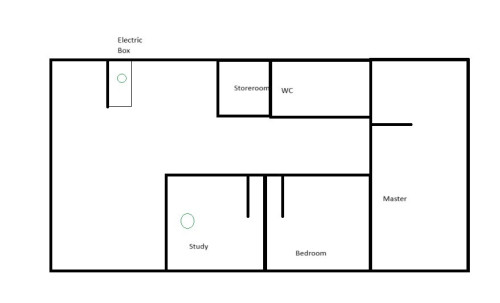 A simple drawing of my house layout, one node must be put in electric box wardrobe as the fibre box is in it. Another node was connected to the main node using cat 6 cable in the study room. |
|
|
Oct 21 2024, 11:51 AM
|

Senior Member
1,457 posts Joined: Jan 2005 From: Kajang
|
QUOTE(jacktanwz @ Oct 21 2024, 11:20 AM) A simple drawing of my house layout, one node must be put in electric box wardrobe as the fibre box is in it. Another node was connected to the main node using cat 6 cable in the study room. Also try the following troubleshooting :- 1. Ensure all devices are NOT connected to any of the Wifi or LAN Cable. 2. Power On the Primary Node only 3. Use a PC/Laptop via LAN cable to login the Primary Node and configure the necessary. 4. Ensure that both 2.4Ghz & 5Ghz band is ENABLED. 5. ENABLED MESH, Auto-Roaming, Signal=Strong etc. 6. Power On the Secondary Node. 7. Adopt the Secondary Node & let the Primary Node auto provision it (may take a few minutes). 8. Still on the PC/Laptop with LAN Cable, run a "SpeedTest", note down the speed. 9. Now disconnect the LAN cable & connect via Wifi and run "SpeedTest" again, note the speed. 10. If everything completed, then allow other devices to connect to the Wifi. Hope this helps...  |
|
|
Oct 21 2024, 07:34 PM
Show posts by this member only | IPv6 | Post
#11
|

Senior Member
4,159 posts Joined: Jan 2003 From: Cheras, KL
|
QUOTE(jacktanwz @ Oct 21 2024, 11:20 AM) A simple drawing of my house layout, one node must be put in electric box wardrobe as the fibre box is in it. Another node was connected to the main node using cat 6 cable in the study room. This post has been edited by BOTAK_WAI: Oct 21 2024, 07:37 PM |
|
|
Oct 26 2024, 06:44 PM
Show posts by this member only | IPv6 | Post
#12
|
|
Junior Member
835 posts Joined: Nov 2007 From: Land of Forgotten
|
QUOTE(jacktanwz @ Oct 21 2024, 11:20 AM) A simple drawing of my house layout, one node must be put in electric box wardrobe as the fibre box is in it. Another node was connected to the main node using cat 6 cable in the study room. Is your unit built in with ethernet cables conduit? Does you master room have another wall socket for ethernet? May consider placing another node in master room then connecting from the study room. This post has been edited by Omochao: Oct 26 2024, 06:53 PM |
|
|
Nov 3 2024, 09:13 PM
|
|
Junior Member
8 posts Joined: Feb 2023
|
Any update for this issue? Thinking of getting the same mesh
|
|
|
|
|
|
Nov 27 2024, 10:35 AM
|
|
Newbie
13 posts Joined: Mar 2018
|
Update after almost 1 month
I replace the BE65 deco from electric box and replaced it with 1 unit of BE85. The BE65 unit was moved to master bedroom. All the deco unit was connected to main Deco BE85 with CAT6 LAN cable. Now the whole house is able to receive wifi signal. But now there's a new problem, I connected my personal PC to the deco node in my study room with CAT6 LAN cable, the speed is not stable, sometimes there is no internet connection via cable, but i can get stable internet via WIFI. My motherboard is Gigabyte X870E Aorus Pro ICE with 2.5GbE LAN port + Wifi 7. Internet provider is TIME 600Mbps. When i do speedtest, the download speed for the node in study room are below: WIFI Download: 655Mbps Upload: 25Mbps LAN Download: 671Mbps (when stable) Upload: 10Mbps Do any sifus know why the upload speed is decreased so much with the nodes? I did some speed test with the main BE85 unit and can get 600+Mbps upload and download. |
|
|
Nov 27 2024, 02:35 PM
Show posts by this member only | IPv6 | Post
#15
|
|
Junior Member
53 posts Joined: Nov 2016
|
QUOTE(jacktanwz @ Nov 27 2024, 10:35 AM) Update after almost 1 month Sorry as my question will be a bit out of topic. Talking about BE85, I read a lot of feedback regarding the thermal issue, where it’s hotter comparing with BE65, and some even claimed the internal fan are running very frequently to cool down the router. Do you observe similar issue?I replace the BE65 deco from electric box and replaced it with 1 unit of BE85. The BE65 unit was moved to master bedroom. All the deco unit was connected to main Deco BE85 with CAT6 LAN cable. Now the whole house is able to receive wifi signal. But now there's a new problem, I connected my personal PC to the deco node in my study room with CAT6 LAN cable, the speed is not stable, sometimes there is no internet connection via cable, but i can get stable internet via WIFI. My motherboard is Gigabyte X870E Aorus Pro ICE with 2.5GbE LAN port + Wifi 7. Internet provider is TIME 600Mbps. When i do speedtest, the download speed for the node in study room are below: WIFI Download: 655Mbps Upload: 25Mbps LAN Download: 671Mbps (when stable) Upload: 10Mbps Do any sifus know why the upload speed is decreased so much with the nodes? I did some speed test with the main BE85 unit and can get 600+Mbps upload and download. |
|
|
Nov 27 2024, 04:26 PM
|

Senior Member
6,681 posts Joined: Aug 2008 From: Malaysia 
|
QUOTE(jacktanwz @ Nov 27 2024, 10:35 AM) Update after almost 1 month Think it's best to list down your model with version as well, example "BE85 v1" as this is part of the con of TP-link where certain firmware update does not apply to v1 or v2 hence will have differ result also.I replace the BE65 deco from electric box and replaced it with 1 unit of BE85. The BE65 unit was moved to master bedroom. All the deco unit was connected to main Deco BE85 with CAT6 LAN cable. Now the whole house is able to receive wifi signal. But now there's a new problem, I connected my personal PC to the deco node in my study room with CAT6 LAN cable, the speed is not stable, sometimes there is no internet connection via cable, but i can get stable internet via WIFI. My motherboard is Gigabyte X870E Aorus Pro ICE with 2.5GbE LAN port + Wifi 7. Internet provider is TIME 600Mbps. When i do speedtest, the download speed for the node in study room are below: WIFI Download: 655Mbps Upload: 25Mbps LAN Download: 671Mbps (when stable) Upload: 10Mbps Do any sifus know why the upload speed is decreased so much with the nodes? I did some speed test with the main BE85 unit and can get 600+Mbps upload and download. But how come your upload speed so bad result  sometimes there is no internet connection via cable - do you try with other cable as well ? |
|
|
Nov 27 2024, 08:33 PM
Show posts by this member only | IPv6 | Post
#17
|
|
Junior Member
835 posts Joined: Nov 2007 From: Land of Forgotten
|
QUOTE(jacktanwz @ Nov 27 2024, 10:35 AM) Update after almost 1 month more likely is the speedtest server and your Time ISP routing issue rather than your cable or deco fault.I replace the BE65 deco from electric box and replaced it with 1 unit of BE85. The BE65 unit was moved to master bedroom. All the deco unit was connected to main Deco BE85 with CAT6 LAN cable. Now the whole house is able to receive wifi signal. But now there's a new problem, I connected my personal PC to the deco node in my study room with CAT6 LAN cable, the speed is not stable, sometimes there is no internet connection via cable, but i can get stable internet via WIFI. My motherboard is Gigabyte X870E Aorus Pro ICE with 2.5GbE LAN port + Wifi 7. Internet provider is TIME 600Mbps. When i do speedtest, the download speed for the node in study room are below: WIFI Download: 655Mbps Upload: 25Mbps LAN Download: 671Mbps (when stable) Upload: 10Mbps Do any sifus know why the upload speed is decreased so much with the nodes? I did some speed test with the main BE85 unit and can get 600+Mbps upload and download. if download speed is okay, technically the deco,cable,your network card is all working fine. unless you adjust some of the hardware settings on your network card or pc. also try setting QoS on/off, set limit to 1000mbps for both upload and download. then go to device management and add the device you are testing with as "High priority" under the deco app, see if it helps. This post has been edited by Omochao: Nov 27 2024, 08:36 PM |
|
|
Nov 27 2024, 10:14 PM
|
|
Newbie
13 posts Joined: Mar 2018
|
QUOTE(TongCN @ Nov 27 2024, 04:26 PM) Think it's best to list down your model with version as well, example "BE85 v1" as this is part of the con of TP-link where certain firmware update does not apply to v1 or v2 hence will have differ result also. Version for BE65 nodes are the sameBut how come your upload speed so bad result sometimes there is no internet connection via cable - do you try with other cable as well ? BE65(1.0) 1.0.8 Build 20240723 Rel. 26458 BE85(2.0) 1.1.1 Build 20241023 Rel. 34667 I tried using CAT6 or CAT7 cable from UGREEN, same results Download can reach 680Mbps but upload can only reach 5-10Mbps |
|
|
Nov 27 2024, 10:17 PM
|
|
Newbie
13 posts Joined: Mar 2018
|
QUOTE(ohkeat @ Nov 27 2024, 02:35 PM) Sorry as my question will be a bit out of topic. Talking about BE85, I read a lot of feedback regarding the thermal issue, where it’s hotter comparing with BE65, and some even claimed the internal fan are running very frequently to cool down the router. Do you observe similar issue? I had a USB fan blowing directly at it as it turns quite hot in the electric box with no airflow. But when i use it without the external fan, the device's internal fan runs almost all the time. |
|
|
Nov 27 2024, 10:21 PM
|
|
Newbie
13 posts Joined: Mar 2018
|
QUOTE(Omochao @ Nov 27 2024, 08:33 PM) more likely is the speedtest server and your Time ISP routing issue rather than your cable or deco fault. Download speed is fast, just the upload speed for the specific nodes are super slow via cable or wifi, not sure why. if download speed is okay, technically the deco,cable,your network card is all working fine. unless you adjust some of the hardware settings on your network card or pc. also try setting QoS on/off, set limit to 1000mbps for both upload and download. then go to device management and add the device you are testing with as "High priority" under the deco app, see if it helps. Tried setting QOS on or off, same speed even my pc was set to high priority |
| Change to: |  0.0198sec 0.0198sec
 0.47 0.47
 5 queries 5 queries
 GZIP Disabled GZIP Disabled
Time is now: 14th December 2025 - 08:41 PM |
 Quote
Quote