Welcome Guest ( Log In | Register )

Outline · [ Standard ] · Linear+

 TP-LINK DECO BE11000 Wifi 7 setup help, Setup help needed for DECO WIFI 7

views
     
Omochao
post Oct 16 2024, 10:29 AM

Enthusiast
*****
Junior Member
835 posts

Joined: Nov 2007
From: Land of Forgotten
QUOTE(jacktanwz @ Oct 15 2024, 11:30 AM)
I recently bought a set if DECO BE11000 mesh, but the wifi coverage is quite poor, is there any way to increase the coverage signal?
*
how big is your house built up?

1k sq.ft-2k sq.ft should require 2 minimal.

If its a double storey, you will require 2-3 nodes minimum.

For the dead spot, I think is wise to get a lower end Wifi7 mesh single pack, or just get a used wifi6 deco mesh to place at the dead spot if speed is not your concern. Since the BE11000 is triband, I assume is working sufficiently to provide you a good backhaul speed.
Omochao
post Oct 26 2024, 06:44 PM

Enthusiast
*****
Junior Member
835 posts

Joined: Nov 2007
From: Land of Forgotten
QUOTE(jacktanwz @ Oct 21 2024, 11:20 AM)
user posted image

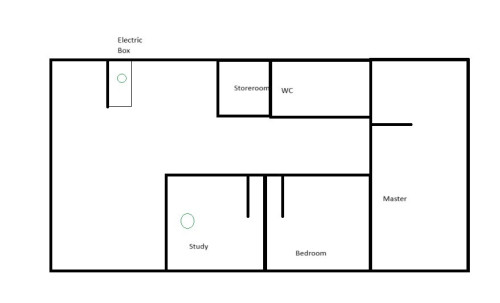
A simple drawing of my house layout, one node must be put in electric box wardrobe as the fibre box is in it. Another node was connected to the main node using cat 6 cable in the study room.
*
The main node must be remove from the electric box at all cost. it will affect all your devices reception to it. Find an installer and extend the fibre out from electric box, so that the main node can be placed out on the open. That should improve the wifi coverage signal, if not, then you might need to get another node to extend it, the study room should be remaining as per usual with ethernet backhaul.

Is your unit built in with ethernet cables conduit? Does you master room have another wall socket for ethernet? May consider placing another node in master room then connecting from the study room.

This post has been edited by Omochao: Oct 26 2024, 06:53 PM
Omochao
post Nov 27 2024, 08:33 PM

Enthusiast
*****
Junior Member
835 posts

Joined: Nov 2007
From: Land of Forgotten
QUOTE(jacktanwz @ Nov 27 2024, 10:35 AM)
Update after almost 1 month

I replace the BE65 deco from electric box and replaced it with 1 unit of BE85. The BE65 unit was moved to master bedroom. All the deco unit was connected to main Deco BE85 with CAT6 LAN cable. Now the whole house is able to receive wifi signal.

But now there's a new problem, I connected my personal PC to the deco node in my study room with CAT6 LAN cable, the speed is not stable, sometimes there is no internet connection via cable, but i can get stable internet via WIFI.

My motherboard is Gigabyte X870E Aorus Pro ICE with 2.5GbE LAN port + Wifi 7. Internet provider is TIME 600Mbps. When i do speedtest, the download speed for the node in study room are below:

WIFI
Download: 655Mbps
Upload: 25Mbps

LAN
Download: 671Mbps (when stable)
Upload: 10Mbps

Do any sifus know why the upload speed is decreased so much with the nodes? I did some speed test with the main BE85 unit and can get 600+Mbps upload and download.
*
more likely is the speedtest server and your Time ISP routing issue rather than your cable or deco fault.

if download speed is okay, technically the deco,cable,your network card is all working fine. unless you adjust some of the hardware settings on your network card or pc.


also try setting QoS on/off, set limit to 1000mbps for both upload and download.

then go to device management and add the device you are testing with as "High priority" under the deco app, see if it helps.

This post has been edited by Omochao: Nov 27 2024, 08:36 PM
Omochao
post Nov 28 2024, 06:30 AM

Enthusiast
*****
Junior Member
835 posts

Joined: Nov 2007
From: Land of Forgotten
QUOTE(jacktanwz @ Nov 27 2024, 10:21 PM)
Download speed is fast, just the upload speed for the specific nodes are super slow via cable or wifi, not sure why.

Tried setting QOS on or off, same speed even my pc was set to high priority
*
Your only choice right now is to narrow it down one by one and isolate the issue to see where is it coming from.

Try removing all the nodes and remain one main node first and test it through Wifi and LAN, to see whether is the ethernet port behind of the deco is malfunctioning.

Yes, is going to be very trouble some and cause some network down issue on your end but that deco is not cheap, and I will definitely send in for a warranty if the thing is a defect.

As I noticed there aren't any firmware for BE65 and your BE85 is at the latest version as of now, Build 20241023.

Try swapping both BE 65 and 85 as the main nodes and make sure no other nodes are connected to it.

From there on, test all of the ethernet ports and do a Wifi speed test again to isolate and narrow down which deco is causing you the problem. I highly don't think 2 of it will be exhibiting the same problem. Is either one of it, or the ethernet ports or is an entire firmware issue which is causing this slow upload bug.

It could also be the Wireless settings that are causing this bug, example

320Mhz
MLO
Smart Connect ; 2.4Ghz+5Ghz all banding up together.
Eco Mode

So my suggestion, is turn off all this Wireless settings or LAN settings, and test it one by one.

Everything must be isolated one by one to see whether is a settings issue or a firmware issue. From there you can show it to the TP-Link engineers and pray that they will be able to solve the problem on the deco itself.

Once you managed to get to the root of the issue, you can send in a support ticket to them, they will arrange for a TeamViewer session and ask for access to your homenetwork through remotely and help you to diagnose through SSH and PuTTy. From then on, they will take your case very seriously and work out for a firmware fix ASAP. I've experienced that process once before for my Deco X50 when the Weekly Reports wasn't working at all.

This post has been edited by Omochao: Nov 28 2024, 06:42 AM

 

Change to:
| Lo-Fi Version
0.0174sec    0.57    6 queries    GZIP Disabled
Time is now: 15th December 2025 - 12:34 PM