Welcome Guest ( Log In | Register )

Outline · [ Standard ] · Linear+

 TP-LINK DECO BE11000 Wifi 7 setup help, Setup help needed for DECO WIFI 7

views
     
Omochao
post Nov 28 2024, 06:30 AM

Enthusiast
*****
Junior Member
835 posts

Joined: Nov 2007
From: Land of Forgotten
QUOTE(jacktanwz @ Nov 27 2024, 10:21 PM)
Download speed is fast, just the upload speed for the specific nodes are super slow via cable or wifi, not sure why.

Tried setting QOS on or off, same speed even my pc was set to high priority
*
Your only choice right now is to narrow it down one by one and isolate the issue to see where is it coming from.

Try removing all the nodes and remain one main node first and test it through Wifi and LAN, to see whether is the ethernet port behind of the deco is malfunctioning.

Yes, is going to be very trouble some and cause some network down issue on your end but that deco is not cheap, and I will definitely send in for a warranty if the thing is a defect.

As I noticed there aren't any firmware for BE65 and your BE85 is at the latest version as of now, Build 20241023.

Try swapping both BE 65 and 85 as the main nodes and make sure no other nodes are connected to it.

From there on, test all of the ethernet ports and do a Wifi speed test again to isolate and narrow down which deco is causing you the problem. I highly don't think 2 of it will be exhibiting the same problem. Is either one of it, or the ethernet ports or is an entire firmware issue which is causing this slow upload bug.

It could also be the Wireless settings that are causing this bug, example

320Mhz
MLO
Smart Connect ; 2.4Ghz+5Ghz all banding up together.
Eco Mode

So my suggestion, is turn off all this Wireless settings or LAN settings, and test it one by one.

Everything must be isolated one by one to see whether is a settings issue or a firmware issue. From there you can show it to the TP-Link engineers and pray that they will be able to solve the problem on the deco itself.

Once you managed to get to the root of the issue, you can send in a support ticket to them, they will arrange for a TeamViewer session and ask for access to your homenetwork through remotely and help you to diagnose through SSH and PuTTy. From then on, they will take your case very seriously and work out for a firmware fix ASAP. I've experienced that process once before for my Deco X50 when the Weekly Reports wasn't working at all.

This post has been edited by Omochao: Nov 28 2024, 06:42 AM
TSjacktanwz
post Nov 28 2024, 02:29 PM

New Member
*
Newbie
13 posts

Joined: Mar 2018


QUOTE(Omochao @ Nov 28 2024, 06:30 AM)
Your only choice right now is to narrow it down one by one and isolate the issue to see where is it coming from.

Try removing all the nodes and remain one main node first and test it through Wifi and LAN, to see whether is the ethernet port behind of the deco is malfunctioning.

Yes, is going to be very trouble some and cause some network down issue on your end but that deco is not cheap, and I will definitely send in for a warranty if the thing is a defect.

As I noticed there aren't any firmware for BE65 and your BE85 is at the latest version as of now, Build 20241023.

Try swapping both BE 65 and 85 as the main nodes and make sure no other nodes are connected to it.

From there on, test all of the ethernet ports and do a Wifi speed test again to isolate and narrow down which deco is causing you the problem. I highly don't think 2 of it will be exhibiting the same problem. Is either one of it, or the ethernet ports or is an entire firmware issue which is causing this slow upload bug.

It could also be the Wireless settings that are causing this bug, example

320Mhz
MLO
Smart Connect ; 2.4Ghz+5Ghz all banding up together.
Eco Mode

So my suggestion, is turn off all this Wireless settings or LAN settings, and test it one by one.

Everything must be isolated one by one to see whether is a settings issue or a firmware issue. From there you can show it to the TP-Link engineers and pray that they will be able to solve the problem on the deco itself.

Once you managed to get to the root of the issue, you can send in a support ticket to them, they will arrange for a TeamViewer session and ask for access to your homenetwork through remotely and help you to diagnose through SSH and PuTTy. From then on, they will take your case very seriously and work out for a firmware fix ASAP. I've experienced that process once before for my Deco X50 when the Weekly Reports wasn't working at all.
*
I see, i will try once there are no one using the internet.
paultantk
post Dec 4 2024, 12:42 PM

Casual
***
Junior Member
407 posts

Joined: Jan 2003


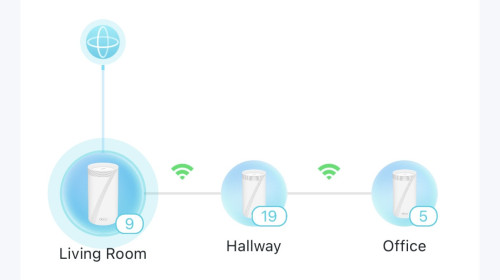
using de85. highly recommend it. even with clients connected to "office" mesh which is two hops away wirelessly from main unit i can get 1gbps speed test. three storey house from top floor to bottom

user posted image
sulfuriq
post Dec 31 2024, 04:25 PM

Regular
******
Senior Member
1,183 posts

Joined: Jun 2009
Have you try Test Internet Speed in the Tp-Link DECO App and also change the Device Type for each client?


Change to:
| Lo-Fi Version
0.0154sec    0.37    5 queries    GZIP Disabled
Time is now: 15th December 2025 - 07:39 AM