

 Oct 21 2024, 11:51 AM


QUOTE(jacktanwz @ Oct 21 2024, 11:20 AM)
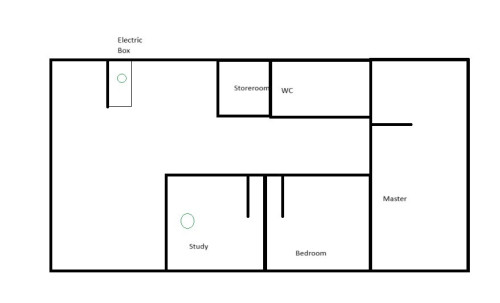
A simple drawing of my house layout, one node must be put in electric box wardrobe as the fibre box is in it. Another node was connected to the main node using cat 6 cable in the study room.

Also try the following troubleshooting :-
1. Ensure all devices are NOT connected to any of the Wifi or LAN Cable.
2. Power On the Primary Node only
3. Use a PC/Laptop via LAN cable to login the Primary Node and configure the necessary.
4. Ensure that both 2.4Ghz & 5Ghz band is ENABLED.
5. ENABLED MESH, Auto-Roaming, Signal=Strong etc.
6. Power On the Secondary Node.
7. Adopt the Secondary Node & let the Primary Node auto provision it (may take a few minutes).
8. Still on the PC/Laptop with LAN Cable, run a "SpeedTest", note down the speed.
9. Now disconnect the LAN cable & connect via Wifi and run "SpeedTest" again, note the speed.
10. If everything completed, then allow other devices to connect to the Wifi.
Hope this helps...

 Quote
Quote
 0.0168sec
 1.13
1.13
 6 queries
 GZIP Disabled