got updated budget n usage?? i hv some precision good deal
No thanks. Used to be running on a precision cluster. The machines were ok but the fact we couldn't tweak more performance out of them made me a bit annoyed.
It is better for production machine to be stable instead of messing around.
Have you actually benchmarked with your data under different configurations, instead of just being fussy at the clock speed?
Electricity bill does come into play too. Now we are under the realm of TCO.
So far through benchmarks, we found about a 2-3% in certain phase of processing especially where RAM usage is very high. In some others not so much as the software is GPU dependent in some phases. Of course the largest improvement was in improving the cooling of the system by tweaking the airflow though the casing and AIO and also improving the contact between the heat block and CPU. The CPU stayed at higher clock speeds for longer resulting in almost 5% everywhere.
The software somehow responds better to higher clock speeds than more parallel cores. Before this when we were using precisions, we had a 8 core 3.8ghz Xeon running on ddr3 and a 22 core 2.x GHz running on ddr4. We found the 8 core still churning out data faster than the 22 core. That's why my quest to have stable and higher clock speeds as opposed to more cores.
So far through benchmarks, we found about a 2-3% in certain phase of processing especially where RAM usage is very high. In some others not so much as the software is GPU dependent in some phases. Of course the largest improvement was in improving the cooling of the system by tweaking the airflow though the casing and AIO and also improving the contact between the heat block and CPU. The CPU stayed at higher clock speeds for longer resulting in almost 5% everywhere.
The software somehow responds better to higher clock speeds than more parallel cores. Before this when we were using precisions, we had a 8 core 3.8ghz Xeon running on ddr3 and a 22 core 2.x GHz running on ddr4. We found the 8 core still churning out data faster than the 22 core. That's why my quest to have stable and higher clock speeds as opposed to more cores.
No thanks. Used to be running on a precision cluster. The machines were ok but the fact we couldn't tweak more performance out of them made me a bit annoyed.
but amd with EXPO with giv u even more headache.. n its unending
Commercial software. Closed source. But the preference of clock speeds over core count was verified by the developer. All cores can be used but I believe the algorithm is highly iterative in nature
but amd with EXPO with giv u even more headache.. n its unending
So far the stability is something that is understood and can be solved. Actually dell also has precision with AMD. Just not sold here. A friendly company who does the same software processing in the states tested and Vs intel and prefers AMD so we follow their recommendation.
Also I don't know why your experience with amd is so bad. Mine after a bios rest has never taken more than 10 minutes for a ram relearn and my interns made mistakes in assembling resulting in a slower machine. Slow but stable. Even when they forgot to connect the main connector into the heat pump block on the CPU, the system just immediately shutdown. But nothing as chronic as what you described.
This post has been edited by sakaic: May 3 2024, 10:41 PM
usually buy high end , people tend to boost clock, overclock.
12900K to 13900K got significant boost with performance using same process node. Big clock speed boost too. 13900K is technically an "overclocked" CPU at stock. Pushing it further will degrade it faster.
This post has been edited by TristanX: May 3 2024, 10:50 PM
So far the stability is something that is understood and can be solved. Actually dell also has precision with AMD. Just not sold here. A friendly company who does the same software processing in the states tested and Vs intel and prefers AMD so we follow their recommendation.
Also I don't know why your experience with amd is so bad. Mine after a bios rest has never taken more than 10 minutes for a ram relearn and my interns made mistakes in assembling resulting in a slower machine. Slow but stable. Even when they forgot to connect the main connector into the heat pump block on the CPU, the system just immediately shutdown. But nothing as chronic as what you described.
See mobo.. mid range n above less trouble.. the 1 giv me unending headache use x670p.. while the b650 tomahawk less issue ..but memory training still occur.. expo certified ram worse compatibility than xmp ram
U building more pc? I got AMD target to meet.. haha
See mobo.. mid range n above less trouble.. the 1 giv me unending headache use x670p.. while the b650 tomahawk less issue ..but memory training still occur.. expo certified ram worse compatibility than xmp ram
U building more pc? I got AMD target to meet.. haha
Not this quarter. Depends on what contracts we get. probably will need more hardware during Q4 if we win tender
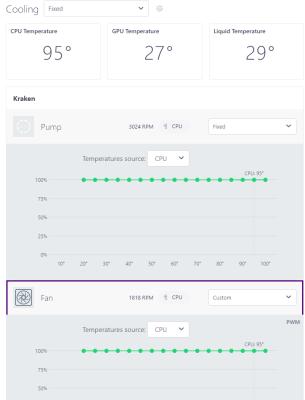
Just an update to show where my "bottleneck" and main cause for concern is
Here you can see the loading of the CPU. The casing is a NZXT H9 Flow with the 360 radiator at the top and fans blowing out. The rear fan blows out and the bottom 3 and side 3 blow in.
Despite setting all the fans to run at 100% including the pump and radiator fans, you can see the large difference between coolant and CPU temp. I am worried I didn't install the pump properly or does anyone here have any tips to improve the cooler performance?
Just an update to show where my "bottleneck" and main cause for concern is
Here you can see the loading of the CPU. The casing is a NZXT H9 Flow with the 360 radiator at the top and fans blowing out. The rear fan blows out and the bottom 3 and side 3 blow in.
Despite setting all the fans to run at 100% including the pump and radiator fans, you can see the large difference between coolant and CPU temp. I am worried I didn't install the pump properly or does anyone here have any tips to improve the cooler performance?
Just an update to show where my "bottleneck" and main cause for concern is
Here you can see the loading of the CPU. The casing is a NZXT H9 Flow with the 360 radiator at the top and fans blowing out. The rear fan blows out and the bottom 3 and side 3 blow in.
Despite setting all the fans to run at 100% including the pump and radiator fans, you can see the large difference between coolant and CPU temp. I am worried I didn't install the pump properly or does anyone here have any tips to improve the cooler performance?
Did not see that I should reply to you; Ryzen AM5, 95C is absolutely 'normal' according to AMD
Did not see that I should reply to you; Ryzen AM5, 95C is absolutely 'normal' according to AMD
The 95 is not the issue. My worry is the massive difference between the coolant temp and CPU temp. You can use GPU temp kinda like ambient temp in the casing
This post has been edited by sakaic: May 16 2024, 10:35 AM


 May 3 2024, 08:40 PM


 Quote
Quote



 0.0291sec
 0.21
0.21
 6 queries
 GZIP Disabled