Welcome Guest ( Log In | Register )

Bump Topic Topic Closed RSS Feed
6 Pages « < 3 4 5 6 >Bottom

Outline · [ Standard ] · Linear+

Unifi Official TM UniFi High Speed Broadband Thread V42, READ 1ST PAGE FOR RELEVANT WIFI INFO!

views
     
Jjuggler
post Oct 10 2024, 06:16 PM

Narcissistic Genius
******
Senior Member
1,341 posts

Joined: Dec 2016
QUOTE(tng55 @ Oct 10 2024, 11:54 AM)
lol 36m crazy you suka free tv
i wont take free tv due if if TM offering reduce price + high speed more
that why not worth take free tv hahaha
next year my contract will finish 1 year left so if new SWU 5.0 OR 6.0 OR 7.0 i will catch for more speed price cheap i hope 6 month free bill again lol i wont downgrade
i am SWU 3.0 500Mbps RM119 so i hope 2GBPS promo
*
Okay. You, i ask want. Promo 2Gbps do what you want? Usage monthly you much how?
Jjuggler
post Oct 10 2024, 10:15 PM

Narcissistic Genius
******
Senior Member
1,341 posts

Joined: Dec 2016
QUOTE(YoungMan @ Oct 10 2024, 07:58 PM)
Give 2gbps rm119 contract 60 months. laugh.gif
*
Hahahaha. Mana boleh itu macam lol. hahaha. Not fair for those users who is playing full price.
Jjuggler
post Oct 11 2024, 09:07 AM

Narcissistic Genius
******
Senior Member
1,341 posts

Joined: Dec 2016
QUOTE(tng55 @ Oct 11 2024, 01:35 AM)
i paying RM119 = 500Mbps SWU
i can wait 2GBPS price reduce like SWU
*
Understand, me completely. Ask I you what do 2Gbps with? Download? 24/7 download? torrent? One no utilise spbG2. Ask thats why me, you.
Jjuggler
post Oct 16 2024, 08:51 AM

Narcissistic Genius
******
Senior Member
1,341 posts

Joined: Dec 2016
QUOTE(tng55 @ Oct 11 2024, 10:58 PM)
i wont pc run 24/7
yes we do download some torrent too fast
any imported urgent then we download early fast and also need urgent we can upload early fast to
*
Fast download torrent want where go? Do what remaining speed? Average what size file upload?
Jjuggler
post Oct 16 2024, 11:32 PM

Narcissistic Genius
******
Senior Member
1,341 posts

Joined: Dec 2016
QUOTE(maiself @ Oct 16 2024, 01:04 PM)
Hi Guys,

My Unifi got upgraded to 1Gbps recently and they provided me Fiberhome (HG6145F3) AX3000 Combo.. but I dont want to use this combo router (port forward to my NAS also not working with this router but cctv/alarm are working) and I have ASUS AX88U & AC88U that i can combined to create a mesh.
I tried to use back the old BTU - ALCATEL LUCENT + my Asus router (previously used on 800Mbps plan). It got connected (refer printscreen) but with IP 172.23.x.x & cannot browse the internet.
i also noticed that my password on Fiberhome is different with the password on my Asus router. I tried to use it on my asus but getting error.
Any suggestion or should I just call TM and ask their technician to come?
*
It is known as a bogon IP address. Usually ISP assigns these IP range when they detect suspicious attempt to replace their provided equipments that binds with your account.

Refer here to know more about bogon IP address.

If you have time to learn in depth, Refer here.

This post has been edited by Jjuggler: Oct 16 2024, 11:33 PM
Jjuggler
post Nov 11 2024, 09:06 AM

Narcissistic Genius
******
Senior Member
1,341 posts

Joined: Dec 2016
QUOTE(StuartLee2015 @ Nov 9 2024, 10:50 PM)
Currently using Fiberhome SR1041F AX3000 router. Plan was 800Mbps.  Desktop using AXE5400 Tp-link PCIE Wifi card ( Wifi 6e )

Single storey house. Router roughly at the center of the house. My pc is in my room and the router is at dining hall TV table. My room and dining hall is just side by side. Signal strength around 77% .
Is the D-link DIR-X3000Z ( non unifi ) better and more stable wifi signal strength or just the same?
*
The Fiberhome SR104F is a decent router with average wireless coverage, but certainly better than the D-Link DIR3060Z in terms of overall stability. I've recorded 63 days of uptime with the fiberhome model compared to 1 week uptime with D-Link. Maybe others would get different result than me. Since I don't want to waste cash on buying another router, I just settle with stock router. As long as I have a mesh unit to extend wireless coverage consider good already.

QUOTE(tng55 @ Nov 10 2024, 10:32 AM)
D-link DIR-X3000Z bad and also bad Fiberhome SR1041F AX3000

hmm 800mbps you need get more powerful router to get handle high speed
just get AXE Router
*
What is your definition of powerful router? I believe when you said powerful router, you are comparing consumer grade router with enterprise grade router. Most consumer grade routers are pretty average and most of the features are underutilized, not to mention, some providers stopped providing updates after certain period, except for ASUS; and only supported router gets RMerlin's fw support which is more superior than stock asuswrt.

What is the percentile of your internet usage on daily basis? Did you utilize 100% of your subscribed speed with your powerful router all the time? What I mean is, not only when uploading and downloading, but other features that comes with the router.

Jjuggler
post Nov 27 2024, 12:46 PM

Narcissistic Genius
******
Senior Member
1,341 posts

Joined: Dec 2016
QUOTE(Anime4000 @ Nov 27 2024, 12:26 PM)
TM have new ONR 2.5G Skyworth that replace D-Link Black, bridge mode might not possible in some OLT

this will follow TIME, OMCI control the ONU now
*
QUOTE(cyruz @ Nov 27 2024, 12:41 PM)
maksudnya still pecah 2 atau keluar 1, 2 gbps?
*
The answer is already there lol.

Edit:
Not sure if the new ONR will be based on this model: GN640V.

This post has been edited by Jjuggler: Nov 27 2024, 12:49 PM
Jjuggler
post Nov 27 2024, 01:14 PM

Narcissistic Genius
******
Senior Member
1,341 posts

Joined: Dec 2016
QUOTE(cyruz @ Nov 27 2024, 12:52 PM)
sorry newbies
*
Its okay. It is a combo unit. ONR = Optical Network Router. 2-in-one unit.


QUOTE(Anime4000 @ Nov 27 2024, 01:04 PM)
N630V, 2.5G LAN, no Bridge:
user posted image

the OMCI ME171 cause this, the FwdOp 0x10 (vendor specific) tell to Route instead of bridging.

if lucky, need ask HBC for Bridge Mode, they can control the OLT OMCI

if need bridge without ISP intervention, I have 2.5G ONU Box for this case, also solve speed issue.
*
Not a big fan of skyworth ONR. Prefer either Fiberhome or D-Link due to the dual antenna design.
So bro, there will be no standalone unit anymore? What happens to the TP-Link ONU? tak jadi ke?

This post has been edited by Jjuggler: Nov 27 2024, 01:19 PM
Jjuggler
post Dec 17 2024, 02:32 PM

Narcissistic Genius
******
Senior Member
1,341 posts

Joined: Dec 2016
QUOTE(Mochan @ Dec 16 2024, 11:52 AM)
Sorry I'm not sure, I ran the speedtest on my PC, my router is this round black one provided Unifi long ago, my download cap is around 29.7 like that when downloading from different sources like Steam, other game launchers and websites

user posted image
*
There could be many reason for this issue. One of the possible issue as pointed by other knowledgeable forumers are some servers tend to cap the speed, so, nothing can be done about it. Another possible issue is aging networking equipments such as router. That D-Link DIR850L is released like 11 years ago man. You need to change your router if your budget allows to.

The basic troubleshooting you can do is (cc other forumer already pointed this):
1. Run speedtest on different servers on LAN and WLAN (wireless).
2. Perform the speedtest in real-time servers by downloading files from the stated servers as in bold.
3. When performing wireless test, always use 5GHz band over 2.4GHz band.
4. Tweak your 5GHz band settings, sometimes you need to play with the settings.

P/s: If all the methods given is not working, then just upgrade the router according to your budget. Simple.


QUOTE(Susuwatari @ Dec 16 2024, 01:55 PM)
My office is using 500mbps with this router, it works.
*
and...

QUOTE(cklove96 @ Dec 16 2024, 08:36 PM)
recommend some best asus router to him mah  thumbsup.gif
*
i Am WaITinG fOr 2GBPS pLaN.
user posted image
Jjuggler
post Jan 1 2025, 01:34 AM

Narcissistic Genius
******
Senior Member
1,341 posts

Joined: Dec 2016
QUOTE(countingcrows @ Dec 31 2024, 03:16 PM)
~940Mbps max.

Max speed is probably the same with the Skyworth ONR.

Also, it's very rare to be able to get the full 1Gbps on Wifi so yea my previous set up with the X3060Z is good enough for me.
*
Not sure why UniFi following this route. They should provide a 2.5GbE ONU or XGPON instead of bundling everything into AIO factor. That is just a bad move.
Jjuggler
post Jan 1 2025, 06:53 PM

Narcissistic Genius
******
Senior Member
1,341 posts

Joined: Dec 2016
QUOTE(PRSXFENG @ Jan 1 2025, 09:33 AM)
Cheaper costs for them and also more control for them
*
Looks like the rumor is true. ZTE ONR just landed.

user posted image

user posted image

It seems that this model using internal antennas, which I like.

Image copyright goes to u/xoxoc997/


Jjuggler
post Jan 2 2025, 10:54 AM

Narcissistic Genius
******
Senior Member
1,341 posts

Joined: Dec 2016
QUOTE(PRSXFENG @ Jan 1 2025, 07:34 PM)
Specs

ZTE site
https://www.zte.com.cn/global/home_and_ente...xhn_f6600p.html

A teardown and specs from a Portuguese site, use Google translate
https://www.tripleoxygen.net/wiki/ont/zte/f6600p
*
Thanks man for the share. Not sure how this model will perform than the rest stock onrs.

QUOTE(blacktubi @ Jan 1 2025, 11:08 PM)
Probably for locations with ZTE OLT.

Heard that the compatibility of universal ONU with ZTE OLT is not great.
*
It is not great. I am just not happy the way tm locking down the freedom of using own equipments. Technically is possible to use bridge mode, but some reported the firmware is too buggy. For power users, is okay since they are very techy and know how to navigate through this, but for generic people, they going to suffer with not good equipments, let it be from security point of view. Remember the famouse DIR-850L issue.
Jjuggler
post Feb 18 2025, 11:20 AM

Narcissistic Genius
******
Senior Member
1,341 posts

Joined: Dec 2016
QUOTE(christina1 @ Feb 17 2025, 11:37 PM)
Which is good Wifi 6 router to get now?
*
Suicidal: D-Link (D-Link already have their DIR-BE3600 in indonesian market, yet we don't know what is their Wi-Fi 7 product lineup for Malaysian market yet)
Budget, but better hardware, and bye bye firmware support after certain period of time: TP-Link
Expensive, good firmware support (selective models), and third-party firmware support (Asuswrt-Merlin): Asus

For ASUS always go for the models that receive firmware updates twice or thrice a year for the stock version, and double-verify if the model supported by Asuswrt-Merlin.
Jjuggler
post Feb 20 2025, 09:20 AM

Narcissistic Genius
******
Senior Member
1,341 posts

Joined: Dec 2016
QUOTE(Anime4000 @ Feb 18 2025, 11:04 PM)
No wonder Skyworth ONT GUI somewhat similar to Riger DB120-WL interface

quick inspection, still use same crap!

well, typical cheap equipment has no security update
*
Deswai I still prefer to use the old configuration: modem + standalone router. If a service provider wants to combine two function into a single box, that means they should assign a reliable vendor to write security patches on monthly basis, firmware with less bug, and give contract to vendor with good track record of maintaining networking device. Unifi clearly cutting down the cost to the most extreme level. I think the only current best solution is opting to maxis if still want to retain the old configuration, regardless 1G or 2G package.
Jjuggler
post Feb 20 2025, 09:28 PM

Narcissistic Genius
******
Senior Member
1,341 posts

Joined: Dec 2016
QUOTE(Anime4000 @ Feb 20 2025, 03:11 PM)
Same here!

only way is to use pon stick or ONU Bridge Box, with this, you can use any Router that doesn't support VLAN, because my ONU act like TIME, untagged the traffic

also, no ISP stuff inside, the firmware reply Fake OK back to ISP 😬
*
Faham faham. Now I still stick with old configuration, heck I even downgraded my internet plan thou I am scheduled to receive free speed upgrade to 1G. I hope, or I could be wrong, but really hope TM goes back to standalone configuration. This is a huge security risk for non-IT people. Just imagine if any bad actor able to find more CVEs or huge flaw in the firmware, then they could turn the ONR into botnet or even worst cyber attack events.
Jjuggler
post Mar 11 2025, 07:05 PM

Narcissistic Genius
******
Senior Member
1,341 posts

Joined: Dec 2016
QUOTE(getalong6165 @ Mar 11 2025, 06:54 PM)
Went ahead with contract renew swu 5.0 but this time at another unifi store.
Renew at 100mbps at rm79 / mth with free 6 months and disney hot star.
What surprised me is the staff said i am eligible for free hardware too. Anyone knows what router they giving nowadays? Am using ax20 at condo but facing congestion now
*
They are giving all-in-one Optical Network Router (ONR), means modem and wireless router jogress shinka into one single device. Better for you to use the existing device as standalone option is the best due to the ability to use your own router. I dont think so currently supplied ONR is the best or at best supplied. Heard a few good reviews on the ZTE unit, not sure how it performs in rl.
Jjuggler
post Mar 12 2025, 07:59 PM

Narcissistic Genius
******
Senior Member
1,341 posts

Joined: Dec 2016
QUOTE(getalong6165 @ Mar 12 2025, 04:43 PM)
They just came and installed the gn630v.

So i just do the bridge setup following blacktubi's tutorial , then connect my own router to the ONR using a lan cable, correct?

After that do i need to do any setup setting in my own router?

Sorry i have no knowledge on tinkering with bridge mode.
Alright. Will use back my ax20 with bridge mode with the onr
*
I would advise you to do backup before proceed to configure the ONR to operate as bridge mode. Or ask any closest friends of you that has networking (basic / intermediate / advance) to help you mate.
Jjuggler
post Apr 19 2025, 08:57 AM

Narcissistic Genius
******
Senior Member
1,341 posts

Joined: Dec 2016
QUOTE(Lozy @ Apr 18 2025, 11:54 PM)
got disconnected while playing games earlier, my pc is connected directly to the modem with ethernet cables, even wifi was down.(this has happened few times since last week)

tried asking unifi the other day but they say my area has no service outage, how can i pinpoint the problem?
*
Specify your issue with the type of package you are using. For example, if you are using 300Mbps, you might be under NAT444 deployment or in common term, CGNAT, aka behind a private IP assigned by the ISP for 30Mbps, 100Mbps, and 300Mbps users (Case 1). If you are using 500Mbps and above package, then you will be assigned with public IP (Case 2).

If your case falls under Case 1, then your root cause is the private IP, else Case 2; then your issue might be due to your router configuration or the router itself is having issues or bugs, further preventing the router to perform to its fullest. Best option is to set reboot function on daily basis. Most stock ISP router comes with this feature built-in. So make use of it.

If the problem persists, then perform a few basic tests using pingplotter (pp), basic speedtest, collect the data, and report to MCMC by cc'ng TM.

This post has been edited by Jjuggler: Apr 19 2025, 08:58 AM
Jjuggler
post Apr 21 2025, 08:45 AM

Narcissistic Genius
******
Senior Member
1,341 posts

Joined: Dec 2016
QUOTE(Lozy @ Apr 21 2025, 08:24 AM)
ya i replaced unifi router with tenda ac2100 on day 1, but still unifi's modem
yeah im case 1 with 300mbps, not really looking for any reboot because i wanted to have at least up to 100% uptime
also i dont think pingplotter helps right, coz im not having internet problem to a specific ip but my whole internet just dropped for a few times recently
how do i know its my model acting weird sometimes before i can request for one replacement from unifi? heard they charge you if the problem isnt that
*
If yours under 300Mbps package, then I am afraid you are under CGNAT. It does affects your overall internet experience, and you often see this limitations while doing certain online activities such as online gaming. An automated reboot can be programmed to reboot specifically during a time period (most programmed to be rebooted around 1 ~5A.M. everyday, or specific day in a week, or once in a week. Just to clear some doubt, you are still using old configuration, which is modem (unifi) + own router. Your mode of connection from client device to the router is via wired, or wireless?
Jjuggler
post Apr 21 2025, 10:51 AM

Narcissistic Genius
******
Senior Member
1,341 posts

Joined: Dec 2016
QUOTE(Lozy @ Apr 21 2025, 10:21 AM)
never knew it's recommended to set up an automatic reboot in my router settings. i see, thank you
i play on my pc with a wired connection. when the internet drops, my phone using wifi on the same router also has no internet access, so yea its a complete internet outage
and yes modem(unifi) + own router, its an old configuration? newer one is what combo o.O
*
I don't wish to jump into conclusion to request you to change your router since you are using or still using Wi-Fi 5 device. By default, that Tenda AC2100 should be to handle 300Mbps, both over wired and wireless. I believe the model is Tenda AC19, right? When you face internet outage, what you normally do? Do you reboot the router and modem manually, or just reboot the router? Normally, in my case, I never rebooted my modem (tm -unit) given to me unless there is power outage in my area. I only scheduled automatic reboot in my own router, which is D-Link DIR-X3000Z (retail version). Any cheap routers, with proper reboot program practice should provide not the best experience, but below-average, average internet experience.


Normally, most networking experts will recommend users to upgrade the firmware issued for specific models of routers (if available).

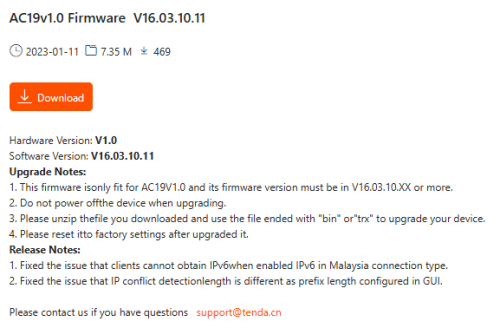
Upon checking, your router model's last firmware patch issued should be on 2023-01-11, according to Tenda Global site: AC19v1.0 Firmware V16.03.10.11.

user posted image

6 Pages « < 3 4 5 6 >Top
Topic ClosedOptions
 

Change to:
| Lo-Fi Version
0.1403sec    0.56    7 queries    GZIP Disabled
Time is now: 13th December 2025 - 05:36 AM