Outline ·
[ Standard ] ·
Linear+
Unifi Official TM UniFi High Speed Broadband Thread V42, READ 1ST PAGE FOR RELEVANT WIFI INFO!
|
PJng
|
 Sep 16 2024, 11:23 PM Sep 16 2024, 11:23 PM
|

|
how do you all do those trace thing, on cmd only? » Click to show Spoiler - click again to hide... « CODE C:\Users\User>ping forum.lowyat.net -t
Pinging forum.lowyat.net [2606:4700:20::681a:649] with 32 bytes of data:
Reply from 2606:4700:20::681a:649: time=5ms
Reply from 2606:4700:20::681a:649: time=7ms
Reply from 2606:4700:20::681a:649: time=8ms
Reply from 2606:4700:20::681a:649: time=6ms
Reply from 2606:4700:20::681a:649: time=7ms
Reply from 2606:4700:20::681a:649: time=7ms
Reply from 2606:4700:20::681a:649: time=6ms
Reply from 2606:4700:20::681a:649: time=7ms
Reply from 2606:4700:20::681a:649: time=5ms
Reply from 2606:4700:20::681a:649: time=5ms
Ping statistics for 2606:4700:20::681a:649:
Packets: Sent = 10, Received = 10, Lost = 0 (0% loss),
Approximate round trip times in milli-seconds:
Minimum = 5ms, Maximum = 8ms, Average = 6ms |
|
|
|
|
|
PJng
|
Sep 16 2024, 11:28 PM
|
|
|
QUOTE(olivur @ Sep 16 2024, 11:27 PM) what's your current ip pool and dns of choice bro pj as well and there's a noticeable delay for me (215.xx / cloudflare) private IP, 115.135.x.x, as my username i stay PJ, using Quad9 DNS |
|
|
|
|
|
PJng
|
Sep 16 2024, 11:34 PM
|
|
|
QUOTE(olivur @ Sep 16 2024, 11:32 PM) oo don't think I've tried using quad9, will give it a go if this drives me high up the wall enough lmao thanks bro 🤝 i start use it since ISP hijack 8888 and 1111 DNS |
|
|
|
|
|
PJng
|
Sep 17 2024, 12:23 PM
|
|
|
QUOTE(heLL_bOy @ Sep 17 2024, 12:00 PM) CGNAT or Public IP all is under load balance via ip range set by TM nothing to do either you are CGNAT or public ip If you notice he keep repeat same comment over and over As i don host game, cctv, or any storage on home that need acces outside I don see any big different speed or respond, torrent for good seed also can max speed 38, 39MB/s |
|
|
|
|
|
PJng
|
Sep 17 2024, 10:27 PM
|
|
|
Anyway to test ping but not actually playing those game?
I don play those game that need keep online, so cannot test in game
|
|
|
|
|
|
PJng
|
Sep 17 2024, 11:22 PM
|
|
|
ipv6 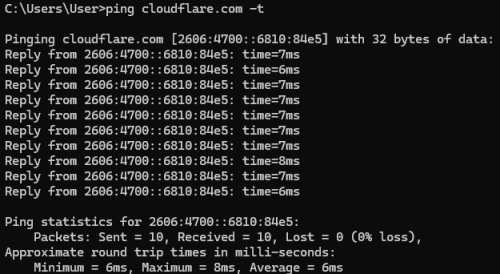 correct use of force ipv4? 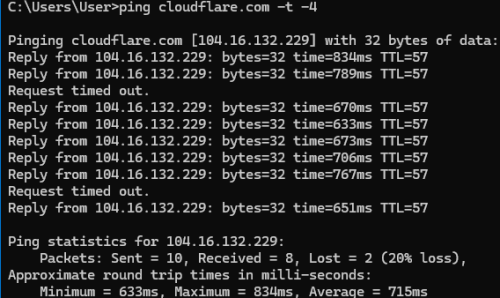 |
|
|
|
|
|
PJng
|
Sep 17 2024, 11:32 PM
|
|
|
QUOTE(kwss @ Sep 17 2024, 11:31 PM) Correct. You can pass -4 or -6 to force either one. Use "tracert" to trace. Think you ask previously right? Not sure if anyone answer. yes asked before, i not expert on this ping, trace command and any IP i need filter out before post? |
|
|
|
|
|
PJng
|
Sep 17 2024, 11:45 PM
|
|
|
CODE C:\Users\User>tracert -4 cloudflare.com
Tracing route to cloudflare.com [104.16.132.229]
over a maximum of 30 hops:
1 1 ms 1 ms 1 ms 192.168.0.1
2 8 ms 5 ms 4 ms 100.70.63.254
3 7 ms 5 ms 4 ms 10.233.33.89
4 14 ms 13 ms 14 ms 10.55.41.6
5 18 ms 18 ms 18 ms tisparkle-peer.istt03.pr.telstraglobal.net [202.126.128.98]
6 167 ms 85 ms 114 ms unknown.telstraglobal.net [210.57.38.225]
7 723 ms 706 ms 710 ms 162.158.160.169
8 * 667 ms 684 ms 104.16.132.229
Trace complete. so look bad? over 600, 700ms above say lazada slow, i try mine ok btw discord is slow |
|
|
|
|
|
PJng
|
Sep 18 2024, 10:57 AM
|
|
|
QUOTE(BaseMod @ Sep 18 2024, 10:48 AM) Anyone else feel laggy after the rain two weeks ago in KL area? My ping to certain gaming servers in Singapore have been 100+ I'm not sure if it destroyed the routing or not. I also just realized im paying RM160 but still getting the old speed which is 100Mbps/50Mbps(RM99/m now). Do I have to tell them to upgrade? It was the same case for my old home too where they don't upgrade the speed for some reason but newer users get the advantage. Just trying applying SWU 4.0, iirc 119 for 300mbps |
|
|
|
|
|
PJng
|
Sep 21 2024, 01:32 PM
|
|
|
Does business IP type same like home?
CGnat? Fixed IP?
Few day ago my sister say line slow, i ask restart router router, keep gettting same IP 60.x
She just know unifi business 300mbps plan
|
|
|
|
|
|
PJng
|
Sep 21 2024, 01:54 PM
|
|
|
QUOTE(zuozi @ Sep 21 2024, 01:41 PM) I think so currently my shop business line is start with 180 , unless i turned off very long like few hour and turn on early morning like 7am probably can get ip start from 64 ish something too. 2 days ago starting i no longer have any slow loading issues everything is very fast now for shop and home I not sure she can turn off router/modem for a long time or not Or set DNS, worry breaking other thing QUOTE(twice1020 @ Sep 21 2024, 01:45 PM) Business plan get public IP even with 100Mbps. CGNAT only applied to home plan When she say is business plan, i no idea is public or private, so i no answer to her So CGNET only for home |
|
|
|
|
|
PJng
|
Sep 23 2024, 08:40 PM
|
|
|
QUOTE(jslee0610 @ Sep 23 2024, 08:29 PM) Forum bros, Just received a call (genuine) from Unifi asking to extend my contract by 3 years. They're offering a free gift (Vivo y28s phone, retailing at RM 700+) Currently my package is 120mbps, RM89/mth. Can bros advice if worth it? Or any news of future price cuts, hence they wanna lock me for 3 more years. Currently living in a landed terrace house so only Unifi and Maxis operating in my area. Thanks for the kind advice! What plan 120mbps? If me only for the phone, not worth |
|
|
|
|
|
PJng
|
Sep 23 2024, 09:47 PM
|
|
|
QUOTE(jslee0610 @ Sep 23 2024, 09:22 PM) Originally was 30mbps plan signed last time during Gobind days. Then it got upgraded to 100mbps, and later upped again to 120mbps Never see or hear 120mbps If me better wait plan like SWU |
|
|
|
|
|
PJng
|
Sep 23 2024, 11:41 PM
|
|
|
off topic, no idea why some torrent very weird, i just start download few piece, mean not even 1.0% complete, upload will instantly high, over 3, 4MB/s, but my download speed less that 1MB/s
i try limit upload speed, download also drop
|
|
|
|
|
|
PJng
|
Sep 24 2024, 01:14 AM
|
|
|
QUOTE(soonwai @ Sep 24 2024, 12:44 AM) Not enough seeders? I see this also on torrents with low seeder:leecher ratios. Torrent i test now around 10 seed, about 30 to 40 not yet complete download Then i go to peers to check, some funny thing happen i upload over 500KB/s to a user over 10% complete, but he only send me less that 100KB/s where i less that 1% conplete I cancel and delete download now |
|
|
|
|
|
PJng
|
Sep 24 2024, 01:14 AM
|
|
|
Wby i click reply once show double
This post has been edited by PJng: Sep 24 2024, 01:14 AM
|
|
|
|
|
|
PJng
|
Sep 24 2024, 01:15 PM
|
|
|
Trying someone mention click disconnect, and connect on tp link router network page, really change the IP for both CGnet and external IP,
After show operation success, click again connect, again show operation success,
No need off on router
I just use ax20
|
|
|
|
|
|
PJng
|
Sep 27 2024, 03:08 PM
|
|
|
QUOTE(Oltromen Ripot @ Sep 27 2024, 11:12 AM) don't use WPA, it's very outdated. use WPA3 if you want latest standard. stick to WPA2 if your client mix can't all support WPA3. like my router got 3 option WPA/WPA2 personal WPA2/WPA3 personal WPA/WPA2 enterprise to avoid old device cannot connect, i set first option, as no separate only WPA2 can set |
|
|
|
|
|
PJng
|
Oct 1 2024, 03:05 PM
|
|
|
QUOTE(jitbeng @ Oct 1 2024, 02:34 PM) Last month got upgraded to 1Gbps & unifi technical installed the D-Link DPN-FX3060V Combo. I tried to put in DNS 1.1.1.1 & 1.0.0.1. Also tried to put Port Forwarding for my Xbox Series X Console. Went into the Combo but cannot seems to find the options to do it. My old tplink before upgraded I was able to do it. Can Sifus advise how to do it? Many thanks in advance 😀 As many say, put in bridge mode, use back own tp link router Need check many page to see the guide |
|
|
|
|
|
PJng
|
Oct 5 2024, 12:57 AM
|
|
|
QUOTE(jitbeng @ Oct 5 2024, 12:36 AM) I understand sometime early 2023 if not mistaken, the gov announced free upgrade with no increase in pricing for Unifi users to be implemented by end 2023. I waited to be upgraded from 800Mbps to 1000mbps. But nothing happened until my contract expired beginning of 2024. I did not renew my contract, just continued paying monthly. Finally I went to TMPOINT Kepong personally on 30August 2024 to complain. TM agreed to upgrade to 1000mbps free with no increase in pricing with 6 months free & to sign 2 years contract. I agreed. TM installed the Dlink dpn-fx3060v B1 Combo. They did not take back their existing modem while the router is mine. I hooked up my Xbox Series X console using lan cable to the 2.5G port of the Dlink Combo. Tested the connection with my Xbox Series X and got abt 1050mbps down & 550mbps up. I play MMORPG a lot lol! The remaining ports used for Android TV & TV Box. look like is SWU? 2023 upgrade does not need renew contract |
|
|
|
|



 Quote
Quote

 0.0801sec
 0.63
0.63
 7 queries
 GZIP Disabled