Welcome Guest ( Log In | Register )

Bump Topic Topic Closed RSS Feed
4 Pages  1 2 3 > » Bottom

Outline · [ Standard ] · Linear+

Unifi Official TM UniFi High Speed Broadband Thread V41, READ 1ST PAGE FOR RELEVANT WIFI INFO

views
     
Omochao
post Oct 31 2023, 03:57 PM

Enthusiast
*****
Junior Member
835 posts

Joined: Nov 2007
From: Land of Forgotten
Just hop on board SWU 3.0 back last week, took me 1 day to migrate from

YEP 2019 100mbps to 300 SWU 3.0 (Mesh 6)

Spent almost 5 hours to get registered.

On my side, TM required me to subscribe to a unifi mobile plan at the cheapest package which rm39 only then can take this 119 Swu 3.0

After that, can anytime cancel it before the next bill cycle as I need to pay forward first for the usage.

So from the previous 10x speed (300mbps) to YEP 2019 (100mbps) now I'm on 500mbps.

Just a question, anyone manage to pair this Fiberhome SR1041F with other mesh/router like from Tp Link, Dlink or Tenda?

Also I'm wondering , lets say if i get a Time router/mesh extra, will it be able to pair or function as a router/modem for Unifi?

Not saying this Fiberhome is not good, but is just a bare minimum piece of device for general usage, the UI and settings are very very minimal at its best, but is doing wonders to cover double storey 2.4k sqft floor.

Previously am using a Tenda Ac10u, but unfortunately, now that my speed is at 500mbps, can only achieve 300mbps at max.

EDIT: I also reconfirm with the TM staff at that time that our speed upgrade to 500mbps is Permanent rather than a 1year/6mths trial.

So which is which???

This post has been edited by Omochao: Oct 31 2023, 04:03 PM
Omochao
post Oct 31 2023, 04:43 PM

Enthusiast
*****
Junior Member
835 posts

Joined: Nov 2007
From: Land of Forgotten
QUOTE(haturaya @ Oct 31 2023, 04:10 PM)
Unfortunately Mesh is never compatible between brand.  sweat.gif
*
Yes, just tried to paired the Fiberhome router/mesh with my tenda through WPS click, no response..but the Fiberhome can be used as a repeater. need to turn off multi-AP mode.

also just tried to use ethernet from Router (A) to Router (B) Wan port, but it will automatically paired under same network if Band Steering is on.
Omochao
post Oct 31 2023, 06:05 PM

Enthusiast
*****
Junior Member
835 posts

Joined: Nov 2007
From: Land of Forgotten
QUOTE(solarmystic @ Oct 31 2023, 05:34 PM)
Wait hold on a second, so they don't potong your existing UnifiTV service completely when you moved to SWU 3.0 (which iinm doesn't include any TV Package for the RM119 one)?

Does the basic free channels include BBC News?

Coz if it does, gaddayum i'll move to SWU 3.0 300->500 RM 119 right now lol, the only reason why i haven't is because my household actually watches those foreign news channels. They don't care about the entertainment stuff lol.

I have the UnifiTV android box they gave in 2018 when i first subscribed to their 30M plan.
*
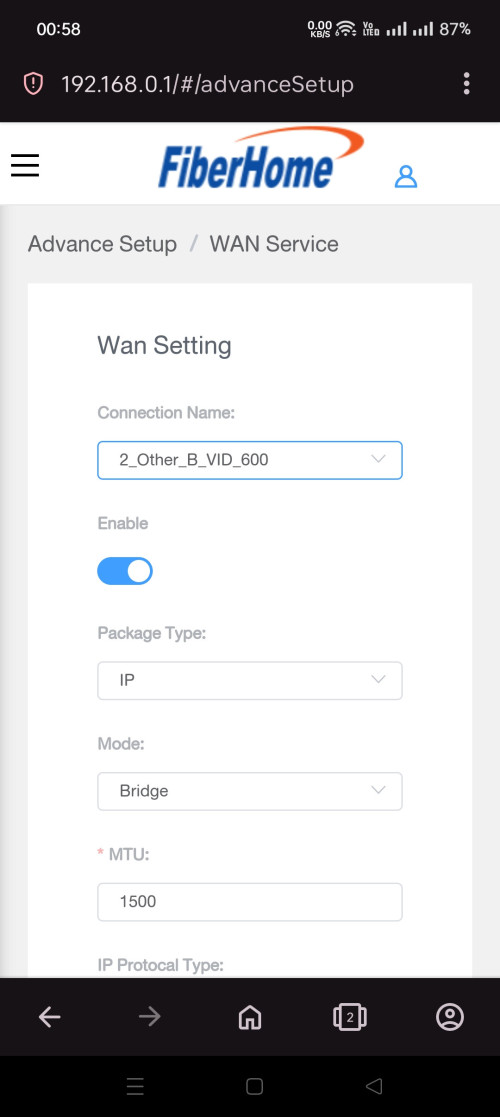
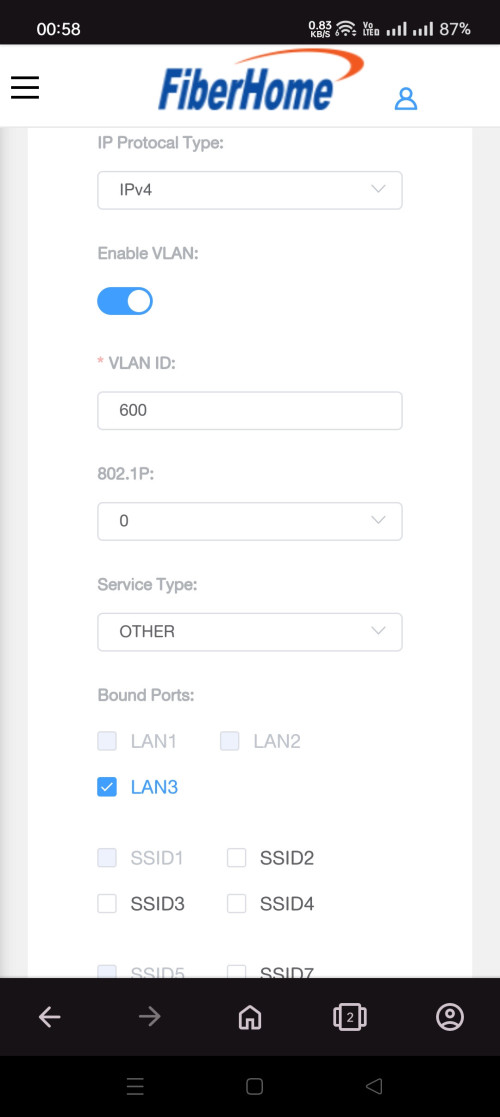
yes can watch, i reconfigure my fiberhome lan port 3 with vlan tagging ,then just plug back from the old hypp tv box to it.

by default the lan port 3 of fiberhome is locked and can't be utilised .

EDIT: channel screenshot that is available on my non unifi tv swu 3.0 package
https://ibb.co/9NQTVCv
https://ibb.co/SczHTjK

This post has been edited by Omochao: Oct 31 2023, 06:09 PM
Omochao
post Nov 1 2023, 12:05 AM

Enthusiast
*****
Junior Member
835 posts

Joined: Nov 2007
From: Land of Forgotten
QUOTE(solarmystic @ Oct 31 2023, 09:34 PM)

Can you check and see whether BBC News HD is still there or is it "Subscribe Now"?

From google, it's Channel 601 on UnifiTV.
*
whatever that was taken from my camera is all the free to view channels ,all the others are shown as Subscribe now. so i guess i didnt notice BBC news.

QUOTE(yenchenje @ Oct 31 2023, 09:44 PM)
Do we know if these are IPTV UDP/RTP multicast addresses?  hmm.gif
Wonder if I can pipe this into my NAS and use it as IPTV  whistling.gif
*
i have no idea on how to set that up, and that tv box is obsolete in today's era. so I can't comment on that, you may need to get a used fiberhome sr1041f router to experiment with it, the router setup page terminology for some things are not really user friendly.

for example, under multi-ap mode, there's a selection to set the router as controller, agent.

for the normal users it is usually known as bridge and router mode.
Omochao
post Nov 1 2023, 12:09 AM

Enthusiast
*****
Junior Member
835 posts

Joined: Nov 2007
From: Land of Forgotten
hopefully this Fiberhome Sr1041f router is good to last for another 2-3 years.

most modern wifi 6 routers with new techs like BSS,ODFMA ,TWT cost more than 200+

below 200+, i can only look at tenda or some older wifi 6 models with only mu-mimo, odfma.


Omochao
post Nov 1 2023, 08:54 AM

Enthusiast
*****
Junior Member
835 posts

Joined: Nov 2007
From: Land of Forgotten
QUOTE(solarmystic @ Nov 1 2023, 07:27 AM)
Thanks again. If no BBC News, then it's a no go imo.

As another helpful poster mentioned earlier my only viable option now to keep a UnifiTV package is to go for 119 SWU3.0 and add 30 to keep the package for a total of 149 per month which is an increase of 20 over my current plan. I'd rather not increase my bill if I can help it.

I can wait another 5 years for another free upgrade to 500, tbh i was already really content with even just 100 since net usage is really low in this house, and we don't have any heavy torrenters/streamers.
*
Looking back at the website from here , it shows that BBC news channel needs subscription, so I think is safe to say you need to sub to view it.

https://unifi.com.my/tv/offerings/channels

I gone through the same process too, when I went to the TM point in Kajang , they did not allow me, the customer service told me I had to go apply with another ISP and get the report number first, and then submit to their HQ for justification to get SWU 3.0, but I told them why need to go such lengthy and cumbersome process? Is not like I'm not agreeable to a 2 year contract, why dont just change my subscription on the spot with new contract terms?

So in the end, they advise I take up a unifi mobile plan, which I am already using since WEBE time, RM59 unlimited 5G data. Took up the cheapest which RM39, after that the lady told me can be cancel before 1 month usage and no penalty.

I guess, right now TM has some quota or targets to hit, thats why they want current users to take up Unifi mobile plan.

IMO, I find is better you take up the offer if you are paying within 120-140, because they are actually withholding the actual speed that was supposed to be yours. Whether are you using it fully or not, that is your right, but shouldn't you be getting the actual for what you pay?? 300mbps is already overkill and more than enough for me, as my household do not do heavy downloading, just some light usage like streaming netflix and sometimes just a bit of 4k downloading.

If 100mbps is enough, i suggest you cancel your current package, and take back the 89 promo. which is better than the previous.

My previous package for 100mbps was RM136 after service tax, but I'm only allowed to take 500mbps SWU 3.0 or cancel and take back 89 if I wish to retain the speed back to 100mbps.

EDIT: Also, if Im not mistaken, if you take back RM89 as a new user, you wont be eligible for the free speed upgrade. Free speed upgrade is only for existing users, and TM didn't allow me to go anything below from what I paying, in simpler terms, downgrading way too much. As like what others mention, it will affect their yearly earnings on paper report. so the only way is to throw in faster speeds, and slight price reduced package.

This post has been edited by Omochao: Nov 1 2023, 08:56 AM

Omochao
post Nov 1 2023, 06:11 PM

Enthusiast
*****
Junior Member
835 posts

Joined: Nov 2007
From: Land of Forgotten
QUOTE(soonwai @ Oct 31 2023, 08:57 PM)
Page 400!

Edit: Oops count wrongly.
If they support EasyMesh then should work but standard still new so who knows. SR1041F and DIR-X3060Z both have Easymesh right?

I can't even get the 2 units X3060Z to mesh to each other wirelessly. Need to use cable to establish the connection then after that it's OK.
https://forum.lowyat.net/topic/5415545
*
So far can link up two devices for this Fiberhome SR1041F, just press the WPS button on main router, then hold the 2nd fiberhome router button until the LED starts blinking rapidly, and it will automatically pair.

When plug into LAN, it will also auto detect without failure, turn off Multi-Ap mode , it will act like an AP device.

Just feel that the device router feels abit hot on the bottom part, because is slim and compact.


QUOTE(solarmystic @ Nov 1 2023, 09:06 AM)
I would, but the issue is i need a UnifiTV package to get BBC News, so it won't be just 89 per month, it'd be 89+30 = 119 per month lol.

So 119 vs 129 I'm paying right now for 200 Mbps less, which i think is a wash lol.

I am in the same boat like you were, paying 136.75 per month after SST.

So to sum up my options:-

1. Stay on 300 plus UnifiTV package for 129 per month.

2. Go for 500 SWU 3.0 (119) but have to add 30 for UnifiTV package. Total = 149 per month.

3. Go for 100, promo price is 89 per month but have to add 30 for UnifiTV package. Total = 119 per month.
*
In the end, still TM wins, I just hope they open up their package to be more flexible and let existing users to custom made their own preferences.
Omochao
post Nov 1 2023, 06:16 PM

Enthusiast
*****
Junior Member
835 posts

Joined: Nov 2007
From: Land of Forgotten
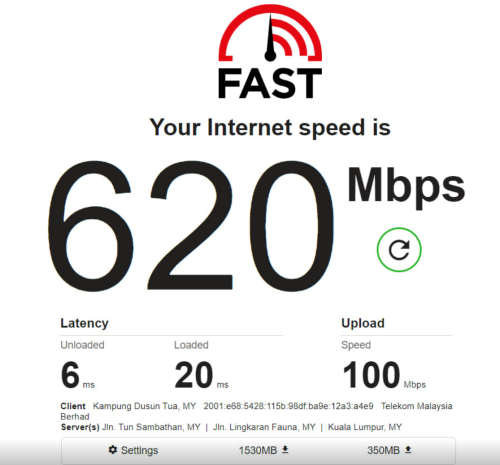
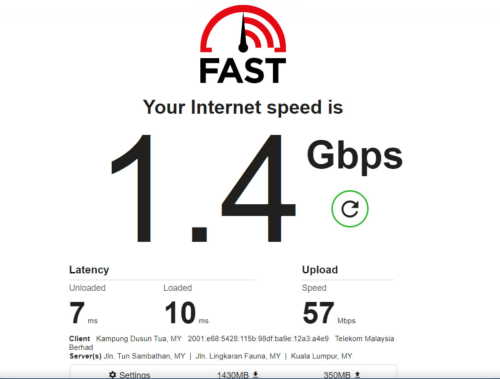
Testing speed (SWU 3.0 500mpbs) from Fiberhome SR1041F Lan port 1 using Cat6 grade cable

Lan 1 port to Cat 6 socket, with cat5e to the socket.

user posted image

Changing the settings max parallel connection to 32++

user posted image

Funny results, can achieve 1.4Gbps?

This post has been edited by Omochao: Nov 1 2023, 06:17 PM
Omochao
post Nov 1 2023, 06:34 PM

Enthusiast
*****
Junior Member
835 posts

Joined: Nov 2007
From: Land of Forgotten
on speedtest.net, depends on which server, some only yield around 400mbps but TM own server usually around 500-515 mbps.

Never imagine I would live to a day to taste 500mbps, back then having 100mbps is like the internet top warrior.
Omochao
post Nov 2 2023, 01:00 AM

Enthusiast
*****
Junior Member
835 posts

Joined: Nov 2007
From: Land of Forgotten
QUOTE(Doraku @ Nov 1 2023, 09:10 PM)
So I trying to bind LAN port 3 to VLAN ID 600  on the TM Fiberhome SR1041Y router so UTV+ box don't use up my internet bandwidth. Did I set it up correctly?
user posted image

user posted image
Omochao
post Nov 2 2023, 04:27 AM

Enthusiast
*****
Junior Member
835 posts

Joined: Nov 2007
From: Land of Forgotten
try changing to cloudfare dns or Google dns?
Omochao
post Nov 2 2023, 12:19 PM

Enthusiast
*****
Junior Member
835 posts

Joined: Nov 2007
From: Land of Forgotten
QUOTE(beverlykho @ Nov 2 2023, 10:21 AM)
The FH SR1041F may lack configuration instructions and options, but it seems like to steady performer. I have meshed 2 with the Main upstairs and the Slave downstairs . Both are separated by a 15cm reinforced concrete floor and a distance of about 10 meters (by direct line estimation). I consistently get 490-515M when speedtesting with the Singtel server, using the Nvidia Shield Pro hardlined to the Slave mesh.
*
Thats why I'm contemplating should I sell it off and change to either TP-LINK or Mercusys, anyway I just got myself some cat6 cables and doing own DIY hardwiring on my walls to re-wire the main controller back up to the 1st floor for better speed.

TP-Link ax53 do not have BSS and cost 250+ and good future support with TPlink mesh eco system, can simply get a 2nd hand router for future meshing.

Mercusys MR70x, cost less than rm200 but have BSS but loses out on 160mhz frequency , but I just discovered that new firmware updates allows easy mesh but not with other brands.

This post has been edited by Omochao: Nov 2 2023, 12:25 PM
Omochao
post Nov 2 2023, 12:38 PM

Enthusiast
*****
Junior Member
835 posts

Joined: Nov 2007
From: Land of Forgotten
QUOTE(SwarmTroll @ Nov 2 2023, 12:27 PM)
Isn't BSS Colour a WiFi 6 thing? Or maybe it isn't? I'm not sure my AX73 has one lol.

If the Fiberhome works well for you, you can just use it I suppose. My Fiberhome didn't work well with my home (maybe the walls) so I sold it and got the AX73. I also did not like how warm it got, there's like a lack of proper ventilation on that router.
*
Yes, I thought about it, since I'm going to change router once and for all, might as well just get a current gen one with the latest tech to future proof it, going to use it for a long time, 3-5 years maybe?

The fiberhome is not bad actually, good signal coverage with its mesh system, just that I find the UI, and the unknown support of future firmwares to further improve the usage, I think TM will just leave it as it is, why fix it when is not broken by their logic.

and yes, quite warm and uncomfortable to my hand palms when touch the bottom part of it. If you are heavy usage like downloading and streaming, I don't think it can last through the heat that it produced.

Ax73 good stuff...but over my budget.
Omochao
post Nov 2 2023, 12:41 PM

Enthusiast
*****
Junior Member
835 posts

Joined: Nov 2007
From: Land of Forgotten
QUOTE(wonghy @ Nov 2 2023, 12:34 PM)
Have been notified by TM a month that I am entitled to free upgrade from 100Mbps to 300Mbps.
However still on 100Mbps.
How do get TM to speed up the upgrade ?
Anyone gotten the 100Mbps to 300Mbps free upgrade ?
*
yes, on my previous package it was from 100mbps to 300mbps, they will notify to your registered mobile by whatsapp or sms.

once done, just restart your router and modem. But again, if your router is too dated back, you might not be able to get the full speed.

and TM being TM, won't bother or obliged to change your router for you unless you are still under contract .

I assume many senior citizens got short changed by this exercise and not tech savy, still pay as per sop, and only get half the speed with dated routers and devices.
Omochao
post Nov 2 2023, 12:42 PM

Enthusiast
*****
Junior Member
835 posts

Joined: Nov 2007
From: Land of Forgotten
QUOTE(BenYeeHua @ Nov 2 2023, 12:40 PM)
Heat easy, just get silent USB fan. tongue.gif
*
I notice shopee/lazada some sellers are selling USB fan, but the Fiberhome has no USB port, dont want to add an additional wiring for it.

But lets see how, is all about practical and individual preference.

and AX3000 is overkill for my speed, I think? for 500mbps a Ax1800 rating should be enough?

This post has been edited by Omochao: Nov 2 2023, 12:43 PM
Omochao
post Nov 2 2023, 01:22 PM

Enthusiast
*****
Junior Member
835 posts

Joined: Nov 2007
From: Land of Forgotten
QUOTE(BenYeeHua @ Nov 2 2023, 01:18 PM)
Hmmm, cut cost even on the USB port... doh.gif
Ya, unless you get a USB plug socket la...
---
500M the problem is need better antenna design for phone, and less sharing on fiber, like all 500M customer on same fiber as yours, or got 2G customer, gg liao laugh.gif

But yes, so far only WiFi issues, remember signal of dead of iPhone?
Similar, but you know la.

Most phone too closed the 2 antenna, so far the best is laptop and tablet, smartphone very depend on luck.(like different channel and interference from nearby WiFi, + too closed 2 antenna so 2:2 don't work well)
*
TM as usual, this fiberhome router is made in China, I'm guessing , cost to them is around 80-100 for a device.

No network file sharing for me but I hardly use that anyway. So only choice is either modify the usb plug to support an external 3 pin plug . but voltage might be an issue later on.

Also, one of my rooted android phone is having trouble connecting to a Band Steering network from the fiberhome router, after I key in password, the phone wifi automatically hang and cant turn back on unless I restart, but back on other devices even with only WiFi5, also no issue. Anyone facing this kind of issue?
Omochao
post Nov 2 2023, 03:55 PM

Enthusiast
*****
Junior Member
835 posts

Joined: Nov 2007
From: Land of Forgotten
QUOTE(BenYeeHua @ Nov 2 2023, 01:37 PM)
console.gif
Ya, so better resale it then buy better one with the budget earned. tongue.gif

Unsure got solution or not, sharing the DC 12V with router?
Like a USB fan you know, plug in the DC adapter, then provide another DC cable to power/passing it to power the Router, lol. biggrin.gif
This also provide stronger fan speed, but sure no need la. laugh.gif

And lol, then better diy a good solution, like hardwire into router la. innocent.gif
---
Hmm, it means driver crashed.
You need to ADB into it and check the wifi driver log, else, don't know what's the problem la.

Maybe this phone 2.4G got issues? better check it up.
*
Just went on to those shopee review , only way is to reuse back those old charger and plug into USB A, which got 5V step, I dont dare to DIY modify the 12V adapter existing line, might cause more troubles.

Yeah, seems to be the custom rom issue, so I'll just reconnect back to my old router WiFi5 for stability.

Better Wifi speed after using ethernet backhaul to the fiberhome mesh, so for now I think best to use it to the max, changing router really involves many unnecessary cost, even though there are 2nd hand routers in the market which comply to WiFi6 standard. tempted to, but nah...

user posted image

This post has been edited by Omochao: Nov 2 2023, 03:57 PM
Omochao
post Nov 2 2023, 04:21 PM

Enthusiast
*****
Junior Member
835 posts

Joined: Nov 2007
From: Land of Forgotten
QUOTE(raizer99 @ Nov 2 2023, 04:16 PM)
user posted image

Wanna ask this will be 500mbps right?
*
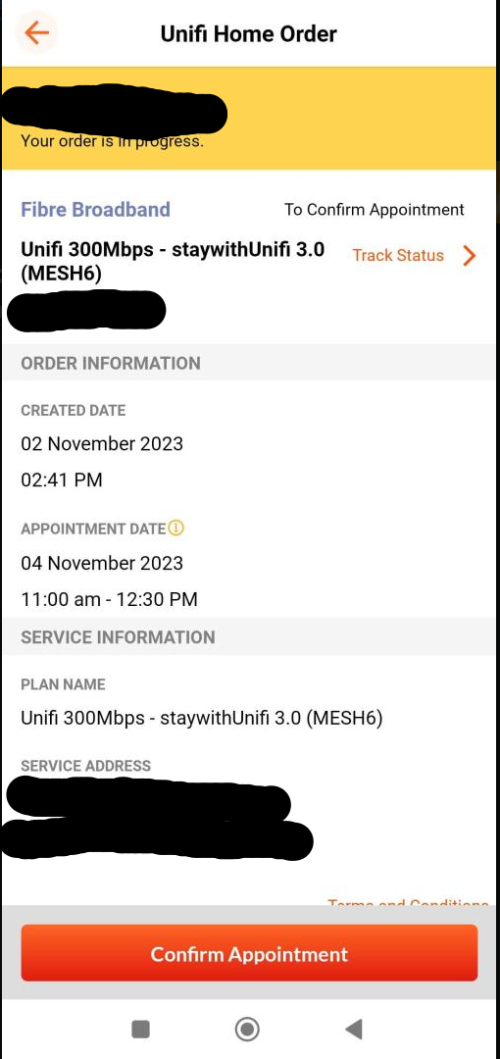
should be, when you change to this package, you need to be present to give thumb print scanning with IC. didn't the staff inform what will be given?

This post has been edited by Omochao: Nov 2 2023, 04:22 PM
Omochao
post Nov 2 2023, 04:59 PM

Enthusiast
*****
Junior Member
835 posts

Joined: Nov 2007
From: Land of Forgotten
QUOTE(wc_how @ Nov 2 2023, 04:47 PM)
You can get a Y cable. But overkill and noisy for router fan.
I am using a 12v fan, and cut down the speed to 5v.
*
the usual old samsung charger should be able to run it, since i got tons of old unused charger brick just use it, not practical for me to get a new cable. and as like you say, noisy, dont want to create another new problem. Rewiring cat6 for my house is already a headache.
Omochao
post Nov 2 2023, 08:46 PM

Enthusiast
*****
Junior Member
835 posts

Joined: Nov 2007
From: Land of Forgotten
QUOTE(beverlykho @ Nov 2 2023, 08:41 PM)
Talking about firmware upgrades, both my Fiberhome routers got its firmware upgraded from RP0104 to RP0106. I didn't even initiate a check for firmware upgrades.

So, upgrades are going on behind the scenes.
*
yes, I pm their live chat ,they told me can only update on their end, but can only be done on the main router device as they cant control mesh according to them. i find it quite troublesome

4 Pages  1 2 3 > » Top
Topic ClosedOptions
 

Change to:
| Lo-Fi Version
0.1632sec    0.50    7 queries    GZIP Disabled
Time is now: 5th December 2025 - 03:57 PM