Welcome Guest ( Log In | Register )

Bump Topic Topic Closed RSS Feed
4 Pages < 1 2 3 4 >Bottom

Outline · [ Standard ] · Linear+

Unifi Official TM UniFi High Speed Broadband Thread V41, READ 1ST PAGE FOR RELEVANT WIFI INFO

views
     
Omochao
post Nov 3 2023, 08:06 AM

Enthusiast
*****
Junior Member
835 posts

Joined: Nov 2007
From: Land of Forgotten
QUOTE(jackpop @ Nov 3 2023, 12:01 AM)
I experience download speed is limit to less than 20MB/s.

My package is 500mbps and i assume i should get download speed around 50 to 60 Mb/s. But this is not the case.

I tried to download Windows iso file and also apple ipsw file, still get less than 20mb/s

I do speedtest, i'm able to get more than 500mbps download speed.

Anyone has any idea how to resolve this ?
*
If you use browser to download it might be slower, try using Internet Download Manager and open the connections number to 32, can hit full speed but will affect the entire network bandwidth
Omochao
post Nov 3 2023, 08:09 AM

Enthusiast
*****
Junior Member
835 posts

Joined: Nov 2007
From: Land of Forgotten
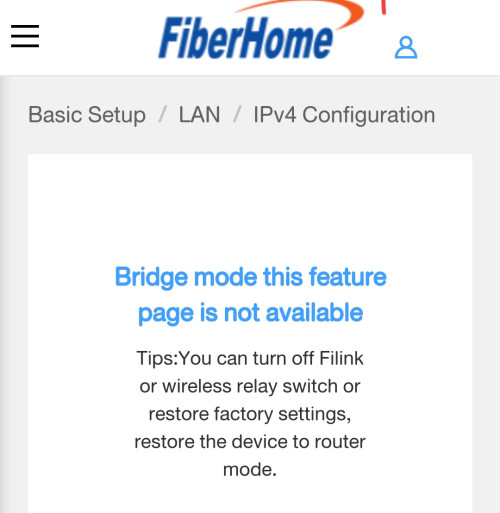
By the way guys, do I need to turn off DHCP at main router/controller if i'm using another router as wireless repeating???

Seems like there are no options for me to turn off DHCP at the mesh router as it is being shown under bridged mode.

Trying to set local ip for the mesh , but cannot.

While setting fix local ip for wireless repeating router, is possible, but if I set Static IP address under the repeater, seems like slower internet loading.

Any guides on how to set up fix ip for the entire network?

I read somewhere that it is better to disable DHCP once under mesh network, or just leave it as it is? So far no overlapping IP addresses, so all devices connect to the network will be automatically assigned with an IP to access the internet.

» Click to show Spoiler - click again to hide... «


This post has been edited by Omochao: Nov 3 2023, 08:16 AM
Omochao
post Nov 3 2023, 10:37 AM

Enthusiast
*****
Junior Member
835 posts

Joined: Nov 2007
From: Land of Forgotten
QUOTE(BladeRider88 @ Nov 3 2023, 10:29 AM)
Not about abt your Mesh network setup, but I am using ASUS AiMesh and I did not disable the DHCP at all, i even use static IP in some of my network device
*
Ok, then best i leave it as it is, setting up network is not my expertise and since everything is working fine, better dont fix it.
Omochao
post Nov 3 2023, 11:07 AM

Enthusiast
*****
Junior Member
835 posts

Joined: Nov 2007
From: Land of Forgotten
QUOTE(matrixVinc @ Nov 3 2023, 11:05 AM)
Hi all, I received a SMS about speed upgrade COMPLETED on 13 Oct, did the restart and everything. Now after 3 weeks my speed still stayed at 30mbps instead of upgrading to 100mbps. Made report several times but they still mention upgrade will by phase and SMS was sent randomly. Can they do that?

May I know anyone got the SMS but speed stayed the same too?
*
check your router and ethernet cable. could be either one.
Omochao
post Nov 3 2023, 12:14 PM

Enthusiast
*****
Junior Member
835 posts

Joined: Nov 2007
From: Land of Forgotten
This new speed really made me discovered a lot of new stuffs about mesh system as I wasn't really active in reading up about Wifi6 and mesh and the latest technology.

After thorough consideration, this mesh thingy is not cheap to replace.

And not all Easy mesh certified by TP-Link or Mercusys can be pair with ethernet backhaul.

Initially, I thought by simply purchasing a good TP Link router and another 2nd hand used tp-link or mercusys router (function as satellite/AP) I will be able to pair up with ethernet backhaul with any easy mesh router or any AX rated router will do the job but unfortunately , after much reading, not only does it not support but is a case to case basis and firmware dependent kind of thing

So in the end, I choose to look at TP-link deco series, but also found out, those deco models doesn't link back with a TP-link router .

And with a budget of RM300, i think Fiberhome is my best option of a router/satellite/mesh with ethernet backhaul support for now.


TLDR;

Initial plan, get a new Mercusys Mr70x or TPlink Ax53, pair it up with AX10/20/23 with ethernet backhaul under EASYmesh to create a mesh network so that I can enjoy roaming and self healing. But ax20 doesn't supports easymesh on firmware, ax10 seems to be fairly limited and some commented when link up with ethernet will cause the device to hang.

This post has been edited by Omochao: Nov 3 2023, 12:14 PM
Omochao
post Nov 3 2023, 12:24 PM

Enthusiast
*****
Junior Member
835 posts

Joined: Nov 2007
From: Land of Forgotten
QUOTE(BenYeeHua @ Nov 3 2023, 12:17 PM)
Unless u need those low latency roaming, no support of mesh also still can be use as another AP, just slower roaming.
*
yeah, in my situation, not really practical for now currently, just that I want to have a taste of the latest techs like BSS, ODFMA and TWT, but at the end of the day, is about whether the devices I'm using is getting full speed.

So for now, better not look at those anymore, the more I look, the more poisoned I get.

Hopefully by next year, AX1800 and above devices will drop price or those Wifi6 mesh 3 packs will be cheaper.

Omochao
post Nov 3 2023, 01:31 PM

Enthusiast
*****
Junior Member
835 posts

Joined: Nov 2007
From: Land of Forgotten
QUOTE(BenYeeHua @ Nov 3 2023, 12:52 PM)
Yes, and also more expensive, like 5G cheap phone expensive than 4G, latest graphic card is expensive than those without NPU.
It is getting harder to playing latest tech as toys nowadays.... sweat.gif
*
no 2nd hand in the market for ax mesh devices yet..if got i will take up
Omochao
post Nov 3 2023, 01:52 PM

Enthusiast
*****
Junior Member
835 posts

Joined: Nov 2007
From: Land of Forgotten
QUOTE(soonwai @ Nov 3 2023, 01:31 PM)
So generally speaking it's a good idea to turn off unwanted DHCP servers when you can.

As for IP address, set the mesh units to pick up its IP address from your main router. After that you can set their addresses to static on the main router.
*
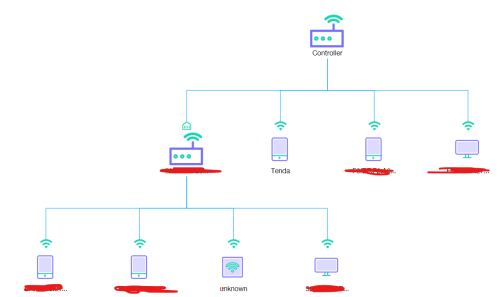
But when I login into my fiberhome satellite/mesh mode wont allow me to turn off dhcp

user posted image

This post has been edited by Omochao: Nov 3 2023, 01:53 PM
Omochao
post Nov 3 2023, 02:58 PM

Enthusiast
*****
Junior Member
835 posts

Joined: Nov 2007
From: Land of Forgotten
QUOTE(soonwai @ Nov 3 2023, 02:50 PM)
Same as Deco, they also don't allow manual turning off of DHCP server.

I bet it's already turned off when it's in bridge mode.
*
I see, thanks for the sharing insight ,this is my first time trying out mesh system, hence really new terms and jargons from it.
Omochao
post Nov 3 2023, 03:21 PM

Enthusiast
*****
Junior Member
835 posts

Joined: Nov 2007
From: Land of Forgotten
QUOTE(soonwai @ Nov 3 2023, 03:06 PM)
I haven't used the Fiberhome before but for DLink DIR-X3060Z, it behaves the same way - DHCP is off when in bridge mode. X3060Z is EasyMesh too so, theoretically, it should mesh with the Fibrehome. The X3060Z is really cheap on Carousell. Performance is pretty good too. https://forum.lowyat.net/index.php?showtopic=5415545
*
Yes infact ,i actually read your thread first before deciding to go for SWU 3.0, so much so I thought I got a better mesh router which is Fiberhome .

but again both dlink and fiberhome lack the latest tech in it.

my only option now is halo h70x , but a 3 pack is really crazy ,600+
Omochao
post Nov 3 2023, 10:45 PM

Enthusiast
*****
Junior Member
835 posts

Joined: Nov 2007
From: Land of Forgotten
QUOTE(blacktubi @ Nov 3 2023, 09:03 PM)
Got to be honest to you, EasyMesh is not great, not terrible. But comparing to all other mesh implementations out there, it's probably the worst.

If I were you, I will do the conventional access point setup for all remaining routers and configure them with same SSID and password.

Believe it or not, you might get better roaming than EasyMesh and definitely better stability.
*
So does this means all those new jargon of roaming protocol k/v/r all of it are gimmicks ?? self healing etc?

but lets say if i set up AP mode with same SSID , wouldn't my phone show up two network wifi with same SSID?

and won't the additional network interfere with each other fighting for the same channel ?

I read your blog lately for the reviews , so does that means you are indirectly dissing at Tx Lxxk??

from your words i can assume that every brand own deco/mesh series (2packs/3packs unit) are way better than setting up router satellite mode?

This post has been edited by Omochao: Nov 3 2023, 10:47 PM
Omochao
post Nov 3 2023, 10:55 PM

Enthusiast
*****
Junior Member
835 posts

Joined: Nov 2007
From: Land of Forgotten
Also just found out that older phone devices with even support to wifi5 standards, can not utilize max speed download even standing near to router side by side while connecting to a Fiberhome wifi6 grade 5ghz .

Where else my current phone which can receive wifi 6 has no issue hitting close to 500mbps.

Now I'm starting to suspect that the high speed being transmitted out by wifi6 router is too much for the old devices to handle.


Speed test download (fast.com)
Poco F1 (connected to WiFi6 fiberhome 5ghz)- max out around 230mbps

Poco M3 (connected to Fiberhome 5ghz)- max out around 200mbps

Realme Narzo 20 pro- cant even connect at all and the phone will just keep crashing but when connected to my Wifi5 ap router , cant even hit 180mbps above on 5ghz network while the others can hit around 200+

having speed above 100mbps is also a challenge , you need newer supported and supporting devices. what a challenge .

This post has been edited by Omochao: Nov 3 2023, 11:01 PM
Omochao
post Nov 3 2023, 11:31 PM

Enthusiast
*****
Junior Member
835 posts

Joined: Nov 2007
From: Land of Forgotten
QUOTE(ChenKaiWen @ Nov 3 2023, 11:13 PM)
My Poco f1 can achieve 500mbps on TP-Link EAP613 wifi 6 AP

user posted image
*
no idea why, even set on the fiberhome to adapt to old network card on, but i dont think that is the real cause for bottleneck speed.
Omochao
post Nov 4 2023, 08:02 AM

Enthusiast
*****
Junior Member
835 posts

Joined: Nov 2007
From: Land of Forgotten
QUOTE(blacktubi @ Nov 4 2023, 12:31 AM)
My reply is in bold
*
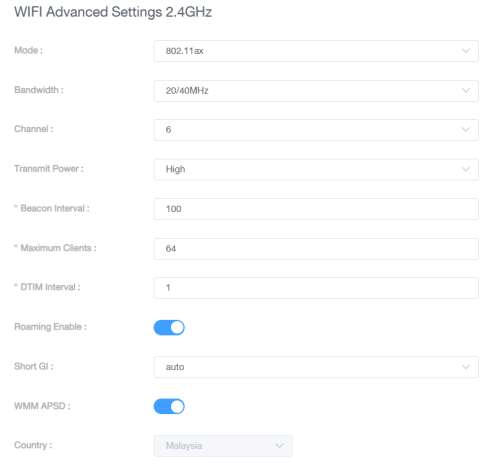
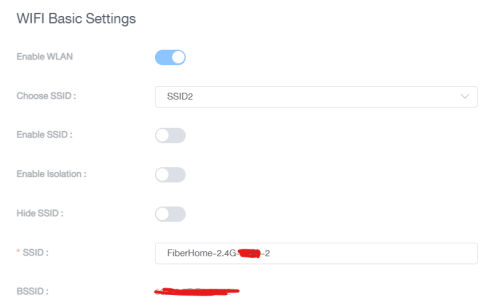
am trying out your method right now by disabling the "multi-ap" mode on my router and manually instruct it to be an independent AP point. Once turned off multi-ap mode, some new options opened up when checking out advance option such as roaming, beacon interval, maximum clients, DTIM interval, and WMM APSD.

Through googling up, just realized this router has basic sets of Target Wake Time function but not sure whether it applies consistenly or realistically on Fiberhome routers.

Yes, my SSID is working under a single network, but with band steering still set at on, no issues for now roaming around. I also tried to set every router channel, to a specific non-overlapping channel base on my area scanned.

And miraculously , my other phone which previously lags badly when connecting to Fiberhome network, works flawlessly now and can connect. Guess it was that multi-ap mode that might be causing issue.

user posted image
user posted image

Also why is that, under "Choose SSID", there are a few options?

This post has been edited by Omochao: Nov 4 2023, 08:07 AM
Omochao
post Nov 4 2023, 08:17 AM

Enthusiast
*****
Junior Member
835 posts

Joined: Nov 2007
From: Land of Forgotten
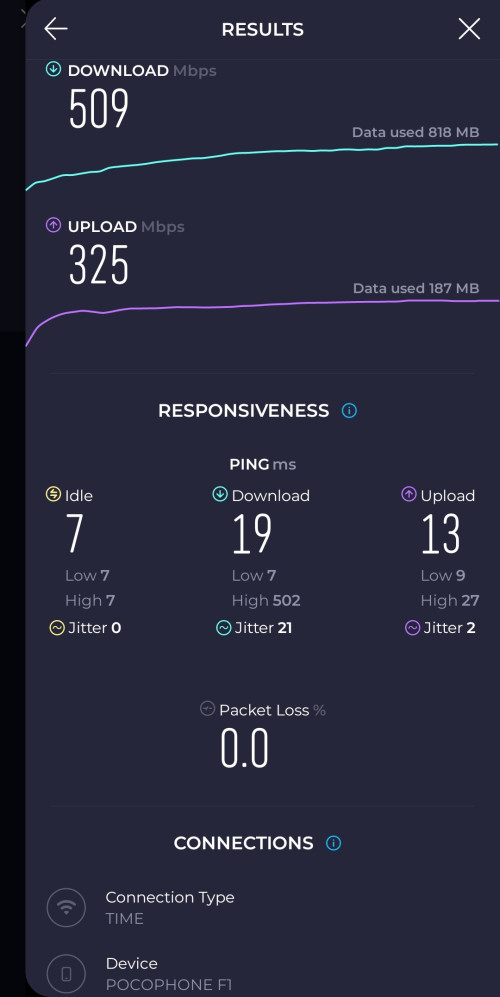
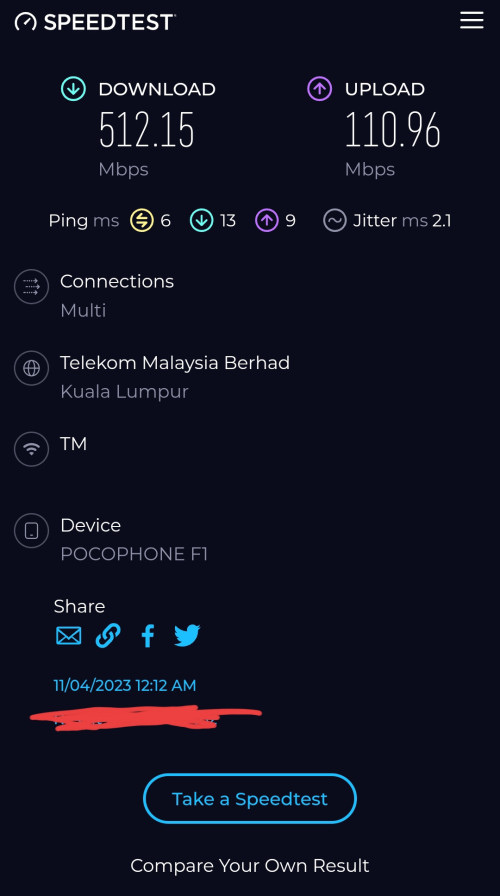
After turning off the multi ap mode really does help a lot

Now no more issue on hitting 500mbps on my poco f1

user posted image

This post has been edited by Omochao: Nov 4 2023, 08:18 AM
Omochao
post Nov 4 2023, 08:21 AM

Enthusiast
*****
Junior Member
835 posts

Joined: Nov 2007
From: Land of Forgotten
QUOTE(westlife @ Nov 4 2023, 08:17 AM)
this test is done at the child node or master node?
*
child node you mean AP ?

yes, standing next to it with ethernet wired backhaul though.
Omochao
post Nov 4 2023, 08:49 AM

Enthusiast
*****
Junior Member
835 posts

Joined: Nov 2007
From: Land of Forgotten
QUOTE(westlife @ Nov 4 2023, 08:36 AM)
Ethernet backhaul. No wonder u can get full speed. I believe even at child node u can get the same speed. This is the good thing about that.
*
Been going from dir850l, to tenda ac10u then add tenda extender , before 100mbps, i only had below 100mbps, but now with 500mbps, i have to use ethernet backhaul as my fiber only reaches ground floor
Omochao
post Nov 4 2023, 01:23 PM

Enthusiast
*****
Junior Member
835 posts

Joined: Nov 2007
From: Land of Forgotten
QUOTE(crackedbox @ Nov 4 2023, 01:18 PM)
Anyone manage to get SWU by walking in to TM Point?
We didn't get any invitation, wondering if possible to walk in and talk to them on the spot?
*
need to walk into a TM point (not the authorized dealer/agent) and do thumbprint scan with the register person name and details to change.

Within 1-2 hours to change the package done.

Some managed to get luckier and contacted through their live chat and changed it.
Omochao
post Nov 4 2023, 08:01 PM

Enthusiast
*****
Junior Member
835 posts

Joined: Nov 2007
From: Land of Forgotten
QUOTE(westlife @ Nov 4 2023, 03:27 PM)
» Click to show Spoiler - click again to hide... «


user posted image
*
Heat ventilation, lightning strikes will degrade the router over the time, even though it may not show faulty or weakening signs, but as usual, even electronics have wear and tear, and heat drives it down very fast.

If I were you, I would do this first to try do what I can best to salvage the remaining juice out of it:

1) Check the ethernet cables first, whether is Cat5 or Cat5e, and make sure they are not faulty.
2) Upgrade/reset the router and reconfigure everything as per TM method
3) Set in google/cloudfare/open dns into it.
4) Plug in LAN cable to your laptop to do a direct speed test.

That's the only way to test once and for all, if it still gives you that result same no improvement speed, high chances is the router that is acting up. for 100mbps speed, you can just go get Tenda Router ac10u, very stable, I was using it before my 100mbps got upgraded, serve me well since 2019. A used one can be found for below rm100. And good coverage for a single floor, although 2nd floor signal is not that fantastic, but does it job.

QUOTE(crackedbox @ Nov 4 2023, 05:57 PM)
Went to TM point today. Unifi no nore contract but got mesh router left 3 more months to pay. Staff said need approval and took thumb print. Will have to wait till get a call.
*
definitely can get SWU.
Omochao
post Nov 4 2023, 08:04 PM

Enthusiast
*****
Junior Member
835 posts

Joined: Nov 2007
From: Land of Forgotten
user posted image

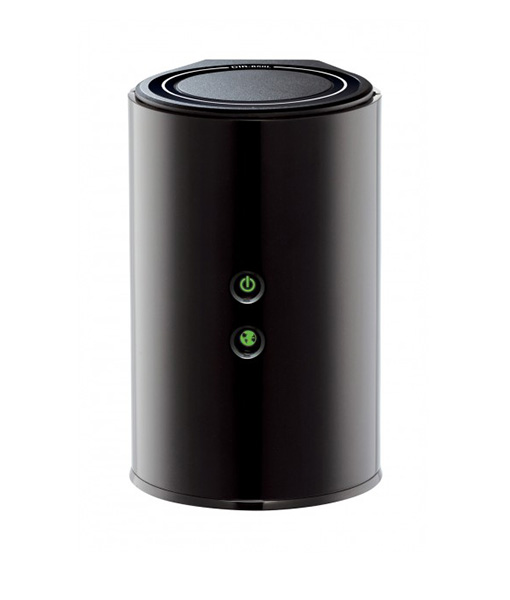
This one was the bomb back in streamyx days, so I think is high time you got to retire that DIR-842

4 Pages < 1 2 3 4 >Top
Topic ClosedOptions
 

Change to:
| Lo-Fi Version
0.2302sec    0.70    7 queries    GZIP Disabled
Time is now: 14th December 2025 - 05:50 AM