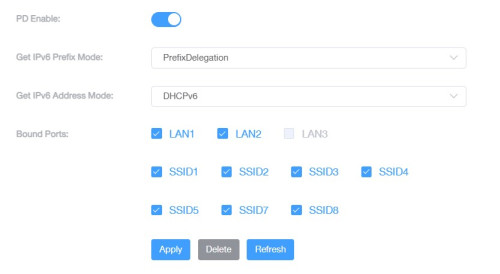
QUOTE(VeeJay @ Nov 4 2023, 09:25 PM)
Isnt that DIR-850L? Im still using mine for 2.4Ghz connection for home automation. it still works well.

yes...but mine will hang occasionally if too much devices start connecting to it.Unifi Official TM UniFi High Speed Broadband Thread V41, READ 1ST PAGE FOR RELEVANT WIFI INFO
|
|
 Nov 4 2023, 10:55 PM Nov 4 2023, 10:55 PM
Return to original view | IPv6 | Post
#41
|
 
Junior Member
835 posts Joined: Nov 2007 From: Land of Forgotten 
|
QUOTE(VeeJay @ Nov 4 2023, 09:25 PM) Isnt that DIR-850L? Im still using mine for 2.4Ghz connection for home automation. it still works well. yes...but mine will hang occasionally if too much devices start connecting to it. |
|
|
|
|
|
Nov 6 2023, 03:06 PM
Return to original view | IPv6 | Post
#42
|
|
Junior Member
835 posts Joined: Nov 2007 From: Land of Forgotten
|
QUOTE(joeblow @ Nov 6 2023, 03:01 PM) Sorry I am out of loop for a while. My contract is coming to an end soon. Can I check after all the big hoo haa on the promised of lower broadband price, now cheapest for 100Mbps still rm89? ie only a reduce of rm10 (mine previously was rm99 without unifi tv). I was told no upgrade possible because my area bandwidth not enough or something like that. So either I continue with rm99 or sign a new contract for 2 years for rm89 per month. your last bet and resort is go sign up for time/maxis, then get a report number. go nearest authorised tm point and say want to cancel, and present them the report number you get from another isp, with that they can help you to submit to HQ for appeal and approval. within a week can get answer.If so I am really disappointed with all the big promises by that minister... only do this if you are really bent on changing isp. |
|
|
Nov 6 2023, 03:36 PM
Return to original view | IPv6 | Post
#43
|
|
Junior Member
835 posts Joined: Nov 2007 From: Land of Forgotten
|
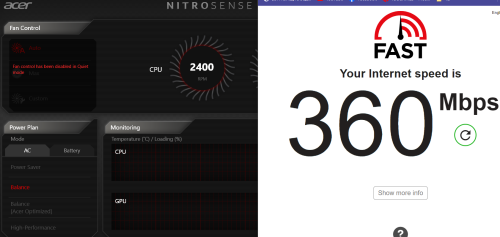
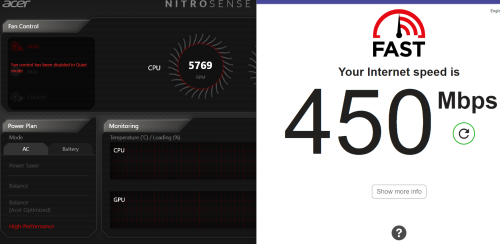
For those who are wondering, as I just receive a PM from someone who were asking me how am I able to achieve near 500mbps and what are the router settings is, basically there's nothing much except
Turning off Multi-AP mode And making sure 2.4ghz & 5ghz running on 20/40 mhz & 40/80/160 mhz respectively at 802.11 AX mode. Also I dont think the multi-ap mode really helps a lot since I was using it and more likely is your device wifi adapter itself. I'm 6m-8m away from my nearest AP mesh router (ethernet backhauled) here are the speed test. Under Balance power mode » Click to show Spoiler - click again to hide... « Performance mode » Click to show Spoiler - click again to hide... « I don't understand why also, on my laptop, whenever i set the power profile to balance mode, i'm getting 260-300mbps on daily average, but turn up to max performance mode, can hit nearly close to 500mbps, and this isnt even a WiFi6 adapter just normal up to AC mode. This post has been edited by Omochao: Nov 6 2023, 03:38 PM |
|
|
Nov 6 2023, 09:27 PM
Return to original view | Post
#44
|
|
Junior Member
835 posts Joined: Nov 2007 From: Land of Forgotten
|
QUOTE(phoenixxx @ Nov 6 2023, 06:14 PM) Hi, can I check... turn off the multi-ap mode and bandsteering, repeater mode will appear.I recently took up SWU 3.0 package (500 mbps, RM119). I was shown a black model (not sure if it's Dlink) at Unifi Centre, but the installer came with a white Fiberhome model. I didn't know better and allowed the installation to proceed, after checking with the sales person and being told that both are the same. After tinkering with this router I find it quite lacking - for example I can't set it up as an access point (I'm not using it as a mesh after failing to get my home CCTV to connect with the new router). So my set up goes ... ONU --> TP Link AC2300 (existing self-bought previously) ---> Dlink (old TM router as AP). The AP is connected upstairs via a LAN cable. I'm trying to use the Fiberhome to replace the Dlink now. Any tips? I'm only knowledgeable to the extent of setting SSID, some IP, DNS configs here and there so not too well versed. I guess I have 2 issues here... 1. Is the router given random or should I have gotten the black Dlink model? 2. How do I make best use of the 2 Fiberhome routers given to me? I'm using the 2nd mesh as an AP with ethernet plug into it..works well so far..no hanging, no restarting. whole house roaming except at wet kitchen area. if you want to pair it with your router (a), just place it closely next to it, press the wps button on the back for router (a), then immediately press and hold mesh (b) wps button until the LED flashes quickly , once start flashing quickly, release the button and wait for it until turns back green..all your settings that has been set at (a) will be mirrored over to (b) and works as mesh. or can pair it with lan cable and it will copy.so as long multi-ap mode is on , the (b) will automatically configure itself..until you set it manually or turn off the multi ap mode. also do take note, if you mesh it and bandsteering is enabled the default ip address for the mesh (b) will be at 192.168.1.1. took me some time to figure out how to access the router main page without having to create a 2nd different ssid just for the mesh (b) This post has been edited by Omochao: Nov 6 2023, 09:34 PM phoenixxx liked this post
|
|
|
Nov 6 2023, 10:40 PM
Return to original view | IPv6 | Post
#45
|
|
Junior Member
835 posts Joined: Nov 2007 From: Land of Forgotten
|
QUOTE(jiaen0509 @ Nov 6 2023, 10:08 PM) So right now still tiada ahli2 yang berhormat got upgrade from 800mbps right? anything above 100mbps is consider fast enough for me...800mbps or above might need to look for better routers again...300mbps is enough 500mbps is overkill for normal house average users sleyer liked this post
|
|
|
Nov 6 2023, 10:54 PM
Return to original view | IPv6 | Post
#46
|
|
Junior Member
835 posts Joined: Nov 2007 From: Land of Forgotten
|
QUOTE(AOI_sama @ Nov 6 2023, 10:51 PM) Hi, I've posted here before but I'm the guy that has just registered for 100Mbps plan for rm89/month last month and ended getting "Unifi 100Mbps - Home BB staywithUnifi 3.0" in the service details on both app and website even though I never asked for it. I've asked around here and with live chat about this and came to the conclusion maybe it's just some kind of glitch or typo and will wait until the next billing cycle to see the actual fee. But just now some new thing happened, I'm now somehow eligible for Free Speed Upgrade in the app and site even though before this it is written that I'm not eligible. So my question is, is this normal and how should I expect to get the benefits if this is somehow not a glitch. Thanks!!! you can just act ignorant to try luck and live chat to see whether you will be getting free upgrade to 300mbps..if yes..then consider yourself lucky...as I asked for this package, they said no, only 100mbps.if i want to take speed upgrade only 119 -300mbps BenYeeHua liked this post
|
|
|
|
|
|
Nov 6 2023, 10:55 PM
Return to original view | IPv6 | Post
#47
|
|
Junior Member
835 posts Joined: Nov 2007 From: Land of Forgotten
|
QUOTE(BenYeeHua @ Nov 6 2023, 10:45 PM) The different part is upload, that's all. yes...too bad tm not offering symmetrical dl/ul |
|
|
Nov 6 2023, 11:29 PM
Return to original view | IPv6 | Post
#48
|
|
Junior Member
835 posts Joined: Nov 2007 From: Land of Forgotten
|
QUOTE(AOI_sama @ Nov 6 2023, 11:22 PM) so it's pretty much just a glitch? alrite then not sure...got to check with tm, they are the one controlling back end. |
|
|
Nov 7 2023, 04:38 PM
Return to original view | IPv6 | Post
#49
|
|
Junior Member
835 posts Joined: Nov 2007 From: Land of Forgotten
|
Anyone tested this brand before, for Unifi?
11.11 on sale for 154, cheapest Wifi 6 router i've seen currently. 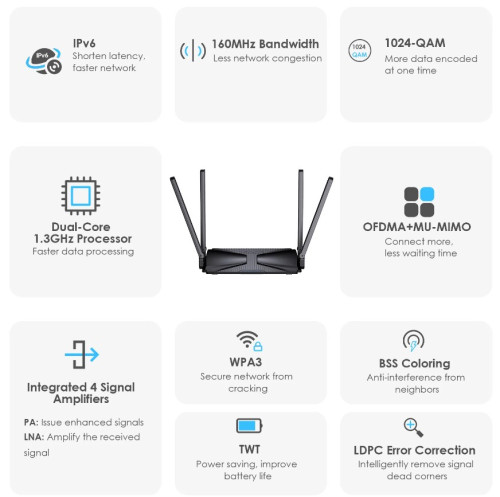 » Click to show Spoiler - click again to hide... « This post has been edited by Omochao: Nov 7 2023, 04:38 PM |
|
|
Nov 7 2023, 09:43 PM
Return to original view | IPv6 | Post
#50
|
|
Junior Member
835 posts Joined: Nov 2007 From: Land of Forgotten
|
QUOTE(calk @ Nov 7 2023, 05:23 PM) 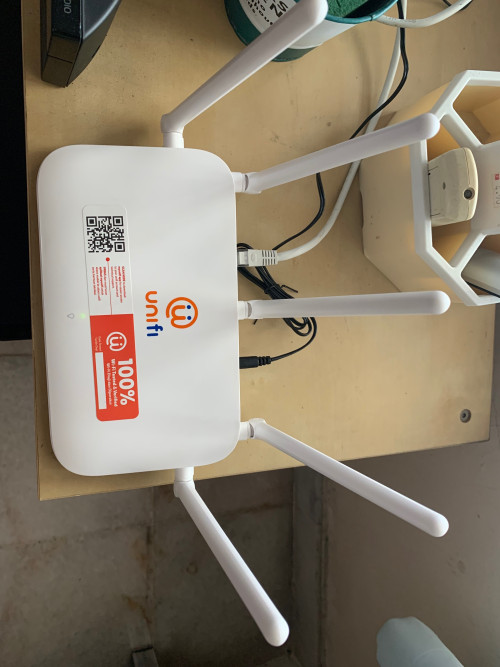 Anyone of you know how to configure the LAN port and so it can be use to connect to my TV box? It seen like on/off the LAN port is not working for some unknown reason and this is the unit which is supposed to be my Mesh downstair and the other one which connect to the optical modem is in upstair. At this moment, only using the previous LAN connection using TP Link via electrical cable. Seen like the LAN port works well in upstair but the Mesh wifi is not for some reason. Appreciate any sifu feedback. Go to Advance Setup and then Wan Service. Follow according to this. 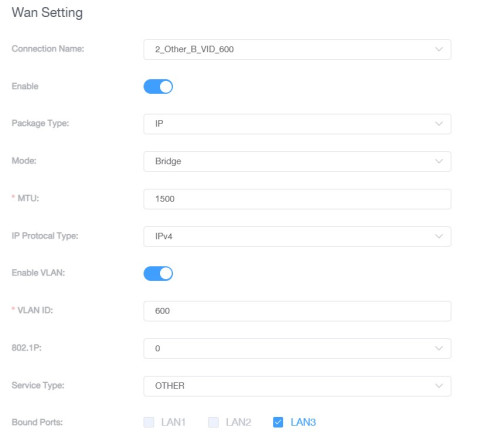 If you can select the LAN port, click drop down and delete the options that has tagged your LAN port under that subsection, just make sure you dont delete " INTERNET_R_VID_500" If you want to use lan port 2 for Iptv, then you need to deselect that particular lan port under internet, and then go back to the IPTV dropdown selection to tag the right port. QUOTE(westlife @ Nov 7 2023, 09:26 PM) This cable ok or not? overkill but 10 years ahead future proof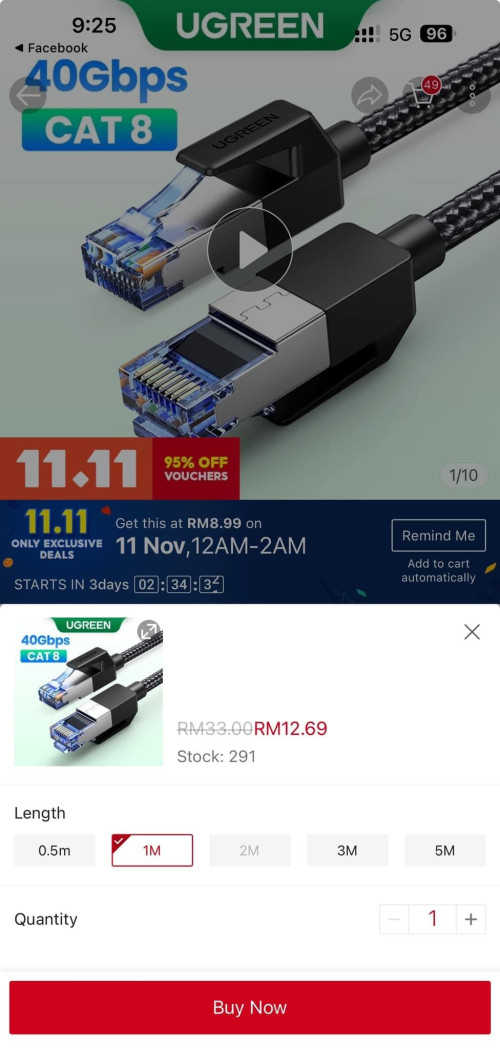 |
|
|
Nov 7 2023, 10:13 PM
Return to original view | IPv6 | Post
#51
|
|
Junior Member
835 posts Joined: Nov 2007 From: Land of Forgotten
|
QUOTE(mikeeeee @ Nov 7 2023, 10:02 PM) Guys, I'm using the fiberhome router from unifi with band steering turned on. It was working fine for a year plus but lately somehow the band steering always uncheck itself. I'm using SR1041F, so far no issues or face auto turning off band steering, maybe need to do hard reset?Is it because configuration issue or the router going kaput? Anyone able to advice? Router model as below: Model Name:SR1041Y Hardware Version:SR1041Y_R1A Firmware Version:RP0107 Thanks in advance |
|
|
Nov 10 2023, 04:19 AM
Return to original view | IPv6 | Post
#52
|
|
Junior Member
835 posts Joined: Nov 2007 From: Land of Forgotten
|
QUOTE(phoenixxx @ Nov 10 2023, 01:11 AM) Thanks sifus you are awesome. I made some progress but still stuck abit. 1. I have yet to try out whether does the repeating mode is stable or usable at all, because same like you, I want full speed for my floor above so hence I decided to go for ethernet backhauled as well after going through the advises here.1. Thanks for the awesome tip on disabling multi AP to get repeater mode. It appeared (I did not change the settings inside), I connected my 2nd Fiberhome to upstairs LAN, and it seems to work. 2. Setting the security to WPA/WPA2 allowed the CCTV to connect. But, the problem is it keeps disconnecting intermittently. But at least I know it can connect, just not sure why it keeps disconnecting. I am using a basic Hikvision DVR with auto DCHP settings. 3. Unrelated question, I manually set the DNS on the router to Google's 8.8.8.8 and 8.8.4.4, but in the main status page it does not reflect. Instead I believe it is still showing TM DNS. Any idea why? I think I read a post somewhere before saying Fiberhome router won't display, but will still use whatever DNS set. Not sure on this. So far managed to put both routers to use, just need to solve CCTV randomly disconnecting (on the phone app). Thx so much. EDIT: Share a trick here in case other users face the same problem. If you connect your PC to LAN3, it will not work. Need to go into settings > advanced > WAN service and disable the LAN3 port there, probably from being reserved for something else by default (e.g. Unifi TV). 2. Maybe try to disable DHCP settings and assign IP addresses for your CCTV camera units, and on the main fiberhome router set a pool of reserve IP address for the cctv units at IPv4 config page? 3. It will reflect definitely, base on other users feedback, use DNS leak test to check/test to see if the set DNS is working or not, so far using google or cloudfare dns, all will either show Singapore or Google servers. |
|
|
Nov 10 2023, 11:49 AM
Return to original view | IPv6 | Post
#53
|
|
Junior Member
835 posts Joined: Nov 2007 From: Land of Forgotten
|
QUOTE(phoenixxx @ Nov 10 2023, 09:12 AM) I think I screwed up the AP upstairs. Connected with WiFi but upstairs show no Internet. To clarify, I disabled multi AP on both routers, and even tho the repeater option is there, I did not enable it (coz it's WiFi and I'm using LAN). Based on devices connected to router, each have their own IP address and doesn't look like there's conflict. I faced the same problem as you did when i first meddle with the settings for the mesh router (b), somehow or rather ended up with only Wifi connected but no internet.AP router light is red. LAN cable plugged into LAN1 as per the old router. CCTV set to manual IP after much tinkering till late night. 😭 It's definitely some settings I screwed up I think... Not sure where I went wrong... So many settings so what I did was hard reset both OR turn back on multi-ap without ethernet backhaul first , then pair up the mesh (b) through the wireless method by clicking wps button until the led flashes rapidly, this needs to be done after clicking wps button on the router. in simpler way, i usually pair up wirelessly first then only plug in ethernet ,after that only turn off the multi ap mode. then from that point only start changing the settings inside. or best way is, start fresh, pair it up, do a backup of the settings first by clicking on the backup settings in the router for both . at least when something goes wrong, no need hard reset and wait for it to boot up I noticed you said repeater mode is shown , means you turned off band steering right ? if multi ap mode turned off only, it won't show up band steering. means you are running 2.4ghz ans 5ghz individually, and somehow maybe under the security settings , under authentication is using another different type of WPA? This post has been edited by Omochao: Nov 10 2023, 11:57 AM |
|
|
|
|
|
Nov 10 2023, 12:16 PM
Return to original view | IPv6 | Post
#54
|
|
Junior Member
835 posts Joined: Nov 2007 From: Land of Forgotten
|
the specs of this fiberhome sr1041f is sure suprising. Attached File(s)  SR1041Fdatasheetcleanz_z854101046839.pdf ( 933.9k )
Number of downloads: 171
SR1041Fdatasheetcleanz_z854101046839.pdf ( 933.9k )
Number of downloads: 171 SwarmTroll liked this post
|
|
|
Nov 10 2023, 03:11 PM
Return to original view | Post
#55
|
|
Junior Member
835 posts Joined: Nov 2007 From: Land of Forgotten
|
QUOTE(calk @ Nov 10 2023, 01:59 PM) I mean the LAN port for the mesh. Anyway, now my mesh is unable to connect to the router and so I turn it off and keep it aside. Just curious is there a manual way to configure the mesh to connect the router than press the button behind? Also, how to enable the mesh LAN port to use as normal LAN port? From router A, LAN port 1, to mesh(b) Wan port.for best result pairing, use wireless and pair first ,then only turn off multi ap mode, as per tm installer advise..the mesh/router will be automatically detected once you pair it wirelessly , so from then on, you can plug in ethernet or without. the attached device page will show you the device if its multi ap turned on for both routers. if you want repeating mode , turn off multi ap and bandsteering ap mode ,just plug in ethernet from behind ,the mesh will get data from router. but settings wise im not so sure..the advanced users and experts should know well. This post has been edited by Omochao: Nov 10 2023, 03:15 PM |
|
|
Nov 10 2023, 03:12 PM
Return to original view | Post
#56
|
|
Junior Member
835 posts Joined: Nov 2007 From: Land of Forgotten
|
QUOTE(SwarmTroll @ Nov 10 2023, 12:24 PM) I guess this is considered decent since it is given for free anwyays? betting someone will be daring enough to make a custom firmware..but i guess the features is too minimal to make any improvements |
|
|
Nov 10 2023, 03:55 PM
Return to original view | IPv6 | Post
#57
|
|
Junior Member
835 posts Joined: Nov 2007 From: Land of Forgotten
|
QUOTE(wkn @ Nov 10 2023, 03:27 PM) lousy dual band router that cuts your speed in half if not using ethernet backhaul. It has been already explained online, even here forum, and also based on many othees experienced users feedbacm from LYN. that even mesh wifi will halve speed...and if you still manage to get half the speed after going through 1 floor..is consider good. If you don't find it appealing, try googling wifi mesh speed halve, tons of users who mesh their tp link router + satellite is facing same issue, even the actual mesh they paid so much for also face same issue. is just the limit. or else just try and get another 2nd hand fiberhome router to set up tri-band mesh wifi and see if you can achieve speed. so your option is rm50 -ethernet -some keystone + socket -nails and cable brackets - effort and energy is hammering rm100 (lowest price in fb/shopee/carousell marketplace/ - a used/unused fiberhome sr1041f router your choice..to me im thankful to have that even though i know there is no full baked in techs inside it but beggars can't be choosers ,be realistic This post has been edited by Omochao: Nov 10 2023, 03:57 PM |
|
|
Nov 10 2023, 04:54 PM
Return to original view | IPv6 | Post
#58
|
|
Junior Member
835 posts Joined: Nov 2007 From: Land of Forgotten
|
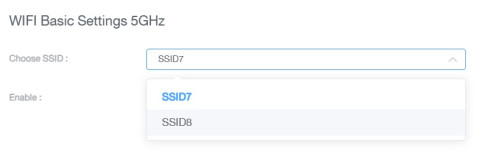
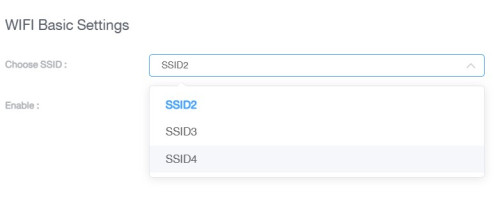
QUOTE(sHawTY @ Nov 10 2023, 04:34 PM) Just ignore him Yes, he/she even PM'd me personally and I already done my best to share what I'm doing right now to overcome the speed challenge , and here is he/she again ranting or whining, pretty much sums up how old a person from the way he writes, but that's not for this section, else I would troll hard here.I already mentioned it to him last time that the halving speed happens to all Dual Band mesh routers Only Tri-Band mesh router can partially solve that problem But somehow he forgot about it eventhough he replied to that specific post of mine By the way, your explanation about Tri-Band mesh is wrong. Getting a 3rd mesh device doesn't make it a "Tri-Band" system The correct explanation: Dual-Band: Router or Mesh device with dual Wi-Fi band = 2.4GHz Wi-Fi + 5GHz Wi-Fi Tri-Band: Router or Mesh device with three Wi-Fi band = 2.4GHz + 5GHz 1 + 5GHz 2 (dedicated for MESH connection) or 2.4GHz + 5GHz + 6GHz (dedicated for MESH connection) Does this explains that this mesh/router has a dedicated band for it to work? because base on this settings, I really have no idea what this router can actually achieve, but I was surprised that the basic Target-Wake-Time feature is somehow coded into it at a very basic level as DTIM WDMM and Beacon interval and stuffs. » Click to show Spoiler - click again to hide... « QUOTE(Oltromen Ripot @ Nov 10 2023, 04:44 PM) https://dongknows.com/dual-band-vs-tri-band...i-fi-bandwidth/ Ethernet is the most practical and efficient way to go, just that you need to crack your head to place the cables running around either on or in your walls.i lost my appetite to get latest and greatest quad-band after reading this. |
|
|
Nov 10 2023, 09:18 PM
Return to original view | IPv6 | Post
#59
|
|
Junior Member
835 posts Joined: Nov 2007 From: Land of Forgotten
|
QUOTE(DroppedJaw @ Nov 10 2023, 08:21 PM) More detailed specs and teardown: Haha...now even more people will get turned off and quickly dispose of it, i saw it earlier but didnt want to post ,as the website show the ins and outs of the entire router .LINK (Article in Chinese) Looks the same inside as the units provided by TM i was shocked that there wasnt any heatsink built in and just a piece of board. price is 135cny, which roughly translates to around 87-90 myr. really cheap skate out ya TM. |
|
|
Nov 11 2023, 08:06 AM
Return to original view | IPv6 | Post
#60
|
|
Junior Member
835 posts Joined: Nov 2007 From: Land of Forgotten
|
QUOTE(mikey8811 @ Nov 10 2023, 10:39 PM) What is the other brand of router they provide? TP Link? Is that better? I was told Fibre Home was Wi Fi 6 but TP Link was Wi Fi 5 so the Fibre Home was better performance wise. D-link Dir 3060z (also ax3000 rated), but I read quite some feedbacks saying that their internet connection will drop after a week usage and always have to restart to get everything back running again. and some said the coverage of wifi signal is not as good as fiberhome if got level difference in your home. Different house different situation.Not true? QUOTE(phoenixxx @ Nov 11 2023, 12:16 AM) Thanks so much for your help. After trying whole night, I did not manage to get it to work. Maybe fiberhome router software is not compatible or user friendly. If it works then it works for you, if not, just have to find another solution, furthermore, definitely by using your old TP-link is going to be better and more stable. I doubt this fiberhome can accomodate up to 64 devices as per its spec sheet under daily usage. So is a better choice by you to use back an older router with a good reputation.So, I replaced the "Mesh AP" with my old TP Link AC2300. Now, everything seem to work. Small compromise. Downstairs get new WiFi 6, upstairs get a better router than the old TM DLink. The spare mesh AP can use as decor....  QUOTE(SwarmTroll @ Nov 11 2023, 01:16 AM) Thanks for sharing the link. No wonder the router felt damn warm to the touch, the whole thing damn small lmao. Now only need to wait for some Chinese daredevils to go mod it either by adding fans/heatsink etc, and customised the firmware for global usage flashing. as per my understanding, this ax3000 has 512mb ram, and 128mb flash. Should be enough to run DD-Wrt or etc.QUOTE(mikey8811 @ Nov 11 2023, 02:54 AM) So to clarify, there isn't a 500 Mbps package for RM 119 per month that gets upgraded to 800 Mbps for a year and then returns to 500 Mbps thereafter correct? Maybe some did get as they gone through a lot of price reduction + speed upgrades from the earliest days, I would say they must have started subscribing since streamyx days, only then yes and maybe. SwarmTroll liked this post
|
|
Topic ClosedOptions
|
| Change to: |  0.2144sec 0.2144sec
 0.27 0.27
 7 queries 7 queries
 GZIP Disabled GZIP Disabled
Time is now: 6th December 2025 - 04:27 PM |
 Quote
Quote