


Unifi Official TM UniFi High Speed Broadband Thread V41, READ 1ST PAGE FOR RELEVANT WIFI INFO
Unifi Official TM UniFi High Speed Broadband Thread V41, READ 1ST PAGE FOR RELEVANT WIFI INFO
|
|
 Oct 13 2023, 12:17 AM Oct 13 2023, 12:17 AM
Return to original view | IPv6 | Post
#61
|
 
Senior Member
1,401 posts Joined: Apr 2012 
|
Yeah I'm just gonna sell off the Fiberhome mesh routers as I've now gotten myself the TP-Link AX73, even better than both of them combined with my experience so far
|
|
|
|
|
|
Oct 13 2023, 01:03 AM
Return to original view | IPv6 | Post
#62
|
|
Senior Member
1,401 posts Joined: Apr 2012
|
QUOTE(cyberic @ Oct 13 2023, 12:25 AM) Haiyaa! Cannot compare lah. D(own) link only can see dust from tp link. Can't expect much from cheaper spec Dlink. Mine was the Fiberhome one, which is probably worse than the D-Link one lmao. QUOTE(BenYeeHua @ Oct 13 2023, 12:25 AM) Yup, except you are using it purely for local transfer, better resale it before the value getting down. Carousell people are like selling them for RM250 for both together. Not sure whether people are buying lol. Will put it up real soon. Not like there is enough wifi channel to give 2 crappy wifi router lol. |
|
|
Oct 16 2023, 09:28 PM
Return to original view | IPv6 | Post
#63
|
|
Senior Member
1,401 posts Joined: Apr 2012
|
QUOTE(keong8867 @ Oct 16 2023, 01:22 AM) I wanna ask who using 500mbps currently and what brand and model router you are using? Free from unifi or buy yourself? I,m using AX3000 free from unifi, should I change 1 ? I went with the TP-Link AX73 for my 500Mbps, no contest, absolutely tapau my Fiberhome mesh that was provided.Previously with two Fiberhome mesh (one ground, one upstairs), my room which is furthest can achieve about 150Mbps. Now with a single AX73 at ground, my room can achieve 300-400Mbps. LOL |
|
|
Oct 18 2023, 01:13 AM
Return to original view | Post
#64
|
|
Senior Member
1,401 posts Joined: Apr 2012
|
Question, does the IP address affect the speedtest results? Should the router settings use IP address that is dynamically set by ISP or should we manually input one?
|
|
|
Oct 18 2023, 01:35 PM
Return to original view | IPv6 | Post
#65
|
|
Senior Member
1,401 posts Joined: Apr 2012
|
QUOTE(sengf @ Oct 18 2023, 11:05 AM) My router is tplink ax20 is it support 300m? Already contact unifi but their said that side no problem I was using a TP-Link AX20 before I upgraded to the AX73. Within line of sight to the AX20, 500Mbps is not a problem to devices that can support such speeds. |
|
|
Oct 18 2023, 03:51 PM
Return to original view | IPv6 | Post
#66
|
|
Senior Member
1,401 posts Joined: Apr 2012
|
QUOTE(nashpantheron @ Oct 18 2023, 02:42 PM) Any noticeable difference when you upgrade to Archer AX73 from AX20? Mine currently using AX20 too, thinking to upgrade to AX73 but still hesitant to do so afraid if no significant improvement... 😅 Your mileage may vary depending on the structure of your home and interference but this is my experience, I always use my room as a test as it is the furthest room away from the router.My fren want to sell his Archer AX73 for around RM300. It is a good price? Both routers are placed in a central position at the ground floor. My room is located upstairs and is the furthest back. I tested 5GHz connections on 80mhz. AX20 Constant poor connection, it is always 1 bar WiFi signal or just drops off completely. My laptop can hold the 1 bar signal better than my phone but still often loses connection. My phone practically unusable, gave up and just used 2.4GHz all the time. Laptop connected would achieve about 50-100Mbps if not disconnected. AX73 Much better connection, constant stable 3 bar WiFi signal for both my laptop and phone. Both devices can achieve speeds of 100-250Mbps. The speed range is wide because my room has two types of walls, brick and wood. I'm now testing out 5GHz on 160mhz using DFS channel 100 since there is no one nearby using it, and I am actually getting better speeds. Desktop (Intel AX200) at ground floor with one wall away from router now constantly achieves 500Mbps, rather than 300Mbps with 80mhz before. Devices in my room upstairs also achieving 150-300Mbps, signal range is weaker but still stable (2-3 bar). Going to run this for a week and see. From what I understand, one of the main cons with AX73 is the 2.4GHz as TP-Link put a lot of emphasis on the 5GHz of this router while sacrificing the 2.4GHz. Thus, the 2.4GHz might not be very different from your AX20. Personally, I don't know since only my smart home devices use it and there is no issues. I purchased mine brand new for RM399 with 3 years warranty. RM300 at second hand depends on how long has he had the router, is there any warranty left? |
|
|
|
|
|
Oct 23 2023, 10:47 PM
Return to original view | IPv6 | Post
#67
|
|
Senior Member
1,401 posts Joined: Apr 2012
|
Hey guys, for the TM Unifi Modem (Mine is the white Huawei modem I got long ago), is it normal that the LAN 1 led is constantly blinking non stop, or is this just normal behaviour?
|
|
|
Oct 25 2023, 03:52 PM
Return to original view | IPv6 | Post
#68
|
|
Senior Member
1,401 posts Joined: Apr 2012
|
Alright, manage to sell both the Fiberhome mesh routers, supplement the cost of the AX73
 |
|
|
Oct 25 2023, 04:37 PM
Return to original view | IPv6 | Post
#69
|
|
Senior Member
1,401 posts Joined: Apr 2012
|
QUOTE(wcpon @ Oct 25 2023, 03:55 PM) How much you sell? QUOTE(GAT @ Oct 25 2023, 03:56 PM) How much u manage to sell? Just done install swu3 this morning. Get 2 unit fiberhome SR1041F QUOTE(JayceOoi @ Oct 25 2023, 04:22 PM) Want to know the easy selling price too. Manage to sell for about one and a half month's worth of Unifi Bill. Both of them were the Fiberhome AX3000 SR1041F. To be honest, if you want to sell both, you'll more than likely have to go below RM200. I gauged Carousell's prices and there are so many of them (19 sellers) just sitting there for weeks or even months. If you place above RM100 for one, you'll only get crickets, unless a sucker comes along.This post has been edited by SwarmTroll: Oct 25 2023, 06:46 PM JayceOoi liked this post
|
|
|
Oct 28 2023, 06:00 PM
Return to original view | IPv6 | Post
#70
|
|
Senior Member
1,401 posts Joined: Apr 2012
|
QUOTE(ineser @ Oct 28 2023, 04:21 PM) Darn the technician charged me RM 53 for changing fiber optic cable head and advise my signal is 29.95dB which is very high, helped me to tune down to 25dB which is more acceptable "range". Got two fiberhome router. Use tmadmin username, even I change DNS, you still see it is still using tm's own DNS server. Any other "super" admin access to change DNS permanently? QUOTE(westlife @ Oct 28 2023, 04:25 PM) mine is 23.xx. that day the tm technican just came to troubleshoot my modem's prob. end up discovered that it was purely due to the power adapter's prob. after changed it, no more intermitten issue. damn, due to this, cannot change new modem. this signal is from the fibre optic? need specific tool to test?my case is lucky. the tm technican never charged me rm53++... he even helped me in the way, he just took a photo of my house with door closed and he just updated the report saying that i was not at home. but he also passed me a fibrehome power adapter that can replace the spoiled one. |
|
|
Oct 28 2023, 06:13 PM
Return to original view | IPv6 | Post
#71
|
|
Senior Member
1,401 posts Joined: Apr 2012
|
QUOTE(westlife @ Oct 28 2023, 06:05 PM) No. From the technician device. They have a device that can view all houses the signal strength. from the exchange to ur modem etc. Graphical somemore and from colours they can tell straightaway if it is good or bad. QUOTE(Max2006 @ Oct 28 2023, 06:11 PM) They will pull off the cable from the modem and plug it into their device to read. The device is some sort of a handheld meter. oh, is there a reason you guys ask them to check? Or when they come to install new mesh router for you guys (assuming), then they check for you on the spot? I should have asked them to check when they came lol. |
|
|
Oct 29 2023, 02:50 PM
Return to original view | IPv6 | Post
#72
|
|
Senior Member
1,401 posts Joined: Apr 2012
|
Wew, there's 23 sellers on Carousell for the Fiberhome SR1041F AX3000. Anyone who sold the D-Link version was able to sell for good price? Was the market also better for that? simmarjit liked this post
|
|
|
Nov 2 2023, 12:27 PM
Return to original view | IPv6 | Post
#73
|
|
Senior Member
1,401 posts Joined: Apr 2012
|
QUOTE(Omochao @ Nov 2 2023, 12:19 PM) Thats why I'm contemplating should I sell it off and change to either TP-LINK or Mercusys, anyway I just got myself some cat6 cables and doing own DIY hardwiring on my walls to re-wire the main controller back up to the 1st floor for better speed. Isn't BSS Colour a WiFi 6 thing? Or maybe it isn't? I'm not sure my AX73 has one lol.TP-Link ax53 do not have BSS and cost 250+ and good future support with TPlink mesh eco system, can simply get a 2nd hand router for future meshing. Mercusys MR70x, cost less than rm200 but have BSS , but I just discovered that new firmware updates allows easy mesh but not with other brands. If the Fiberhome works well for you, you can just use it I suppose. My Fiberhome didn't work well with my home (maybe the walls) so I sold it and got the AX73. I also did not like how warm it got, there's like a lack of proper ventilation on that router. |
|
|
|
|
|
Nov 3 2023, 07:37 PM
Return to original view | IPv6 | Post
#74
|
|
Senior Member
1,401 posts Joined: Apr 2012
|
QUOTE(ppfoong @ Nov 3 2023, 06:57 PM) Waa... you guys action so fast. Nice one stock habis liao! damn shopee voucher habis? bila restok?   |
|
|
Nov 4 2023, 12:51 AM
Return to original view | IPv6 | Post
#75
|
|
Senior Member
1,401 posts Joined: Apr 2012
|
QUOTE(Omochao @ Nov 3 2023, 10:55 PM) Also just found out that older phone devices with even support to wifi5 standards, can not utilize max speed download even standing near to router side by side while connecting to a Fiberhome wifi6 grade 5ghz . When I still had the Fiberhome, I tested using my Poco F3 and could only get about 300 Mbps when nearby (within line of sight) on WiFi 6 5GHz. Tried different settings and couldn't get it to hit 500 Mbps. One of the reasons I just sold it off lol.Where else my current phone which can receive wifi 6 has no issue hitting close to 500mbps. Now I'm starting to suspect that the high speed being transmitted out by wifi6 router is too much for the old devices to handle. Speed test download (fast.com) Poco F1 (connected to WiFi6 fiberhome 5ghz)- max out around 230mbps Poco M3 (connected to Fiberhome 5ghz)- max out around 200mbps Realme Narzo 20 pro- cant even connect at all and the phone will just keep crashing but when connected to my Wifi5 ap router , cant even hit 180mbps above on 5ghz network while the others can hit around 200+ having speed above 100mbps is also a challenge , you need newer supported and supporting devices. what a challenge . This post has been edited by SwarmTroll: Nov 4 2023, 01:06 AM |
|
|
Nov 5 2023, 03:51 AM
Return to original view | IPv6 | Post
#76
|
|
Senior Member
1,401 posts Joined: Apr 2012
|
QUOTE(Boy96 @ Nov 5 2023, 03:30 AM)  Got upgraded to 800mbps Using Tenda AC18 router on Oppo Find X3 Pro phone. Thinking of going to tmpoint for SWU |
|
|
Nov 6 2023, 03:57 PM
Return to original view | IPv6 | Post
#77
|
|
Senior Member
1,401 posts Joined: Apr 2012
|
QUOTE(MyProLife @ Nov 6 2023, 02:25 PM) PSA: after FSU TM seems to increase public IP offering threshold to 500mbps and above Oh actually does this mean If I turn on and set IPv6 on my router it is just pointless?I have see some feedback about 100m package subscribers still getting private IP (cgnat) even after done upgrade to 300mbps Here the result from tm rep when being asked on socmed page (FB/X) DM function 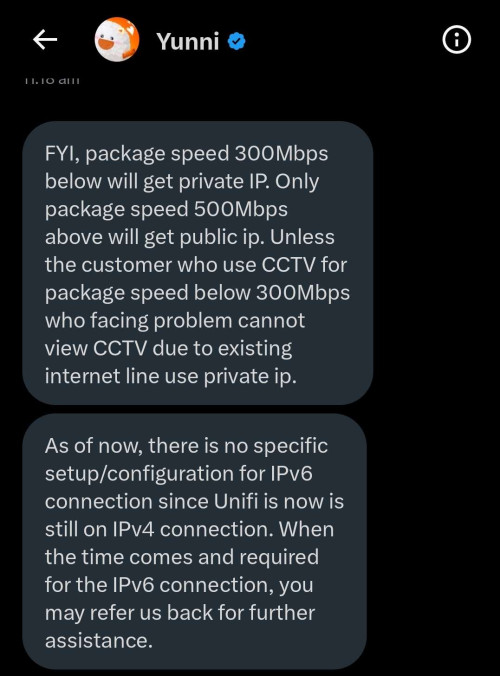 |
|
|
Nov 9 2023, 11:24 AM
Return to original view | IPv6 | Post
#78
|
|
Senior Member
1,401 posts Joined: Apr 2012
|
QUOTE(alvinfks78 @ Nov 9 2023, 09:54 AM) lately after the swu,.......online competitive games faced Okay on my end. When you have lags occuring in game, did you reboot router to see if it solves it? Or it still lags after reboot?lag spikes, even MAS - MAS connection or MAS - SIN sometimes line will disconnect  Anyone faced same thing? |
|
|
Nov 10 2023, 12:24 PM
Return to original view | IPv6 | Post
#79
|
|
Senior Member
1,401 posts Joined: Apr 2012
|
QUOTE(Omochao @ Nov 10 2023, 12:16 PM) the specs of this fiberhome sr1041f is sure suprising. I guess this is considered decent since it is given for free anwyays? |
|
|
Nov 11 2023, 01:16 AM
Return to original view | IPv6 | Post
#80
|
|
Senior Member
1,401 posts Joined: Apr 2012
|
QUOTE(DroppedJaw @ Nov 10 2023, 08:21 PM) More detailed specs and teardown: LINK (Article in Chinese) Looks the same inside as the units provided by TM QUOTE(kelvinlam1980 @ Nov 10 2023, 08:37 PM) wow, the heatsink and broad is so small ! will it overheated? QUOTE(Omochao @ Nov 10 2023, 09:18 PM) Haha...now even more people will get turned off and quickly dispose of it, i saw it earlier but didnt want to post ,as the website show the ins and outs of the entire router . Thanks for sharing the link. No wonder the router felt damn warm to the touch, the whole thing damn small lmao.i was shocked that there wasnt any heatsink built in and just a piece of board. price is 135cny, which roughly translates to around 87-90 myr. really cheap skate out ya TM. |
|
Topic ClosedOptions
|
| Change to: |  0.2144sec 0.2144sec
 0.44 0.44
 7 queries 7 queries
 GZIP Disabled GZIP Disabled
Time is now: 1st December 2025 - 08:27 AM |
 Quote
Quote