

QUOTE(westlife @ Oct 5 2023, 04:21 PM)
icic. thanks.
but will it subsequently also upgraded to 1Gbps from 500Mbps?

Nope, the 500Mbps IS the upgrade itself from 300Mbps.but will it subsequently also upgraded to 1Gbps from 500Mbps?
Unifi Official TM UniFi High Speed Broadband Thread V41, READ 1ST PAGE FOR RELEVANT WIFI INFO
|
|
 Oct 5 2023, 04:22 PM Oct 5 2023, 04:22 PM
Return to original view | IPv6 | Post
#21
|
 
Senior Member
1,401 posts Joined: Apr 2012 
|
QUOTE(westlife @ Oct 5 2023, 04:21 PM) icic. thanks. Nope, the 500Mbps IS the upgrade itself from 300Mbps.but will it subsequently also upgraded to 1Gbps from 500Mbps? |
|
|
|
|
|
Oct 5 2023, 04:55 PM
Return to original view | IPv6 | Post
#22
|
|
Senior Member
1,401 posts Joined: Apr 2012
|
Any idea what is the 2x Mesh router they are giving for SWU3.0? I'm current using a single TP-Link AX20 router, hopefully it is better.
|
|
|
Oct 5 2023, 05:00 PM
Return to original view | IPv6 | Post
#23
|
|
Senior Member
1,401 posts Joined: Apr 2012
|
QUOTE(BenYeeHua @ Oct 5 2023, 04:56 PM) FiberHome, not the best, but enough. Is it AX1800 or AX3000? Well fingers crossed I suppose lol. |
|
|
Oct 5 2023, 05:19 PM
Return to original view | IPv6 | Post
#24
|
|
Senior Member
1,401 posts Joined: Apr 2012
|
QUOTE(Max2006 @ Oct 5 2023, 05:14 PM) So far, most of us (SWU 3.0) are getting D-Link AX3000. Wah the D-Link one seems good, atleast its a brand I heard before LOL. Fingers crossed. |
|
|
Oct 5 2023, 05:29 PM
Return to original view | IPv6 | Post
#25
|
|
Senior Member
1,401 posts Joined: Apr 2012
|
QUOTE(BenYeeHua @ Oct 5 2023, 05:22 PM) Why not? Is this two mesh WiFi suppose to work as one router connecting to the other wirelessly to expand range? One placed downstairs and the other upstairs, don't think I can wire them two together.If you don't care about performance of switching in between, don't care about wiring. Pull 2 Cat 6 cable, plug in these 2 Mesh router into your main router, setup as same SSID Name + password, done. Yes you got degrade experience of switching the 3 router(like 1s hang during switching over), but if signal is your priority, no issues them. But you can also still kind of improve switching speed by setup the mesh la lol, just better not as it might got bug.  The switch exp depend on the system BTW, so having Android 12 is better, the MESH just no need pull cable, but nah. MESH via Wireless degrade your whole WiFi Speed, better pull cable!!! https://source.android.com/docs/core/connec...twork-selection |
|
|
Oct 5 2023, 05:41 PM
Return to original view | IPv6 | Post
#26
|
|
Senior Member
1,401 posts Joined: Apr 2012
|
QUOTE(BenYeeHua @ Oct 5 2023, 05:33 PM) Yes, but it degrade the whole WiFi speed, if you got WiFi 6 as main router, then it might not having issues. I'll probably just put aside my current TP-Link router since its AX1800 and just use the two free D-Link mesh router that is AX3000 which is faster. My parents are definitely not gonna agree to having wires going up and down the stairs lol.Let's said you put the main router at the stair, what's you need to do is. Pull 2 cable only on the stair, another 2 mesh router put on stair also, so no need worry about it too much.  Also it helps if you need to pull cable into room, so you just need to plug it on each floor's router instead of main router.  And yes, I think the mesh protocol might not compatible, so you need at least 1 mesh router connected to main router. Then another one just same location, but different floor(WiFi can pass 1 floor without issues, but not floor + wall.) --- if die die need MESH, it means you need a big house, no nearby WiFi 6 MESH router interference the signal of your house. Then you are sharing 866 Mbps in total, if 2 antenna, then double the speed, but at least 400Mbps la. BenYeeHua liked this post
|
|
|
|
|
|
Oct 5 2023, 05:45 PM
Return to original view | IPv6 | Post
#27
|
|
Senior Member
1,401 posts Joined: Apr 2012
|
QUOTE(BenYeeHua @ Oct 5 2023, 05:43 PM) You can do the revert. Wait are you asking me to buy another one when they are giving two? I thought if I use the two free mesh routers it is already considered mesh? lolSwitch main router to D-Link, then connect the important place with Mesh, up or down stair. The old router? Put it in store room. Meanwhile... Buy same MESH router online, as many sign up for SWU 3.0, there will be more people selling it dirty cheap.  --- Yes, you are already saving money by SWU 3.0, so why not use that saved money, get a dirty cheap same model of MESH router online lol.  |
|
|
Oct 5 2023, 05:55 PM
Return to original view | IPv6 | Post
#28
|
|
Senior Member
1,401 posts Joined: Apr 2012
|
QUOTE(BenYeeHua @ Oct 5 2023, 05:47 PM) Depend on your requirement la lol. Thanks for info, I see how the technician set up both when he arrives. If its shit, I'll post some questions here. If wanna 1 more floor get better coverage(like bottom living room), yes, just set it up la. If target full coverage, then buy another 1 lol~ The remaining can switch your TP-link router into repeater mode, this is compatible mode. But still, I will using it as client mode, then plug in other device via cable. --- Edit for link. https://www.tp-link.com/us/support/faq/1606/ This fix those weak WiFi device, like the famous NS console lol.  |
|
|
Oct 5 2023, 06:11 PM
Return to original view | IPv6 | Post
#29
|
|
Senior Member
1,401 posts Joined: Apr 2012
|
QUOTE(joehann @ Oct 5 2023, 06:08 PM) mine like 10 minute after CS process my order. My SWU 3.0 149 with tv pack, CS create order 5pm and 7pm already updated in the unifi web page. Walk in much faster if trough live chat, most of the time lambat. Your TV pack is one of the 3 is it? Aneka/Ruby/Varnam TV pack at RM30? |
|
|
Oct 7 2023, 08:21 AM
Return to original view | IPv6 | Post
#30
|
|
Senior Member
1,401 posts Joined: Apr 2012
|
QUOTE(dc89 @ Oct 7 2023, 08:03 AM) Guys I can’t wait for the technician to come later hehe Same, been paying RM179 for 500Mbps Turbo Speed since 2018. RM119 is so much lower, plus the 6 months fee waiver and free mesh. The technician called me 8am sharp asking to come earlier, waking me up lmao.First time got so excited downgrading my internet speed plan 800mbps turbo speed 2018 (RM199) to 500mbps swu3.0 (RM119) Hopefully don’t ffk me la him |
|
|
Oct 7 2023, 09:25 AM
Return to original view | IPv6 | Post
#31
|
|
Senior Member
1,401 posts Joined: Apr 2012
|
QUOTE(AVFAN @ Oct 7 2023, 09:01 AM) A side effect is u give up TV pack, right? I had the Aneka pack tied to my original 500Mbps 2018 turbo upgrade. Now the plan no longer has TV pack, but no problems if I wish to add on again later. UnifiTV sales team said will call me to discuss further, I will see how to proceed. Astro TV packs is actually still more expensive than UnifiTV lol.Later u go subscribe assteruk. Ass wins! 😄 |
|
|
Oct 7 2023, 10:45 AM
Return to original view | IPv6 | Post
#32
|
|
Senior Member
1,401 posts Joined: Apr 2012
|
QUOTE(AVFAN @ Oct 7 2023, 09:29 AM) Check the unifitv thread regularly. Yeah will see how it goes, apparently need wait for them to install the SWU3.0 at my house, then they will call. Hopefully better stuff than what they are having as promo now for UnifiTV. Your Ultimate Max has 6 months bill waiver?There's another person also looking for suitable TV pack n had a call from them. Possible they can find a nice win-win solution QUOTE(emilyngsc @ Oct 7 2023, 09:30 AM) I still have Ruby pack. How come your side no longer exist or you unsubscribed? If you subscribe to SWU3.0, there is no TV pack included. So if you had a TV pack that you couldn't remove before, it can now be removed. |
|
|
Oct 7 2023, 10:59 AM
Return to original view | IPv6 | Post
#33
|
|
Senior Member
1,401 posts Joined: Apr 2012
|
QUOTE(raynman @ Oct 7 2023, 10:58 AM)  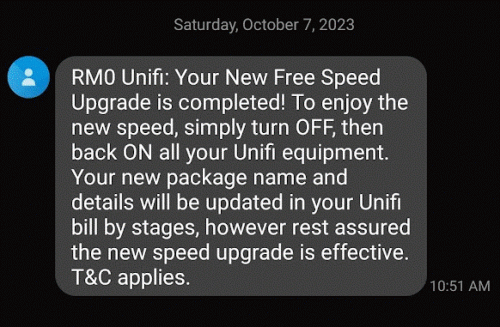 Finally just upgraded from 300Mbps to 500Mbps |
|
|
|
|
|
Oct 7 2023, 11:55 AM
Return to original view | IPv6 | Post
#34
|
|
Senior Member
1,401 posts Joined: Apr 2012
|
QUOTE(dc89 @ Oct 7 2023, 11:52 AM) I am using Asus ROG Rapture GT-AC5300 Tri-band WiFi Gaming Router, bought from Taobao since 2019 - https://www.pcmag.com/reviews/asus-rog-rapture-gt-ac5300 How much did you pay for this? looks like a damn spaceship ROFL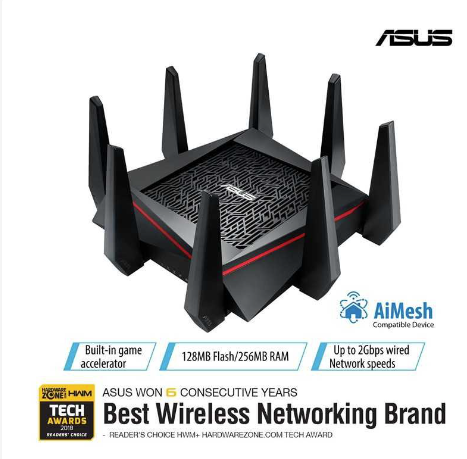 Previously I am on 800mbps (Turbo 2018 upgrade) I just downgraded to SWU 3.0 500mbps because i notice i don't utilize that kind of speed and also would prefer to have lower monthly subscription fees I connect CAT6 LAN cable (15 meter) from this router to my room desktop (2nd floor) pc to get this speed |
|
|
Oct 7 2023, 11:58 AM
Return to original view | IPv6 | Post
#35
|
|
Senior Member
1,401 posts Joined: Apr 2012
|
Well my installation is finished for the new SWU3.0; changed to Fibrehome mesh routers, but kept the modem as the same. Not sure about the Fibrehome but hopefully it is better than my TP-Link AX20 since it is AX3000 compared to my original router's AX1800. My modem is like the original one almost 10 years ago, I guess it's still kicking as technician said no need to change lol.
|
|
|
Oct 7 2023, 12:00 PM
Return to original view | IPv6 | Post
#36
|
|
Senior Member
1,401 posts Joined: Apr 2012
|
QUOTE(dc89 @ Oct 7 2023, 11:57 AM) HAHAHHA it is everyone that came to my house is like WTF is that a spider/spaceship etcc.... Not only is the router damn fat, the number of antenna is two times my router and also two times thicker wtf. Wah RM1.3K, my tp-link ax20 was like what, rm250?bought it for around RM1.3k (taobao direct air ship) duing 4 years back 2019 that time wifi 6 is not launched yet i know that time RRP our local retail outlet all selling above RM2k basically during that time is like asus wifi 5 flagship router like currently flagship is their (ROG Rapture GT-AXE11000) |
|
|
Oct 7 2023, 12:10 PM
Return to original view | IPv6 | Post
#37
|
|
Senior Member
1,401 posts Joined: Apr 2012
|
QUOTE(tzxsean @ Oct 7 2023, 12:08 PM) I don’t get 2x mesh wifi router Huh, shouldn't they be giving you 2x fibrehome RG6 router to mesh together? That is what I got.Only replace my fiberhome router with RG6 fiberhome router This post has been edited by SwarmTroll: Oct 7 2023, 12:10 PM palgo47 liked this post
|
|
|
Oct 7 2023, 04:36 PM
Return to original view | IPv6 | Post
#38
|
|
Senior Member
1,401 posts Joined: Apr 2012
|
Is there anything specific I should set for the mesh router settings (Fiberhome SR1041F)? I only changed DNS for now.
|
|
|
Oct 8 2023, 12:47 AM
Return to original view | IPv6 | Post
#39
|
|
Senior Member
1,401 posts Joined: Apr 2012
|
QUOTE(nyunyu @ Oct 7 2023, 11:27 PM) Is the fiberhome rg6 offered by TM any good? Yesterday changed to SWU 3 300Mbps and today the technician came and give me the mesh, asked not to installed as already have own hardware. Tbh doesn't feel much different than the one I originally used which is TP-Link AX20, then again the TP-Link I had wasn't an expensive model. The second Fiberhome mesh I placed upstairs however does help to increase signal and speed for my room though (furthest from ground floor router). |
|
|
Oct 8 2023, 12:31 PM
Return to original view | IPv6 | Post
#40
|
|
Senior Member
1,401 posts Joined: Apr 2012
|
Does anyone know if the Fiberhome SR1041F (AX3000) has the same features as the DLink DIR-X3060Z (AX3000)? e.g. MUMIMO, OFDMA, etc?
|
|
Topic ClosedOptions
|
| Change to: |  0.5341sec 0.5341sec
 0.29 0.29
 7 queries 7 queries
 GZIP Disabled GZIP Disabled
Time is now: 1st December 2025 - 08:58 PM |
 Quote
Quote