BOUGHT ASUS TUF AX4200 [UPDATED with more test], Bufferbloat Is Still There.Fibre Reading
|
|
 Jul 26 2023, 01:15 AM Jul 26 2023, 01:15 AM
Show posts by this member only | IPv6 | Post
#41
|
 
Senior Member
966 posts Joined: Apr 2016  
|
Seems like mine is worse PowerGadget liked this post
|
|
|
|
|
|
Jul 26 2023, 04:03 PM
|

Junior Member
821 posts Joined: Apr 2012
|
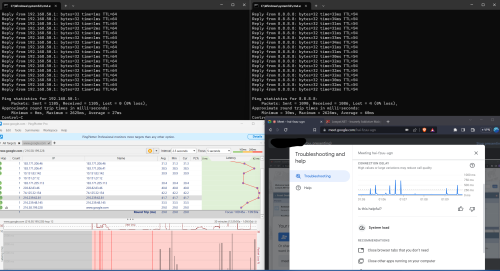
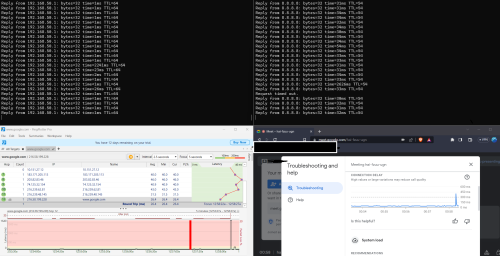
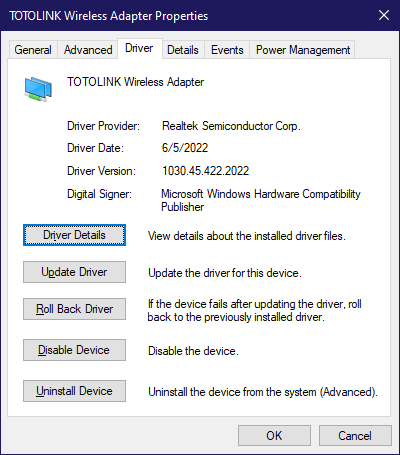
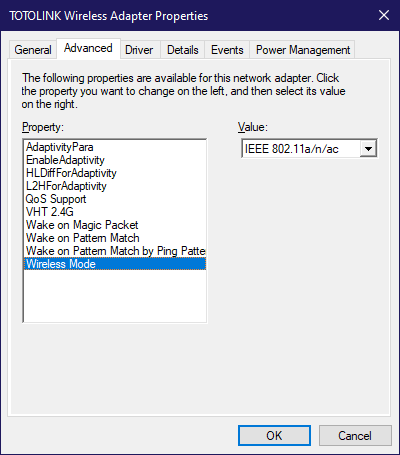
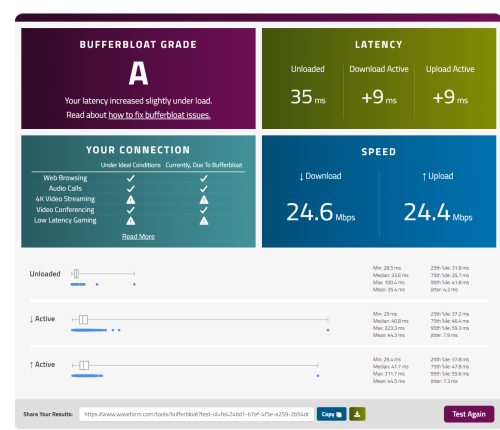
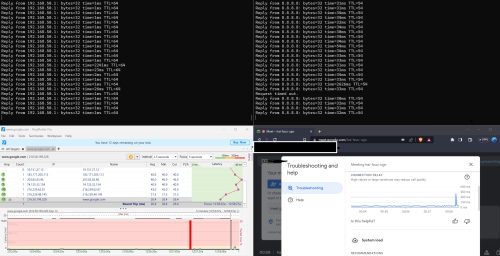
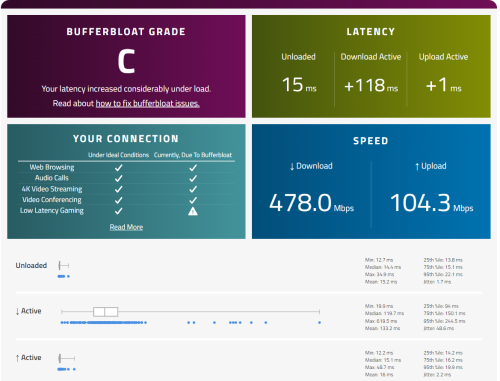
QUOTE(blacktubi @ Jul 22 2023, 08:32 PM) Change your QoS profile to Work From Home and jump on an actual GMeet call to test it Thanks blacktubi for constantly helping out.Bufferbloat is just a test it won’t indicate real world scenario  I changed QoS Profile to Work From Home and capped both my DL/UL to 25Mbps. Currently my bufferbloat issue improved a lot. However, it might still spike once in a while even in LAN cable. Is it normal? QUOTE(Momo33 @ Jul 23 2023, 05:56 PM) means there is nothing wrong with your routers. ! I have high latency due to I located in East Malaysia most probably.this test also say you got high latency . the cause need to know why first !. . my guess you got line problems . try use ping plotter . download the app and run ping to www.google.com use google dns 8.8.8.8 post the pix. / screen snip It's normal for our ping to be on higher side. I tried to do so with my t9uh v1 WiFi, will move my PC downstair to do LAN cable test if I have more time. Thanks a lot for your help Momo33. » Click to show Spoiler - click again to hide... « QUOTE(BenYeeHua @ Jul 24 2023, 02:38 AM) » Click to show Spoiler - click again to hide... « OUTDATED info, kick it to wireless adapter test first.I will put my bet on T9UH wireless adapter Try using a cable direct to the router, then run bufferfloat testing for temporary testing, if solved, it means better buy a Intel ax2xx to replace the USB wifi adapter.  --- https://oemdrivers.com/network-tp-link-archer-t9uh-v2 Based on v2 hardware ver, it is same chipset as mine. Lucky I got similar chipset, based on my testing, this Realtek hardware got a fault on handing 2.4G + 5G, by disabling 2.4G, I solved the background scanning of 2.4G + 5G take too long time, and cut off 80% of transmit time on 5Ghz. Yes, it means when someone is transfering over WiFi on same channel, and you got likely 20+ of SSID around you, you are likely get high latency even when it is unloaded testing of latency. Try install this second latest date driver, but latest branch. (1030.45, 1030.44 got sync time bug which will disconnect when time changing in forward) https://www.station-drivers.com/index.php/e...HQL/lang,en-gb/ For update manually, extract by right click on it, then "Extract All" Copy the path of the extracted folder, then. » Click to show Spoiler - click again to hide... « Then, to fix the latency issues. » Click to show Spoiler - click again to hide... « To ensure complete reboot, shut down the computer, unplug your wifi adapter, plug in back, boot your computer. Try run bufferbloat test again, see the result?  --- And yes, no USB 2.0 extension please, this likely causing issues, unless you using WD-40 to clean up the golden finger/pins QUOTE(wc_how @ Jul 24 2023, 08:11 AM) From my experience, bufferbloat usually caused by ISP rather than router. Thanks BenYeeHua for investing so much of your time in helping me to troubleshooting. My 2 houses are using Citybroadband and Maxis thru Allo backbone, both bufferbloat A/A+. Using cheap/stock ISP router. While my office using some highend router & cisco switch, 800mbps plan, still B/C only. I tried to reinstall the driver but my t9uh is Ver1 instead of Ver2. But I managed to changed the WiFi Mode in Control panel. Along with setting the QoS Profile with 25Mbps for up and down. https://www.waveform.com/tools/bufferbloat?...59-2b54dc0d0d3b This is my latest result as of I am typing this message. This is over the WiFi. I tried to use LAN cable and it deviate by few ms. QUOTE(andrekua2 @ Jul 24 2023, 08:33 AM) Just check your upload speed when doing video conferencing. Thanks andreakua2 for your helping.Anyway, if you max your upload speed, then your internet gonna suffer. Previously on Streamyx 2Mbps and someone phone or pc kept backing up and it totally renders the internet unusable when the upload is maxed out. 30Mbps is totally fine for a couple devices to stream 1080p but once you hit the download/upload button, everything goes to hell. Why not upgrade your subscription instead? I checked the total upload speed during my video conference on my ASUS Router page. It's about 3Mbps upload. My current plan is symmetrical speed which is 30Mbps for up and down. I don't mine to pay more if subscribe to higher speed could solve the problem. I was 300Mbps Unifi user previously but not really utilise the speed. So when moving house, I just opt for the cheapest package to save some bucks. Momo33 liked this post
|
|
|
Jul 26 2023, 04:13 PM
|
|
Junior Member
821 posts Joined: Apr 2012
|
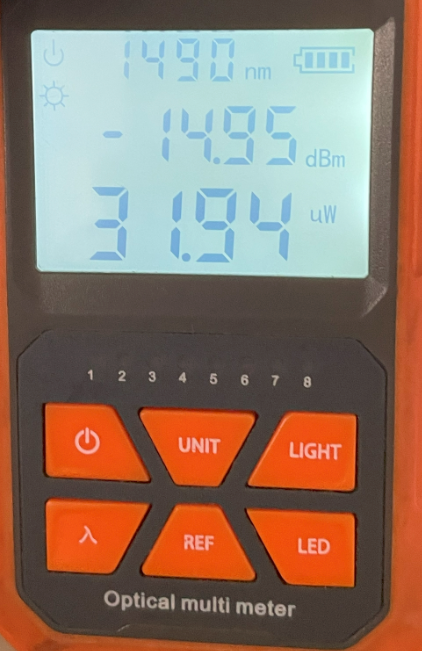
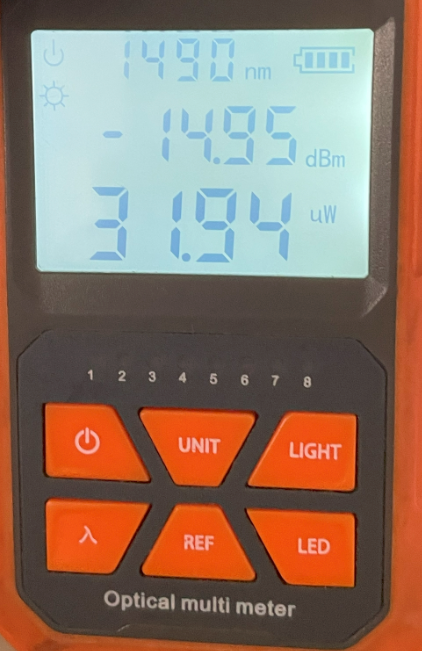
QUOTE(hasmidzul_jojo @ Jul 24 2023, 09:05 AM) This was my test on my sister internet(home internet) to combat bufferbloat. Thanks a lot for your sharing, hasmidzul. You seemed to know in depth about networking. If I want to do something like that, is it need to install OpenWRT firmware? QUOTE(yenchenje @ Jul 24 2023, 10:29 PM) My two cents about your situation, I'm quite certain that your CGNAT region is the one causing bufferbloat issue. Thanks yenchenje for your valuable time to do so many testing and sharing here.Currently I'm in Johor and my CGNAT gateway is 100.88.191.x, public IP is 60.53.x.x and my bufferbloat on LAN/5GHz AX is both A My setup for wired LAN for testing is OPNSense VM - 16 Port PoE Switch - TP-Link 8 Port Switch - My PC For wifi it's OPNSense VM - 16 Port PoE Switch - TP-LINK TL-XAP3007GC I also have shapers on my OPNSense for the 30Mbps connection [attachmentid=11474102] [attachmentid=11474103] [attachmentid=11474104] LAN Wired Bufferbloat Setup (After shaping with OPNSense) https://www.waveform.com/tools/bufferbloat?...38-5c7a4a6efb53 2.4GHz AX test on Galaxy S21 5G [attachmentid=11474105] 5GHz AX test on Galaxy S21 5G [attachmentid=11474106] Strongly recommend you contact TM and complain to see if they can reset any gateway or check on their side, CGNAT users can only get a few no matter how many PPPoE connects/disconnects we do Considering your router currently is already decently high-end, even with QoS it shouldn't be THAT bad As before I shaped my traffic with OPNSense, my bufferbloat can go up to 200-400+ ms when dl/ul, and can shoot up about 100-200 while unloaded I raise a report to Celcom and it's already 1 week+ and they have yet to solve the problem. A technician came over to do some testing and told me "Celcom line memang begini, better subscribe to UniFi) Here's my Fibre reading. » Click to show Spoiler - click again to hide... « Currently after applying QoS capped to 25Mbps for up and down. I managed to get grade A. So does it mean that my isp has problem or it meant to be like that? QUOTE(hasmidzul_jojo @ Jul 25 2023, 09:25 AM) I installed MT7621AT based router/wifi (<rm200) on my cousin home, under cgnat 30Mbps unifi.On default router..the bufferbloat was very bad.After installing this router with AQM in place with proper wireless channel tuning(mainly 5GHz band,only one device on 2.4GHz which is his air purifier), never ever heard him complained.He had 6 devices connected to the router, 5 devices wireless and 1 pc hardwired( online gaming).Of course, when isp have problems ,no AQM can save you from bad bufferbloat. After apply the basic QoS 25Mbps up and down, I seemed like solved the bufferbloat and getting grade A or C (worse) currently.Wondering this indicate my ISP has problem? or it meant to be like that ya? QUOTE(BenYeeHua @ Jul 25 2023, 06:39 PM) Guess op busy working, let him test my workaround(disable 2.4GHz background scanning) on his Realtek Wireless USB adapter first, it is very likely another victim of Realtek. I am sorry for being late to get back to you all with more testing result.  Here is my LAN Test result. » Click to show Spoiler - click again to hide... « |
|
|
Jul 26 2023, 04:14 PM
|
|
Junior Member
821 posts Joined: Apr 2012
|
QUOTE(prokiller1199 @ Jul 26 2023, 01:15 AM) Seems like mine is worse Hi Prokiller, do you use any QoS for this?When I don't use QoS, my ping shoot up to 500-600 or even 1k+. Currently after applied QoS,it seemed more stable than usual |
|
|
Jul 26 2023, 04:19 PM
|
 
Elite
8,416 posts Joined: Jul 2008 
|
QUOTE(PowerGadget @ Jul 26 2023, 04:03 PM) Thanks blacktubi for constantly helping out. Based on your latest test, it looks very healthy now. Glad that my recommendation works for youI changed QoS Profile to Work From Home and capped both my DL/UL to 25Mbps. Currently my bufferbloat issue improved a lot. However, it might still spike once in a while even in LAN cable. Is it normal? https://www.waveform.com/tools/bufferbloat?...59-2b54dc0d0d3b Spike is unavoidable, it's normal and shouldn't be disruptive. BenYeeHua and PowerGadget liked this post
|
|
|
Jul 26 2023, 04:25 PM
|
|
Junior Member
821 posts Joined: Apr 2012
|
QUOTE(blacktubi @ Jul 26 2023, 04:19 PM) Based on your latest test, it looks very healthy now. Glad that my recommendation works for you Really appreciate your help, blacktubi! Spike is unavoidable, it's normal and shouldn't be disruptive.  |
|
|
|
|
|
Jul 26 2023, 04:25 PM
|
|
Junior Member
821 posts Joined: Apr 2012
|
Currently thinking of pulling a cat6a cable from downstair to upstair.
Wondering any good brand of cat6a that you all can introduce? Might need to route it from exterior of house to first floor of the house. Haven't engage with any contractor yet to see whether it is feasible to hack the wall from ground floor to first floor |
|
|
Jul 26 2023, 04:30 PM
|

Senior Member
2,109 posts Joined: Jan 2003 From: Damansara Damai, PJ 
|
QUOTE(PRSXFENG @ Jun 26 2023, 06:42 PM) Why would you replace that router with the old TPLINK C1200 which is known to overheat and have problems? ask ts to put a 80mm/120mm fan and see if spike continue. can buy those plugged into usb type |
|
|
Jul 26 2023, 07:47 PM
|
|
Junior Member
932 posts Joined: Dec 2019
|
QUOTE(PowerGadget @ Jul 26 2023, 04:25 PM) Currently thinking of pulling a cat6a cable from downstair to upstair. Draka is decent, but honestly unless you're getting like cheap random crap from like Aliexpress, all of them should be more or less similar. If u want like really proven good quality cables, try and check if you can buy from infinite cables or even better ubiquiti. Tho for ubiquiti they only sell in spool of 306M for not patching cables, you can try to check on carousell. Wondering any good brand of cat6a that you all can introduce? Might need to route it from exterior of house to first floor of the house. Haven't engage with any contractor yet to see whether it is feasible to hack the wall from ground floor to first floor If you want something that's more cheaper but still decent quality, I'm currently using a super thin cat6a I bought from taobao(Tmall) and it's quite good, super thin so you have to be careful, and currently the longest I got is 2m and still decent. Not sure if their 50M holds up but I like how thin they are and flexible they are. https://detail.tmall.com/item.htm?_u=q3hjjd....5a472e8dpMqa51 
Plan to buy a few more shorter cables to use coupler/patch panel to patch the white/blue LAN cables away soon  , far from the best but already a decent upgrade from the rats nest I had before , far from the best but already a decent upgrade from the rats nest I had before PowerGadget and BenYeeHua liked this post
|
|
|
Jul 26 2023, 08:26 PM
Show posts by this member only | IPv6 | Post
#50
|
|
Senior Member
1,873 posts Joined: Nov 2010
|
QUOTE(PowerGadget @ Jul 26 2023, 04:03 PM) Thanks BenYeeHua for investing so much of your time in helping me to troubleshooting. Yes, much better for WiFi now, as you can see, the unloaded get lower and stable now.I tried to reinstall the driver but my t9uh is Ver1 instead of Ver2. But I managed to changed the WiFi Mode in Control panel. Along with setting the QoS Profile with 25Mbps for up and down. https://www.waveform.com/tools/bufferbloat?...59-2b54dc0d0d3b This is my latest result as of I am typing this message. This is over the WiFi. I tried to use LAN cable and it deviate by few ms. Thanks andreakua2 for your helping. I checked the total upload speed during my video conference on my ASUS Router page. It's about 3Mbps upload. My current plan is symmetrical speed which is 30Mbps for up and down. I don't mine to pay more if subscribe to higher speed could solve the problem. I was 300Mbps Unifi user previously but not really utilise the speed. So when moving house, I just opt for the cheapest package to save some bucks. QUOTE(PowerGadget @ Jul 26 2023, 04:25 PM) Currently thinking of pulling a cat6a cable from downstair to upstair. cat6a is overkill la lol.Wondering any good brand of cat6a that you all can introduce? Might need to route it from exterior of house to first floor of the house. Haven't engage with any contractor yet to see whether it is feasible to hack the wall from ground floor to first floor Cat5e or cat6 enough. Unless you target 10Gbps future proof, then yes, inside wall then put the cat6a better la. QUOTE(yenchenje @ Jul 26 2023, 07:47 PM) Draka is decent, but honestly unless you're getting like cheap random crap from like Aliexpress, all of them should be more or less similar. If u want like really proven good quality cables, try and check if you can buy from infinite cables or even better ubiquiti. Tho for ubiquiti they only sell in spool of 306M for not patching cables, you can try to check on carousell. Yup, if asking 1Gbps, just slim/thin enough.If you want something that's more cheaper but still decent quality, I'm currently using a super thin cat6a I bought from taobao(Tmall) and it's quite good, super thin so you have to be careful, and currently the longest I got is 2m and still decent. Not sure if their 50M holds up but I like how thin they are and flexible they are. https://detail.tmall.com/item.htm?_u=q3hjjd....5a472e8dpMqa51
Plan to buy a few more shorter cables to use coupler/patch panel to patch the white/blue LAN cables away soon , far from the best but already a decent upgrade from the rats nest I had before If asking future proof, better standard ethernet cable. ---- Just thinking, why Google Meet is lagging, is the problem. Can't you lower down the video resolution? And yes, upgrade to higher speed is recommend, as this is for your jobs, not a daily unimportant usage.  So for the listing 1. Upgrade higher speed 2. Change to cable I will say, try another time for Google Meet now, as you solved most of the problem. Then, if it still lagging, it means you are lacking high speed, you need to either 1. Upgrade higher speed Or 2. Lower Google Meet received video resolution And count it as solved, lol. QUOTE Send resolution— The image quality from your device that others see. https://support.google.com/meet/answer/9302...setting-optionsReceive resolution— The image quality that you see from other participants. PowerGadget liked this post
|
|
|
Jul 27 2023, 12:36 AM
Show posts by this member only | IPv6 | Post
#51
|
|
Senior Member
966 posts Joined: Apr 2016
|
QUOTE(PowerGadget @ Jul 26 2023, 04:14 PM) Hi Prokiller, do you use any QoS for this? Nope, using AX86U. I tried QoS last time, it limit my speed. But I think all happens because I use wifi, LAN off QoS also no ping spike.When I don't use QoS, my ping shoot up to 500-600 or even 1k+. Currently after applied QoS,it seemed more stable than usual |
|
|
Jul 27 2023, 01:05 PM
|
|
Senior Member
1,444 posts Joined: Sep 2021
|
QUOTE(yenchenje @ Jul 26 2023, 07:47 PM) Draka is decent, but honestly unless you're getting like cheap random crap from like Aliexpress, all of them should be more or less similar. If u want like really proven good quality cables, try and check if you can buy from infinite cables or even better ubiquiti. Tho for ubiquiti they only sell in spool of 306M for not patching cables, you can try to check on carousell. what brand switch you using i see bigIf you want something that's more cheaper but still decent quality, I'm currently using a super thin cat6a I bought from taobao(Tmall) and it's quite good, super thin so you have to be careful, and currently the longest I got is 2m and still decent. Not sure if their 50M holds up but I like how thin they are and flexible they are. https://detail.tmall.com/item.htm?_u=q3hjjd....5a472e8dpMqa51
Plan to buy a few more shorter cables to use coupler/patch panel to patch the white/blue LAN cables away soon , far from the best but already a decent upgrade from the rats nest I had before |
|
|
Jul 27 2023, 01:10 PM
Show posts by this member only | IPv6 | Post
#53
|
|
Senior Member
1,873 posts Joined: Nov 2010
|
QUOTE(prokiller1199 @ Jul 27 2023, 12:36 AM) Nope, using AX86U. I tried QoS last time, it limit my speed. But I think all happens because I use wifi, LAN off QoS also no ping spike. Qos not required when you are high speed + not using multi-thread download + not p2p.Because fyi, there is TCP window algorithm to ensure low buffer while high speed, good algorithm will keep your latency low and no packet loss, bad will bite all the speed and left nothing. Also, higher speed means lower buffer on your router, thus hardly to facing bufferbloat. And yes, if you bound by your WiFi speed(WiFi>unifi speed), then it will ensure low latency and max WiFi speed. |
|
|
|
|
|
Jul 28 2023, 07:11 AM
|

All Stars
14,299 posts Joined: Jan 2011
|
QUOTE(PowerGadget @ Jun 26 2023, 03:53 PM) » Click to show Spoiler - click again to hide... « ######################### Thanks everybody for your kind contribution. I just bought ASUS TUF-AX4200 but upon testing, same problem still occurs over my connection. May I know what can I do right now? https://www.waveform.com/tools/bufferbloat?...47-f0b878e5b57f This is the result of the latest test. ######################### UPDATE 2 ######################### NEW TEST RESULT » Click to show Spoiler - click again to hide... « NEW LAN TEST MIDNIGHT 12am+ » Click to show Spoiler - click again to hide... « |
|
|
Jul 28 2023, 08:58 AM
|
|
Junior Member
932 posts Joined: Dec 2019
|
QUOTE(tng55 @ Jul 27 2023, 01:05 PM) what brand switch you using i see big Just a Chinese 16 port PoE switch I got from taobao. Used to run a TP-Link 8 port with 4 port PoE but the jump up to 16 also only means that I get 8 + 8, and since my fam is moving soon, might as well get a decked out fully PoE capable switch for future upgradesTho I’m currently looking at another Chinese switch from AliExpress, 8x10GBe port with PoE for about 300USD |
|
|
Jul 28 2023, 11:27 AM
Show posts by this member only | IPv6 | Post
#56
|
|
Senior Member
1,873 posts Joined: Nov 2010
|
QUOTE(westlife @ Jul 28 2023, 07:11 AM) What u need is to upgrade ur internet speed instead of buying a better wifi router for such low speed internet plan. Unless he need to record down every Google meet, just downgrade the video resolution also works.Not like a 1080p monitor need to saw each face with 1080p quality lol. |
|
|
Jul 29 2023, 01:40 AM
|
|
Senior Member
1,444 posts Joined: Sep 2021
|
QUOTE(yenchenje @ Jul 28 2023, 08:58 AM) Just a Chinese 16 port PoE switch I got from taobao. Used to run a TP-Link 8 port with 4 port PoE but the jump up to 16 also only means that I get 8 + 8, and since my fam is moving soon, might as well get a decked out fully PoE capable switch for future upgrades i think Chinese switch is no good maybe poor quality i doubt Tho I’m currently looking at another Chinese switch from AliExpress, 8x10GBe port with PoE for about 300USD my office upstairs hp switch 16 port 1GBPS almost full and i still really need 48 Port imported future proof because downstairs is shop counter pc 2x and weight machine 3x and cctv and 16 port was full so i connect weight machine router almost full crazy will add too that why 48 Port really need Good quality without problem hp switch sometime unstable its poor quality |
|
|
Jul 30 2023, 01:16 AM
|
|
Junior Member
932 posts Joined: Dec 2019
|
QUOTE(tng55 @ Jul 29 2023, 01:40 AM) i think Chinese switch is no good maybe poor quality i doubt So far so good still for what I'm using it for, 2x PoE devices, 5x normal GbE. And as long as it works and holds up it's fine. A bit lighter than a 16 port switch but I haven't encountered any issues. I understand the need for actual branded/high quality switches for like an office space or w/e but for homelab, this is perfectly reasonable.my office upstairs hp switch 16 port 1GBPS almost full and i still really need 48 Port imported future proof because downstairs is shop counter pc 2x and weight machine 3x and cctv and 16 port was full so i connect weight machine router almost full crazy will add too that why 48 Port really need Good quality without problem hp switch sometime unstable its poor quality 220MYR/65$ USD from Taobao shipped for a 16 port GbE PoE switch with 2x uplink and 1 SFP port  |
|
|
Jul 30 2023, 01:41 AM
|
|
Senior Member
1,444 posts Joined: Sep 2021
|
QUOTE(yenchenje @ Jul 30 2023, 01:16 AM) So far so good still for what I'm using it for, 2x PoE devices, 5x normal GbE. And as long as it works and holds up it's fine. A bit lighter than a 16 port switch but I haven't encountered any issues. I understand the need for actual branded/high quality switches for like an office space or w/e but for homelab, this is perfectly reasonable. yah need for actual branded/high quality switches for like an office space220MYR/65$ USD from Taobao shipped for a 16 port GbE PoE switch with 2x uplink and 1 SFP port because staying 24h7d imported due CCTV running 24h7d very imported hmm you is home usage lucky you POE is best for WIFI ACCESS POINT |
| Change to: |  0.0154sec 0.0154sec
 0.49 0.49
 6 queries 6 queries
 GZIP Disabled GZIP Disabled
Time is now: 15th December 2025 - 04:54 AM |
 Quote
Quote