Welcome Guest ( Log In | Register )

3 Pages  1 2 3 >Bottom

Outline · [ Standard ] · Linear+

 BOUGHT ASUS TUF AX4200 [UPDATED with more test], Bufferbloat Is Still There.Fibre Reading

views
     
TSPowerGadget
post Jun 26 2023, 03:53 PM, updated 3y ago

Enthusiast
*****
Junior Member
821 posts

Joined: Apr 2012
» Click to show Spoiler - click again to hide... «

#########################
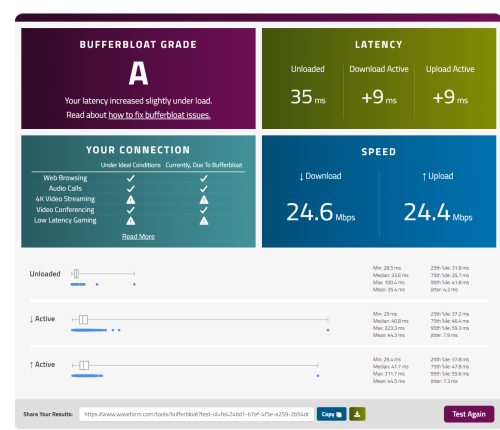
Thanks everybody for your kind contribution. I just bought ASUS TUF-AX4200 but upon testing, same problem still occurs over my connection. May I know what can I do right now?

https://www.waveform.com/tools/bufferbloat?...47-f0b878e5b57f
This is the result of the latest test.

######################### UPDATE 2 #########################
NEW TEST RESULT
» Click to show Spoiler - click again to hide... «


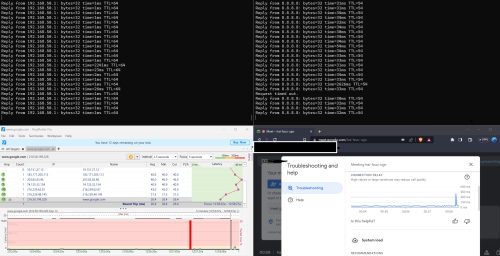
NEW LAN TEST MIDNIGHT 12am+
» Click to show Spoiler - click again to hide... «


This post has been edited by PowerGadget: Jul 26 2023, 04:18 PM
go626201
post Jun 26 2023, 04:02 PM

Regular
******
Senior Member
1,882 posts

Joined: Sep 2017
QUOTE(PowerGadget @ Jun 26 2023, 03:53 PM)
Hi all, I have subscribed to Celcom Home Fibre 30 Mbps that tapped into Unifi infrastructure. They gave me devices as below:

Modem
ZTE GPON ONT
Model : ZXHN F620
Router
Shenzen Skyworth
RN685

I replaced the router with my previous TP LINK Archer C1200

I connect to the router by using T9UH wireless adapter. Wondering how do I know whether my router is the main problem or is their modem or fibre connection have problem?

My google meeting keep spike to 300-400ms and average at 30-40ms which is normal for my place as I live in East Malaysia.

Thanks everyone in advanced
*
ping your router ip and google dns ip(8.8.8.8) when your are facing issue.
And if the result is normal,then the problem normally not at your end or not within your home.

But if the latency to your router ip is abnormal,then u might need to check your network.
PRSXFENG
post Jun 26 2023, 06:42 PM

Look at all my stars!!
*******
Senior Member
2,611 posts

Joined: Nov 2020


QUOTE(PowerGadget @ Jun 26 2023, 03:53 PM)
Hi all, I have subscribed to Celcom Home Fibre 30 Mbps that tapped into Unifi infrastructure. They gave me devices as below:

Modem
ZTE GPON ONT
Model : ZXHN F620
Router
Shenzen Skyworth
RN685

I replaced the router with my previous TP LINK Archer C1200

I connect to the router by using T9UH wireless adapter. Wondering how do I know whether my router is the main problem or is their modem or fibre connection have problem?

My google meeting keep spike to 300-400ms and average at 30-40ms which is normal for my place as I live in East Malaysia.

Thanks everyone in advanced
*
Why would you replace that router with the old TPLINK C1200 which is known to overheat and have problems?
OlgaC4
post Jun 26 2023, 07:19 PM

Look at all my stars!!
*******
Senior Member
5,296 posts

Joined: Nov 2006
QUOTE(PowerGadget @ Jun 26 2023, 03:53 PM)
Hi all, I have subscribed to Celcom Home Fibre 30 Mbps that tapped into Unifi infrastructure. They gave me devices as below:

Modem
ZTE GPON ONT
Model : ZXHN F620
Router
Shenzen Skyworth
RN685

I replaced the router with my previous TP LINK Archer C1200

I connect to the router by using T9UH wireless adapter. Wondering how do I know whether my router is the main problem or is their modem or fibre connection have problem?

My google meeting keep spike to 300-400ms and average at 30-40ms which is normal for my place as I live in East Malaysia.

Thanks everyone in advanced
*
Spike are usually overheat related
TSPowerGadget
post Jul 8 2023, 03:45 PM

Enthusiast
*****
Junior Member
821 posts

Joined: Apr 2012
QUOTE(go626201 @ Jun 26 2023, 04:02 PM)
ping your router ip and google dns ip(8.8.8.8) when your are facing issue.
And if the result is normal,then the problem normally not at your end or not within your home.

But if the latency to your router ip is abnormal,then u might need to check your network.
*
QUOTE(PRSXFENG @ Jun 26 2023, 06:42 PM)
Why would you replace that router with the old TPLINK C1200 which is known to overheat and have problems?
*
QUOTE(OlgaC4 @ Jun 26 2023, 07:19 PM)
Spike  are usually overheat related
*
I am thinking of upgrading router as currently when I ping my router as per recommendation, the ping keep spike. And whenever it spikes, my google meet experience severe lagging.

I replaced the original router with my current one is because the one provided also spiking even worse than Archer C1200.

Here's are some choices that I had narrowed down.

1. TP-Link AX72 (RM360 after cashback)
- good processor, cheap and good range of wifi
2. TP-Link AX11000 (RM760+ after cashback)
- beast but worry it's too outdated
3. Asus TUF AX4200 (RM550+ after cashback)
- Always heard asus is overprice and review saying 2.4ghz rather in weak side in range.

Wondering what would suit me the best for double storey terrace house that has land size about 22 x 85 and built up 22 x 35.

Appreciate all of your inputs and thanks in advanced.

MyProLife
post Jul 8 2023, 03:59 PM

I bully wumao & MPKL
*******
Senior Member
2,075 posts

Joined: Sep 2021
From: nowhere

QUOTE(PowerGadget @ Jul 8 2023, 03:45 PM)
I am thinking of upgrading router as currently when I ping my router as per recommendation, the ping keep spike. And whenever it spikes, my google meet experience severe lagging.

I replaced the original router with my current one is because the one provided also spiking even worse than Archer C1200.

Here's are some choices that I had narrowed down.

1. TP-Link AX72 (RM360 after cashback)
- good processor, cheap and good range of wifi
2. TP-Link AX11000 (RM760+ after cashback)
- beast but worry it's too outdated
3. Asus TUF AX4200 (RM550+ after cashback)
- Always heard asus is overprice and review saying 2.4ghz rather in weak side in range.

Wondering what would suit me the best for double storey terrace house that has land size about 22 x 85 and built up 22 x 35.

Appreciate all of your inputs and thanks in advanced.
*
unless you having plan to upgrade the plan speed later, AX72 is more than enough
OlgaC4
post Jul 8 2023, 04:15 PM

Look at all my stars!!
*******
Senior Member
5,296 posts

Joined: Nov 2006
QUOTE(MyProLife @ Jul 8 2023, 03:59 PM)
unless you having plan to upgrade the plan speed later, AX72 is more than enough
*
I concur AX72 is more then enough but AX73 for future
PRSXFENG
post Jul 8 2023, 11:40 PM

Look at all my stars!!
*******
Senior Member
2,611 posts

Joined: Nov 2020


Pro for Asus would be very long firmware support
(you get what you pay for)
TPLink... Consider AX73
TSPowerGadget
post Jul 9 2023, 12:08 AM

Enthusiast
*****
Junior Member
821 posts

Joined: Apr 2012
QUOTE(MyProLife @ Jul 8 2023, 03:59 PM)
unless you having plan to upgrade the plan speed later, AX72 is more than enough
*
QUOTE(OlgaC4 @ Jul 8 2023, 04:15 PM)
I concur AX72 is more then enough but AX73 for future
*
Thanks for both of your help. I don’t think I would upgrade in near future. For sure won’t be upgrading in these two years though. So I guess AX72 would be a good buy then at RM360.
TSPowerGadget
post Jul 9 2023, 12:10 AM

Enthusiast
*****
Junior Member
821 posts

Joined: Apr 2012
QUOTE(PRSXFENG @ Jul 8 2023, 11:40 PM)
Pro for Asus would be very long firmware support
(you get what you pay for)
TPLink... Consider AX73
*
Thanks for pointing that out! I see someone also mentioned about tp link very infrequent in updating their firmware as compare to ASUS.

Not sure whether it worth almost the double for AX4200 @ RM566 which is RM206 more expensive than the AX72.


tng55
post Jul 9 2023, 01:24 AM

Regular
******
Senior Member
1,445 posts

Joined: Sep 2021


get latest AX73 future
AX72 IS too old
blacktubi
post Jul 9 2023, 10:51 PM

-
Group Icon
Elite
8,420 posts

Joined: Jul 2008

ASUS TUF-AX4200 for a simple reason. The 2.0GHz Quad Core CPU.

It's a huge difference in overall smoothness. Loaded latency / bufferbloat is more important than raw speed these days.
TSPowerGadget
post Jul 10 2023, 01:33 PM

Enthusiast
*****
Junior Member
821 posts

Joined: Apr 2012
QUOTE(tng55 @ Jul 9 2023, 01:24 AM)
get latest AX73 future
AX72 IS too old
*
Thanks for the info, because previously I thought they were almost identical and just different in processor. AX72 has dual core Qualcomn and AX73 has triple core Broadcom.

Will take note on the age of router.

QUOTE(blacktubi @ Jul 9 2023, 10:51 PM)
ASUS TUF-AX4200 for a simple reason. The 2.0GHz Quad Core CPU.

It's a huge difference in overall smoothness. Loaded latency / bufferbloat is more important than raw speed these days.
*
Thanks for your reply, blacktubi.

I see the router is using MediaTek and some peoples say MediaTek is rather bad. Not sure how true it is. Just a little bit skeptical and worry get a bad apple after all.

Do you have any specific router in mind that is good and stay under 1k budget?
blacktubi
post Jul 10 2023, 10:01 PM

-
Group Icon
Elite
8,420 posts

Joined: Jul 2008

QUOTE(PowerGadget @ Jul 10 2023, 01:33 PM)
Thanks for the info, because previously I thought they were almost identical and just different in processor. AX72 has dual core Qualcomn and AX73 has triple core Broadcom.

Will take note on the age of router.
Thanks for your reply, blacktubi.

I see the router is using MediaTek and some peoples say MediaTek is rather bad. Not sure how true it is. Just a little bit skeptical and worry get  a bad apple after all.

Do you have any specific router in mind that is good and stay under 1k budget?
*
Since you stay in East Malaysia, you probably have a bigger house.

I will suggest getting a mesh Wi-Fi system. By doing so, you can get more 5GHz coverage for your entire property.

2.4GHz is the culprit of low speed and high ping.
TSPowerGadget
post Jul 10 2023, 11:21 PM

Enthusiast
*****
Junior Member
821 posts

Joined: Apr 2012
QUOTE(blacktubi @ Jul 10 2023, 10:01 PM)
Since you stay in East Malaysia, you probably have a bigger house.

I will suggest getting a mesh Wi-Fi system. By doing so, you can get more 5GHz coverage for your entire property.

2.4GHz is the culprit of low speed and high ping.
*
My built up is rather small though, it’s just a normal double storey terrace about 22x35ish.

Any specific mesh system can you recommend that below 1k?
Momo33
post Jul 16 2023, 10:15 AM

Regular
******
Senior Member
1,448 posts

Joined: Oct 2019
QUOTE(PowerGadget @ Jul 8 2023, 04:45 PM)


Here's are some choices that I had narrowed down.

1. TP-Link AX72 (RM360 after cashback)
- good processor, cheap and good range of wifi
2. TP-Link AX11000 (RM760+ after cashback)
- beast but worry it's too outdated
3. Asus TUF AX4200 (RM550+ after cashback)
- Always heard asus is overprice and review saying 2.4ghz rather in weak side in range.

Wondering what would suit me the best for double storey terrace house that has land size about 22 x 85 and built up 22 x 35.

Appreciate all of your inputs and thanks in advanced.
*
the AX72 can easily provide coverage to your DS house/all rooms . but place it in center of house. high up between ground and first floor.
i have check the rooms signal coverage and easily get -60dBm in rooms . use wifi analyser .


TSPowerGadget
post Jul 16 2023, 09:55 PM

Enthusiast
*****
Junior Member
821 posts

Joined: Apr 2012
QUOTE(Momo33 @ Jul 16 2023, 10:15 AM)
the AX72  can easily provide coverage to your DS house/all rooms  .  but place it  in center of house. high up between ground and first floor.
i have check the rooms signal coverage  and easily get -60dBm  in rooms .  use wifi analyser .
*
Thanks for your assurance. Was thinking of whether being cheap out here to get the ax72 as well since my speed is only 30Mbps,

Yours is attached on the wall or ceiling?
blacktubi
post Jul 16 2023, 11:08 PM

-
Group Icon
Elite
8,420 posts

Joined: Jul 2008

QUOTE(PowerGadget @ Jul 16 2023, 09:57 PM)
Hello guys, I have a 30Mbps Celcom plan and tapped into Unifi infrastructure.

Recently I try buffer-bloat test and get an F. I found out that my upload ping is about 500-600ms when loaded. Ethernet cable is used for this test.

Is it due to my router Archer C1200 or it’s Celcom fault? Can I report fault or report to MCMC?
*
MCMC don't care about bufferbloat.

I believe C1200 comes with QoS feature.

Try to set enable the QoS function and limit download speed to 27Mbps. Do the same for the upload speed and limit it to the 90% of actual speed.

Should be able to solve your bufferbloat issue. If still not solved, you need to change a router.
Momo33
post Jul 17 2023, 10:25 AM

Regular
******
Senior Member
1,448 posts

Joined: Oct 2019
QUOTE(PowerGadget @ Jul 16 2023, 10:55 PM)
Thanks for your assurance. Was thinking of whether being cheap out here to get the ax72 as well since my speed is only 30Mbps,

Yours is attached on the wall or ceiling?
*
so happen i have a tall glass showcase in center hall nearly 6 feet. place on top.
anywhere in center of house , midway between ground and 1 st floor is fine. ensure no obstruction to the antennas is best.

there are 6 antenna . 2 x 2.4G and 4x 5G
pointing /antenna angle placement helps if you want certain room have stronger signal.
counting from left /looking from front of router, antenna no 1 & 3 are for 2.4G

the only difference between AX72/73 is the cpu used .
and AX72 was release 5 months after AX73 . year 2021
there was 1 update so far.

my 5 year old router was a Asus AC1300 , now keep as standby spare.
the asus wifi signals/ -70 dBm at 1st floor are weaker cos of walls but still ok .

use wifi analyzer APP for android phone
get from google store to measure the wifi signal strength in the rooms.


TSPowerGadget
post Jul 19 2023, 05:08 AM

Enthusiast
*****
Junior Member
821 posts

Joined: Apr 2012
QUOTE(Momo33 @ Jul 17 2023, 10:25 AM)
so happen i have a tall glass showcase in center hall  nearly 6 feet. place on top.
anywhere in center of house , midway between ground and 1 st floor is fine. ensure no obstruction to the antennas is best.

there are 6 antenna .  2 x 2.4G  and 4x 5G
pointing /antenna angle placement helps if you want certain room have stronger signal.
counting from left /looking from front of router, antenna  no 1 & 3  are for 2.4G

the only difference between AX72/73  is the cpu used .
and AX72 was release 5 months after AX73 .  year  2021
there was 1 update so far.

my 5 year old router was a Asus AC1300 , now keep as  standby spare.
the asus wifi signals/ -70 dBm  at 1st floor  are weaker cos of walls  but still ok .

use wifi analyzer APP for android phone
get from google store  to measure the wifi signal strength  in the rooms.
*
Thanks for your insight Momo33, so coincidence that somehow I also have something like a cabinet showcase in the middle of my house that is about 6 feet tall as well. I think I would just place all my router and smart hub to that place then.

I'll try to get a new router soon and see whether spreading out the antenna and changing the position able to solve the problem. Else might just spend a little bit extra to get someone to pull the cable all the way from ground floor to first floor. Not sure how much is the damage to pull a cable and whether it is feasible to do so as currently everything is sealed up.

Thanks for the quick tips once again and will be keep that in mind for using wifi analyzer APP

3 Pages  1 2 3 >Top
 

Change to:
| Lo-Fi Version
0.0276sec    0.65    6 queries    GZIP Disabled
Time is now: 17th December 2025 - 09:16 AM