Welcome Guest ( Log In | Register )

Outline · [ Standard ] · Linear+

 BOUGHT ASUS TUF AX4200 [UPDATED with more test], Bufferbloat Is Still There.Fibre Reading

views
     
TSPowerGadget
post Jun 26 2023, 03:53 PM, updated 3y ago

Enthusiast
*****
Junior Member
821 posts

Joined: Apr 2012
» Click to show Spoiler - click again to hide... «

#########################
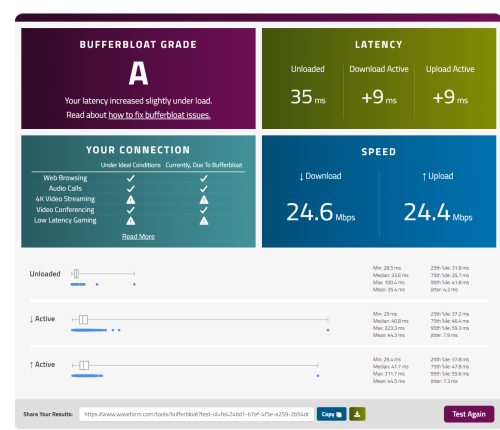
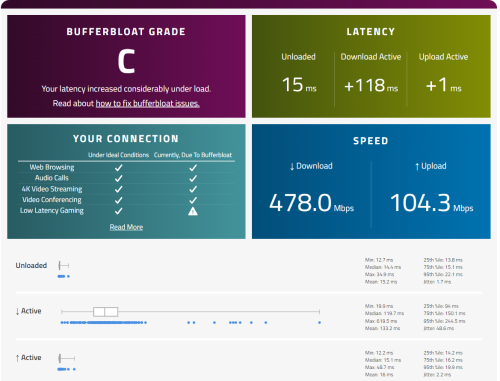
Thanks everybody for your kind contribution. I just bought ASUS TUF-AX4200 but upon testing, same problem still occurs over my connection. May I know what can I do right now?

https://www.waveform.com/tools/bufferbloat?...47-f0b878e5b57f
This is the result of the latest test.

######################### UPDATE 2 #########################
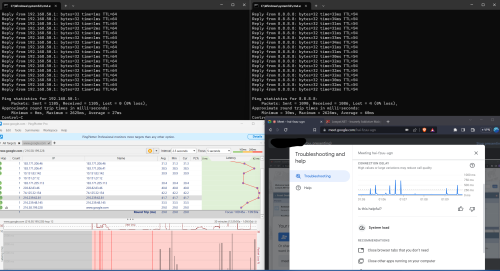
NEW TEST RESULT
» Click to show Spoiler - click again to hide... «


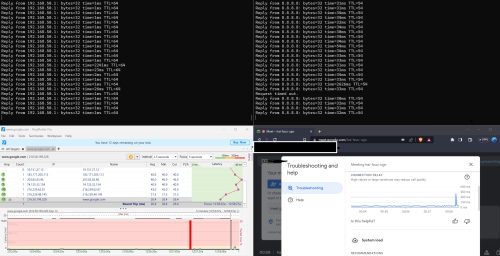
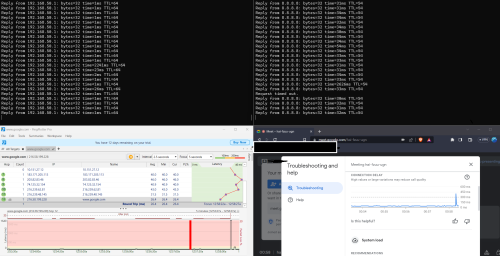
NEW LAN TEST MIDNIGHT 12am+
» Click to show Spoiler - click again to hide... «


This post has been edited by PowerGadget: Jul 26 2023, 04:18 PM
TSPowerGadget
post Jul 8 2023, 03:45 PM

Enthusiast
*****
Junior Member
821 posts

Joined: Apr 2012
QUOTE(go626201 @ Jun 26 2023, 04:02 PM)
ping your router ip and google dns ip(8.8.8.8) when your are facing issue.
And if the result is normal,then the problem normally not at your end or not within your home.

But if the latency to your router ip is abnormal,then u might need to check your network.
*
QUOTE(PRSXFENG @ Jun 26 2023, 06:42 PM)
Why would you replace that router with the old TPLINK C1200 which is known to overheat and have problems?
*
QUOTE(OlgaC4 @ Jun 26 2023, 07:19 PM)
Spike  are usually overheat related
*
I am thinking of upgrading router as currently when I ping my router as per recommendation, the ping keep spike. And whenever it spikes, my google meet experience severe lagging.

I replaced the original router with my current one is because the one provided also spiking even worse than Archer C1200.

Here's are some choices that I had narrowed down.

1. TP-Link AX72 (RM360 after cashback)
- good processor, cheap and good range of wifi
2. TP-Link AX11000 (RM760+ after cashback)
- beast but worry it's too outdated
3. Asus TUF AX4200 (RM550+ after cashback)
- Always heard asus is overprice and review saying 2.4ghz rather in weak side in range.

Wondering what would suit me the best for double storey terrace house that has land size about 22 x 85 and built up 22 x 35.

Appreciate all of your inputs and thanks in advanced.
TSPowerGadget
post Jul 9 2023, 12:08 AM

Enthusiast
*****
Junior Member
821 posts

Joined: Apr 2012
QUOTE(MyProLife @ Jul 8 2023, 03:59 PM)
unless you having plan to upgrade the plan speed later, AX72 is more than enough
*
QUOTE(OlgaC4 @ Jul 8 2023, 04:15 PM)
I concur AX72 is more then enough but AX73 for future
*
Thanks for both of your help. I don’t think I would upgrade in near future. For sure won’t be upgrading in these two years though. So I guess AX72 would be a good buy then at RM360.
TSPowerGadget
post Jul 9 2023, 12:10 AM

Enthusiast
*****
Junior Member
821 posts

Joined: Apr 2012
QUOTE(PRSXFENG @ Jul 8 2023, 11:40 PM)
Pro for Asus would be very long firmware support
(you get what you pay for)
TPLink... Consider AX73
*
Thanks for pointing that out! I see someone also mentioned about tp link very infrequent in updating their firmware as compare to ASUS.

Not sure whether it worth almost the double for AX4200 @ RM566 which is RM206 more expensive than the AX72.


TSPowerGadget
post Jul 10 2023, 01:33 PM

Enthusiast
*****
Junior Member
821 posts

Joined: Apr 2012
QUOTE(tng55 @ Jul 9 2023, 01:24 AM)
get latest AX73 future
AX72 IS too old
*
Thanks for the info, because previously I thought they were almost identical and just different in processor. AX72 has dual core Qualcomn and AX73 has triple core Broadcom.

Will take note on the age of router.

QUOTE(blacktubi @ Jul 9 2023, 10:51 PM)
ASUS TUF-AX4200 for a simple reason. The 2.0GHz Quad Core CPU.

It's a huge difference in overall smoothness. Loaded latency / bufferbloat is more important than raw speed these days.
*
Thanks for your reply, blacktubi.

I see the router is using MediaTek and some peoples say MediaTek is rather bad. Not sure how true it is. Just a little bit skeptical and worry get a bad apple after all.

Do you have any specific router in mind that is good and stay under 1k budget?
TSPowerGadget
post Jul 10 2023, 11:21 PM

Enthusiast
*****
Junior Member
821 posts

Joined: Apr 2012
QUOTE(blacktubi @ Jul 10 2023, 10:01 PM)
Since you stay in East Malaysia, you probably have a bigger house.

I will suggest getting a mesh Wi-Fi system. By doing so, you can get more 5GHz coverage for your entire property.

2.4GHz is the culprit of low speed and high ping.
*
My built up is rather small though, it’s just a normal double storey terrace about 22x35ish.

Any specific mesh system can you recommend that below 1k?
TSPowerGadget
post Jul 16 2023, 09:55 PM

Enthusiast
*****
Junior Member
821 posts

Joined: Apr 2012
QUOTE(Momo33 @ Jul 16 2023, 10:15 AM)
the AX72  can easily provide coverage to your DS house/all rooms  .  but place it  in center of house. high up between ground and first floor.
i have check the rooms signal coverage  and easily get -60dBm  in rooms .  use wifi analyser .
*
Thanks for your assurance. Was thinking of whether being cheap out here to get the ax72 as well since my speed is only 30Mbps,

Yours is attached on the wall or ceiling?
TSPowerGadget
post Jul 19 2023, 05:08 AM

Enthusiast
*****
Junior Member
821 posts

Joined: Apr 2012
QUOTE(Momo33 @ Jul 17 2023, 10:25 AM)
so happen i have a tall glass showcase in center hall  nearly 6 feet. place on top.
anywhere in center of house , midway between ground and 1 st floor is fine. ensure no obstruction to the antennas is best.

there are 6 antenna .  2 x 2.4G  and 4x 5G
pointing /antenna angle placement helps if you want certain room have stronger signal.
counting from left /looking from front of router, antenna  no 1 & 3  are for 2.4G

the only difference between AX72/73  is the cpu used .
and AX72 was release 5 months after AX73 .  year  2021
there was 1 update so far.

my 5 year old router was a Asus AC1300 , now keep as  standby spare.
the asus wifi signals/ -70 dBm  at 1st floor  are weaker cos of walls  but still ok .

use wifi analyzer APP for android phone
get from google store  to measure the wifi signal strength  in the rooms.
*
Thanks for your insight Momo33, so coincidence that somehow I also have something like a cabinet showcase in the middle of my house that is about 6 feet tall as well. I think I would just place all my router and smart hub to that place then.

I'll try to get a new router soon and see whether spreading out the antenna and changing the position able to solve the problem. Else might just spend a little bit extra to get someone to pull the cable all the way from ground floor to first floor. Not sure how much is the damage to pull a cable and whether it is feasible to do so as currently everything is sealed up.

Thanks for the quick tips once again and will be keep that in mind for using wifi analyzer APP
TSPowerGadget
post Jul 19 2023, 05:08 AM

Enthusiast
*****
Junior Member
821 posts

Joined: Apr 2012
QUOTE(blacktubi @ Jul 16 2023, 11:08 PM)
MCMC don't care about bufferbloat.

I believe C1200 comes with QoS feature.

Try to set enable the QoS function and limit download speed to 27Mbps. Do the same for the upload speed and limit it to the 90% of actual speed.

Should be able to solve your bufferbloat issue. If still not solved, you need to change a router.
*
Thanks for your reply blacktubi.

But this bufferbloat/high ping problem affected my normal routine like Google Meet or Zoom call which the other side has problem to hear me due to my high latency.

I don't mind to pay more to fix the problem at the moment as it really bother my life as of now.

Thanks for the quick tips and by applying the QoS function on my router, I managed to lower down my download latency to +0ms when load but upload is still freaking high at +600ms. Wondering this indicate the fault at unifi/celcom side or it's all due to my router ya?

Here's my result :
https://www.waveform.com/tools/bufferbloat?...7e-4e8a57715ce5

Thanks in advanced
TSPowerGadget
post Jul 19 2023, 05:52 AM

Enthusiast
*****
Junior Member
821 posts

Joined: Apr 2012
QUOTE(mystvearn @ Jul 19 2023, 05:39 AM)
I bought ax72 to replace my ax10 as the coverage did nothing covered all. After 1 week, returnees its for ax73. Never looked back at since. Before was using tm router with 2 tp link mesh. Then replaced with ax10 no more mesh. Overage of my house not full, ax72 didi fiver all, but performance drop the further room. Changes a73. Great. WiFi 6 everywhere.

I just went down this list vs price. Find something affordable at good penetration.
https://networkshardware.com/routers/review...nk-archer-ax73/

After ax10 I can play steam link properly. With ax 73 can play wireless to my phone/laptop from my wired pc. No lag.
*
Thanks mystvearn! It really help me a lot by using your real life experience and the link attached with some solid data to be compared there.

Was about to pull a trigger to buy either one of this router and hopefully it able to solve my problem.

Do you think ASUS TUF-AX4200 is a good choice as well considering a newer hardware and long term support in term of their firmware?


TSPowerGadget
post Jul 19 2023, 12:24 PM

Enthusiast
*****
Junior Member
821 posts

Joined: Apr 2012
QUOTE(mystvearn @ Jul 19 2023, 08:50 AM)
Sorry for the typo errors previously. Autocorrect on phone. I actually did considered that but reviews say it doesn't not penetrate that much. Asus router is more towards gaming but when comparing price to tp link for the same class, tp link is more value for money. I did consider the Asus ax86u, but I cannot justify the price and great coverage. I am interested in the parental control, but by the time I need to implement for the kids, maybe it will be Wi-Fi 8 or 9 standard. Also I have opendns for parental controls, if I need it. The ax86u may have greater coverage, but then I don't want it to go into neighbours house, as I then may need to hide SSID to prevent hacking. Also, I need only 4 wired ports maximum for my case, nothing higher. Cctv, pc and NAS. The extra port if I need to wire up my laptop in bedroom to the NAS..

I did a map of the WiFi reception for my entire house to see where the heat place to place the order Wi-Fi router and a 10 M Ethernet cable. I'm satisfied that it covers the perimeter of my house including the tapo cameras outside. Anything higher than AX73 will give me diminishing returns. 2.5gb or 10gb is no use when my unifi is 100mbs. And I backup work and upload data a lot. So any higher broadband package will still give 50 mb upload.

What I will say is that tp link deco mesh is not really that good to expensive for what it is. For the price of a high end mesh, you can get a very high end router without latency problems for gaming. Previously, I bought a pair of E4 deco. I have about 27 connected device, including 2 Wi-Fi cctv, Ethernet cctv, iot, NAS, wired connected gaming pc. The mesh got fried when I do sustain up/dl from pc to NAS. Either dropping connection or connected wifi devices drop and unable to connect again. Like restoring files. My pc can do 2.5gb, nas can do 1gb,fine with me. Wi-Fi speed almost like wired in same room. Furthers room, I get about 90% speed. Of course I enable QoS for both my gaming, hp and laptop. I do steam link as kids watch cartoons on the TV and my pc is setup like a console with steam big picture. One button on off. Exclusively controlled with xbox wireless controllers. If I need to play games away for the TV, I just turn on the pc in the background and go to my laptop/phone to play. I played about 40% uncharted 4 on my phone and laptop.

Using uncharted 4 and steam big picture, Gaming on mesh is unbearable. Gaming on ax10 is ok, if in the same room, if you get the WiFi 6 on the phone. The moment I go to different rooms, I drop the 5ghz for the barley reachable 2.4ghz connection. I only have 1 wifi 6e tablet, but that is my wife's. On my Wi-Fi 6 phone, I can game ok.

I am lucky I started with tp link ax10 and I can see where the problems are. I keep that as a spare as I also fried my unifi dlink wifi 6 router..also due to the NAS transfer. Also, it takes forever for a device to connect WiFi with to the unifi.
*
Thank you so much for your time and efforts in sharing your experience with me so that I won't need to go through that much of troubleshooting. notworthy.gif

Haha my case would be same as yours, my kid is still very young and by the time I need parental control, it might be Wi-Fi 8 or 9 or the current router already out of service.

It's rather true that AX73 give the most bang for buck considering the Wi-Fi penetration range with good speed.

I won't be gaming and don't have as many devices as yours nor as high tech as your house but will be using primarily for Google Meet or Zoom Call as my works allow me to WFH. So I think if AX73 can serve you well, perhaps could serve me good as well.

Do you hack your wall just for ethernet cables?

QUOTE(blacktubi @ Jul 19 2023, 09:51 AM)
Did you limit your upload speed to 90% of your subscribed speed? Still seeing 28.3Mbps on the result. Perhaps you can try to force it lower to 25Mbps.

Bufferbloat is caused by poor congestion management which is generally handled by the router. You can Google for more details. It will be worsen by slow subscribed Internet speed.

That's why I recommended ASUS TUF-AX4200 to you in my first reply as it comes with AdaptiveQoS. It's especially useful for users who subscribed to slower speed.

What I am guiding you now is a hard traffic shapping to deal with the issue. While it can solve the issue, your speed will be 10-20% slower as a result.
*
Thanks blacktubi for your guiding.

I eventually tried to set it for 27 Down and 27 UP then tried with 25 down 25 down. Unfortunately the upload QOS seemed like not working. It still go above the set bandwith.

Yes, I do searched around for Bufferbloat and do aware that low speed make the case worse.

Might be thinking of jumping to 300Mbps if any good deal but currently tied to 2 years contract with this Celcom.

So would you say that it's solely my problem and not infrastructure side? IF yes, then I would bite the bullet and order a decent router real soon.
QUOTE(Momo33 @ Jul 19 2023, 11:42 AM)
my 2 sen .
your latency /ping  is  very high  47ms
if this is on wifi ,  you can try  wired cable direct connect to router test /pc  and test . should get better  lower latency.

i get 4ms  latency  /Ookla  test  from TM msia KL  to house  30km away.  Also can try  https://speedtest.tm.com.my/
on Waveform test  i get  9 ms.

you will get better performance with a new AX router on wifi .  your devices need/can support  AX

the 30Mbps plan you have will be an issue  if you have many people in your house or have many
user devices online .  just 2 video session you already at your  bandwidth limits.
*
Thanks momo33!

I am from Sabah so that's why my base latency is rather high. It's rather normal for us to have 30-60ms range. The lowest I ever got is when I subscribe to Celcom Timur Sabah.

I had hooked up one of my PC directly to router but unfortunately I still get about +600ms for uploading latency with QoS enabled.

I won't mind to spend more to get PCI-card that support AX if this could solve my problem as it's rather hard for me to hack wall for adding ethernet cable to upstair. Not sure whether contractor willing to do.

Currently only two users in the entire network, so 30Mbps seemed like more than enough for our usage.

QUOTE(blacktubi @ Jul 19 2023, 11:54 AM)
Sadly, that's the norm for Sabah Sarawak.

Most of their International connectivity are routed through the exchanges over here in Semenanjung.

Nothing can be done on the base latency. Only the loaded latency is something that can be solved.
*
Yes, that's right. You know it well.

Just hoping to solve the loaded latency and don't mind to pay a little bit more to settle the problem.

Worry the fault is infrastructure only

TSPowerGadget
post Jul 22 2023, 07:11 PM

Enthusiast
*****
Junior Member
821 posts

Joined: Apr 2012
QUOTE(blacktubi @ Jul 19 2023, 12:31 PM)
For your scenario, your current router is the culprit due to bad congestion management.
*
Hi Blacktubi, thanks a lot for your kindness. I just pulled my trigger to buy ASUS TUF-AX4200 as recommended.

But here's my result. Seemed like almost similar.

https://www.waveform.com/tools/bufferbloat?...47-f0b878e5b57f


QUOTE(mystvearn @ Jul 19 2023, 02:50 PM)
No, I don't hack the walls. Just follow current electrical trunking where available. Where not available, I just use hook and hammer to the wall. Only two places in my house I did need proper drilling. When the ac maintenance people come, I ask them to drill a hole for the wire to pass through.

During MCO, 3 people WFH,, webex/zoom and kids on their device and it was fine. Now only 1 WFH. for my gaming purposes, even if I download games, it does not affect other people streaming their youtube/Netflix.
*
Thanks for your insight, mystvearn. Really learn a lot from you.

Most probably I'll pull cable from electrical trunking as well, might engage with contractor to check is there any available trunk that able to pull over to upstair.

Here's my latest bufferbloat test after upgraded to ASUS TUF-AX4200.

https://www.waveform.com/tools/bufferbloat?...47-f0b878e5b57f

Any advise?
TSPowerGadget
post Jul 26 2023, 04:03 PM

Enthusiast
*****
Junior Member
821 posts

Joined: Apr 2012
QUOTE(blacktubi @ Jul 22 2023, 08:32 PM)
Change your QoS profile to Work From Home and jump on an actual GMeet call to test it

Bufferbloat is just a test it won’t indicate real world scenario
*
Thanks blacktubi for constantly helping out.

I changed QoS Profile to Work From Home and capped both my DL/UL to 25Mbps.

Currently my bufferbloat issue improved a lot.

However, it might still spike once in a while even in LAN cable. Is it normal?

QUOTE(Momo33 @ Jul 23 2023, 05:56 PM)
means  there is nothing wrong with your routers.  !

this test  also say you got  high latency .  the cause need to know why    first  !. .  my guess you got line problems .

try use ping plotter .    download  the app  and  run  ping to  www.google.com
use google dns 8.8.8.8
post the pix. / screen  snip
*
I have high latency due to I located in East Malaysia most probably.

It's normal for our ping to be on higher side.

I tried to do so with my t9uh v1 WiFi, will move my PC downstair to do LAN cable test if I have more time.

Thanks a lot for your help Momo33.

» Click to show Spoiler - click again to hide... «


QUOTE(BenYeeHua @ Jul 24 2023, 02:38 AM)
» Click to show Spoiler - click again to hide... «
OUTDATED info, kick it to wireless adapter test first.

I will put my bet on
T9UH wireless adapter

Try using a cable direct to the router, then run bufferfloat testing for temporary testing, if solved, it means better buy a Intel ax2xx to replace the USB wifi adapter. hmm.gif
---
https://oemdrivers.com/network-tp-link-archer-t9uh-v2
Based on v2 hardware ver, it is same chipset as mine.

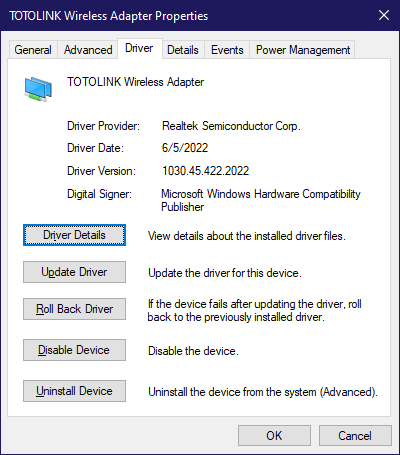
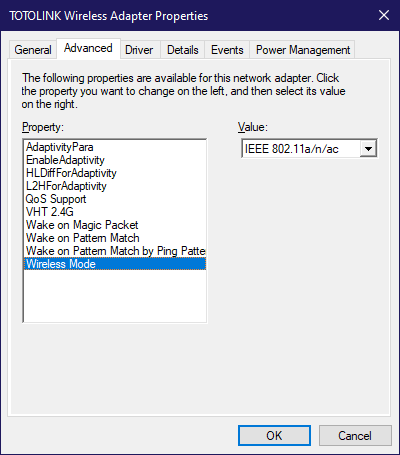
Lucky I got similar chipset, based on my testing, this Realtek hardware got a fault on handing 2.4G + 5G, by disabling 2.4G, I solved the background scanning of 2.4G + 5G take too long time, and cut off 80% of transmit time on 5Ghz.
Yes, it means when someone is transfering over WiFi on same channel, and you got likely 20+ of SSID around you, you are likely get high latency even when it is unloaded testing of latency.

Try install this second latest date driver, but latest branch.
(1030.45, 1030.44 got sync time bug which will disconnect when time changing in forward)
https://www.station-drivers.com/index.php/e...HQL/lang,en-gb/

For update manually, extract by right click on it, then "Extract All"
Copy the path of the extracted folder, then.
» Click to show Spoiler - click again to hide... «


Then, to fix the latency issues.
» Click to show Spoiler - click again to hide... «

To ensure complete reboot, shut down the computer, unplug your wifi adapter, plug in back, boot your computer.

Try run bufferbloat test again, see the result? tongue.gif
---
And yes, no USB 2.0 extension please, this likely causing issues, unless you using WD-40 to clean up the golden finger/pins
*
QUOTE(wc_how @ Jul 24 2023, 08:11 AM)
From my experience, bufferbloat usually caused by ISP rather than router.
My 2 houses are using Citybroadband and Maxis thru Allo backbone, both bufferbloat A/A+. Using cheap/stock ISP router.
While my office using some highend router & cisco switch, 800mbps plan, still B/C only.
*
Thanks BenYeeHua for investing so much of your time in helping me to troubleshooting.

I tried to reinstall the driver but my t9uh is Ver1 instead of Ver2. But I managed to changed the WiFi Mode in Control panel.

Along with setting the QoS Profile with 25Mbps for up and down.

https://www.waveform.com/tools/bufferbloat?...59-2b54dc0d0d3b

This is my latest result as of I am typing this message. This is over the WiFi.
I tried to use LAN cable and it deviate by few ms.

QUOTE(andrekua2 @ Jul 24 2023, 08:33 AM)
Just check your upload speed when doing video conferencing.

Anyway, if you max your upload speed, then your internet gonna suffer. Previously on Streamyx 2Mbps and someone phone or pc kept backing up and it totally renders the internet unusable when the upload is maxed out.

30Mbps is totally fine for a couple devices to stream 1080p but once you hit the download/upload button, everything goes to hell. Why not upgrade your subscription instead?
*
Thanks andreakua2 for your helping.

I checked the total upload speed during my video conference on my ASUS Router page.

It's about 3Mbps upload. My current plan is symmetrical speed which is 30Mbps for up and down.

I don't mine to pay more if subscribe to higher speed could solve the problem.

I was 300Mbps Unifi user previously but not really utilise the speed. So when moving house, I just opt for the cheapest package to save some bucks.


TSPowerGadget
post Jul 26 2023, 04:13 PM

Enthusiast
*****
Junior Member
821 posts

Joined: Apr 2012
QUOTE(hasmidzul_jojo @ Jul 24 2023, 09:05 AM)
This was my test on my sister internet(home internet) to combat bufferbloat.
*
Thanks a lot for your sharing, hasmidzul. You seemed to know in depth about networking.

If I want to do something like that, is it need to install OpenWRT firmware?


QUOTE(yenchenje @ Jul 24 2023, 10:29 PM)
My two cents about your situation, I'm quite certain that your CGNAT region is the one causing bufferbloat issue.

Currently I'm in Johor and my CGNAT gateway is 100.88.191.x, public IP is 60.53.x.x and my bufferbloat on LAN/5GHz AX is both A

My setup for wired LAN for testing is OPNSense VM - 16 Port PoE Switch - TP-Link 8 Port Switch - My PC
For wifi it's OPNSense VM - 16 Port PoE Switch - TP-LINK TL-XAP3007GC

I also have shapers on my OPNSense for the 30Mbps connection
[attachmentid=11474102]
[attachmentid=11474103]
[attachmentid=11474104]

LAN Wired Bufferbloat Setup (After shaping with OPNSense)
https://www.waveform.com/tools/bufferbloat?...38-5c7a4a6efb53

2.4GHz AX test on Galaxy S21 5G
[attachmentid=11474105]

5GHz AX test on Galaxy S21 5G
[attachmentid=11474106]

Strongly recommend you contact TM and complain to see if they can reset any gateway or check on their side, CGNAT users can only get a few no matter how many PPPoE connects/disconnects we do

Considering your router currently is already decently high-end, even with QoS it shouldn't be THAT bad
As before I shaped my traffic with OPNSense, my bufferbloat can go up to 200-400+ ms when dl/ul, and can shoot up about 100-200 while unloaded
*
Thanks yenchenje for your valuable time to do so many testing and sharing here.

I raise a report to Celcom and it's already 1 week+ and they have yet to solve the problem. A technician came over to do some testing and told me "Celcom line memang begini, better subscribe to UniFi)

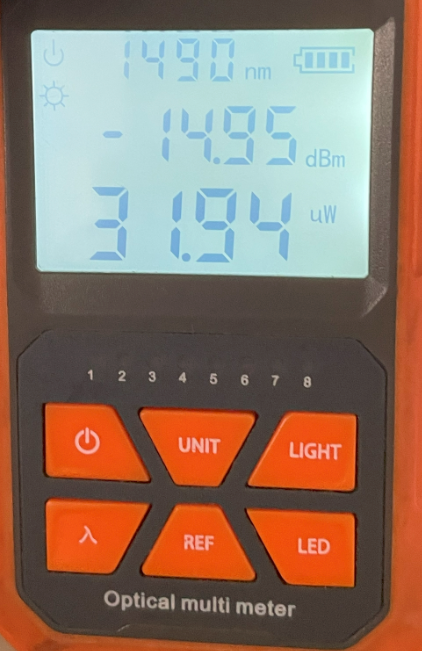
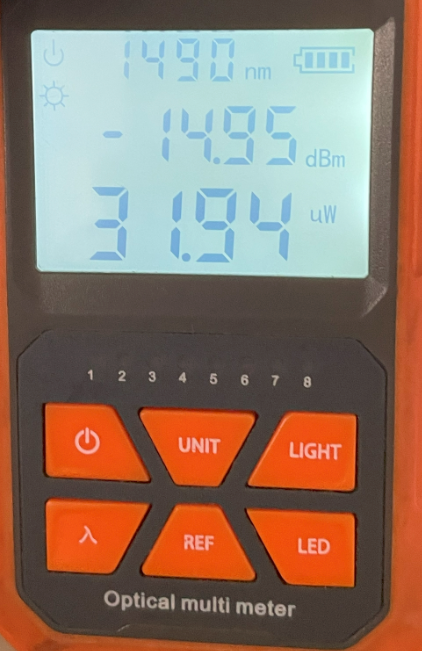
Here's my Fibre reading.
» Click to show Spoiler - click again to hide... «


Currently after applying QoS capped to 25Mbps for up and down. I managed to get grade A. So does it mean that my isp has problem or it meant to be like that?
QUOTE(hasmidzul_jojo @ Jul 25 2023, 09:25 AM)
I installed MT7621AT based router/wifi (<rm200) on my cousin home, under cgnat 30Mbps unifi.On default router..the bufferbloat was very bad.After installing this router with AQM in place with proper wireless channel tuning(mainly 5GHz band,only one device on 2.4GHz which is his air purifier), never ever heard him complained.He had 6 devices connected to the router, 5 devices wireless and 1 pc hardwired( online gaming).Of course, when isp have problems ,no AQM can save you from bad bufferbloat.
*
After apply the basic QoS 25Mbps up and down, I seemed like solved the bufferbloat and getting grade A or C (worse) currently.

Wondering this indicate my ISP has problem? or it meant to be like that ya?

QUOTE(BenYeeHua @ Jul 25 2023, 06:39 PM)
Guess op busy working, let him test my workaround(disable 2.4GHz background scanning) on his Realtek Wireless USB adapter first, it is very likely another victim of Realtek. laugh.gif
*
I am sorry for being late to get back to you all with more testing result.

Here is my LAN Test result.

» Click to show Spoiler - click again to hide... «


TSPowerGadget
post Jul 26 2023, 04:14 PM

Enthusiast
*****
Junior Member
821 posts

Joined: Apr 2012
QUOTE(prokiller1199 @ Jul 26 2023, 01:15 AM)
Seems like mine is worse smile.gif

user posted image
*
Hi Prokiller, do you use any QoS for this?

When I don't use QoS, my ping shoot up to 500-600 or even 1k+.

Currently after applied QoS,it seemed more stable than usual
TSPowerGadget
post Jul 26 2023, 04:25 PM

Enthusiast
*****
Junior Member
821 posts

Joined: Apr 2012
QUOTE(blacktubi @ Jul 26 2023, 04:19 PM)
Based on your latest test, it looks very healthy now. Glad that my recommendation works for you

Spike is unavoidable, it's normal and shouldn't be disruptive.
*
Really appreciate your help, blacktubi! notworthy.gif


TSPowerGadget
post Jul 26 2023, 04:25 PM

Enthusiast
*****
Junior Member
821 posts

Joined: Apr 2012
Currently thinking of pulling a cat6a cable from downstair to upstair.

Wondering any good brand of cat6a that you all can introduce? Might need to route it from exterior of house to first floor of the house. Haven't engage with any contractor yet to see whether it is feasible to hack the wall from ground floor to first floor


Change to:
| Lo-Fi Version
0.2173sec    0.49    7 queries    GZIP Disabled
Time is now: 15th December 2025 - 09:38 PM