QUOTE(mystvearn @ Jul 19 2023, 08:50 AM)
Sorry for the typo errors previously. Autocorrect on phone. I actually did considered that but reviews say it doesn't not penetrate that much. Asus router is more towards gaming but when comparing price to tp link for the same class, tp link is more value for money. I did consider the Asus ax86u, but I cannot justify the price and great coverage. I am interested in the parental control, but by the time I need to implement for the kids, maybe it will be Wi-Fi 8 or 9 standard. Also I have opendns for parental controls, if I need it. The ax86u may have greater coverage, but then I don't want it to go into neighbours house, as I then may need to hide SSID to prevent hacking. Also, I need only 4 wired ports maximum for my case, nothing higher. Cctv, pc and NAS. The extra port if I need to wire up my laptop in bedroom to the NAS..
I did a map of the WiFi reception for my entire house to see where the heat place to place the order Wi-Fi router and a 10 M Ethernet cable. I'm satisfied that it covers the perimeter of my house including the tapo cameras outside. Anything higher than AX73 will give me diminishing returns. 2.5gb or 10gb is no use when my unifi is 100mbs. And I backup work and upload data a lot. So any higher broadband package will still give 50 mb upload.
What I will say is that tp link deco mesh is not really that good to expensive for what it is. For the price of a high end mesh, you can get a very high end router without latency problems for gaming. Previously, I bought a pair of E4 deco. I have about 27 connected device, including 2 Wi-Fi cctv, Ethernet cctv, iot, NAS, wired connected gaming pc. The mesh got fried when I do sustain up/dl from pc to NAS. Either dropping connection or connected wifi devices drop and unable to connect again. Like restoring files. My pc can do 2.5gb, nas can do 1gb,fine with me. Wi-Fi speed almost like wired in same room. Furthers room, I get about 90% speed. Of course I enable QoS for both my gaming, hp and laptop. I do steam link as kids watch cartoons on the TV and my pc is setup like a console with steam big picture. One button on off. Exclusively controlled with xbox wireless controllers. If I need to play games away for the TV, I just turn on the pc in the background and go to my laptop/phone to play. I played about 40% uncharted 4 on my phone and laptop.
Using uncharted 4 and steam big picture, Gaming on mesh is unbearable. Gaming on ax10 is ok, if in the same room, if you get the WiFi 6 on the phone. The moment I go to different rooms, I drop the 5ghz for the barley reachable 2.4ghz connection. I only have 1 wifi 6e tablet, but that is my wife's. On my Wi-Fi 6 phone, I can game ok.
I am lucky I started with tp link ax10 and I can see where the problems are. I keep that as a spare as I also fried my unifi dlink wifi 6 router..also due to the NAS transfer. Also, it takes forever for a device to connect WiFi with to the unifi.
Thank you so much for your time and efforts in sharing your experience with me so that I won't need to go through that much of troubleshooting.

Haha my case would be same as yours, my kid is still very young and by the time I need parental control, it might be Wi-Fi 8 or 9 or the current router already out of service.
It's rather true that AX73 give the most bang for buck considering the Wi-Fi penetration range with good speed.
I won't be gaming and don't have as many devices as yours nor as high tech as your house but will be using primarily for Google Meet or Zoom Call as my works allow me to WFH. So I think if AX73 can serve you well, perhaps could serve me good as well.
Do you hack your wall just for ethernet cables?
QUOTE(blacktubi @ Jul 19 2023, 09:51 AM)
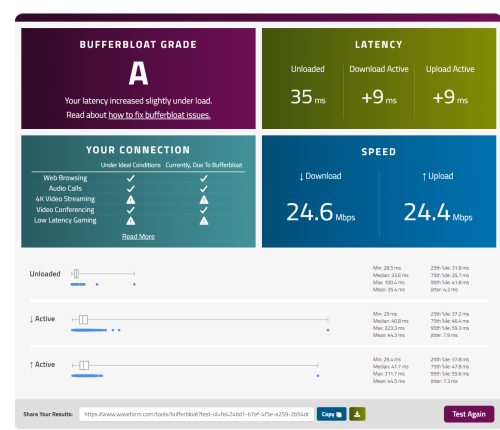
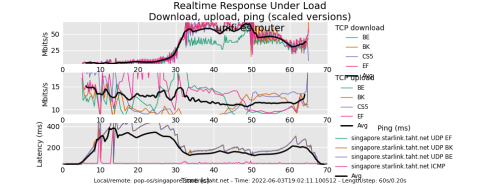
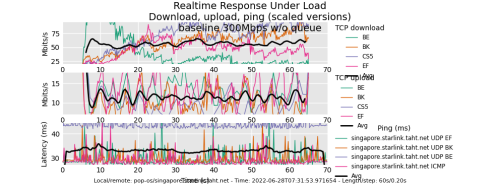
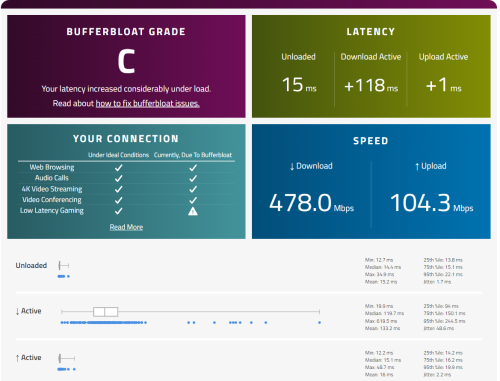
Did you limit your upload speed to 90% of your subscribed speed? Still seeing 28.3Mbps on the result. Perhaps you can try to force it lower to 25Mbps.
Bufferbloat is caused by poor congestion management which is generally handled by the router. You can Google for more details. It will be worsen by slow subscribed Internet speed.
That's why I recommended ASUS TUF-AX4200 to you in my first reply as it comes with AdaptiveQoS. It's especially useful for users who subscribed to slower speed.
What I am guiding you now is a hard traffic shapping to deal with the issue. While it can solve the issue, your speed will be 10-20% slower as a result.
Thanks blacktubi for your guiding.
I eventually tried to set it for 27 Down and 27 UP then tried with 25 down 25 down. Unfortunately the upload QOS seemed like not working. It still go above the set bandwith.
Yes, I do searched around for Bufferbloat and do aware that low speed make the case worse.
Might be thinking of jumping to 300Mbps if any good deal but currently tied to 2 years contract with this Celcom.
So would you say that it's solely my problem and not infrastructure side? IF yes, then I would bite the bullet and order a decent router real soon.
QUOTE(Momo33 @ Jul 19 2023, 11:42 AM)
my 2 sen .
your latency /ping is very high 47ms
if this is on wifi , you can try wired cable direct connect to router test /pc and test . should get better lower latency.
i get 4ms latency /Ookla test from TM msia KL to house 30km away. Also can try
https://speedtest.tm.com.my/on Waveform test i get 9 ms.
you will get better performance with a new AX router on wifi . your devices need/can support AX
the 30Mbps plan you have will be an issue if you have many people in your house or have many
user devices online . just 2 video session you already at your bandwidth limits.
Thanks momo33!
I am from Sabah so that's why my base latency is rather high. It's rather normal for us to have 30-60ms range. The lowest I ever got is when I subscribe to Celcom Timur Sabah.
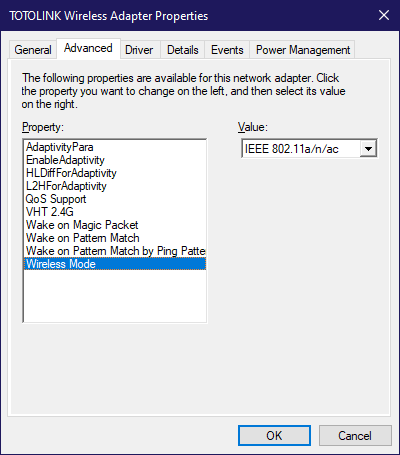
I had hooked up one of my PC directly to router but unfortunately I still get about +600ms for uploading latency with QoS enabled.
I won't mind to spend more to get PCI-card that support AX if this could solve my problem as it's rather hard for me to hack wall for adding ethernet cable to upstair. Not sure whether contractor willing to do.
Currently only two users in the entire network, so 30Mbps seemed like more than enough for our usage.
QUOTE(blacktubi @ Jul 19 2023, 11:54 AM)
Sadly, that's the norm for Sabah Sarawak.
Most of their International connectivity are routed through the exchanges over here in Semenanjung.
Nothing can be done on the base latency. Only the loaded latency is something that can be solved.
Yes, that's right. You know it well.
Just hoping to solve the loaded latency and don't mind to pay a little bit more to settle the problem.
Worry the fault is infrastructure only


 Jun 26 2023, 03:53 PM, updated 3y ago




 Quote
Quote









 , far from the best but already a decent upgrade from the rats nest I had before


 0.0361sec
 0.19
0.19
 6 queries
 GZIP Disabled