

QUOTE(netken @ May 4 2024, 09:13 PM)
mine dc and connect back - i guess its normal for 5G network .... no restarts ..

Dc and reconnect at least no taking much time than device reboot.U Home 5G
|
|
 May 4 2024, 10:36 PM May 4 2024, 10:36 PM
Return to original view | Post
#21
|
 
Junior Member
164 posts Joined: May 2006 From: Rawang, Selangor  
|
QUOTE(netken @ May 4 2024, 09:13 PM) mine dc and connect back - i guess its normal for 5G network .... no restarts .. Dc and reconnect at least no taking much time than device reboot. |
|
|
|
|
|
May 5 2024, 11:38 AM
Return to original view | Post
#22
|
|
Junior Member
164 posts Joined: May 2006 From: Rawang, Selangor
|
QUOTE(Ngto @ May 5 2024, 07:52 AM) Placement of modem and direction of internal antenna to tower can make a big difference. exactly. same spot with different angle do have huge impact on rx and tx. |
|
|
May 5 2024, 09:07 PM
Return to original view | Post
#23
|
|
Junior Member
164 posts Joined: May 2006 From: Rawang, Selangor
|
QUOTE(petpenyubobo @ May 5 2024, 01:25 PM) Maybe you should reject the MC888S by returning it again and ask for a Kaon replacement instead? Probably Kaon no stock hence they sent me ZTE even though i specifically requested it. |
|
|
May 5 2024, 09:08 PM
Return to original view | Post
#24
|
|
Junior Member
164 posts Joined: May 2006 From: Rawang, Selangor
|
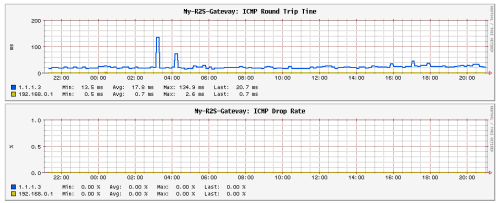 nice. more than 24 hours no dc, no reboot. i believe this is due to hardware defect rather than firmware. eason47 and mista_amin liked this post
|
|
|
May 6 2024, 02:02 AM
Return to original view | Post
#25
|
|
Junior Member
164 posts Joined: May 2006 From: Rawang, Selangor
|
QUOTE(petpenyubobo @ May 5 2024, 09:53 PM) Should have waited until new stock arrives. It's actually supposed to be better with a Mediatek chipset inside. are you suggesting that i suffer with dc and reboot multiple times a day while waiting for the stock?  |
|
|
May 6 2024, 02:04 AM
Return to original view | Post
#26
|
|
Junior Member
164 posts Joined: May 2006 From: Rawang, Selangor
|
QUOTE(Crystal2 @ May 5 2024, 10:57 PM) What is the model number of the Koan router supplied by Umobile? 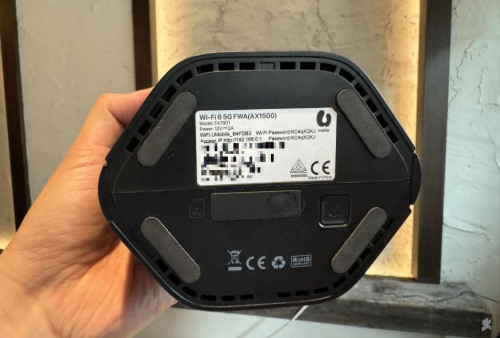 Crystal2 liked this post
|
|
|
|
|
|
May 6 2024, 02:09 AM
Return to original view | Post
#27
|
|
Junior Member
164 posts Joined: May 2006 From: Rawang, Selangor
|
QUOTE(immobile @ May 6 2024, 12:08 AM) hi sifus, could anyone advised what went wrong. wireless mesh won't give you full speed. just more coverage. mesh just a wifi repeater.i am currently living in a 2 storey terrace house. Just bought TP Link X50 - 5G (U Home 5G plan). TP Link X50 is placed in my room 2nd floor, averaging speeds are around 650mpbs to 800mpbs ++. however, 1st floor speeds are averaging between 20 to 30mpbs only. Likewise, i am using 4 mesh in total: 1 TP Link X50 - 5G and 3 Deco E4 mesh(1 situated in 2nd floor living hall and the other 2 mesh situated at 1st floor) could any sifus advise any solutions....so much difference in speeds across both floors tqtq else, look for wired mesh if you don't mind the cables. i'm living in 2 storey house 36 x 65. I just use single Wifi5 router for the whole house. still can cover the whole house with 2.4ghz and 5ghz wifi. lowest speed on lowest signal for 5ghz i can get 60mbps from actual 300mbps (peak) 400mbps (off-peak). tower max (500mbps). This post has been edited by ameyhazuan: May 6 2024, 02:24 AM |
|
|
May 9 2024, 09:40 PM
Return to original view | Post
#28
|
|
Junior Member
164 posts Joined: May 2006 From: Rawang, Selangor
|
QUOTE(netken @ May 4 2024, 06:49 AM) the zte somehow cleared all logs after the firmware update and does not show any DC or restart since last 52 hours .... will continue to monitor ... mine after 56 hours of usage the modem dc and reboot. after that once a day it will dc. if just dc not as bad as modem reboot. netken liked this post
|
|
|
May 14 2024, 02:19 AM
Return to original view | Post
#29
|
|
Junior Member
164 posts Joined: May 2006 From: Rawang, Selangor
|
QUOTE(k_yagami @ May 13 2024, 09:41 PM) I just got the Kaon modem yesterday, plug in the U-Mobile SIM, turn on the power, and nothing happened. kaon as replacement or newly registered?Connected to the modem page and it says SIM not detected, which is strange, because I can use that SIM on my phone and hotspot. Any advise? |
|
|
May 21 2024, 03:41 PM
Return to original view | Post
#30
|
|
Junior Member
164 posts Joined: May 2006 From: Rawang, Selangor
|
I got my second replacement (third modem). I might go to their center and ask for kaon. 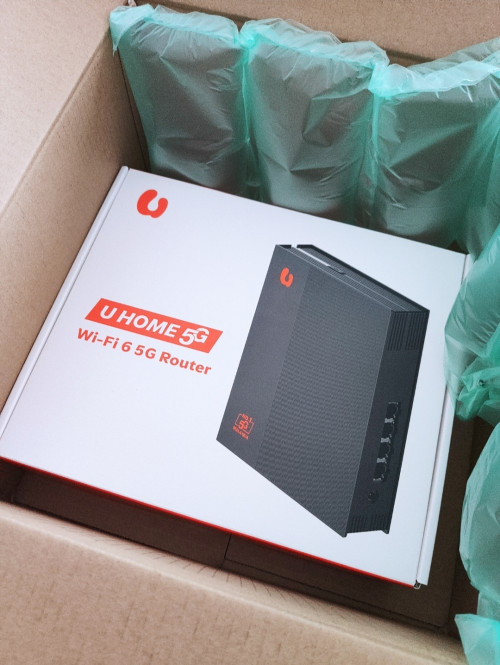 eauyong liked this post
|
|
|
May 22 2024, 04:19 PM
Return to original view | Post
#31
|
|
Junior Member
164 posts Joined: May 2006 From: Rawang, Selangor
|
QUOTE(k_yagami @ May 21 2024, 08:46 PM) This is the one I got too for replacement. I have not open the 2nd replacement. I want to try kaon at least. Will return to them for the replacement.I tried to go to the center in Penang, they're unable to do replacement. need to deliver to your house. What do you do with the old modem? Throw it away? |
|
|
May 23 2024, 12:06 AM
Return to original view | Post
#32
|
|
Junior Member
164 posts Joined: May 2006 From: Rawang, Selangor
|
QUOTE(k_yagami @ May 21 2024, 08:46 PM) This is the one I got too for replacement. by the way, have you tried the new replacement? was your old one the white color?I tried to go to the center in Penang, they're unable to do replacement. need to deliver to your house. What do you do with the old modem? Throw it away? |
|
|
May 23 2024, 08:42 PM
Return to original view | Post
#33
|
|
Junior Member
164 posts Joined: May 2006 From: Rawang, Selangor
|
QUOTE(k_yagami @ May 23 2024, 12:35 PM) My old one is the Kaon modem, black color. may be black zte is better. i have not tried mine. black zte and white zte came from different supplier. probable different hardware version.Can't detect SIM when I 1st turn it on, it was brand new. Already tried the replacement, it's ZTE, this one works fine. now i have doubt on using kaon. This post has been edited by ameyhazuan: May 23 2024, 08:42 PM |
|
|
|
|
|
May 23 2024, 08:45 PM
Return to original view | Post
#34
|
|
Junior Member
164 posts Joined: May 2006 From: Rawang, Selangor
|
QUOTE(andrekua2 @ May 23 2024, 02:51 PM) Bro, I already shared my findings since I have been using 801s for more than a year. I just signed with UM and got this 888s router. Although I havent tried it but I think the symptom is same. The router will hang at the same hour every day or every few days. The problem lies with the WiFi. Disable the WiFi and plug in any old router you have, set to AP mode and use the wifi, you will find that it will never hang at all even after weeks. myself i never turn on wifi. the modem sits at the best location. my wifi ap at different location. still using wifi5 though. have no desire for wifi6. my wifi5 can cover the whole 2 storey 36x65 house. |
|
|
May 23 2024, 08:48 PM
Return to original view | Post
#35
|
|
Junior Member
164 posts Joined: May 2006 From: Rawang, Selangor
|
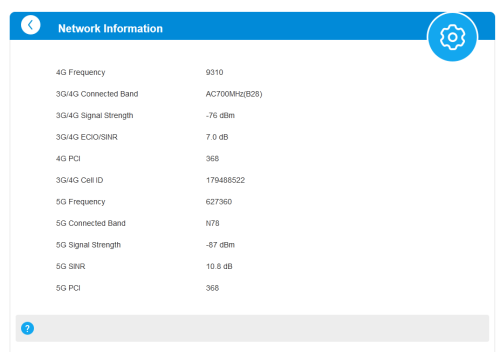 I use this page to determine best location and best reception in my house This post has been edited by ameyhazuan: May 23 2024, 08:49 PM |
|
|
May 23 2024, 08:50 PM
Return to original view | Post
#36
|
|
Junior Member
164 posts Joined: May 2006 From: Rawang, Selangor
|
 strange, why i'm in roaming? i'm not near any border. |
|
|
May 23 2024, 09:06 PM
Return to original view | Post
#37
|
|
Junior Member
164 posts Joined: May 2006 From: Rawang, Selangor
|
QUOTE(andrekua2 @ May 23 2024, 08:59 PM) white zte also 888? or 801s? mc888s has both white oem color and black (u mobile theme) |
|
|
May 23 2024, 09:09 PM
Return to original view | Post
#38
|
|
Junior Member
164 posts Joined: May 2006 From: Rawang, Selangor
|
QUOTE(andrekua2 @ May 23 2024, 08:59 PM) white zte also 888? or 801s? white onehttps://forum.lowyat.net/index.php?showtopi...ost&p=109671526 This post has been edited by ameyhazuan: May 23 2024, 09:10 PM |
|
|
May 24 2024, 09:00 PM
Return to original view | Post
#39
|
|
Junior Member
164 posts Joined: May 2006 From: Rawang, Selangor
|
QUOTE(Zaryl @ May 24 2024, 03:18 PM) Ok now that the 5G speed problem was resolved after correct placement, now i faced another problem: what color is your zte?ZTE MC888s will keep on DC on certain time and WiFi SSID will reappear after 1-2 minutes. the DC frequency sometimes vary; sometime it will DC after an hour, then sometime few hours. I already put a 16” Khind table fan set at speed 2 and aim straight at it. I guess the router overheats and it forced itself to auto restart? But the speed still fast, although now it’s only average at ~150Mbps after auto restart. Before this ~230-280Mbps easy. So, it’s time for me to make that Zyxel NR5103E v2 5G router purchase then? Cooling is good, never auto restart?  |
|
|
May 24 2024, 09:04 PM
Return to original view | IPv6 | Post
#40
|
|
Junior Member
164 posts Joined: May 2006 From: Rawang, Selangor
|
QUOTE(Zaryl @ May 24 2024, 03:18 PM) Ok now that the 5G speed problem was resolved after correct placement, now i faced another problem: i doubt it's because of overheating. i already opened the casing and pointed a casing fan direct to the heat plate. no go. could be hardware issue. i never use wifi but still it will dc and reboot. major problem we are having now.ZTE MC888s will keep on DC on certain time and WiFi SSID will reappear after 1-2 minutes. the DC frequency sometimes vary; sometime it will DC after an hour, then sometime few hours. I already put a 16” Khind table fan set at speed 2 and aim straight at it. I guess the router overheats and it forced itself to auto restart? But the speed still fast, although now it’s only average at ~150Mbps after auto restart. Before this ~230-280Mbps easy. So, it’s time for me to make that Zyxel NR5103E v2 5G router purchase then? Cooling is good, never auto restart? |
| Change to: |  0.0282sec 0.0282sec
 0.34 0.34
 7 queries 7 queries
 GZIP Disabled GZIP Disabled
Time is now: 19th December 2025 - 03:39 PM |
 Quote
Quote