

keke~~download using xunlei 200mb finished less than 15 min~
Maxis The Official Maxis Wireless Broadband Thread, OMG PORT FORWARDING KRACKED !
Maxis The Official Maxis Wireless Broadband Thread, OMG PORT FORWARDING KRACKED !
|
|
 Dec 14 2007, 02:46 PM Dec 14 2007, 02:46 PM
Return to original view | Post
#41
|
 
Junior Member
99 posts Joined: Jul 2006 
|
keke~~download using xunlei 200mb finished less than 15 min~
|
|
|
|
|
|
Dec 17 2007, 12:49 AM
Return to original view | Post
#42
|
|
Junior Member
99 posts Joined: Jul 2006
|
haiz~ these few days my maxis bb really running slow. even surfing website also need to wait long time.
|
|
|
Dec 17 2007, 02:22 AM
Return to original view | Post
#43
|
|
Junior Member
99 posts Joined: Jul 2006
|
QUOTE(bulibulizaimon @ Dec 17 2007, 01:24 AM) Why dun you try resetting ur modem and obtaining new ip adress.. Do untill you get a smooth connection's ip huh~u always reconnect until get a good ip? how many time u tried to get a good ip?  anyway, everyday after 1am my maxis bb will become smooth. |
|
|
Dec 17 2007, 11:25 PM
Return to original view | Post
#44
|
|
Junior Member
99 posts Joined: Jul 2006
|
these few days my maxis bb always kick me from HSDPA back to UMTS. even when i downloading and surfing website. anyone knw the reason of this problem? coz normally this will only happen when thr is no network traffic after 3 minute right?
|
|
|
Dec 22 2007, 10:53 PM
Return to original view | Post
#45
|
|
Junior Member
99 posts Joined: Jul 2006
|
QUOTE(JWCheah @ Dec 22 2007, 06:32 PM) Hmmm.... USB package was down since yesterday's evening.... just got on9 back, seems like the rest of you is not facing the same 404Http Apache issue. i also same problem with u today~all website cant go in, but u try surf this website everything will be fine after surf this site, i not sure work for u or not. but i work for me. This post has been edited by wedjohn57: Dec 22 2007, 10:57 PM |
|
|
Dec 23 2007, 12:33 PM
Return to original view | Post
#46
|
|
Junior Member
99 posts Joined: Jul 2006
|
QUOTE(mac.tay @ Dec 23 2007, 10:48 AM) latest update (i'm at SG now) huh? our maxis BB also can international roaming? got extra charge or not?tested maxis SIM into USB modem from Singtel, can online even roaming on my apple. set ur APN, dial #, username and password den dial can online oredi...  Added on December 23, 2007, 10:51 amnothing much i can say, tested singtel BB on mobile 2 days. speedtest always exceeded my expectation, upload speed oso amazing... see my singnature i got a question, after 18 month contract.the maxis provide zte modem we need to return maxis or not? |
|
|
|
|
|
Dec 24 2007, 10:36 AM
Return to original view | Post
#47
|
|
Junior Member
99 posts Joined: Jul 2006
|
QUOTE(mac.tay @ Dec 24 2007, 02:21 AM) not using maxis BB SIM. oh~~but the speed for singtel is capped at 512kbps only~i'm using my postpaid SIM + my sister singtel USB modem  |
|
|
Dec 29 2007, 12:24 PM
Return to original view | Post
#48
|
|
Junior Member
99 posts Joined: Jul 2006
|
QUOTE(JWCheah @ Dec 28 2007, 09:04 AM) ......averaging at 65GB d/l per month.... no extra charges in the billing for the last 3 months .... your contract havent finish also can change plan? is thr any different compare with the package 138 last time u use?--------------------------------------------------------------------------------------------------------------------------------------------------------------------- I've just switched to using the I2G RM99/mth package using a Sierra Wireless Aircard 875 for 2 days now. I must say, during daytime, the speed is superb at 1.8mbps but @ 9pm-2am, its only 600kbps....I'm still evaluating the performance. But somehow at my place, I could not obtain full signal (3 to 4-bars only), does anyone knows where I can the antenna for it??? Been searching high and low thru Lelong/Malaysian-Ebay/LYN but no answer....  .... 5 Band Blade Antenna with SSMB Connector : Please .... 5 Band Blade Antenna with SSMB Connector : Please  i heard tat ppl said I2Go didnt block bt port rite? This post has been edited by wedjohn57: Dec 29 2007, 12:26 PM |
|
|
Dec 29 2007, 10:51 PM
Return to original view | Post
#49
|
|
Junior Member
99 posts Joined: Jul 2006
|
QUOTE(JWCheah @ Dec 29 2007, 04:50 PM) No, I did an exchange with a good friend of mine as he bought a new laptop with ExpressCard slot which makes his existing Aircard useless. So we did an exchange where he took up my USB while I signed in for I2G even ur ip is different range with us. so now u r register a new maxis line?so need to pay any extra charge? Here's my findings: IP Header : 58.71.XXX.XXX » Click to show Spoiler - click again to hide... « Tracert to Google.com » Click to show Spoiler - click again to hide... « Speed Test : [location : DesaParkCity Signal: 3bars to 4 bars max] Cyberjaya :  Singapore :  Vancover Canada :  Advantages: ZTE/USB service is actually under the MaxisBB, a separate entity from the voice service and Internet2Go is actually under the GSM umbrella. This means that the chances of I2G to go down is very rare unless one of the international linkage is down or the entire Maxis Voice Mobile is disabled. I was also told that the I2G was launched to support the corporate market which is not doing so well meaning that the total user vs their projection is way much lower, hence, it is not congested like the MaxisBB. The Speed is quite decent and stable, I've not experience the "connected but no data transfer" symptoms from I2G. When Idle, it will not switched to UTMS. Disadvantages: Speed and latency drops by at least 30% during 9pm to 2am (I suspect the high number of Voice traffic but not strong theory to back this up as they are not running under the same BW freq). I've failed to obtain a constant full 5 bar as I do not have an external antenna for my Sierra Aircard 875 (searched whole LYPlaza, SS2, Lelong, Malaysia Ebay; closes available in HKonline). In coming phone call does affect the speed even though the signal remains unchanged. Hence, I've placed my hp in another room. i thk the attenna u wanna to buy need to order from other country , hv u try ask the guy who sold u the sierra 875 get the attenna for u? |
|
|
Dec 29 2007, 11:36 PM
Return to original view | Post
#50
|
|
Junior Member
99 posts Joined: Jul 2006
|
QUOTE(JWCheah @ Dec 29 2007, 11:11 PM) yeap as the ip indicates that it uses a different backbone... no hidden charges if u r an existing post-paid customer, either getting a new sim card for data only (same number) or sub-new line with data only (extra RM10/mth). "getting a new sim card for data only" mean u need to apply the multiple sim 1 line isnt? i checked from maxis website, this need rm15/month. how come yours no nid to charge. i saw ur screenshot, ur speed is fast enough aldy~ mine 1 in the day time download really suck,so i only download at the mid night until morning. hv u regret y dont buy the usb version of sierra 875? coz usb can juz use your old usb extension cable.i think you are right about getting the antenna overseas as i've tried everywhere but the same answer; "coming soon but not sure". I'm seeking frens help in UK... should be here before CNY.... i guess ur I2GO is fast than ours is because thr are very less user on tat backbone, coz of it is too expensive. last time i have trying to use my phone surf 2 website, it cost me around RM5.  unless like u apply unlimited package. unless like u apply unlimited package. |
|
|
Dec 30 2007, 11:13 AM
Return to original view | Post
#51
|
|
Junior Member
99 posts Joined: Jul 2006
|
QUOTE(prasys @ Dec 30 2007, 10:17 AM) First of all , how did you get rid your maxisbb. I am thinking of changing it to I2G. My phone shows that i could get 1.3Mbps (after doing a speed test). This seems to be promising he apply new I2GO and his old package 138 transfer to his frd.i also thinking of change to I2GO, but i thk thr is no way beside of transfer account. |
|
|
Dec 30 2007, 06:44 PM
Return to original view | Post
#52
|
|
Junior Member
99 posts Joined: Jul 2006
|
QUOTE(JWCheah @ Dec 30 2007, 02:49 PM) right on.... oh man~2mbps?? But I must say, the usb was actually better for gaming performance and it was still improving... the I2G latency is somehow not stable. I was on 80ms to HK server when I started but after an hour it jumped to 300ms... then kena "kicked" for high ping....  Download speed was excellent during the morning.... 2mbps!!!  our maxis BB stable latency also 200ms +- , your is better a lot man. now u make me feel like to change.  anyway, averagely i could get only 500kbps+- ~although my RSSI is around 65dBm |
|
|
Dec 30 2007, 09:26 PM
Return to original view | Post
#53
|
|
Junior Member
99 posts Joined: Jul 2006
|
what tweaking u doing? u using what package?
|
|
|
|
|
|
Jan 1 2008, 04:15 AM
Return to original view | Post
#54
|
|
Junior Member
99 posts Joined: Jul 2006
|
QUOTE(MX510 @ Dec 30 2007, 11:45 PM) 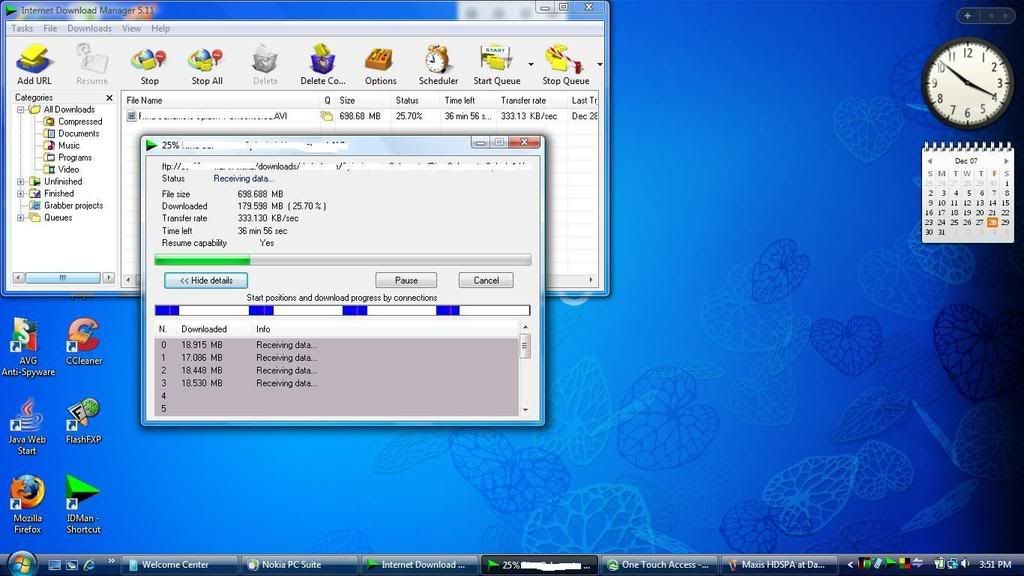 Maxis HSPDA Package RM 120 per month Settings N95 Conneceted to cable to Sony Vaio Location Damansara Height 3 Mbit ftp download from torrentflux servers |
|
|
Jan 1 2008, 11:29 PM
Return to original view | Post
#55
|
|
Junior Member
99 posts Joined: Jul 2006
|
JWCheah:
i now planning to change to I2GO same to u. not sure whether successful or not. coz one of my frd are interested with my maxis BB. i am maxis postpaid user.but now my problem is maxis is charging me another extra 15 riggit monthly if i need to apply extra sim for data purpose under the same line. if not mistaken, last time u say thr is no extra charge rite? how u do tat? |
|
|
Jan 2 2008, 12:24 AM
Return to original view | Post
#56
|
|
Junior Member
99 posts Joined: Jul 2006
|
QUOTE(JWCheah @ Jan 2 2008, 12:21 AM) Good on you.... I need to recheck if there is extra charges for it and let you know, but I did get a verbal confirmation in regards to this.... wait on ur good news~ now i am thinking of to buy e220 or 875u~which is better?This post has been edited by wedjohn57: Jan 2 2008, 12:24 AM |
|
|
Jan 2 2008, 01:23 AM
Return to original view | Post
#57
|
|
Junior Member
99 posts Joined: Jul 2006
|
QUOTE(faizalmzain @ Jan 2 2008, 12:40 AM) is it possible to downgrade for maxissbb? i thk u r not allowed to downgrade your current package.currently i subscribed to power package but apparently the best speed i could get is 3G speed only eventhough the status indicates that the modem is connected to HSDPA network... during the first 2 months i managed to get HSDPA speed like 2-3 times....but not anymore...i did some tests on the speed various times and never exceeded 3G speed. i plan to downgrade to rm68/basic package now..waste of money paying rm103 per month but only managed to get 3G speed. supposedly my area has a stable HSDPA network since the modem always connected to HSDPA network... |
|
|
Jan 2 2008, 10:33 PM
Return to original view | Post
#58
|
|
Junior Member
99 posts Joined: Jul 2006
|
JWCheah:
still dont hv answer? |
|
|
Jan 3 2008, 12:08 AM
Return to original view | Post
#59
|
|
Junior Member
99 posts Joined: Jul 2006
|
QUOTE(JWCheah @ Jan 2 2008, 11:08 PM) Need to wait for the up and coming bill as I've not been billed yet for the month's I2G RM99.... called 123 and they told me just pay the net RM99 but knowing Maxis, verbal confirmation is not good enough.... so now u got 2 sim for 1 line, can u use both of them online at the same time? Added on January 3, 2008, 12:09 am QUOTE(faizalmzain @ Jan 2 2008, 11:40 PM) nvm thats great to u~ how u tell the guy?i already downgraded at maxis center klcc... i downgraded to advance package(rm78) no question asked, the person in charge willingly downgraded for me right there and then  This post has been edited by wedjohn57: Jan 3 2008, 12:09 AM |
|
|
Jan 3 2008, 01:03 PM
Return to original view | Post
#60
|
|
Junior Member
99 posts Joined: Jul 2006
|
QUOTE(prasys @ Jan 3 2008, 09:40 AM) Yes , how did you downgrade your package cause I am thinking of downgrading to RM 68 cause thats enough for their faces !. Seriously , now it sucks big time....But on the other hand the I2G package looks good , consistent speed even though they are connected to the same tower i wondering maxis will allowed us directly transfer maxis BB to I2GO or not~~if can, this would be great to us. later i will try to call 123 ask them. Added on January 3, 2008, 1:04 pm QUOTE(JWCheah @ Jan 3 2008, 09:52 AM) Maybe you need to take a drive to KLCC to try your luck, who knows, you might get lucky. I2G is strongly recommended as I'm still enjoying great speed. Very stable connection. But a piece of advice, try to get a compatible modem with attached antenna unlike mine I2GO can reach 3.6mbps? how come the maxis website stated on 768kbps? .This post has been edited by wedjohn57: Jan 3 2008, 01:04 PM |
|
Topic ClosedOptions
|
| Change to: |  0.0520sec 0.0520sec
 0.58 0.58
 7 queries 7 queries
 GZIP Disabled GZIP Disabled
Time is now: 5th December 2025 - 08:08 PM |
 Quote
Quote