Welcome Guest ( Log In | Register )

Bump Topic Topic Closed RSS Feed
11 Pages « < 8 9 10 11 >Bottom

Outline · [ Standard ] · Linear+

Maxis The Official Maxis Wireless Broadband Thread, OMG PORT FORWARDING KRACKED !

views
     
JWCheah
post Jan 14 2008, 03:52 PM

Getting Started
**
Junior Member
251 posts

Joined: Sep 2007


QUOTE(sui @ Jan 14 2008, 03:16 PM)
is this true?

10.  TERMS AND TERMINATION

10.1  The Agreement shall commence on the Service Commencement Date and continues for a period of eighteen (18) months ("Initial Term"). Upon the expiry of the Initial Term, the Agreement shall automatically extend for further eighteen (18) months term (each term called "Renewal Term") unless Maxis or the Customer gives at least one (1) months prior written notice to the other party of its intention not to renew the Agreement for the subsequent term.

http://www.maxis.com.my/personal/general/t...isbroadband.asp

so after 17 months and if i dont inform them that i dont want to continue the service i will automatically get another 18 months of nightmare?
*
Good point.... at the moment, the ppl experiencing this is still very small or none at all considering batch#1 ppl signup in Feb/Mar2007 so soon, u should be seeing some screaming in this forum if MAxis persist in implementing the above...... wish them luck....
JWCheah
post Jan 15 2008, 12:06 AM

Getting Started
**
Junior Member
251 posts

Joined: Sep 2007


To wedjohn57: Great Guide thumbup.gif , didnot test it but it sounded right. Maybe Prasys should consider posting it at post#1 in a spoiler mode for future guidelines.

To doinkz_gaara: Hmmmm...... msn no issue at all whole night as i was chatting on it. this is not the first time for you.... i suspect it is either intermittent signal or port error.... maybe some "sifu" can help you out. Verify the settings again.


Added on January 15, 2008, 12:36 am
QUOTE(sui @ Jan 14 2008, 04:05 PM)
right now im getting headache with my contract

i passed everything to my friend and maxis said i cant transfer because i have 16 months of contract left (renewed my contract after downgrading package without telling me)

now i pray that my friend will pay me monthly or lump sum for half year,  provided if he doesnt dump everything back to me when he finds a better  choice then im fukked
*
dun quite get you on that, but it a known policy that you can transfer your account as long as there is a willing taker and RM50, i've verified this at KLCC but you need both taker and giver present at the counter and not possible to do so by phone as the new taker needs to sign all the required documents and declarations (and must not appear in their blacklist).

Btw, new Latest Mac software for E220 available!!!
http://www.maxis.com.my/maxisbb/

This post has been edited by JWCheah: Jan 15 2008, 12:36 AM
JWCheah
post Jan 15 2008, 03:27 AM

Getting Started
**
Junior Member
251 posts

Joined: Sep 2007


Well it is an Indian guy sitting at the BB counter (C15/16/17 i think), a well build guy with goatee... dun know his name but very helpful. Just tell them some bull story that you might be leaving the country for study and this is the best alternative rather than waiting for the account to get default. hope this helps ;)
JWCheah
post Jan 15 2008, 05:14 PM

Getting Started
**
Junior Member
251 posts

Joined: Sep 2007


QUOTE(jonu @ Jan 15 2008, 05:05 PM)

Dont even think about Maxis broadband. (I'm using USB mobile RM138 package)

1. It's not unlimited package, It's limited to 3Gb/month, lebih kena bayar xtra
2. 3.6Mb/s tu speed untuk satu kawasan/sector
3. Disconnected very very frequently.
4. 3.6Mb/s is only for HSDPA(High Speed..) area.
5. All BITTORRENT port is closed from 6am to 1am.(Open also very slow..)

Others I dont know but Maxis Broadband mobile SUXS!!!
The stupid fair usage contract is NOT FAIR at all!
Dont sold your soul to this guys.
mad.gif  mad.gif  mad.gif  mad.gif  mad.gif  mad.gif  mad.gif  mad.gif  mad.gif
*
Wow.... lots of angry faces.... but please provide the facts and not personal accusations....
when you mention in point#1 [lebih kena bayar xtra] did you get charged? If yes, how do they charge you?
any prove of bill you can upload for us to share? I'm sorry for being a nosy, but i was on in for few months with average 70GB download per month and no extra charges like you mention...

Btw, tell me any other wireless that do not throttle P2P.... Jaring? It is limited at the moment.... Don't compare to Streamyx as it is wired and it is in a different class.... i'm not defending Maxis but most of us in this forum are sharing useful tips on how to maximize our usage with FACTS.....
For example.... for P2P... try using WebUI (e.g. GetByte.com) or VPN.... great speed if you are living <2km from the base station....
JWCheah
post Jan 15 2008, 06:39 PM

Getting Started
**
Junior Member
251 posts

Joined: Sep 2007


QUOTE(jonu @ Jan 15 2008, 05:38 PM)
rclxms.gif
Before I start u better be using USB mobile package or it will be a waste for me to attend to your cause rather than to the whole forumners.

The first point is from their FAIR USAGE policy
Please refer to FAIR USAGE policy??

I dont care about whether u are getting charged or not. If it's in the contract u can be charged anytime, whether its now or 6 month later.

*
well Facts.....
Maxis : limit 3GB
Digi : limit 5GB
Celcom :unlimited but.....
» Click to show Spoiler - click again to hide... «


The point I was making on is the way you sounded like you got a BIG SLAP from MAXIS BILLING for over the limit which in actual fact, a big NO. I can understand the frustration while getting discon in the middle of Internet Banking but how often do you experience it. If it is very often then it must be bad reception at your area and there are tips in this forum that can help you resolve(improve) your issues. Look man.... chilled.... we are in here to assist each other in dealing with MaxisBB and to all newbies who inquire the service needs to read the previous post to understand the situation. If Celcom serves you better at your area then so be it.... sorry if i offended u but please bear in mind where I'm coming from.... we need FACTS.... or else this thread will become just another cursing + complaining thread like the rest and not helpful in resolving the issues... PRASYS has did a lot of work to this (check out post#1) to help the rest... rclxms.gif

Btw, I've used all the product ZTE / USB E220 / I2G (on Sierra875).... cheers man icon_rolleyes.gif

This post has been edited by JWCheah: Jan 15 2008, 06:41 PM
JWCheah
post Jan 15 2008, 07:06 PM

Getting Started
**
Junior Member
251 posts

Joined: Sep 2007


QUOTE(wr6969 @ Jan 15 2008, 06:50 PM)
Ahem, you need to correct your statement about Celcom's offering, bro.

user posted image

It's buried under their Fair Usage Policy, the link is next to their Terms and Conditions link when you open the Celcom Broadband link.
*
LOL....ops.... correction (thanks to wr6969 laugh.gif )
Maxis : limit 3GB
Digi : limit 5GB
Celcom :unlimited but.....no.... wait... it is also 5GB blush.gif

Jonu.... i think butthead has just given you the solution.... check his previous posting on how to maintain the HSDPA signal and not let it falls back to UTMS/EDGE....

But I personally reckons that the I2G is much better as it is not contracted (which leaves you open to better/cheaper options in the near future) and much more stable in terms of speed and gaming...

JWCheah
post Jan 15 2008, 07:30 PM

Getting Started
**
Junior Member
251 posts

Joined: Sep 2007


QUOTE(butthead @ Jan 15 2008, 07:15 PM)
err.. your 2nd name is a tongue twister... i wonder how is it pronounced?
haha... talk about small letterings... now it is small lettering and also hidden hyperlinks... die lar our future... we'll get into deep shit just for nothing... we better start clicking on every pixel of any page before applying for anything in the future...
it's okay... it proves that we commoners just fallen into Celcom's trap...

definitely... i think I2GO is better too... from my understanding and reading of others feedbacks... supposedly the old 3G datacards are quite good too... my colleague told me he can BT and reach speeds up to 50KBps... 20-30KBps is about the average with a good torrent...but need to spend RM1200 or is it RM2000 to buy the damn card and need to buy another PCMCIA slot PCI card for my desktop somemore..
*
Just get the SierraAircard 875 = RM300+ (from LYN.net sales) not sure about the new 875U (maybe around RM600?).
I manage to torrent (good seeded) at +60kBps on average but sticking to WebUI using ftp at +100kBps......i'm not sure if it is true but I followed Prasys idea by connecting to APN : *99***1# .... the latency drops to 150ms from 250ms.... did not bother to compare the TraceRT results.
JWCheah
post Jan 15 2008, 11:30 PM

Getting Started
**
Junior Member
251 posts

Joined: Sep 2007


QUOTE(probiotix @ Jan 15 2008, 09:50 PM)
when on earth did Digi implement a 5GB limitation on its users?
I'm a digi unlimited user myself downloading averagely about 1.5gb per day for a total pf 40-50gb per month(according to my monthly statements)
using torrentflux of course.........  biggrin.gif

Care to provide a link to support your facts?
*
Sorry must have confused it with Celcom... you are right, no limitation on BW, only subject to availability of Service in an area.

QUOTE(max211 @ Jan 15 2008, 10:11 PM)
That seems interesting. I've just cancelled my maxis bb 384 package(zte modem). Now searching for a new solution, only to find out that other options are not that good either. I've been reading that Internet2Go package is getting better speed and reliabilty. Only problem is, I can't use Sierra Aircard 875 because I think my laptop dont support them (only support xpress card). Maybe I'll try my luck using Sierra 875U. Any idea how much is the price? Anyway, using Internet2Go with HSDPA, can I still get connected where no 3G coverage is available (When going back to kampung where there'll be only GPRS or EDGE)

Thanks for your help. biggrin.gif
*
Yes you can set it to Auto or 2G for GPRS/EDGE connection... should be fine.


Added on January 16, 2008, 3:07 amJust got my antenna : Sierra Aircard 3G/HSDPA 5dB External Antenna from a LYN member.... great deal!!! [Thanks man... icon_rolleyes.gif ]
Eventhough it is suppose to be 5dB gain.... but with the 12 feet extension sitting at my balcony... i manage to improve the signal from -85dBm to -68dBm!!!! Equivalent to 50% gain in speed.... thus now cruising in 1.6mbps.

This post has been edited by JWCheah: Jan 16 2008, 03:08 AM
JWCheah
post Jan 16 2008, 01:07 PM

Getting Started
**
Junior Member
251 posts

Joined: Sep 2007


QUOTE(wedjohn57/boonboon @ Jan 16 2008)
whr u get the antenna? how much?

How much u get for the antenna?
*
I got it for RM150... from some sales posting. It is a personal sale and not by resellers. It will be difficult to bring in thru eBay as there is a chance for it to be confiscated by Custom (w/o SiRim and stuff)... my signal used to be 3~4bars but now it is a constant 5bar (<-70dBm).... I notice a big difference in http/ftp download as it very constant(+/-10kBps) unlike previous, where the speed varies +/-30kBps. Trust me, if you not on 5-bar, you will notice the differences. Now I'm considering doing a self-installation on the new firmware to 7.2mbps as it claims to be very stable in terms of performance (slight improvement) but still watching some forums' comment before executing it.
JWCheah
post Jan 16 2008, 02:55 PM

Getting Started
**
Junior Member
251 posts

Joined: Sep 2007


QUOTE(wedjohn57 @ Jan 16 2008, 02:07 PM)
nice~now i also planning to get 1 for my 875u. can u take some pic for ur anttena?
i cant found the guide for upgrading to 7.2mbps, do u hv it?
thx.
*
I've downloaded but still doubtful... most ppl claim that it will not re-lock the card but whether you can connect or not is still not confirmed....
The firmware is originally released by Telstra Australia and even Sierra's version is still under beta....
Sierra875 upgrade to 7.2mbps firmware(Please note that this is for 875 w/o U, need to see if it is the same...)
Attached Image
The image courtesy from the seller....
JWCheah
post Jan 17 2008, 11:25 AM

Getting Started
**
Junior Member
251 posts

Joined: Sep 2007


I've successfully installed the new firmware to enable 7.2mbps (Firmware_Upgrade-H2_0_3_1BL-H2_0_7_1BAP.exe) and no issue with connecting thru Maxis. Can't tell the different in terms of performance (not in Malaysia as we can't even past the 3mbps speedbarrier). The Sierra 875 original used to be at download/upload : 3.6mpbs/384kbps but I'm not sure if this software has also upgraded its upload speed... hmm.gif ...
sign0006.gif Btw, the seller also provided me the link to enable Voice in SierraAircard 875 (http://www.myceloteh.com/?p=100).... not tested....
[wow.... www.myceloteh.com is very useful for those using datacard/usbE220.... it also includes the whole list of software support (Click Here)]

This post has been edited by JWCheah: Jan 17 2008, 11:41 AM
JWCheah
post Jan 18 2008, 10:22 AM

Getting Started
**
Junior Member
251 posts

Joined: Sep 2007


QUOTE(cloudstrife07 @ Jan 17 2008, 07:32 PM)
speed max is around 45kBps for 640kbps package.issit normal for a HSDPA full strength covered area?

user posted image
*
Define full strength, in terms of -dBm. Check the range below:
Great : from -70dBm to -55dBm
Good : from -80dBm to -71dBm
So-So : from -90dBm to -81dBm
Gutted: above -90dBm

this is just an indicative from my own experience, but sometimes GREAT signal does not necessary result GREAT speed as it is still depended on your local base station traffic/total HSDPA users. All you can control is achieving the best signal and then start praying..... icon_rolleyes.gif
JWCheah
post Jan 18 2008, 11:48 AM

Getting Started
**
Junior Member
251 posts

Joined: Sep 2007


QUOTE(cloudstrife07 @ Jan 18 2008, 11:38 AM)
yeah, i calculated that too.the speed is just like my 384 package before i upgraded it to 640 package. sweat.gif
i went to lowyat plaza last tuesday to update my modem firmware in hope that the modem interface will be upgraded as well. but after upgrade it, my interface still remains the same old one without -dBm etc etc. hmm.gif
*
Aren't you are on ZTE? If yes, you should get the firmware from http://www.maxis.com.my/maxisbb/ latest patch.
QUOTE(jamkuwong @ Jan 18 2008, 11:46 AM)
Hi all,

my area is Selayang and is out of HSDPA coverage I get crappy signals and speed. Look at my speed test below. (which consider the fastest speed so far)  doh.gif . Any idea to increase the speed??  icon_question.gif
*

You need to give more details than that..... Package type/modem/signalstrength and stuff.

This post has been edited by JWCheah: Jan 18 2008, 11:51 AM
JWCheah
post Jan 18 2008, 12:12 PM

Getting Started
**
Junior Member
251 posts

Joined: Sep 2007


QUOTE(jamkuwong @ Jan 18 2008, 11:57 AM)
Hi,

I'm using 384 (RM68) package and using ZTE MF600 (old type) modem. This type of modem can check signal strength meh? How ar?

Thx
*
Read the RSSI value in your 192.168.0.1 page....... example screen shot
user posted image
JWCheah
post Jan 21 2008, 11:37 AM

Getting Started
**
Junior Member
251 posts

Joined: Sep 2007


Hmmm.... looks like Maxis is having yet another technical glitch. I2G is running fine but my area is getting intermittent Mobile Signal disruption, even my "012" also facing a minute or so "zero signal" issue. Hmmm...... i really started to think that Maxis started to deteriorate after the privatization exercise. sad.gif
JWCheah
post Jan 22 2008, 10:30 AM

Getting Started
**
Junior Member
251 posts

Joined: Sep 2007


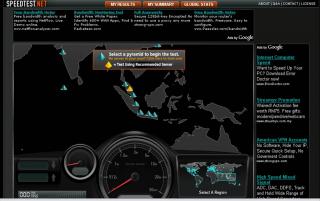
Strange.... speedtest.net yesterday shows the map with the missing of CyberJaya (Gizmo) on it.... wondering what's going down there? Any1 from the Cybie with info to share......?
Attached Image

This post has been edited by JWCheah: Jan 22 2008, 10:31 AM
JWCheah
post Jan 22 2008, 05:57 PM

Getting Started
**
Junior Member
251 posts

Joined: Sep 2007


QUOTE(wrigglerr @ Jan 22 2008, 05:37 PM)
I was checking the coverage of HSDPA for Klang Valley using the coverage map in Maxis Broadband website. The map shows that in KLCC and the surrounding area of it, is NOT covered for HSPDA, only 3G. Isn't funny?  rclxub.gif  rclxub.gif The maxis HQ is in KLCC, right? (stand to be corrected if I'm wrong). Have anybody been using HSDPA in KLCC area? Or is the map not updated??  hmm.gif
*
U r rite... it is only UTMS and it is coming from the Maxis Tower itself. If you try to surf near the water fountain at the front, u will get strong signal at UTMS running at 700kbps constantly.... but not inside KLCC shopping area.
JWCheah
post Jan 23 2008, 03:47 PM

Getting Started
**
Junior Member
251 posts

Joined: Sep 2007


QUOTE(wr6969 @ Jan 23 2008, 03:36 PM)
We have to consider the possibility that in the case of their resellers, Maxis may be "allowing" them a higher bandwidth/higher speed to help them sell the service.  After all, if their speed is the same as other subscribers, ie. sucks, then how are they going to be able to "con" people into signing up?  laugh.gif
*
Location, location, location. It is very much depends on the base station technology (version), number of users and then your signal strength. I've asked a communication engineer for Ericsson who does the maintenance for Maxis and he inform that there will be huge differences if the base tower is newly equip for 3G/HSDPA enable or just with an upgrade. How many users they can take, i'm not sure but as compared to the upgraded ones, the newly setup towers will perform much much better will good average speed per users. So conclusion, if your area is a new area, like Damansara Perdana or so.... it should be on a WOW speed as compared to maybe SubangJaya or Cheras. There isn't enough pressure from the authorities to push for a BETTER SERVICE at the moment due to limited number of ISPs (with 3G permit). I don't think Cyberjaya and the MSC is doing enough. sad.gif Malaysia Boleh (malas)!

This post has been edited by JWCheah: Jan 23 2008, 04:11 PM
JWCheah
post Jan 25 2008, 11:07 AM

Getting Started
**
Junior Member
251 posts

Joined: Sep 2007


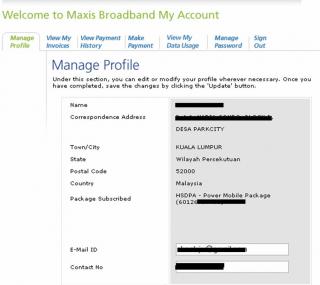
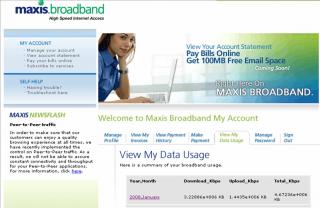
Well my Account shows.....
Attached Image
Attached Image
The total DL+UL = 4.67236GB.... oh...exceeded... yeah man thumbup.gif ......

U guys sure that the "expired" term is not referring to the payment? This account is currently used by my fren and he only complains that he cannot access Yahoo and MSn... but the speed remains great at >1mpbs average. I don't think the recent performance is link with this as Streamyx is also facing some issues.... i think something is going down in Cybie....
QUOTE(shenmui @ Jan 25 2008, 09:12 AM)
Start from this year I think maxis going start to control ...............S***
*
Hmmm..... agree man.... but i still think that they do not have that large groups of client to start this... it will only make Celcom and Digi stronger. But we will have to see.... it is obvious that their strategy is to limit the BW rather than charging the extra.... else, by law, if it involves $$$, they need to make a public announcement of at least 60days on the Rate, Terms and Condition if it has not been announced previously, b4 they can start charging.
Attached Image
Up-to-date, I2Go is still running like fine, occasion dc (1 or 2 times) at 12:00 midnite, really strange.... dry.gif
This week is at 17GB for 7 days... should be more but been gaming everynite and not much torrent to d/l at the moment.....
Attached Image

QUOTE(sam240 @ Jan 25 2008, 10:02 AM)
Hi guys...i'm planning to get the RM68 package, is this come with any modem?....usb or PCMCIA?....free or rent?....

If there is no with/free modem, can I get these below PCMCIA and direct to online?
Is this PCMCIA as datacard reader + modem?

(1) http://photohost.lelong.com.my/is.php?i=27...mg=IMG_0645.JPG
(2) http://i1.lelong.com.my/UserImages/Items/0.../chiaron@17.jpg

I'm still confuse with wireless concept, anyone can tell me more detail about this?
I'm wonder can subscribe this RM68 package and setup up a simple WIFI at my home .... pls help...
added:
and if I plan to get Vodafone Zuhause Web & Talk 3G Wireless LAN Router, is this work with Maxis Broadband?
This modem just cannot support up to HSDPA right?.....but it's seem almost all-in-one, take a look at here:
http://www.comfortsurf.com/

I need help and guide on this...help me pls...
*
If you are getting ur own modem, go for I2Go package.... monthly basis and no contract.... u will not regret it.... forget about MaxisBB.....
bruce.gif
JWCheah
post Jan 25 2008, 01:40 PM

Getting Started
**
Junior Member
251 posts

Joined: Sep 2007


QUOTE(butthead @ Jan 25 2008, 12:37 PM)
are you sure yours is only 4GBs? tongue.gif
yup I2GO is the way to go although might be a bit more expensive on the initial investment...
i think HuaWei already release another model of the USB modem called E2700 or something like that which is supposedly be able to act as a wireless 802.11x adapter as well.... any ideas when maxisbb users can expect this to come to them or if they get an upgrade for free? tongue.gif
*
as i said, the 4G is my frens usage.... mine... well as you can see.... 17GB in 7 days..... my lowest considering i did 85GB in December tongue.gif ...... if they started charging, i will definitely go to court....

QUOTE(sam240 @ Jan 25 2008, 12:59 PM)
Well, I cannot find the I2GO package webpage, mind to show me the link? what's the different between MaxisBB and I2Go package? with and without modem? how about speed?

RM68 is included the ZTE Modem right?....then connect this ZTE modem to WIFI router with RJ45 (network cable) then can use WIFI at home...correct? smile.gif but...
i) the problem is has to bring this ZTE modem on the go during travel / on car, the modem is quite big....and how's to powered the modem during on the go?
ii) ZTE using what kind of battery?....AA? AAA?.... rechargeable battery?.....
iii) cannot find detail for this ZTE modem in ZTE home page
iv) Is this ZTE come with USB port? If yes, then can I connect it to laptop by using USB port then online?

Is this RM68 package is just only 384kbps, so I no need to buy PCMCIA for HSDPA speed, right?....i just can buy 3G speed, right?
Sifu...help me again....any comments are welcome
*
I2GO info : http://store.maxis.com.my/?tpt_id=14&ch=83&pg=1109&ac=3623
i) ZTE comes with its rechargeable batt.... max at 3 hours....
ii) refer to (i)
iii) google ZTE MF600
iv) ZTE does not offer any usb port... onli RJ45(cross)..... to connect to pc/laptop


11 Pages « < 8 9 10 11 >Top
Topic ClosedOptions
 

Change to:
| Lo-Fi Version
0.0442sec    0.55    7 queries    GZIP Disabled
Time is now: 4th December 2025 - 05:20 PM