Welcome Guest ( Log In | Register )

320 Pages « < 252 253 254 255 256 > » Bottom

Outline · [ Standard ] · Linear+

 [2022] iPhone 14 Pro / 14 Pro Max Discussion, Welcome to Dynamic Island

views
     
SkyHermit
post Oct 31 2022, 01:37 PM

Regular
******
Senior Member
1,799 posts

Joined: Nov 2009


Question about the photography regarding macro mode.
Coming from iPhone 11 so this is new to me.

I love to take close-up shot of food and I notice the picture quality for 14PM is worse than my iPhone 11 for the words of surrounding area when I take close up picture.

Should the "macro control" be turned on in Camera setting? From what I read I should.
Then there is a 'yellow flower' icon when I want to take picture. Should I use this or not when taking picture up close?

This post has been edited by SkyHermit: Oct 31 2022, 01:37 PM
angel-girl
post Oct 31 2022, 04:39 PM

Look at all my stars!!
*******
Senior Member
3,408 posts

Joined: Nov 2008
Just got my 14pm purple 256 @ puchong directd. Plenty of stocks available
T09
post Oct 31 2022, 05:36 PM

The Kopite
*******
Senior Member
2,194 posts

Joined: Apr 2010
From: Anfield


QUOTE(SkyHermit @ Oct 31 2022, 01:37 PM)
Question about the photography regarding macro mode.
Coming from iPhone 11 so this is new to me.

I love to take close-up shot of food and I notice the picture quality for 14PM is worse than my iPhone 11 for the words of surrounding area when I take close up picture.

Should the "macro control" be turned on in Camera setting? From what I read I should.
Then there is a 'yellow flower' icon when I want to take picture. Should I use this or not when taking picture up close?
*
Do you mean when the camera turns into macro mode during close up shot, it appears to be slightly 'grainy' or not so crystal clear/HD than when you are in normal mode with wide camera? At least that is what i noticed on my 13PM.
jianwei87
post Oct 31 2022, 07:25 PM

Casual
***
Junior Member
481 posts

Joined: Jan 2007
I’m tired wallpaper deep effect
SkyHermit
post Oct 31 2022, 07:49 PM

Regular
******
Senior Member
1,799 posts

Joined: Nov 2009


QUOTE(T09 @ Oct 31 2022, 05:36 PM)
Do you mean when the camera turns into macro mode during close up shot, it appears to be slightly 'grainy' or not so crystal clear/HD than when you are in normal mode with wide camera? At least that is what i noticed on my 13PM.
*
Not sure if that's the case

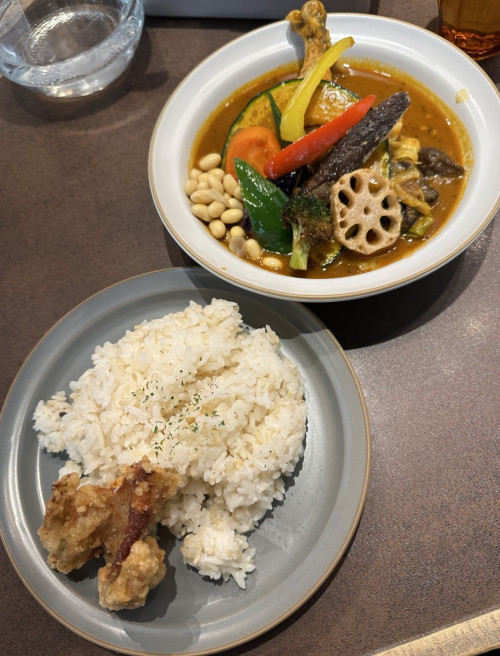
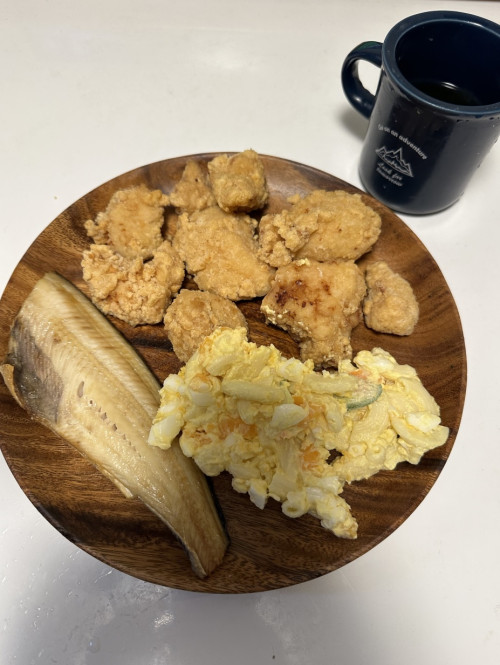
Look at the 3 pictures below. You can see that the object nearer to the camera is clearer, and the one further away is more blurry.

1) The words on the egg is blurry than the stuff nearer infront of camera

2) The curry(further away) is more blurry than the rice.

3) The words on the cup(further away) is blurry.

user posted image

user posted image

user posted image

This post has been edited by SkyHermit: Oct 31 2022, 07:51 PM
NXaqua
post Oct 31 2022, 08:31 PM

Enthusiast
*****
Senior Member
921 posts

Joined: May 2006
From: Either Ayer Itam, Damansara or Kuala Terengganu
QUOTE(NXaqua @ Oct 25 2022, 10:00 PM)
https://s.lazada.com.my/s.4wToL

Here the link.
Hope to receive this week, then will share my review.
*
Hi guys,

My brief review on Anker MagSafe Battery Pack.
1. Magnet is strong, firmly attach to my MagSafe case.
2. 4 little round light indicator on battery pack to show battery power level.
3. Come with a short cable.


Cons.
1. Slightly only, heavier and more rounder than the other MagSafe Battery pack.
2. Expensive.

I have also bought another MagSafe Battery pack which is cheaper by RM30.00 plus. It is also lighter and more compact.
Magnet is also quite strong.

Conclusion, my wife choose the cheaper version as it is more lighter and easily carry around.

That about it.
cheesey
post Nov 1 2022, 08:51 AM

On my way
****
Junior Member
521 posts

Joined: Jan 2003
QUOTE(NXaqua @ Oct 31 2022, 08:31 PM)
Hi guys,

My brief review on Anker MagSafe Battery Pack.
1. Magnet is strong, firmly attach to my MagSafe case.
2. 4 little round light indicator on battery pack to show battery power level.
3. Come with a short cable.
Cons.
1. Slightly only, heavier and more rounder than the other MagSafe Battery pack.
2. Expensive.

I have also bought another MagSafe Battery pack which is cheaper by RM30.00 plus. It is also lighter and more compact.
Magnet is also quite strong.

Conclusion, my wife choose the cheaper version as it is more lighter and easily carry around.

That about it.
*
What brand is cheaper versoin bro.
angel-girl
post Nov 1 2022, 10:19 AM

Look at all my stars!!
*******
Senior Member
3,408 posts

Joined: Nov 2008
transfer my whatapps data from android to new ip took 15 hours. lucky didnt stuck. pheww
davidletterboyz
post Nov 1 2022, 10:52 AM

Der Kaiser
*******
Senior Member
4,672 posts

Joined: Jan 2003


QUOTE(SkyHermit @ Oct 31 2022, 07:49 PM)
Not sure if that's the case

Look at the 3 pictures below. You can see that the object nearer to the camera is clearer, and the one further away is more blurry.

1) The words on the egg is blurry than the stuff nearer infront of camera

2) The curry(further away) is more blurry than the rice.

3) The words on the cup(further away) is blurry.

user posted image

user posted image

user posted image
*
I'm not an iPhone user but I can comment based on my photography background.

You are not supposed to use macro mode in the sample you provide because the subject (food) is far away. Macro mode is for close up range (e.g. as close as 2 cm for iPhone 14 series). Example of macro shot: https://i0.wp.com/9to5mac.com/wp-content/up...fo&w=2000&ssl=1

Having said that, the "blurry"/out of focus area is due to iP14PM larger sensor size. The larger is the sensor size (and also lens aperture in general, but iP14PM and iP11 have same f/1.8 aperture), the more background blur you will get. Mind you this is not a software trick like portrait mode. In fact, the purpose of portrait mode is to emulate the large aperture out of focus blur like a DSLR and no software trick could recover the blurred image as well. This is an inherit effect of going for a larger sensor size.
shockk
post Nov 1 2022, 11:55 AM

[ T A R G E T - L 0 C K E D ]
Group Icon
VIP
11,883 posts

Joined: Jan 2003
QUOTE(angel-girl @ Nov 1 2022, 10:19 AM)
transfer my whatapps data from android to new ip took 15 hours. lucky didnt stuck. pheww
*
My God. 15 hours. Mine was transferring for nearly 10 hours or so from my Fold 4, but gave up as I had to use my phone for work. laugh.gif
End up I just restored from my latest iCloud backup (prior to this, I regularly alternate my daily driver phone often between Android and iPhone). yawn.gif

This post has been edited by shockk: Nov 1 2022, 11:57 AM
angel-girl
post Nov 1 2022, 12:25 PM

Look at all my stars!!
*******
Senior Member
3,408 posts

Joined: Nov 2008
QUOTE(shockk @ Nov 1 2022, 11:55 AM)
My God. 15 hours. Mine was transferring for nearly 10 hours or so from my Fold 4, but gave up as I had to use my phone for work. laugh.gif
End up I just restored from my latest iCloud backup (prior to this, I regularly alternate my daily driver phone often between Android and iPhone).    yawn.gif
*
Yea wei from yesterday 6pm till this morning, i told myself if morning cannot settle then i will cancel it, lucky it got completed.

This post has been edited by angel-girl: Nov 1 2022, 12:25 PM
SkyHermit
post Nov 1 2022, 12:36 PM

Regular
******
Senior Member
1,799 posts

Joined: Nov 2009


QUOTE(davidletterboyz @ Nov 1 2022, 10:52 AM)
I'm not an iPhone user but I can comment based on my photography background.

You are not supposed to use macro mode in the sample you provide because the subject (food) is far away. Macro mode is for close up range (e.g. as close as 2 cm for iPhone 14 series). Example of macro shot: https://i0.wp.com/9to5mac.com/wp-content/up...fo&w=2000&ssl=1

Having said that, the "blurry"/out of focus area is due to iP14PM larger sensor size. The larger is the sensor size (and also lens aperture in general, but iP14PM and iP11 have same f/1.8 aperture), the more background blur you will get. Mind you this is not a software trick like portrait mode. In fact, the purpose of portrait mode is to emulate the large aperture out of focus blur like a DSLR and no software trick could recover the blurred image as well. This is an inherit effect of going for a larger sensor size.
*
Thanks for your info. The Macro mode works fine for some picture

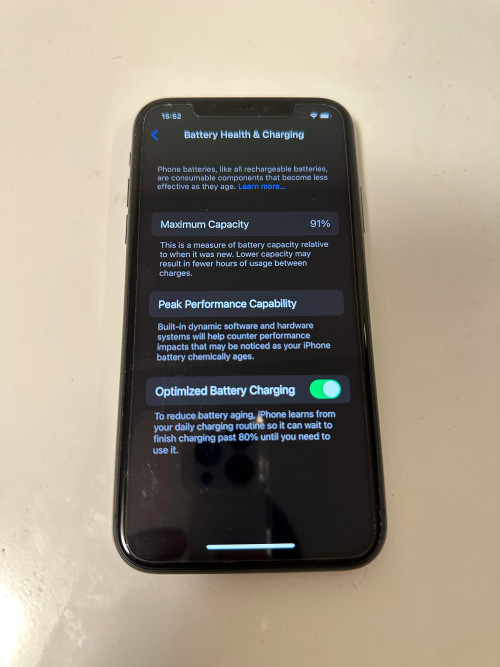
But for some shots, like this one below where it is far enough where I cannot even choose to use Macro or not, you can see the center part is clear but the part on top where it shows the time 15:52 and "Battery Health & Charging" is like having double vision, or like my hand was shaking when taking the picture

Even my iPhone 11 has clearer picture all around.

user posted image

user posted image
irwan6179
post Nov 1 2022, 12:57 PM

Regular
******
Senior Member
1,040 posts

Joined: Oct 2004
From: the other side


Any chance you are using any lense protector?

anyway, larger aperture may contribute to out of focus for near subject. How about when you focus on further section, is the nearer section become blur too?

Edit: That screen protector on the older phone might skew the light as well. I suggest take outside photo and see if can replicate these shortcomings.

This post has been edited by irwan6179: Nov 1 2022, 12:59 PM
weihaoteo
post Nov 1 2022, 01:53 PM

New Member
*
Junior Member
8 posts

Joined: Sep 2014
hi want to get a new iPhone 14 pro. Should I buy from a person who sells (telco) set ?? I shouldn't is it because of the warranty thingy?
ejump82
post Nov 1 2022, 03:18 PM

On my way
****
Senior Member
684 posts

Joined: Aug 2005


QUOTE(weihaoteo @ Nov 1 2022, 01:53 PM)
hi want to get a new iPhone 14 pro. Should I buy from a person who sells (telco) set ?? I shouldn't is it because of the warranty thingy?
*
what do you meant by warranty thing? all apple products need to go to apple service provider wherever you bought it.

TongCN
post Nov 1 2022, 03:48 PM

Look ma, I have lots stars :D
*******
Senior Member
6,714 posts

Joined: Aug 2008
From: Malaysia


Place order for 256GB i14P 2 weeks ago but end up buying 128GB cause see there is stock for walk-in since i'm using icloud+ anyway.

Change from my iphone 11 to 14P

One thing i noticed is that the close-up focus range become further as compares to Iphone 11 using main wide camera sad.gif
Addword
post Nov 1 2022, 04:00 PM

Getting Started
**
Junior Member
203 posts

Joined: Oct 2014


QUOTE(weihaoteo @ Nov 1 2022, 01:53 PM)
hi want to get a new iPhone 14 pro. Should I buy from a person who sells (telco) set ?? I shouldn't is it because of the warranty thingy?
*
The only issue buying telco set is the device being telco locked if the person didnt settle his bill.. only advise to buy from close friend or family members
davidletterboyz
post Nov 1 2022, 04:44 PM

Der Kaiser
*******
Senior Member
4,672 posts

Joined: Jan 2003


QUOTE(SkyHermit @ Nov 1 2022, 12:36 PM)
Thanks for your info. The Macro mode works fine for some picture

But for some shots, like this one below where it is far enough where I cannot even choose to use Macro or not, you can see the center part is clear but the part on top where it shows the time 15:52 and "Battery Health & Charging" is like having double vision, or like my hand was shaking when taking the picture

Even my iPhone 11 has clearer picture all around.

user posted image

user posted image
*
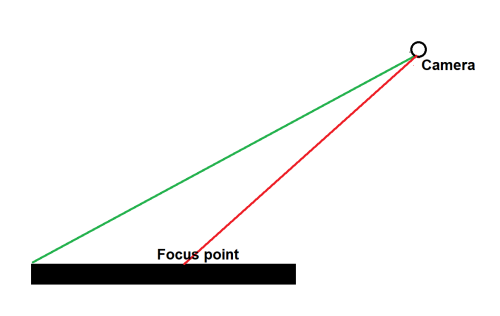
I do not have an iPhone to test but the situation you mentioned is actually very common for large sensor and/or lens aperture. Take a look at the following diagram:

user posted image

Basically, if the lens focus at the center of your subject, whatever further away from that point will gradually become out of focus. This is because the focus distance from your lens to center (red line) and the top (green line) are different. For camera with small size sensor or aperture, this behavior is not as significant because it has a larger focus zone and will only start to see out of focus part when it is very further away.

You can use this aperture simulator to understand the behaviour: http://www.andersenimages.com/tutorials/exposure-simulator/
Choose aperture priority.
Then set the aperture slider to f/1.4 (means more light goes into the sensor). Notice whatever behind the subject is blurred.
SkyHermit
post Nov 1 2022, 04:49 PM

Regular
******
Senior Member
1,799 posts

Joined: Nov 2009


QUOTE(davidletterboyz @ Nov 1 2022, 04:44 PM)
I do not have an iPhone to test but the situation you mentioned is actually very common for large sensor and/or lens aperture. Take a look at the following diagram:

user posted image

Basically, if the lens focus at the center of your subject, whatever further away from that point will gradually become out of focus. This is because the focus distance from your lens to center (red line) and the top (green line) are different. For camera with small size sensor or aperture, this behavior is not as significant because it has a larger focus zone and will only start to see out of focus part when it is very further away.

You can use this aperture simulator to understand the behaviour: http://www.andersenimages.com/tutorials/exposure-simulator/
Choose aperture priority.
Then set the aperture slider to f/1.4 (means more light goes into the sensor). Notice whatever behind the subject is blurred.
*
Thanks mate.

In other words, the aperture for iPhone 14PM has smaller number than iPhone 11 due to having bigger lens?

From what I read, it looks like I can't change the aperture on the iPhone
davidletterboyz
post Nov 1 2022, 05:20 PM

Der Kaiser
*******
Senior Member
4,672 posts

Joined: Jan 2003


QUOTE(SkyHermit @ Nov 1 2022, 04:49 PM)
Thanks mate.

In other words, the aperture for iPhone 14PM has smaller number than iPhone 11 due to having bigger lens?

From what I read, it looks like I can't change the aperture on the iPhone
*
Their aperture value are roughly the same, IP14PM f/1.78 vs IP11 f/1.8
but their sensor size is really different:
https://forums.macrumors.com/proxy.php?imag...739f8ecdebddf8b

If we take into account of sensor size, we can normalize their aperture value to 35-mm equivalent (full frame sensor) so that they are comparable. After a series of calculation, that would be f/6.3 for IP14PM and f/10.2 for IP11P.

Here’s the aperture scale. Each step down lets in half as much light:

f/1.4 (very large opening of your aperture blades, lets in a lot of light)
f/2.0 (lets in half as much light as f/1.4)
f/2.8 (lets in half as much light as f/2.0)
f/4.0 (etc.)
f/5.6
f/8.0
f/11.0
f/16.0

We can approximately say that the IP11P only let in a quarter of light vs IP14PM.

Unfortunately, iPhone (and most phones) has a fixed aperture. IIRC, Samsung S9, S10, and Sony Pro-i have dual aperture system. The new Huawei Mate 50 series have variable aperture (f/1.4 to f/4.0).

320 Pages « < 252 253 254 255 256 > » Top
 

Change to:
| Lo-Fi Version
0.0456sec    0.70    6 queries    GZIP Disabled
Time is now: 18th December 2025 - 09:35 AM