Welcome Guest ( Log In | Register )

Outline · [ Standard ] · Linear+

 [2022] iPhone 14 Pro / 14 Pro Max Discussion, Welcome to Dynamic Island

views
     
davidletterboyz
post Nov 1 2022, 10:52 AM

Der Kaiser
*******
Senior Member
4,672 posts

Joined: Jan 2003


QUOTE(SkyHermit @ Oct 31 2022, 07:49 PM)
Not sure if that's the case

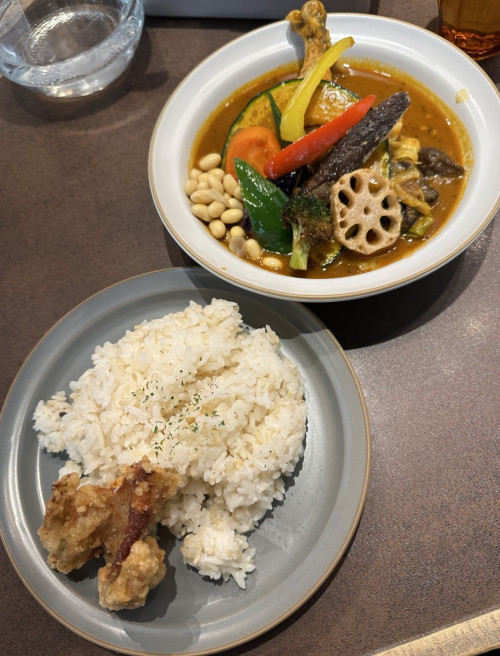
Look at the 3 pictures below. You can see that the object nearer to the camera is clearer, and the one further away is more blurry.

1) The words on the egg is blurry than the stuff nearer infront of camera

2) The curry(further away) is more blurry than the rice.

3) The words on the cup(further away) is blurry.

user posted image

user posted image

user posted image
*
I'm not an iPhone user but I can comment based on my photography background.

You are not supposed to use macro mode in the sample you provide because the subject (food) is far away. Macro mode is for close up range (e.g. as close as 2 cm for iPhone 14 series). Example of macro shot: https://i0.wp.com/9to5mac.com/wp-content/up...fo&w=2000&ssl=1

Having said that, the "blurry"/out of focus area is due to iP14PM larger sensor size. The larger is the sensor size (and also lens aperture in general, but iP14PM and iP11 have same f/1.8 aperture), the more background blur you will get. Mind you this is not a software trick like portrait mode. In fact, the purpose of portrait mode is to emulate the large aperture out of focus blur like a DSLR and no software trick could recover the blurred image as well. This is an inherit effect of going for a larger sensor size.
davidletterboyz
post Nov 1 2022, 04:44 PM

Der Kaiser
*******
Senior Member
4,672 posts

Joined: Jan 2003


QUOTE(SkyHermit @ Nov 1 2022, 12:36 PM)
Thanks for your info. The Macro mode works fine for some picture

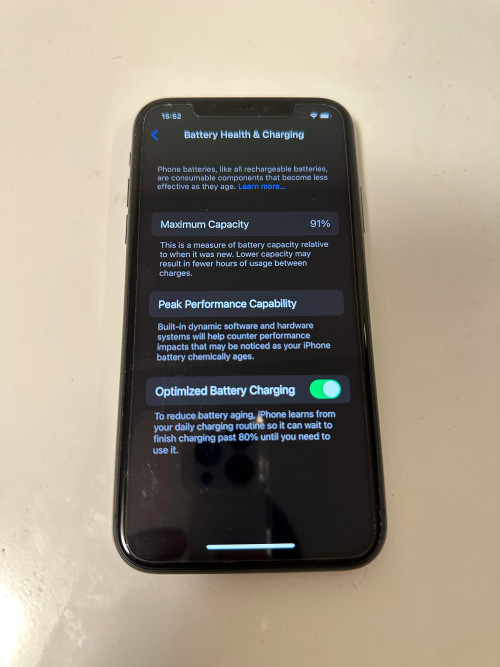
But for some shots, like this one below where it is far enough where I cannot even choose to use Macro or not, you can see the center part is clear but the part on top where it shows the time 15:52 and "Battery Health & Charging" is like having double vision, or like my hand was shaking when taking the picture

Even my iPhone 11 has clearer picture all around.

user posted image

user posted image
*
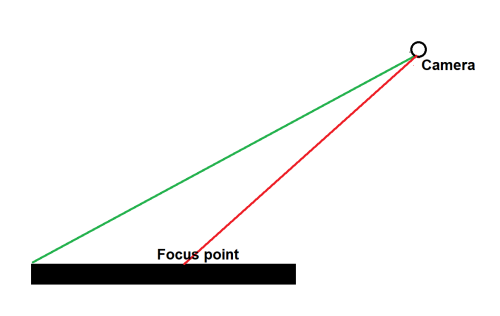
I do not have an iPhone to test but the situation you mentioned is actually very common for large sensor and/or lens aperture. Take a look at the following diagram:

user posted image

Basically, if the lens focus at the center of your subject, whatever further away from that point will gradually become out of focus. This is because the focus distance from your lens to center (red line) and the top (green line) are different. For camera with small size sensor or aperture, this behavior is not as significant because it has a larger focus zone and will only start to see out of focus part when it is very further away.

You can use this aperture simulator to understand the behaviour: http://www.andersenimages.com/tutorials/exposure-simulator/
Choose aperture priority.
Then set the aperture slider to f/1.4 (means more light goes into the sensor). Notice whatever behind the subject is blurred.
davidletterboyz
post Nov 1 2022, 05:20 PM

Der Kaiser
*******
Senior Member
4,672 posts

Joined: Jan 2003


QUOTE(SkyHermit @ Nov 1 2022, 04:49 PM)
Thanks mate.

In other words, the aperture for iPhone 14PM has smaller number than iPhone 11 due to having bigger lens?

From what I read, it looks like I can't change the aperture on the iPhone
*
Their aperture value are roughly the same, IP14PM f/1.78 vs IP11 f/1.8
but their sensor size is really different:
https://forums.macrumors.com/proxy.php?imag...739f8ecdebddf8b

If we take into account of sensor size, we can normalize their aperture value to 35-mm equivalent (full frame sensor) so that they are comparable. After a series of calculation, that would be f/6.3 for IP14PM and f/10.2 for IP11P.

Here’s the aperture scale. Each step down lets in half as much light:

f/1.4 (very large opening of your aperture blades, lets in a lot of light)
f/2.0 (lets in half as much light as f/1.4)
f/2.8 (lets in half as much light as f/2.0)
f/4.0 (etc.)
f/5.6
f/8.0
f/11.0
f/16.0

We can approximately say that the IP11P only let in a quarter of light vs IP14PM.

Unfortunately, iPhone (and most phones) has a fixed aperture. IIRC, Samsung S9, S10, and Sony Pro-i have dual aperture system. The new Huawei Mate 50 series have variable aperture (f/1.4 to f/4.0).
davidletterboyz
post Nov 1 2022, 09:47 PM

Der Kaiser
*******
Senior Member
4,672 posts

Joined: Jan 2003


QUOTE(SkyHermit @ Nov 1 2022, 05:46 PM)
You are right about the aperture as I just checked the close up shot of my food taken with both iPhone 11 and 14PM.
iPhone 14PM : f/1.78
iPhone 11 : f/1.8

Learned new thing from you regarding the amount of light!

Basically, all iPhone 14 Pro Max would have the same picture quality like those pics I posted earlier right? And not just my current 14 Pro Max (blurry photo the further away from center.. a.k.a the double vision)
*
Yes. Not only IP14PM, all other Android phones with similar or larger sensor size has the same characteristic.

QUOTE(lazyman@home @ Nov 1 2022, 06:30 PM)
You can try if still getting blurry pic when you take the pic perpendicularly. By this way, the object will be in same plane of focus area rather than tilted where got difference in distance.
*
Yes. I'm sure the whole page will be in focus.


Change to:
| Lo-Fi Version
0.1521sec    0.40    7 queries    GZIP Disabled
Time is now: 18th December 2025 - 07:47 AM