Welcome Guest ( Log In | Register )

Bump Topic Topic Closed RSS Feed

Outline · [ Standard ] · Linear+

Unifi Official TM UniFi High Speed Broadband Thread V40, READ 1ST PAGE FOR RELEVANT WIFI INFO

views
     
countingcrows
post Apr 12 2023, 09:45 PM

Getting Started
**
Junior Member
260 posts

Joined: Feb 2023
QUOTE(Anime4000 @ Apr 12 2023, 06:42 PM)
For GPON, yeah, I have been hacking during PKP, so much free time...

if XGPON/XGSPON, So far I found some high end SFP and run very hot.

last year have tested 2.1Gbps during 2~3am, this using multiple PPPoE account and aggregate via Mikrotik:
https://forum.lowyat.net/index.php?showtopi...#entry105123186
*
But what about the phone line?

countingcrows
post Apr 12 2023, 10:34 PM

Getting Started
**
Junior Member
260 posts

Joined: Feb 2023
QUOTE(totally_skint @ Apr 12 2023, 10:19 PM)
New pricing not implemented yet

https://amanz.my/2023384855/
*
I hope this is the case and not

2Gbps RM459, @ RM399 post MSAP price.
1Gbps RM409, @ RM349 post MSAP price.

This post has been edited by countingcrows: Apr 12 2023, 10:39 PM
countingcrows
post Apr 17 2023, 01:35 PM

Getting Started
**
Junior Member
260 posts

Joined: Feb 2023
QUOTE(dragna @ Apr 17 2023, 12:50 PM)
If you're only on 800Mbps then might as well go the distance with 2Gbps. 1Gbps is just marginally small upgrade, yes although the upload is doubled still doesn't justify the upgrade to be a huge leap.
If on 500Mbps, then 1Gbps will be a good choice.
*
Yea but one has to take into account the cost of procuring new hardware to truly get 2Gbps vs 2 x 1Gbps or just 1Gbps.

GPON stick + RB5009 for eg at a minimum for 1 wired device to be able to hit 2Gbps + your old WIFI router acting as AP at max 1Gbps.


For more devices and faster WIFI, you'd need say a 5 x 2.5Gbps switch, WIFI AP with 2.5Gbps port, 2.5Gbps LAN cards if your PCs are only 1Gbps capable.

IP phone or analog converter to use a regular phone.


countingcrows
post Apr 20 2023, 09:44 PM

Getting Started
**
Junior Member
260 posts

Joined: Feb 2023
QUOTE(Oltromen Ripot @ Apr 20 2023, 09:09 PM)
(i have TV treaming while this result was obtained.)


Same. Streaming to my TV downstairs.
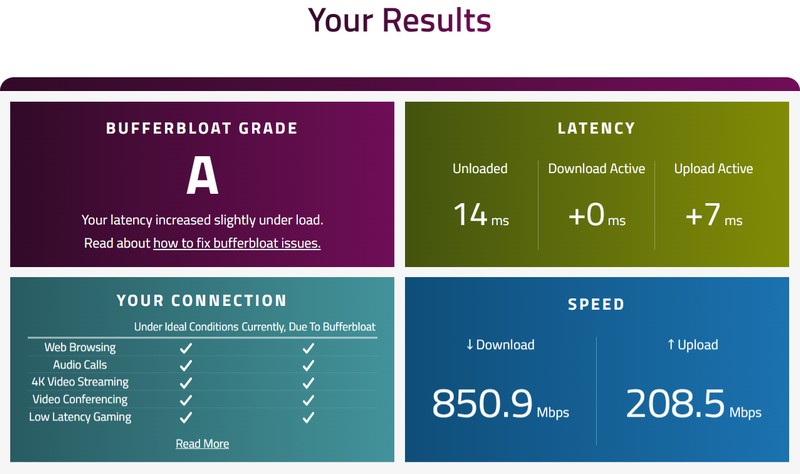
No idea but got an A.
user posted image
countingcrows
post Apr 22 2023, 08:17 PM

Getting Started
**
Junior Member
260 posts

Joined: Feb 2023
QUOTE(ry8128 @ Apr 22 2023, 07:59 PM)
Anyone here encounter before the 5G wifi connection suddenly missing?

We normally have 2.4G and 5G connection for unifi. But all of a sudden, the 5G is missing and all of my devices cant connect to it anymore. Currently surviving by connecting to the 2.4G.

Any idea what happen and how to fix it?
*
Check your router settings, and/or reboot it?


countingcrows
post Apr 22 2023, 10:13 PM

Getting Started
**
Junior Member
260 posts

Joined: Feb 2023
QUOTE(ry8128 @ Apr 22 2023, 08:20 PM)
Didnt change any router settings, possible for it to change?

Already reboot few times, still same.
*
I don't know.

But if it happened to me, I would check if 5ghz is enabled. Then I'd disable it. Save. Enable it. Save.

I might change the channel and other settings to see if it starts working too.


countingcrows
post Apr 26 2023, 07:39 PM

Getting Started
**
Junior Member
260 posts

Joined: Feb 2023
QUOTE(go626201 @ Apr 26 2023, 06:15 PM)
, since the 800mbps and 1gbps is showing the same price,which should mean TM was thinking to do so.

So I think TM not going to upgrade 800mbps user to 2gbps plan. (Unless TM going to replace most older device?)
*
A bit unfair for 800Mbps users if they only get upgraded to 1Gbps since the packages costs the same?

When lower speed packages get upgraded to faster and more expensive packages?

countingcrows
post Apr 27 2023, 02:33 PM

Getting Started
**
Junior Member
260 posts

Joined: Feb 2023
QUOTE(Prissy Elf @ Apr 27 2023, 01:35 PM)
Dear all,

What's the deal with this Free Wifi 6 router upgrade? Has anyone gotten a free replacement yet? Sounds too good to be true. I'm still using the D-link DIR-850L router. About time I get an upgrade  sweat.gif

Claim your FREE* Wi-Fi 6 Router today!
*
So far so good. I have the AX3000 variety. You get 2 identical wifi routers.

One thing to note is I mistakenly used and set up the one supposed to be the mesh as the main router since the box was in plastic wrap while the other one wasn't and only realized a few days later when I opened the other box with all the instructions.

It's no wonder the auto set up thingy didn't work but I managed to set it up manually.


countingcrows
post Apr 27 2023, 02:47 PM

Getting Started
**
Junior Member
260 posts

Joined: Feb 2023
QUOTE(Anime4000 @ Apr 27 2023, 02:35 PM)
Using GPON SFP Stick (Realtek RTL9601D), cloned D-LINK OMCI Info, custom firmware

RB5009, working SFP+ with 2.5Gb (HiSGMII-PHY)
If I'm on the old Huawei HG-8240W ONU, will I be able to use this GPON stick method or
is it not possible as I won't be able to gather the info needed?


countingcrows
post Apr 27 2023, 04:15 PM

Getting Started
**
Junior Member
260 posts

Joined: Feb 2023
QUOTE(Anime4000 @ Apr 27 2023, 03:28 PM)
You can use the stick and emulate HG8240H5 information which I have put online (GitHub)
*
Prerequisite
1. Your PLOAM/SLID Password (ASCII or HEX)
2. Your old ONT Serial Number (HWTC14211ED8)
3. Your old ONT Software Version (V3R017C10S100)
4. Your old ONT Hardware Version (BF9.A)
5. Your old ONT Model Name (HG8240H)

You need these before setup xPON Stick


Will I be able to get the above info from my HG8240W?


countingcrows
post Apr 27 2023, 11:56 PM

Getting Started
**
Junior Member
260 posts

Joined: Feb 2023
QUOTE(Anime4000 @ Apr 27 2023, 11:13 PM)
no, I just take from WebUI and use it on GPON Stick
*
Sigh, my HG-8240w does not have web ui according to this thread.
Any other way?
countingcrows
post May 3 2023, 06:57 PM

Getting Started
**
Junior Member
260 posts

Joined: Feb 2023
QUOTE(Smithmaster @ May 3 2023, 03:27 PM)
Hi, I just recently gotten the upgrade to 300mbps. Had to swap to tmnet dlink ax3000.

May I ask if anyone know if i can switch DNS on router itself?

Or have to buy new router?
*
You can set any ipv4/6 DNS in the router
countingcrows
post May 7 2023, 11:41 AM

Getting Started
**
Junior Member
260 posts

Joined: Feb 2023
QUOTE(akhito @ May 7 2023, 08:54 AM)
TLDR: 1st of July go check all points and then redeem all be4 1 Oct cuz not going to add more points ald.
It sounds to me more like cost cutting just like digi can give u perks that u seldom use but dun wanna use point to rebate bill anymore.
*
Going to redeem majority next month, and leave about 100 pts to ensure pts accumulated in the following months do not go to waste since a min of 100 pts is req for redemption.

Will redeem the rest in Sep.


My bad. Just realized I earn more then 100 pts per month.
Just redeemed max system will allow.

This post has been edited by countingcrows: May 7 2023, 12:01 PM
countingcrows
post May 10 2023, 04:02 PM

Getting Started
**
Junior Member
260 posts

Joined: Feb 2023
QUOTE(HumanExtinction @ May 10 2023, 02:57 PM)
im really annoyed right now, ask 3 times livechat support, all 3 gives different answers. One said need to pay 300 penalty, one said need to pay 200 penalty, one said no need.

Yesterday I called 100, ask again no need pay penalty but will renew contract 2 years. Today get called from them again, say sorry 100 cannot do downgrade, need to go tmpoint and do it youself, further more need to pay the remaining months before you can downgrade.

DAFUQ?!  bangwall.gif

EDIT: can anyone confirm with me if downgrade speed still in contract need to pay the remaining month?
*
How many months are you still under contract?

If I were TM and if someone only had 2 or 3 months left, it would make sense to just allow a downgrade and recontract them for 24 months vs annoy them by denying downgrade unless penalty is paid and have them go to a competitor in 2/3 months time.

countingcrows
post May 10 2023, 04:56 PM

Getting Started
**
Junior Member
260 posts

Joined: Feb 2023
QUOTE(HumanExtinction @ May 10 2023, 04:40 PM)
4 months, furthermore my place only have tm infrastructure and no time here so im stuck with tm anyway

the reason why im annoyed is because all of them gave different answers, if the first time i ask and they provide a clear and concise answer, i wouldn't be so fed up at all.
*
Since they have a monopoly in your area, I can see why they're playing hard ball.
Best to email them at help@tm.com.my and get a response in writing?


countingcrows
post May 14 2023, 02:40 PM

Getting Started
**
Junior Member
260 posts

Joined: Feb 2023
QUOTE(PalakOtakHang @ May 14 2023, 03:53 AM)
Anyone can help me with configuring Fiberhome SR1041Y router (Hardware Version:SR1041Y_R1A, Firmware Version:RP0102)? I factory reset the router because suddenly all devices cannot access the default gateway of the router, and internet goes down too.

I followed instructions from this video: https://www.youtube.com/watch?v=IFWXlnL6R7c except the bandsteering part, i just leave the access points as 2.4 and 5 Ghz

When I use the Ping Diagnostic tool in the router interface, I successfully ping google.com with no problem. But on my pc, when i connected using cable or wifi, it just says no internet. I think my unifi pppoe id and password are correct, because I got them from customer service. Also, the internet light on the router is lit after i insert the id and password. I got redirected to walledgarden.tm, I followed up with customer service again, but cs told me there is nothing wrong with the account (account is active and no suspended)...

The technician will only come on Monday afternoon. The 4G reception for the carrier Im using is very poor in my room...  I need internet to do some works. Is there any configuration which I have missed? icon_question.gif
*
Check your PC's IP?
Is it 169.*... or 192.*...?

This post has been edited by countingcrows: May 14 2023, 02:48 PM
countingcrows
post May 21 2023, 11:33 AM

Getting Started
**
Junior Member
260 posts

Joined: Feb 2023
QUOTE(Oltromen Ripot @ May 21 2023, 03:09 AM)
Me again.

Upgraded fibre from 500Mbps/100Mbps to 1Gbps/500Mbps plan

D-LINK Downstream ModeASUS WAN ModeASUS Ports InvolvedASUS Speed Test (Mbps)ASUS DDNS RegistrationRemark
BridgedPPPoEWAN650Mbps/500MbpsSuccessful (IPv4, IPv6)
BridgedPPPoEDual-WAN WAN+2.5G650Mbps/500MbpsSuccessful (IPv4, IPv6)Only 1 PPPoE session possible on either port is successful
|
Have you tried testing with your previous set up? Old BTU and Asus RT-AX86U?


countingcrows
post May 21 2023, 11:39 PM

Getting Started
**
Junior Member
260 posts

Joined: Feb 2023
QUOTE(Oltromen Ripot @ May 21 2023, 11:20 PM)
ZTE ZXHN-F620 <-- vlan500 --> ASUS RT-AX86U

as-is configuration just like pre-upgrade.
Your LAN cables can transfer files at 900+Mbps between 2 PCs that are wired to your RT-AX86U?

Perhaps your line is not configured properly?

I just tested @ TM Seberang Jaya server and can get 837Mbps from KL.

countingcrows
post May 23 2023, 06:21 PM

Getting Started
**
Junior Member
260 posts

Joined: Feb 2023
QUOTE(doomed151 @ May 23 2023, 05:54 PM)
Anyone else facing trouble accessing certain sites suddenly?

github.com
slack.com
fandom.com
Telegram
blizzard.com

Either not loading at all or super slow.
*
Nope, but fandom and blizzard is a lil slow.
countingcrows
post May 27 2023, 11:10 AM

Getting Started
**
Junior Member
260 posts

Joined: Feb 2023
QUOTE(Rob W @ May 27 2023, 01:57 AM)
My wife accepted an upgrade to 500 Mbps whilst I way away and we now have 2 DLink AX3000 (DIR-X3060Z) Wifi 6mesh routers.
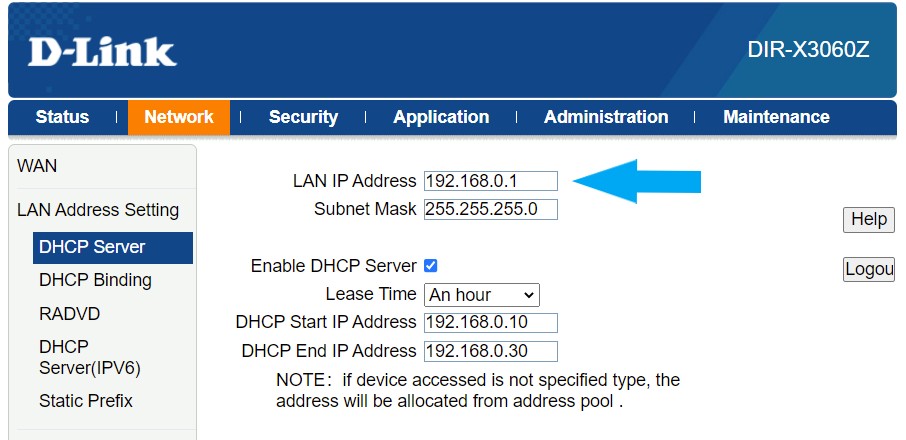
1) You can change the Dlink's IP to the previous router's IP, 192.168.1.1

user posted image

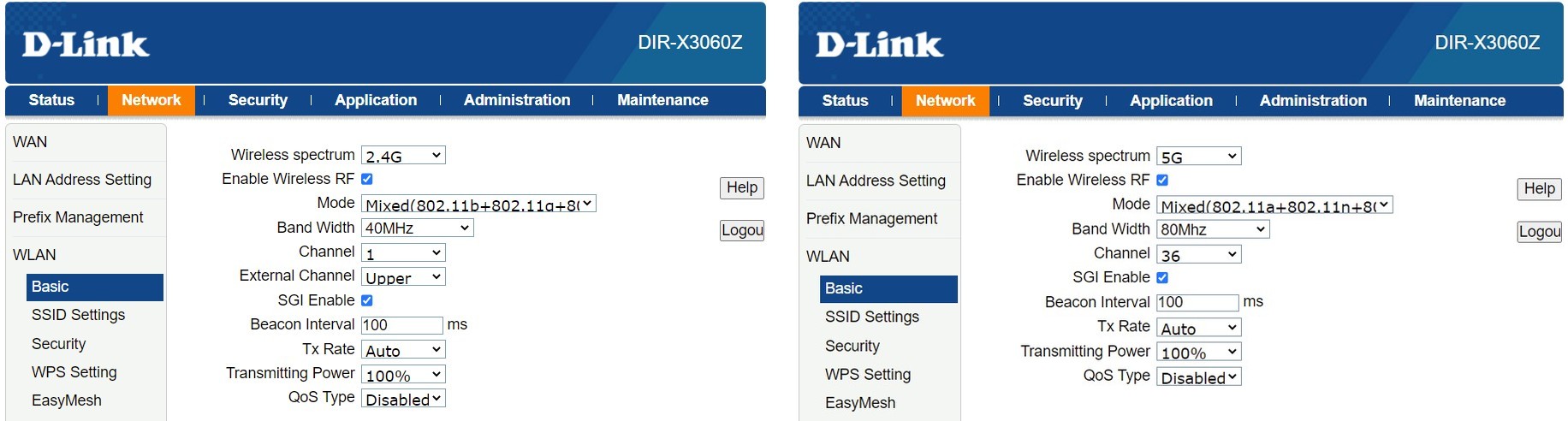
2) That page is to set the WIFI settings for 2.4GHz and 5GHz. If the "Enable Wireless RF" is checked for both 2.4GHz and 5GHz then both 2.4GHz and 5GHz are enabled.

user posted image


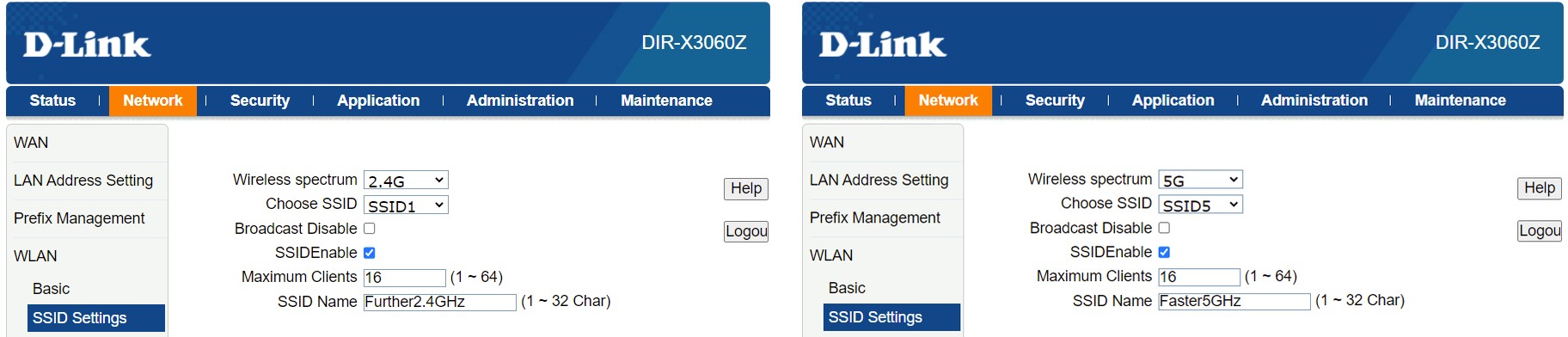
You can change the SSIDs for both 2GHz and 5GHz to the same SSID if you want.

user posted image


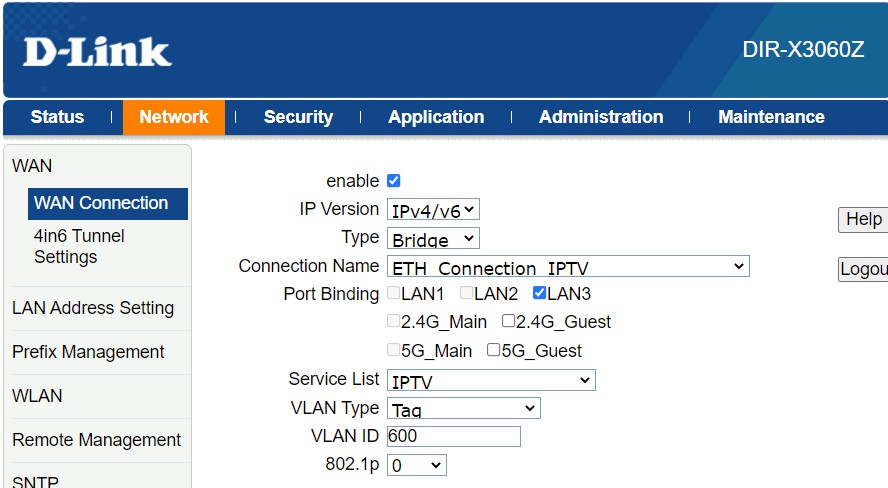
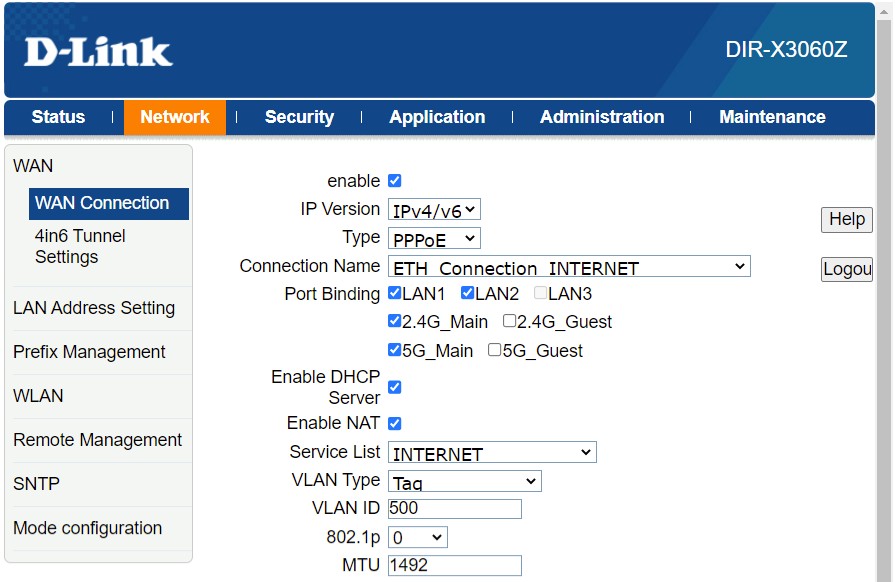
3) The default settings for the Dlink makes LAN 3 the port for wired IPTV connections.
If you want to use LAN 3 for internet and not IPTV, then uncheck "Enable"

user posted image

Then, enable internet-port binding for LAN 3 by checking it.

user posted image


4) Not that I know of but I was able to configure everything from scratch with the default user/pwd.


3 Pages < 1 2 3 >Top
Topic ClosedOptions
 

Change to:
| Lo-Fi Version
0.2717sec    0.46    7 queries    GZIP Disabled
Time is now: 21st December 2025 - 10:59 PM