

QUOTE(lambox105 @ Oct 18 2022, 09:47 PM)
Didn't you already bought earlier?

I sold already hahaMoto Motorola Edge 30 Pro Discussion Thread, The Cheapest Snapdragon 8 Gen 1
|
|
 Oct 18 2022, 09:47 PM Oct 18 2022, 09:47 PM
|
 
Senior Member
3,522 posts Joined: Jan 2010  
|
QUOTE(lambox105 @ Oct 18 2022, 09:47 PM) Didn't you already bought earlier? I sold already haha |
|
|
|
|
|
Nov 1 2022, 09:04 PM
|

Junior Member
183 posts Joined: Sep 2009 From: Petaling Jaya, Malaysia 
|
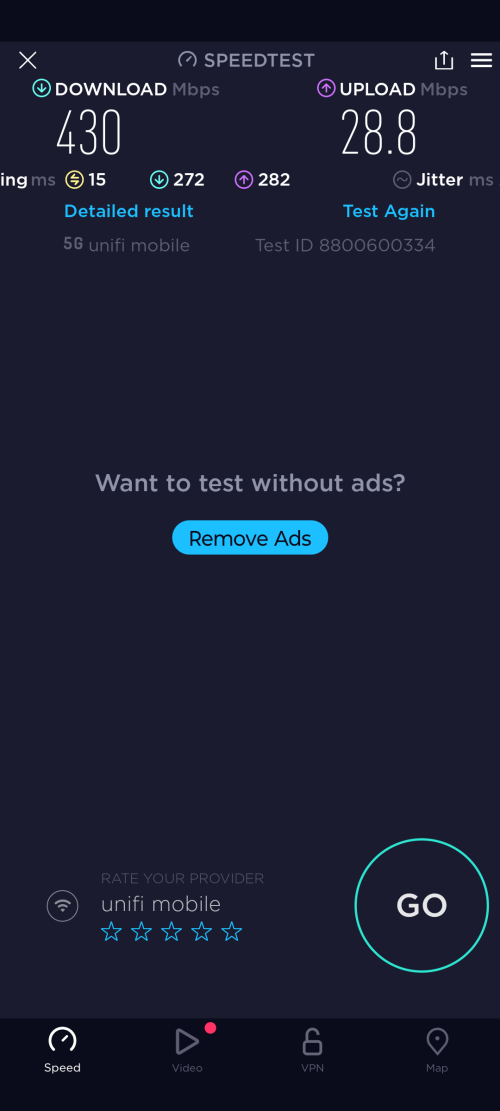 Unifi Mobile 5G is live now from my Moto Edge 30 Pro. ijuanp03 liked this post
|
|
|
Nov 2 2022, 01:24 PM
|

Junior Member
440 posts Joined: May 2008
|
QUOTE(cybercrew @ Nov 1 2022, 09:04 PM) Unifi Mobile 5G is live now from my Moto Edge 30 Pro. no software update can connect to 5G? |
|
|
Nov 2 2022, 01:28 PM
|

Junior Member
454 posts Joined: Oct 2017
|
Interesting. I thought the 30 Pro isnt in any 5G list so far..
|
|
|
Nov 2 2022, 03:11 PM
|
|
Senior Member
3,522 posts Joined: Jan 2010
|
Yes 5g not supported on the edge 30 5g...😅
|
|
|
Nov 2 2022, 03:49 PM
|
|
Senior Member
1,064 posts Joined: Oct 2016
|
QUOTE(marcyeo @ Nov 2 2022, 03:11 PM) Yes 5g not supported on the edge 30 5g...😅 Telcos did not mention other devices are not supported. They mentioned the list of devices that are supported. Devices that are not in the list does NOT mean 5G won't work.It only means that Telcos have NOT purchased Motorola devices to test 5G signal and connectivity. From Motorola Edge 30 Ultra thread Surprise! 5G is supported and has working mobile internet connection. https://pictr.com/image/EHbMqD Edge 30 Ultra (x30 Pro) isn't even in officially sold in Malaysia. Then why is it working? Because just like 4G, 5G is "just" a frequency. If your phone can receive 5G signal, then it means you can use the 5G network. Then why telcos don't want to inform users about this? Because telcos don't want to be held liable if your device is not working properly with their network. This post has been edited by ijuanp03: Nov 2 2022, 03:53 PM pikacu and biotic_boy liked this post
|
|
|
|
|
|
Nov 3 2022, 09:50 AM
|
|
Junior Member
183 posts Joined: Sep 2009 From: Petaling Jaya, Malaysia
|
QUOTE(STEVE75 @ Nov 2 2022, 01:24 PM) yr is postpaid or prepaid? Unifi Mobile Prepaid.. I had to purchase RM35 pass to be entitled for the 5Gno software update can connect to 5G? I was told no need to change SIM.. just purchase the RM 35 pass and activate it over the app..Just did so and 5G worked immediately.. and quota is unlimited.. So far the speedtest can reach max up to 600++ mbps while in the house. ijuanp03 liked this post
|
|
|
Nov 3 2022, 09:51 AM
|
|
Junior Member
183 posts Joined: Sep 2009 From: Petaling Jaya, Malaysia
|
QUOTE(bahjan_2000 @ Nov 2 2022, 01:28 PM) Interesting. I thought the 30 Pro isnt in any 5G list so far.. yes it is not in the list..But i remember seeing it in upcoming devices list.. so just thought of try luck by activating it.. and it works. |
|
|
Nov 3 2022, 12:37 PM
Show posts by this member only | IPv6 | Post
#709
|

Senior Member
1,347 posts Joined: Jan 2021
|
QUOTE(cybercrew @ Nov 3 2022, 09:50 AM) Unifi Mobile Prepaid.. I had to purchase RM35 pass to be entitled for the 5G May I know which prepaid are you using?I was told no need to change SIM.. just purchase the RM 35 pass and activate it over the app..Just did so and 5G worked immediately.. and quota is unlimited.. So far the speedtest can reach max up to 600++ mbps while in the house. |
|
|
Nov 5 2022, 03:19 PM
|
|
Junior Member
183 posts Joined: Sep 2009 From: Petaling Jaya, Malaysia
|
QUOTE(Created On 21/1/2021 @ Nov 3 2022, 12:37 PM) May I know which prepaid are you using? Unifi Mobile |
|
|
Sep 22 2023, 08:47 AM
|
|
Senior Member
1,064 posts Joined: Oct 2016
|
QUOTE(marcyeo @ Nov 2 2022, 03:11 PM) Yes 5g not supported on the edge 30 5g...😅 How to enable 5G on Motorola X30 Pro (or any Motorola China/Global phone):1. Turn Off Phone 2. Remove Sim Card(s) 3. Turn On Phone 4. Go to Settings>Apps>See All Apps>Select thr 3 Dots in the Top right Side and Select Show system apps 5. Look for "Carrier Setting" and open 6. Clear Storage Data then Disable the app 7. Go back and look for "Carrier Service" app and uninstall/disable (skip this step if you cannot find it) 8. Go to Settings>System>Reset Options>Reset Wifi, mobile & Bluetooth 9. Turn off your Phone 10. Insert Sim Card(s) 11. Turn on phone 12. Check and you can now see 5G signal. 13. Go to Settings then toggle off "Smart data mode" - if the network signal keeps on switching to 4G. (skip this if you cannot find in Settings). |
|
|
Sep 22 2023, 11:16 AM
|
|
Junior Member
440 posts Joined: May 2008
|
QUOTE(ijuanp03 @ Sep 22 2023, 08:47 AM) How to enable 5G on Motorola X30 Pro (or any Motorola China/Global phone): will try tonight. using edge 30 pro1. Turn Off Phone 2. Remove Sim Card(s) 3. Turn On Phone 4. Go to Settings>Apps>See All Apps>Select thr 3 Dots in the Top right Side and Select Show system apps 5. Look for "Carrier Setting" and open 6. Clear Storage Data then Disable the app 7. Go back and look for "Carrier Service" app and uninstall/disable (skip this step if you cannot find it) 8. Go to Settings>System>Reset Options>Reset Wifi, mobile & Bluetooth 9. Turn off your Phone 10. Insert Sim Card(s) 11. Turn on phone 12. Check and you can now see 5G signal. 13. Go to Settings then toggle off "Smart data mode" - if the network signal keeps on switching to 4G. (skip this if you cannot find in Settings). ijuanp03 liked this post
|
|
|
Sep 22 2023, 11:17 AM
Show posts by this member only | IPv6 | Post
#713
|
|
Senior Member
3,522 posts Joined: Jan 2010
|
QUOTE(ijuanp03 @ Sep 22 2023, 08:47 AM) How to enable 5G on Motorola X30 Pro (or any Motorola China/Global phone): Thanks for sharing 😊1. Turn Off Phone 2. Remove Sim Card(s) 3. Turn On Phone 4. Go to Settings>Apps>See All Apps>Select thr 3 Dots in the Top right Side and Select Show system apps 5. Look for "Carrier Setting" and open 6. Clear Storage Data then Disable the app 7. Go back and look for "Carrier Service" app and uninstall/disable (skip this step if you cannot find it) 8. Go to Settings>System>Reset Options>Reset Wifi, mobile & Bluetooth 9. Turn off your Phone 10. Insert Sim Card(s) 11. Turn on phone 12. Check and you can now see 5G signal. 13. Go to Settings then toggle off "Smart data mode" - if the network signal keeps on switching to 4G. (skip this if you cannot find in Settings). ijuanp03 liked this post
|
|
|
Sep 22 2023, 01:27 PM
|
|
Junior Member
440 posts Joined: May 2008
|
QUOTE(ijuanp03 @ Sep 22 2023, 08:47 AM) How to enable 5G on Motorola X30 Pro (or any Motorola China/Global phone): just tried. can select 5G under "Preferred Network Type" on Digi but sad still no VoLTE1. Turn Off Phone 2. Remove Sim Card(s) 3. Turn On Phone 4. Go to Settings>Apps>See All Apps>Select thr 3 Dots in the Top right Side and Select Show system apps 5. Look for "Carrier Setting" and open 6. Clear Storage Data then Disable the app 7. Go back and look for "Carrier Service" app and uninstall/disable (skip this step if you cannot find it) 8. Go to Settings>System>Reset Options>Reset Wifi, mobile & Bluetooth 9. Turn off your Phone 10. Insert Sim Card(s) 11. Turn on phone 12. Check and you can now see 5G signal. 13. Go to Settings then toggle off "Smart data mode" - if the network signal keeps on switching to 4G. (skip this if you cannot find in Settings). ijuanp03 liked this post
|
|
|
Sep 22 2023, 05:59 PM
|
|
Junior Member
136 posts Joined: Jan 2007
|
QUOTE(ijuanp03 @ Sep 22 2023, 08:47 AM) How to enable 5G on Motorola X30 Pro (or any Motorola China/Global phone): 1. Turn Off Phone 2. Remove Sim Card(s) 3. Turn On Phone 4. Go to Settings>Apps>See All Apps>Select thr 3 Dots in the Top right Side and Select Show system apps 5. Look for "Carrier Setting" and open 6. Clear Storage Data then Disable the app 7. Go back and look for "Carrier Service" app and uninstall/disable (skip this step if you cannot find it) 8. Go to Settings>System>Reset Options>Reset Wifi, mobile & Bluetooth 9. Turn off your Phone 10. Insert Sim Card(s) 11. Turn on phone 12. Check and you can now see 5G signal. 13. Go to Settings then toggle off "Smart data mode" - if the network signal keeps on switching to 4G. (skip this if you cannot find in Settings). 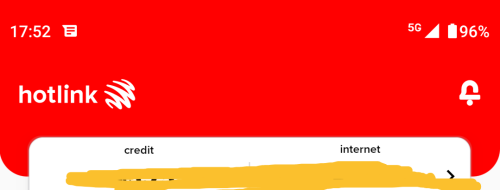 It really worked! I'm on Moto G51 Android 12 Hotlink After waiting for so long, the solution was simple... ijuanp03 liked this post
|
| Change to: |  0.0286sec 0.0286sec
 0.48 0.48
 6 queries 6 queries
 GZIP Disabled GZIP Disabled
Time is now: 23rd December 2025 - 06:24 PM |
 Quote
Quote