Welcome Guest ( Log In | Register )

Outline · [ Standard ] · Linear+

 Ditch Router, use Maxis VoIP on other device!, Works on MicroSIP too

views
     
TSAnime4000
post Feb 17 2022, 10:38 PM, updated 3y ago

Look at all my stars!!
*******
Senior Member
2,399 posts

Joined: Jul 2009
From: /dev/null


Hi, Finally I can confirm that Maxis VoIP can work on Yealink IP Phone

This part of my project user replaceable device
1. Ditch ONU, use GPON SFP on Business Grade Router
2. Ditch Router, use Maxis 4G LTE Backup on other device
3. Ditch Router, use Maxis VoIP on other device This Thread

This should work on any Maxis on any fiber, however, I tested on TM-Maxis.

TLDR:
Phone ID / Username:
Your Phone ID and Username, it should be same
CODE
0123456789


Password:
Your password, you can find just do Account Number + Last 4 Digit phone number
CODE
00000000006789


SIP Server:
Note: This FQDN routable via Proxy, it will resolved IP Address to 14.192.234.109
CODE
homesip.maxis.com.my


Proxy Server:
Note: This FQDN routable only on Maxis Network (PPPoE, 4G, VLAN), it will resolved IP Address to 202.75.146.26
CODE
homegw01.maxis.com.my


Codec:
Note: using unsupported codec result no incoming or outgoing call
CODE

1. G.711 ALaw (PCMA)
2. G.711 uLaw (PCMU)


Register Expires (sec):
CODE
900


Register Retry Interval (sec):
CODE
30


DTMF:
CODE
In-Band


User-Agent:
Note: Maxis VoIP only accept valid User-Agent sub-string, without this, you will get Error 405: Method Not Allowed

TP-Link Archer C5v
CODE

TPLINK ARCHER C5V BUILD v1.0_191212-3202049003674


KaonMedia AR2140 (Provided by darthobiguan)
CODE

Brcm-Cctk/v2.2.0 M5T SIP Stack/4.1.10.16 1.2.50_r11 <SN>


Aminia MA131 (Provided by ruifung)
CODE

MA131 SIP-stdR11448 2.1.13m_20200214 <SN>


As you can see, I highlighting User-Agent in RED! This is the reason your VoIP not work on other place, SIP Server looking specific sub-string before get Authenticated.

Tested Device:
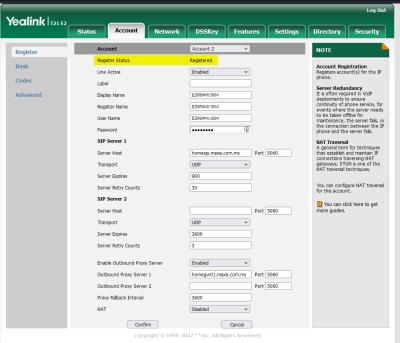
Yealink T21 E2
Configure like this, simple is better
Attached Image

You need change Yealink User-Agent via CFG file, Export, Edit, Import!
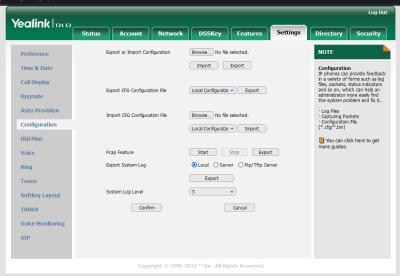
Attached Image
Attached Image

NOTE: Yealink custom User-Agent will append like this, not total replace, it may not work in the future.
Attached Image

Tested SoftPhone:
MicroSIP (Windows)
Open MicroSIP and add 1 account like this, then close MicroSIP
Attached Image

Then edit microsip.ini find userAgent= and paste it, like this:
Attached Image

Then open MicroSIP, try call:
Attached Image

3CX PABX
Refer to this shahrul8404 post

FreePBX
Refer to this ruifung post

Android / iOS
So far I didn't find suitable SoftPhone that allow custom User-Agent, if you find one, let me know~

ONU POTS
I tried on HG8240H and HG8240H5, not working even with custom User-Agent, apparently TM OMCI override VLAN 822 IPoE, you can try if TM OMCI not strict as mine here...

Accepted Network
1. VoIP VLAN
2. Maxis PPPoE Internet
3. Maxis 4G/LTE

I have tired on non-Maxis (TIME, Unifi, ) it seem FQDN sgb-cvx1.146.26 are not reachable

SIP ALG
You can use VoIP without VLAN, however, your router must support SIP ALG.
Ubiquiti EdgeRouter having trouble with SIP ALG, you must use VoIP VLAN

This post has been edited by Anime4000: Jun 29 2023, 08:40 PM
PRSXFENG
post Feb 17 2022, 11:04 PM

Look at all my stars!!
*******
Senior Member
2,607 posts

Joined: Nov 2020


QUOTE(Anime4000 @ Feb 17 2022, 10:38 PM)
ONU POTS
I tried on HG8240H and HG8240H5, not working even with custom User-Agent, apparently TM OMCI override VLAN 822 IPoE, you can try if TM OMCI not strict as mine here...
*
I'm using Maxis on Maxis own infra, how would I go about changing the stuff so that I could give it a try when in free?

I have a HG8240H5

[ps, I do not have a landline phone to test actual calls, all I can tell is if the modem says success or not]

This post has been edited by PRSXFENG: Feb 17 2022, 11:10 PM
joeyrm
post Feb 18 2022, 05:27 PM

Getting Started
**
Junior Member
116 posts

Joined: Jul 2005


QUOTE(Anime4000 @ Feb 17 2022, 10:38 PM)
Hi, Finally I can confirm that Maxis VoIP can work on Yealink IP Phone

This part of my project user replaceable device
1. Ditch ONU, use GPON SFP on Business Grade Router
2. Ditch Router, use Maxis 4G LTE Backup on other device
3. Ditch Router, use Maxis VoIP on other device This Thread

This should work on any Maxis on any fiber, however, I tested on TM-Maxis.

TLDR:
Phone ID / Username:
Your Phone ID and Username, it should be same
CODE
0123456789


Password:
Your password, you can find just do Account Number + Last 4 Digit phone number
CODE
00000000006789


SIP Server:
Note: This FQDN routable via Proxy, it will resolved IP Address to 14.192.234.109
CODE
homesip.maxis.com.my


Proxy Server:
Note: This FQDN routable only on Maxis Network (PPPoE, 4G, VLAN), it will resolved IP Address to 202.75.146.26
CODE
homegw01.maxis.com.my


Codec:
Note: using unsupported codec result no incoming or outgoing call
CODE

1. G.711 ALaw (PCMA)
2. G.711 uLaw (PCMU)


Register Expires (sec):
CODE
900


Register Retry Interval (sec):
CODE
30


DTMF:
CODE
In-Band


User-Agent:
Note: Maxis VoIP only accept valid User-Agent sub-string, without this, you will get Error 405: Method Not Allowed
CODE

1. TPLINK ARCHER C5V


Waiting User-Agent for these model, if anyone willing to help, I appreciate it, use WireShark to find it:
CODE

1. Aminia MA131
2. KAONMEDIA AR2140


As you can see, I highlighting User-Agent in RED! This is the reason your VoIP not work on other place, SIP Server looking specific sub-string before get Authenticated.

Tested Device:
Yealink T21 E2
Configure like this, simple is better
Attached Image

You need change Yealink User-Agent via CFG file, Export, Edit, Import!
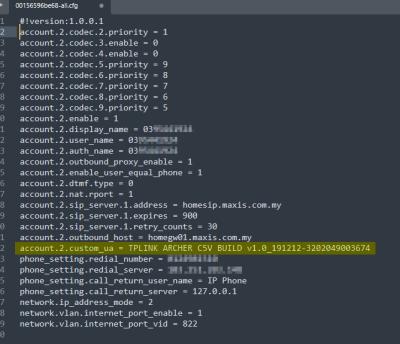
Attached Image
Attached Image

NOTE: Yealink custom User-Agent will append like this, not total replace, it may not work in the future.
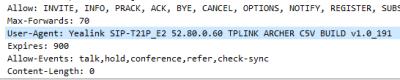
Attached Image

Tested SoftPhone:
MicroSIP (Windows)
Open MicroSIP and add 1 account like this, then close MicroSIP
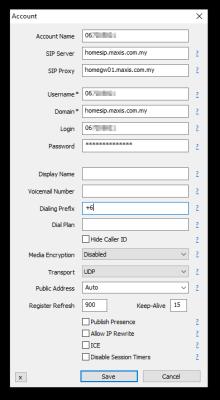
Attached Image

Then edit microsip.ini find userAgent= and paste it, like this:
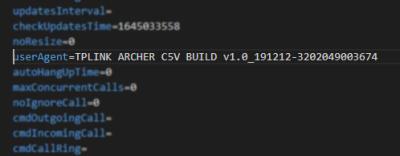
Attached Image

Then open MicroSIP, try call:
Attached Image

Android / iOS
So far I didn't find suitable SoftPhone that allow custom User-Agent, if you find one, let me know~

ONU POTS
I tried on HG8240H and HG8240H5, not working even with custom User-Agent, apparently TM OMCI override VLAN 822 IPoE, you can try if TM OMCI not strict as mine here...

Accepted Network
1. VoIP VLAN
2. Maxis PPPoE Internet
3. Maxis 4G/LTE

I have tired on non-Maxis (TIME, Unifi, ) it seem FQDN sgb-cvx1.146.26 are not reachable

SIP ALG
You can use VoIP without VLAN, however, your router must support SIP ALG.
Ubiquiti EdgeRouter having trouble with SIP ALG, you must use VoIP VLAN
*
Do you know whether Yealink has any ATA that supports Maxis VoIP too?
TSAnime4000
post Feb 18 2022, 08:42 PM

Look at all my stars!!
*******
Senior Member
2,399 posts

Joined: Jul 2009
From: /dev/null


QUOTE(joeyrm @ Feb 18 2022, 05:27 PM)
Do you know whether Yealink has any ATA that supports Maxis VoIP too?
*
You mean Analogue Telephone Adapter?
What I discovered, Yealink just IP/SIP Phone like others
moonsatelite
post Feb 18 2022, 10:46 PM

Enthusiast
*****
Junior Member
737 posts

Joined: Mar 2016
apparently, when calling tollfree numbers on MicroSIP, it cannot register inputs when the operator prompts for language selection
TSAnime4000
post Feb 19 2022, 01:50 AM

Look at all my stars!!
*******
Senior Member
2,399 posts

Joined: Jul 2009
From: /dev/null


QUOTE(moonsatelite @ Feb 18 2022, 10:46 PM)
apparently, when calling tollfree numbers on MicroSIP, it cannot register inputs when the operator prompts for language selection
*
yea, need fix Dialing Prefix and Dialing Plan syntax
joeyrm
post Feb 20 2022, 02:30 PM

Getting Started
**
Junior Member
116 posts

Joined: Jul 2005


QUOTE(Anime4000 @ Feb 18 2022, 08:42 PM)
You mean Analogue Telephone Adapter?
What I discovered, Yealink just IP/SIP Phone like others
*
Yup.. i'm looking for Telephone Adapter.. Previously used the linksys adapter, but it no longer work since 3 yrs ago. Right now, I'm using back maxis original gateway for voice and will continue using it until i find a compatible ATA, which unfortunately i haven't found yet.
TSAnime4000
post Feb 20 2022, 03:58 PM

Look at all my stars!!
*******
Senior Member
2,399 posts

Joined: Jul 2009
From: /dev/null


QUOTE(joeyrm @ Feb 20 2022, 02:30 PM)
Yup.. i'm looking for Telephone Adapter.. Previously used the linksys adapter, but it no longer work since 3 yrs ago.  Right now, I'm using back maxis original gateway for voice and will continue using it until i find a compatible ATA, which unfortunately i haven't found yet.
*
then, you need modify Linksys User-Agent.

or, install 3cx PABX, (middle man), surely any ATA can work, as long 3cx sending valid User-Agent


Instead of:
Maxis VoIP > ATA

Do like this:
Maxis VoIP > 3cx > ATA
SUSpetpenyubobo
post Feb 20 2022, 09:15 PM

Regular
******
Senior Member
1,030 posts

Joined: Jan 2022

Actually there a more simple solution to all this, Maxis home fixed line fibre should just follow TIME's way of delivering fixed line calls anywhere.

Just launch an app like TIME's Voice app where any Android/iOS phone can make calls as though they are at home with just an internet access line either through WiFi or mobile data.


TSAnime4000
post Feb 20 2022, 11:43 PM

Look at all my stars!!
*******
Senior Member
2,399 posts

Joined: Jul 2009
From: /dev/null


QUOTE(petpenyubobo @ Feb 20 2022, 09:15 PM)
Actually there a more simple solution to all this, Maxis home fixed line fibre should just follow TIME's way of delivering fixed line calls anywhere.

Just launch an app like TIME's Voice app where any Android/iOS phone can make calls as though they are at home with just an internet access line either through WiFi or mobile data.


*
Yea, that good actually, I tried to do this but none SIP app allow change User-Agent
joeyrm
post Feb 21 2022, 02:33 PM

Getting Started
**
Junior Member
116 posts

Joined: Jul 2005


QUOTE(Anime4000 @ Feb 20 2022, 03:58 PM)
then, you need modify Linksys User-Agent.

or, install 3cx PABX, (middle man), surely any ATA can work, as long 3cx sending valid User-Agent
Instead of:
Maxis VoIP > ATA

Do like this:
Maxis VoIP > 3cx > ATA
*
Thanks. let me try ur suggestion and come back to you on the result.
joeyrm
post Feb 22 2022, 12:39 PM

Getting Started
**
Junior Member
116 posts

Joined: Jul 2005


deleted. managed to resolve issue with microsip

This post has been edited by joeyrm: Feb 22 2022, 12:49 PM
joeyrm
post Feb 26 2022, 06:05 PM

Getting Started
**
Junior Member
116 posts

Joined: Jul 2005


Hi,

Just checking, is your Yealink IP phone still working?. I managed to get Microsip app to work, but not Yealink SIP-T20. Below is the UA msg captured thru wireshark. If your's still working, then something else is missing from my config.

user posted image
TSAnime4000
post Feb 26 2022, 06:49 PM

Look at all my stars!!
*******
Senior Member
2,399 posts

Joined: Jul 2009
From: /dev/null


QUOTE(joeyrm @ Feb 26 2022, 06:05 PM)
Hi,

Just checking, is your Yealink IP phone still working?. I managed to get Microsip app to work, but not Yealink SIP-T20. Below is the UA msg captured thru wireshark.  If your's still working, then something else is missing from my config.

user posted image
*
I dont have Yealink, it was my friend, we tried it,

another way to troubleshoot, adjust your microSIP User-Agent like this:
CODE

userAgent=Yealink STP-T20P 9.73.0.50 TPLINK ARCHER C5V BUILD v1.0_191212-3202049003674


if your microSIP work with that User-Agent, check Yealink config
joeyrm
post Feb 28 2022, 09:04 AM

Getting Started
**
Junior Member
116 posts

Joined: Jul 2005


QUOTE(Anime4000 @ Feb 26 2022, 06:49 PM)
I dont have Yealink, it was my friend, we tried it,

another way to troubleshoot, adjust your microSIP User-Agent like this:
CODE

userAgent=Yealink STP-T20P 9.73.0.50 TPLINK ARCHER C5V BUILD v1.0_191212-3202049003674


if your microSIP work with that User-Agent, check Yealink config
*
Managed to get both microsip and yealink to work with the above useragent setting, but only for few hours. i couldn't get it registered again after a while. But if remove the yealink string from useragent setting in microsip, then it works perfectly. i guess the sip server doesn't like that useragent yealink string.
TSAnime4000
post Feb 28 2022, 03:05 PM

Look at all my stars!!
*******
Senior Member
2,399 posts

Joined: Jul 2009
From: /dev/null


QUOTE(joeyrm @ Feb 28 2022, 09:04 AM)
Managed to get both microsip and yealink to work with the above useragent setting, but only for few hours.  i couldn't get it registered  again after a while.  But if remove the yealink string from useragent setting in microsip, then it works perfectly.  i guess the sip server doesn't like that useragent yealink string.
*
interesting... I try on my end if any different
TSAnime4000
post Mar 4 2022, 10:49 PM

Look at all my stars!!
*******
Senior Member
2,399 posts

Joined: Jul 2009
From: /dev/null


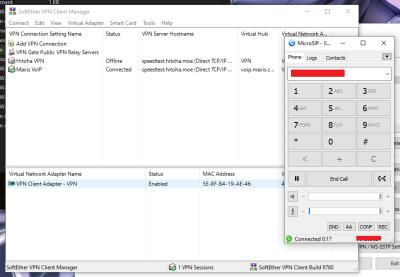
I made a VPN for Maxis VoIP. Exposing VLAN822 to VPN and get VLAN822 IP Address (Full Bridge)

Attached Image

so, VoIP can be use anywhere! biggrin.gif
jacktiew
post Mar 4 2022, 11:13 PM

Getting Started
**
Junior Member
289 posts

Joined: Sep 2012
QUOTE(Anime4000 @ Mar 4 2022, 10:49 PM)
I made a VPN for Maxis VoIP. Exposing  VLAN822 to VPN and get VLAN822 IP Address (Full Bridge)

Attached Image

so, VoIP can be use anywhere! biggrin.gif
*
Guide please. Although I'm not Maxis Fiber user. 🤭
TSAnime4000
post Mar 4 2022, 11:15 PM

Look at all my stars!!
*******
Senior Member
2,399 posts

Joined: Jul 2009
From: /dev/null


QUOTE(jacktiew @ Mar 4 2022, 11:13 PM)
Guide please. Although I'm not Maxis Fiber user. 🤭
*
Setup VPN guide like this?
aneip
post Mar 5 2022, 02:28 PM

Look at all my stars!!
*******
Senior Member
2,466 posts

Joined: Nov 2004


Anybody try freepbx? I still playing around. But microsip also not working. Maybe my Unifi Dream Machine router. Trying to use vlan822 but still thinking the easier way to do it.
TSAnime4000
post Mar 5 2022, 06:37 PM

Look at all my stars!!
*******
Senior Member
2,399 posts

Joined: Jul 2009
From: /dev/null


this mean, use FreePBX as VoIP gateway?

microSIP > (eth0, 192.168.88.200) FreePBX (eth0.822 10.61.24.8) > Maxis VoIP
aneip
post Mar 5 2022, 08:23 PM

Look at all my stars!!
*******
Senior Member
2,466 posts

Joined: Nov 2004


QUOTE(Anime4000 @ Mar 5 2022, 06:37 PM)
this mean, use FreePBX as VoIP gateway?

microSIP > (eth0, 192.168.88.200) FreePBX (eth0.822 10.61.24.8) > Maxis VoIP
*
microSIP i test directly on maxis fiber (TM fiber), not working. Next step maybe trying in vlan 822. This might be because I use Ubiquiti UDM as router. Got many feedback on broken SIP ALG implementation.

As for FreePBX, I wanna use Maxis voip as SIP Trunk. But the term/option as SIP trunk is like too many. Dunno which 1 to fill in. > This is my final use case. I got few cheap IP phone, wanna use as house intercom and incoming & doing outgoing call through maxis.
aneip
post Mar 5 2022, 10:57 PM

Look at all my stars!!
*******
Senior Member
2,466 posts

Joined: Nov 2004


Update. Able to make microsip to work. Seems need to stop sip in Maxis router 1st. If not will keep getting wrong password in Microsip app.
TSAnime4000
post Mar 6 2022, 12:43 AM

Look at all my stars!!
*******
Senior Member
2,399 posts

Joined: Jul 2009
From: /dev/null


QUOTE(aneip @ Mar 5 2022, 10:57 PM)
Update. Able to make microsip to work. Seems need to stop sip in Maxis router 1st. If not will keep getting wrong password in Microsip app.
*
SIP EdgeRouter 12 also broken,

so I bought RB5009, single Internet is fine, when I add 2nd WAN, SIP not work
aneip
post Mar 7 2022, 08:59 AM

Look at all my stars!!
*******
Senior Member
2,466 posts

Joined: Nov 2004


Yesterday able to connect using 3CX, using normal maxis internet access (pppoe). So no need to use voip vlan. I think ubiquiti update 2 day before solve sip slg isu. For 3cx just need to change user agent. All able to do within GUI.

Nice.. full feature PBX with sip trunk + local incoming number.
PRSXFENG
post Mar 7 2022, 02:27 PM

Look at all my stars!!
*******
Senior Member
2,607 posts

Joined: Nov 2020


Anime4000
Working on Huawei HG8240H5 on Maxis Own Infra!

user posted image

Followed your old Github repo, but VLAN 14, and blank URI
https://gist.github.com/Anime4000/6bb17e435...4f01771359bfe5f

I don't have a landline phone to test but the TEL1 light on the modem also light up, and blinks when a call comes in!

so, Huawei ONT also accepted User Agent?
And I guess without TM managing the ONT

This post has been edited by PRSXFENG: Mar 7 2022, 02:36 PM
TSAnime4000
post Mar 7 2022, 02:52 PM

Look at all my stars!!
*******
Senior Member
2,399 posts

Joined: Jul 2009
From: /dev/null


QUOTE(PRSXFENG @ Mar 7 2022, 02:27 PM)
Anime4000
Working on Huawei HG8240H5 on Maxis Own Infra!

user posted image

Followed your old Github repo, but VLAN 14, and blank URI
https://gist.github.com/Anime4000/6bb17e435...4f01771359bfe5f

I don't have a landline phone to test but the TEL1 light on the modem also light up, and blinks when a call comes in!

so, Huawei ONT also accepted User Agent?
And I guess without TM managing the ONT
*
Maxis on TM VLAN822 require specific User-Agent

HG8240H5 has no option to change User-Agent sad.gif
PRSXFENG
post Mar 7 2022, 06:05 PM

Look at all my stars!!
*******
Senior Member
2,607 posts

Joined: Nov 2020


QUOTE(Anime4000 @ Mar 7 2022, 02:52 PM)
Maxis on TM VLAN822 require specific User-Agent

HG8240H5 has no option to change User-Agent  sad.gif
*
I did my investigation with MicroSIP

For the TP-Link user agent you just need "TPLINK ARCHER C5V" and it's accepted, no need firmware version or serial

The "HUAWEI-EchoLife" user agent also works for me, so that's how my ONT was accepted.

(you could try changing <X_HW_SIPStringDefineInstance InstanceID="13" StringBody="HUAWEI-EchoLife %M%/%V%"/> in huawei config file to other user agents, since that's where I got the "HUAWEI-EchoLife" phrase from)

I think it's just looking for specific phrases, hence the Yealink phone working while appended.
(and thanks Maxis for accepting Huawei ONT user agent)

TSAnime4000
post Mar 7 2022, 07:23 PM

Look at all my stars!!
*******
Senior Member
2,399 posts

Joined: Jul 2009
From: /dev/null


QUOTE(PRSXFENG @ Mar 7 2022, 06:05 PM)
I did my investigation with MicroSIP

For the TP-Link user agent you just need "TPLINK ARCHER C5V" and it's accepted, no need firmware version or serial

The "HUAWEI-EchoLife" user agent also works for me, so that's how my ONT was accepted.

(you could try changing <X_HW_SIPStringDefineInstance InstanceID="13" StringBody="HUAWEI-EchoLife %M%/%V%"/> in huawei config file to other user agents, since that's where I got the "HUAWEI-EchoLife" phrase from)

I think it's just looking for specific phrases, hence the Yealink phone working while appended.
(and thanks Maxis for accepting Huawei ONT user agent)
*
1. I know Maxis User-Agent accept "TPLINK ARCHER C5V" substring, I edit back using full string just to avoid unforseen consequences where Maxis adjust how User-Agent accepted

2. "HUAWEI-EchoLife" not accepted in my place with MicroSiP, I believe Subnet Gateway I live have more User-Agent restrictions because Maxis SIP is unencrypted.

Also, with "HUAWEI-EchoLife" User-Agent, Wireshark show no reply from homesip.maxis.com.my VoIP Gateway purposely drop packet for invalid User-Agent.

Also... I cannot use SIP via PPPoE, only VLAN 822 & 4G Backup
joeyrm
post Mar 10 2022, 09:17 PM

Getting Started
**
Junior Member
116 posts

Joined: Jul 2005


I have finally managed to get a linksys pap2 gateway running using the steps given. It’s quite stable and works better than the ip phone. Just edit the user-agent as suggested and walla, it works perfectly.

Thanks anime4000 for the guide.
TSAnime4000
post Mar 10 2022, 11:04 PM

Look at all my stars!!
*******
Senior Member
2,399 posts

Joined: Jul 2009
From: /dev/null


QUOTE(joeyrm @ Mar 10 2022, 09:17 PM)
I have finally managed to get a linksys pap2 gateway running using the steps given.  It’s quite stable and works better than the ip phone. Just edit the user-agent as suggested and walla, it works perfectly.

Thanks anime4000 for the guide.
*
Great it works for you!
darthobiguan
post Mar 17 2022, 04:20 PM

Getting Started
**
Junior Member
63 posts

Joined: Nov 2008


Hi,

Just to let you know. I am using Kaon 2140. Using wireshark, I get

userAgent=Brcm-Cctk/v2.2.0 M5T SIP Stack/4.1.10.16 1.2.50_r11 <SN>

The <SN> is your KAON router serial number all in capital. I have tested without the serial number, it works too. On my side, I must register using vlan 822. If using standard internet 621, I will get a timeout.


user posted image
PRSXFENG
post Mar 17 2022, 04:55 PM

Look at all my stars!!
*******
Senior Member
2,607 posts

Joined: Nov 2020


QUOTE(darthobiguan @ Mar 17 2022, 04:20 PM)
Hi,

Just to let you know. I am using Kaon 2140. Using wireshark, I get

userAgent=Brcm-Cctk/v2.2.0 M5T SIP Stack/4.1.10.16 1.2.50_r11 <SN>

The <SN> is your KAON router serial number all in capital. I have tested without the serial number, it works too. On my side, I must register using vlan 822. If using standard internet 621, I will get a timeout.
user posted image
*
Huh, interestingly it seems to be Broadcom branded(not Kaon branded), M5T SIP Stack gives this result https://www.m5t.com/news/tag/sip-stack/

I wonder if any other Broadcom based routers with VoIP are using the same user agent?

This post has been edited by PRSXFENG: Mar 17 2022, 04:56 PM
TSAnime4000
post Mar 18 2022, 01:44 PM

Look at all my stars!!
*******
Senior Member
2,399 posts

Joined: Jul 2009
From: /dev/null


QUOTE(darthobiguan @ Mar 17 2022, 04:20 PM)
Hi,

Just to let you know. I am using Kaon 2140. Using wireshark, I get

userAgent=Brcm-Cctk/v2.2.0 M5T SIP Stack/4.1.10.16 1.2.50_r11 <SN>

The <SN> is your KAON router serial number all in capital. I have tested without the serial number, it works too. On my side, I must register using vlan 822. If using standard internet 621, I will get a timeout.
user posted image
*
I have updated the post! Thanks for KaonMedia User-Agent
adx3660
post Apr 28 2022, 11:51 AM

New Member
*
Newbie
6 posts

Joined: Jul 2007
QUOTE(aneip @ Mar 7 2022, 08:59 AM)
Yesterday able to connect using 3CX, using normal maxis internet access (pppoe). So no need to use voip vlan.  I think ubiquiti update 2 day before solve sip slg isu. For 3cx just need to change user agent. All able to do within GUI.

Nice.. full feature PBX with sip trunk + local incoming number.
*
Try few time setting up 3cx can't work. Mind to share the config?
yongtjunkit
post May 10 2022, 04:13 PM

Look at all my stars!!
*******
Senior Member
2,516 posts

Joined: Mar 2016
QUOTE(Anime4000 @ Feb 17 2022, 10:38 PM)
Hi, Finally I can confirm that Maxis VoIP can work on Yealink IP Phone

This part of my project user replaceable device
1. Ditch ONU, use GPON SFP on Business Grade Router
2. Ditch Router, use Maxis 4G LTE Backup on other device
3. Ditch Router, use Maxis VoIP on other device This Thread

This should work on any Maxis on any fiber, however, I tested on TM-Maxis.

TLDR:
Phone ID / Username:
Your Phone ID and Username, it should be same
CODE
0123456789


Password:
Your password, you can find just do Account Number + Last 4 Digit phone number
CODE
00000000006789


SIP Server:
Note: This FQDN routable via Proxy, it will resolved IP Address to 14.192.234.109
CODE
homesip.maxis.com.my


Proxy Server:
Note: This FQDN routable only on Maxis Network (PPPoE, 4G, VLAN), it will resolved IP Address to 202.75.146.26
CODE
homegw01.maxis.com.my


Codec:
Note: using unsupported codec result no incoming or outgoing call
CODE

1. G.711 ALaw (PCMA)
2. G.711 uLaw (PCMU)


Register Expires (sec):
CODE
900


Register Retry Interval (sec):
CODE
30


DTMF:
CODE
In-Band


User-Agent:
Note: Maxis VoIP only accept valid User-Agent sub-string, without this, you will get Error 405: Method Not Allowed

TP-Link Archer C5v
CODE

TPLINK ARCHER C5V BUILD v1.0_191212-3202049003674


KaonMedia AR2140 (Provided by darthobiguan)
CODE

Brcm-Cctk/v2.2.0 M5T SIP Stack/4.1.10.16 1.2.50_r11 <SN>


Aminia MA131
CODE

// Waiting User-Agent for these model, if anyone willing to help, I appreciate it, use WireShark to find it:


As you can see, I highlighting User-Agent in RED! This is the reason your VoIP not work on other place, SIP Server looking specific sub-string before get Authenticated.

Tested Device:
Yealink T21 E2
Configure like this, simple is better
Attached Image

You need change Yealink User-Agent via CFG file, Export, Edit, Import!
Attached Image
Attached Image

NOTE: Yealink custom User-Agent will append like this, not total replace, it may not work in the future.
Attached Image

Tested SoftPhone:
MicroSIP (Windows)
Open MicroSIP and add 1 account like this, then close MicroSIP
Attached Image

Then edit microsip.ini find userAgent= and paste it, like this:
Attached Image

Then open MicroSIP, try call:
Attached Image

Android / iOS
So far I didn't find suitable SoftPhone that allow custom User-Agent, if you find one, let me know~

ONU POTS
I tried on HG8240H and HG8240H5, not working even with custom User-Agent, apparently TM OMCI override VLAN 822 IPoE, you can try if TM OMCI not strict as mine here...

Accepted Network
1. VoIP VLAN
2. Maxis PPPoE Internet
3. Maxis 4G/LTE

I have tired on non-Maxis (TIME, Unifi, ) it seem FQDN sgb-cvx1.146.26 are not reachable

SIP ALG
You can use VoIP without VLAN, however, your router must support SIP ALG.
Ubiquiti EdgeRouter having trouble with SIP ALG, you must use VoIP VLAN
*
Microsip for some reason shows incorrect password, VPN to Maxis PPPOE Internet

Maxis router not connected(shouldn't have any login to the VOIP account)

Update: turns out the password format given in the 1st post doesn't work, contacted maxis for the voip password

This post has been edited by yongtjunkit: May 13 2022, 12:27 PM
Gaara92
post Nov 7 2022, 03:26 PM

Herald
****
Junior Member
612 posts

Joined: Mar 2008


Any updated documentation for Unifi VoIP? Need to implement this on my home network because I want to throw out the ONU since the VoIP is connected to my ONU.
shahrul8404
post Dec 31 2022, 10:57 AM

New Member
*
Newbie
2 posts

Joined: Mar 2009


Hi,
thanks for valuable input from earlier threads.
I follow this thread and finally able to make it works using generic VoiP PBX system.
In my case, i installed 3CX OS package on Raspberry Pi where the raspberry pi has access to dual IP networks:
- Maxis Voip vlan 822
- home wifi 9originated from maxis home fiber PPoE)

the trick to make other generic VoIP PBX to works is by injecting the right user agent that recognized by the Maxis VoIP server/proxy.
the working user Agent strings have been described in earlier posts.

my turn here is to share a working 3CX config that you can use to make your own VoIP PBX connecting to Maxis VoIP:
the same principle can be applied if you want to use generic other PBX gateway like asterisk etc.

CODE

shahrul8404@pi-3cx:/usr/share/3cxpbx/skel/Data/Http/Templates/provider $ cat maxissiptrunk.pv.xml
<?xml version="1.0"?>
<doc xmlns:tcx="http://www.3cx.com">
<header>
   <type>gateway-template</type>
   <version>122147</version>
   <time>2021-05-20 16:00:00</time>
   <name>Maxis MY SIP Trunk</name>
   <url>https://www.maxis.com.my/</url>
   <image></image>
   <description>MY</description>
</header>

<data>
   <device>
     <type>provider</type>
     <manufacturer>Maxis Home Fiber SIP Trunk</manufacturer>
     <model>Provider</model>

     <!-- Friendly Name -->
     <field name="Name">Maxis Home Fiber SIP Trunk</field>

     <!-- Hostnames and Port Numbers -->
     <field name="RegistrarHost">homesip.maxis.com.my</field>          <!-- Registrar & Proxy IP / FQDN  -->
     <field name="RegistrarPort">5060</field>                                                          <!-- Registrar & Proxy Port Number -->
     <field name="ProxyHost">homegw01.maxis.com.my</field>                                                                             <!-- Proxy IP / FQDN -->
     <field name="ProxyPort">5060</field>                                                                      <!-- Proxy Port Number -->
     <field name="StunServerHost"></field>                                                                     <!-- StunServer IP / FQDN -->
     <field name="StunServerPort"></field>                                                                     <!-- StunServer Port Number -->

     <!-- Registration Settings -->
     <field name="LineAuthenticationPassword" status="readonly"></field>
     <field name="TimeBetweenRegistration">120</field>                                         <!-- Registration Expiry -->
     <field name="RequireAuthFor">4</field>                                                            <!-- No=1; In=2; Out=3; Both=4 -->
     <field name="IpInContactReg">1</field>                                                            <!-- Ext=1; Int=2; Both=3; Specified=4 -->
     <field name="IpInContactRegValue"></field>                                                        <!-- List of PBX IPs -->
     <field name="3wayauthenticationid" status="readonly"></field>                     <!-- Entry to enable 3 way authentication-->

     <!-- Provider Capabilities -->
     <field name="IsSupportReinvite">0</field>                                                         <!-- Yes=1; No=0 -->
     <field name="IsSupportReplaces">0</field>                                                         <!-- Yes=1; No=0 -->
     <field name="DisableVideo">1</field>                                                                      <!-- Yes=1; No=0 -->
     <field name="RegistrarInvite">1</field>                                                           <!-- Send INVITE to same IP as REGISTER=1; Resolve FQDN each time for INVITE=0-->

     <!-- Location of Destination Number -->
     <field name="DestNumberIn_TO">1</field>                                                           <!-- Yes=1; No=0 -->
     <field name="DestNumberIn_REQLINEURI">1</field>                                           <!-- Yes=1; No=0 -->
     <field name="DestNumberIn_RPID_CALLED">0</field>                                          <!-- Yes=1; No=0 -->

     <!-- Other Options -->
     <field name="IPRestriction">IPV4</field>                                                          <!-- Restricts IPv4 or IPv6. Values: ANY, IPV4, IPV6 -->
     <field name="TransportRestriction">TCP</field>                                            <!-- Restricts the Transport Protocol. Values: ANY, UDP, TCP, TLS -->
     <field name="SecondaryRegistrar"></field>                                                         <!-- Possible values: FQDN:Port or IP:Port -->
     <field name="IsBindToMS">1</field>                                                                        <!-- Bound=1; NotBound=0 -->
     <field name="UseIPInContact">0</field>                                                            <!-- UseIP=1; DoNotUseIP=0 -->
     <field name="CallerIDIn">1</field>                                                                        <!-- Fm=1; To=2; ReqURI=3; Con=4; RemPtyClg=6 -->
     <field name="CalledNumberIn">2</field>                                                            <!-- Fm=1; To=2; ReqURI=3; Con=4; RemPtyCld=5 -->

   <codecs>
     <codec rfcname="g722" />
     <codec rfcname="pcma" />
     <codec rfcname="g729" />
   </codecs>

     <!--Source Identification - Use Default PBX Internal Source Identification-->
     <!--<field status="readonly" name="MatchStrategy">0</field>-->
     <!--<field status="readonly" name="Source" parameter="" custom=""></field>-->

     <!-- Gateway / Provider Inbound Parameters -->
     <field name="ParameterIn" custom="" parameter="RequestLineURIUser">$CalledNum</field>
     <field name="ParameterIn" custom="" parameter="FromUserPart">$CallerName</field>
     <field name="ParameterIn" custom="" parameter="FromUserPart">$CallerNum</field>

     <!-- Gateway / Provider Outbound Parameters -->
     <field name="ParameterOut" custom="" parameter="RequestLineURIUser">$CalledNum</field>
     <field name="ParameterOut" custom="" parameter="RequestLineURIHost">$GWHostPort</field>
     <field name="ParameterOut" custom="" parameter="ContactUser">$OriginatorCallerId</field>
     <field name="ParameterOut" custom="" parameter="ContactHost">$ContactURI</field>
     <field name="ParameterOut" custom="" parameter="ToDisplayName">$CalledName</field>
     <field name="ParameterOut" custom="" parameter="ToUserPart">$CalledNum</field>
     <field name="ParameterOut" custom="" parameter="ToHostPart">$GWHostPort</field>
     <field name="ParameterOut" custom="" parameter="FromDisplayName">$OriginatorCallerId</field>
     <field name="ParameterOut" custom="" parameter="FromUserPart">$OriginatorCallerId</field>
     <field name="ParameterOut" custom="" parameter="FromHostPart">$GWHostPort</field>
     <field name="ParameterOut" custom="" parameter="P-AssertedIdentityDisplayName">$LineNumber</field>
     <field name="ParameterOut" custom="" parameter="P-AssertedIdentityUserPart">$LineNumber</field>
     <field name="ParameterOut" custom="" parameter="P-AssertedIdentityHostPart">$GWHostPort</field>
     <field name="ParameterOut" custom="TPLINK ARCHER C5V BUILD V1.0_191212-3202049003674" parameter="">$CustomField</field>   <!-- this is the most important trick to fool the VoIP gateway -->
   </device>
</data>
</doc>


TSAnime4000
post Jan 5 2023, 11:15 PM

Look at all my stars!!
*******
Senior Member
2,399 posts

Joined: Jul 2009
From: /dev/null


very nice! shahrul8404 !
I have updated the first post to link your, so user can refer quickly
leezhijiang
post Jan 29 2023, 01:58 AM

Getting Started
**
Junior Member
272 posts

Joined: Jan 2010


I have successfully set this up too together with VOIP and TV. More info type later
aztech
post May 13 2023, 03:58 PM

Getting Started
**
Junior Member
134 posts

Joined: Jan 2003
From: Miri <-> KL <-> Penang
Looking into this too - if any update on VOIP working for TM Unifi, plan to ditch TM Original ONU
ruifung
post Jun 29 2023, 04:22 PM

Getting Started
**
Junior Member
82 posts

Joined: Aug 2010
@Anime4000

Aminia MA131 User Agent

MA131 SIP-stdR11448 2.1.13m_20200214 <SN>

This post has been edited by ruifung: Jun 29 2023, 04:55 PM
ruifung
post Jun 29 2023, 06:12 PM

Getting Started
**
Junior Member
82 posts

Joined: Aug 2010
In my case, I'm not using vlan 822, and directly going over PPPoE link. Seems to work find behind NAT with RPORT enabled.
If you're having issues with NAT/Stateful Firewall forgetting the UDP session, set Qualify in the pjsip trunk advanced settings to make freepbx send a SIP OPTIONS packet periodically.

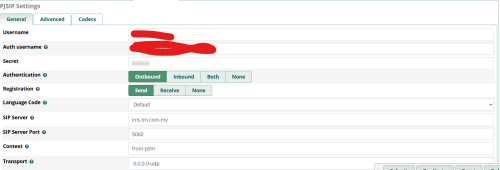
Instructions for configuring with FreePBX

1. Set User-Agent (/etc/asterisk/pjsip_custom_post.conf)
CODE

[global](+type=global)
user_agent=<User Agent>


2. Create Trunk (Connectivity -> Trunks)
CODE

[General]
Outbound Caller ID: Phone number with country code

[pjsip Settings - General]
Username: <SIP Username; i.e. Your phone number>
Auth Username: <SIP Username>
Secret: <SIP Password>
Authentication: Outbound
Registration: Send
SIP Server: homesip.maxis.com.my
SIP Server Port: <blank>
Context: from-trunk
Transport: (0.0.0.0-udp is the default only enabled transport)

[pjsip Settings - Advanced]
DTMF Mode: Inband
Send Line in Registration: Yes
Qualify Frequency: 0
Outbound Proxy: sip:homegw01.maxis.com.my\;lr
Contact User: <SIP Username>
From Domain: homesip.maxis.com.my
From User: <SIP Username>
Force rport: Yes

[pjsip Settings - Codecs]
ulaw, alaw


3. Create Outbound Route (Connectivity -> Outbound Routes)
CODE

Route CID: Your phone number
Override extension: Yes
Trunk Sequence for Matched Routes: (Select the trunk you created above)
Dial Patterns: (Alter as desired)
1. Match Pattern +X.
2. Prepend: +60, Prefix: 0, Match Pattern X.


4. Create Inbound Routes (Connectivity -> Inbound Routes)
CODE

1. Set destination to your desired destination (Created separately as desired)
e.g. Ring Groups (Applications -> Ring Groups), Extensions (Applications -> Extensions)


5. Test calling.

This post has been edited by ruifung: Jun 29 2023, 10:15 PM
TSAnime4000
post Jun 29 2023, 08:38 PM

Look at all my stars!!
*******
Senior Member
2,399 posts

Joined: Jul 2009
From: /dev/null


QUOTE(ruifung @ Jun 29 2023, 04:22 PM)
@Anime4000

Aminia MA131 User Agent

MA131 SIP-stdR11448 2.1.13m_20200214 <SN>
*
Nice! I have updated the first thread and link to here
melz84
post Jan 4 2024, 08:04 PM

Regular
******
Senior Member
1,603 posts

Joined: Jun 2005
From: Seremban-Wangsa Maju


anybody wants a SNOM D725 ip phone ? still very new, only used it a couple of times then kept in my storeroom. clearing my junks now. it's a bit of a waste to throw it away. sweat.gif
wilson0416
post Aug 2 2024, 12:15 PM

Casual
***
Junior Member
342 posts

Joined: Jul 2011


Do you have any settings for TM?
leezhijiang
post Sep 27 2024, 07:55 AM

Getting Started
**
Junior Member
272 posts

Joined: Jan 2010


QUOTE(wilson0416 @ Aug 2 2024, 12:15 PM)
Do you have any settings for TM?
*
Yes. After many trial and error. Finally able to get PJSIP working on FreePBX 17 with Asteriek 21. Do note that in Astriek 21 onwards no more chan-sip. I was using chan-sp before, but have to move to pjsip because chan-sip is deprecated.

Please find the below PJSIP settings for Unifi

Under PJSIP General

Username: +60388888888
Auth Username: +60388888888@ims.tm.com.my
Secret: Get From Customer Service
Authentication: Outbound
Registration: Send
SIP-Server: 10.225.0.1
Port: 5060

Under Advance Settings


Outbound Proxy : empty

Contact User: +60388888888
From Domain : ims.tm.com.my
Client URI : sip:+60388888888@ims.tm.com.my:5060

If no mention, just leave it as it is

This post has been edited by leezhijiang: Sep 27 2024, 03:18 PM
wilson0416
post Sep 27 2024, 08:06 AM

Casual
***
Junior Member
342 posts

Joined: Jul 2011


QUOTE(leezhijiang @ Sep 27 2024, 07:55 AM)
Yes. After many try and error. Finally able to get PJSIP working on FreePBX 17 with Asteriek 21. Do note that in Astriek 21 onwards no more chan-sip. I was using chan-sp before, but have to move to pjsip because chan-sip is deprecated.

user posted image
Username: +60388888888
Auth Username: +60388888888@ims.tm.com.my

Under Advance Settings
Outbound Proxy : sip:10.225.0.1:5060

Contact User: +60388888888
From Domain : ims.tm.com.my
From User: +60388888888@ims.tm.com.my
Client URI : +60388888888@ims.com.my@10.225.0.1:5060
Send RPID/PAI : Send P Asserted Identity Header
*
Thanks bro, i will try it.
error
post May 8 2025, 12:03 PM

Enthusiast
*****
Senior Member
869 posts

Joined: Jan 2003
From: S.Damansara


I've manage to setup the ancient Linksys PAP2T with Maxis Fibre + Unifi infra

Hardware setup
CODE

- Fiberhome AN5506-04-BG > Custom Router (Internet) > Linksys PAP2T (VOIP)
- Where my Custom Router is just typical TP-LINK Archer C6 and the VLAN 822 is configured to one of the LAN ports


Prerequisite - to access PAP2T Web interface
CODE

- Attach PAP2T with one of the available LAN ports in the router (not the VLAN822 port)
- Accessing the IVR menu using the handset by dialling in ****
- Restore factory setting by using 73738# (if you have previous settings)
- Enable Web Interface by using 7932#
- Enable DHCP by using 101# (this is to get IP assign to the PAP2T by your router)
- Get your PAP2T IP address using 110#
- Access the Web interface (using the IP address from 110#) - Enable Admin Login and Advanced View to bring out more menus


Linksys PAP2T config via Web interface

Under SIP tab
CODE

- SIP User Agent Name: TPLINK ARCHER C5V BUILD v1.0_191212-3202049003674
- SIP Reg User Agent Name: TPLINK ARCHER C5V BUILD v1.0_191212-3202049003674


Under Line 1 tab
CODE

- Line Enabled: yes
- Proxy: homesip.maxis.com.my
- Outbound Proxy: homegw01.maxis.com.my
- Use Outbound Proxy: yes
- Use OB Proxy In Dialog: yes
- Register: yes
- Register Expires: 900
- Proxy Fallback Intvl: 30
- Display Name: your 03xxxxx number
- User ID: your 03xxxxx number
- Password: your password
- Use Auth ID: no
- Auth ID: your 03xxxxx number
- Preferred Codec: G711a
- Dial Plan: 15xxx|[2-9]xxxxxxxx|0[1-9]xxxxxxxxx|00xxxxxxxxxxxxx|118xx|1[2-9]x|110|111|112|113|114|115|116|117|119|10xx[2-9]xxxxxx|10xx118xx|10xx1[2-9]x|10xx110|10xx111|10xx112|10xx113|10xx114|10xx115|10xx116|10xx117|10xx119|1x00xxxxxx|E|F


Once done setting it up, attach PAP2T with the LAN port (VLAN822). Reboot and fingers crossed

Been trying this for few days based on all the info gathered in this forum, especially thanks to @Anime4000 for all the info
Just need to piece all the info together and lots of trial and error

This post has been edited by error: May 8 2025, 12:08 PM


Change to:
| Lo-Fi Version
0.0387sec    0.73    6 queries    GZIP Disabled
Time is now: 2nd December 2025 - 12:37 AM