

Hi, just a quick question. Any powerline adapter that support 500mbps ISP line? mine is tplink av1300, the max can go around 100mbps when doing speed test.
Maxis Kaon AR2140 Wifi 6 Router, Horrible Router
Maxis Kaon AR2140 Wifi 6 Router, Horrible Router
|
|
 Nov 3 2022, 03:50 PM Nov 3 2022, 03:50 PM
|
 
Junior Member
240 posts Joined: Jan 2007 From: Puchong/MMU Cyberjaya   
|
Hi, just a quick question. Any powerline adapter that support 500mbps ISP line? mine is tplink av1300, the max can go around 100mbps when doing speed test.
|
|
|
|
|
|
Nov 14 2022, 08:39 AM
|

Probation
8 posts Joined: Nov 2021
|
QUOTE(QuantumEdge @ Dec 29 2021, 10:36 PM) 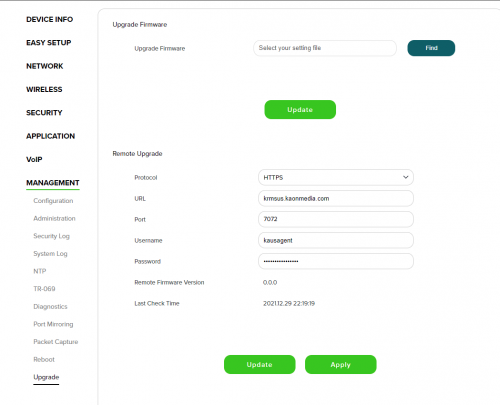 Mine installed today, same 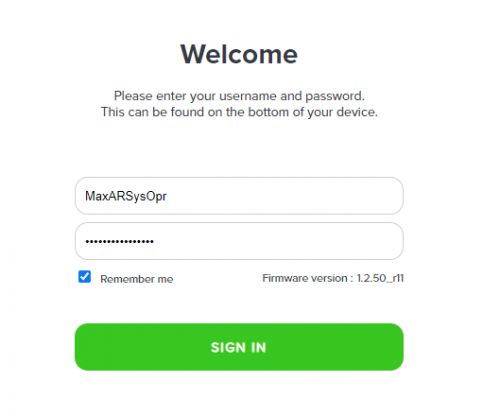 Firmware version is here lol, login page  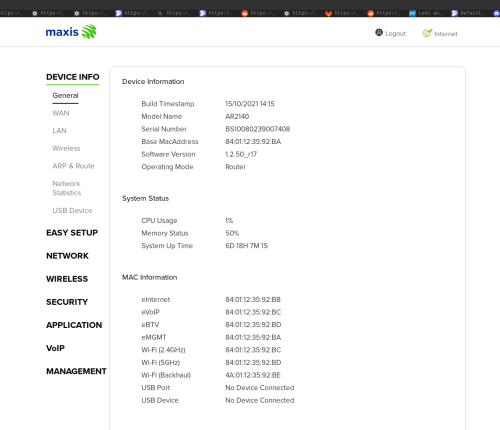 |
|
|
Nov 14 2022, 08:44 AM
Show posts by this member only | IPv6 | Post
#83
|

Junior Member
327 posts Joined: Nov 2008
|
QUOTE(B83C @ Nov 14 2022, 08:39 AM) Qutie strangely, the firmware for my device has been silently upgraded... as opposed to the r11 revision several months ago. Standard issue router have remote access default enable.Either you disable it or change to after-market router |
|
|
Nov 14 2022, 03:46 PM
Show posts by this member only | IPv6 | Post
#84
|

Senior Member
1,602 posts Joined: Jan 2016
|
QUOTE(B83C @ Nov 14 2022, 08:39 AM) Qutie strangely, the firmware for my device has been silently upgraded... as opposed to the r11 revision several months ago. I've only been using this router for the 1st day of installation, or maybe once in a while to troubleshoot stuffSo not noticing anything... |
|
|
Nov 15 2022, 05:37 PM
|

Junior Member
612 posts Joined: Mar 2008
|
Anyone here know what is the credential for Maxis huawei lg8245x6 2021 router? I tried most of the login including the !!bestHOME!!XXXX still not accessible.
|
|
|
Nov 15 2022, 08:09 PM
|
|
Senior Member
2,616 posts Joined: Nov 2020
|
QUOTE(Gaara92 @ Nov 15 2022, 05:37 PM) Anyone here know what is the credential for Maxis huawei lg8245x6 2021 router? I tried most of the login including the !!bestHOME!!XXXX still not accessible. Tried with username of MaxDNSPrUsr and the !!bestHOME!!XX password?Unless maxis changed their password format again via a remote firmware upgrade |
|
|
|
|
|
Nov 15 2022, 08:32 PM
|
|
Junior Member
612 posts Joined: Mar 2008
|
QUOTE(PRSXFENG @ Nov 15 2022, 08:09 PM) Tried with username of MaxDNSPrUsr and the !!bestHOME!!XX password? Yes including that one. But the other router with version LG8245X6-10, I can access it using that particular credentials.Unless maxis changed their password format again via a remote firmware upgrade PRSXFENG liked this post
|
|
|
Dec 23 2022, 05:55 PM
|
|
Newbie
2 posts Joined: Sep 2011
|
QUOTE(CLKH03 @ Feb 9 2022, 11:06 PM) No the maxis router still in router mode, not bridge mode that way it won't use any internet but still remain the VOIP phone function. You don't have to do that. Your Asus router have full functionality, configuration as follows:LAN1 IPTV VLAN 823 LAN2 INTERNET VLAN 621 LAN3 INTERNET VLAN 621 LAN4 VOIP VLAN 822 Whichever port for what purpose, just fill in the VLAN number, (I don't use voip): 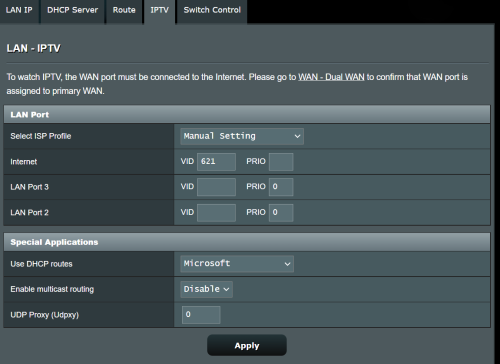 mmohdnor liked this post
|
|
|
Dec 23 2022, 05:59 PM
|
|
Newbie
2 posts Joined: Sep 2011
|
Also, for Maxis Kaon AR2140, I would recommend you go to management and change the password and disable TR-069 remote management.
|
|
|
Jan 24 2023, 07:25 PM
Show posts by this member only | IPv6 | Post
#90
|
|
Probation
2 posts Joined: Jan 2023
|
Hi guys. Sorry if its a silly question but maxis Kaon router has no antenna. Would getting a tplink archer wifi 6 ax 73 router help with wifi coverage in a 2 story house? Also, currently on 500mbps package but only getting 150-200mbps on wifi downstairs. (I downgraded from 800mbps because wifi speed was nowhere near.
Again, would getting that TPlink router help with speed as well? |
|
|
Jan 24 2023, 09:08 PM
Show posts by this member only | IPv6 | Post
#91
|

Senior Member
1,022 posts Joined: Jun 2013
|
QUOTE(Jal111111 @ Jan 24 2023, 07:25 PM) Hi guys. Sorry if its a silly question but maxis Kaon router has no antenna. Would getting a tplink archer wifi 6 ax 73 router help with wifi coverage in a 2 story house? Also, currently on 500mbps package but only getting 150-200mbps on wifi downstairs. (I downgraded from 800mbps because wifi speed was nowhere near. Setting up mesh routers will be better in this case.Again, would getting that TPlink router help with speed as well? |
|
|
Jan 24 2023, 10:30 PM
Show posts by this member only | IPv6 | Post
#92
|
|
Probation
2 posts Joined: Jan 2023
|
QUOTE(jsnhoh @ Jan 24 2023, 09:08 PM) Setting up mesh routers will be better in this case. I did, using the Mesh units maxis gave but honestly its so bad i cant even stream a video on youtube with it 😅 |
|
|
Jan 25 2023, 12:15 PM
|
|
Senior Member
1,022 posts Joined: Jun 2013
|
QUOTE(Jal111111 @ Jan 24 2023, 10:30 PM) I did, using the Mesh units maxis gave but honestly its so bad i cant even stream a video on youtube with it 😅 Buy Asus or tplink mesh router. And the position of your mesh router also very important Jal111111 liked this post
|
|
|
|
|
|
Jan 28 2023, 03:29 PM
Show posts by this member only | IPv6 | Post
#94
|

Junior Member
450 posts Joined: Mar 2011
|
QUOTE(netken @ Sep 20 2022, 03:21 PM) I disable the WPS from the admin page - but i think it still looking for Mesh to connect - it keeps blinking. Hi, i can't see any option to disable mesh - but i think should be safe - it is inside the house and i only use WIFI from ASUS connected to the Kaon router via LAN. KAON wifi both 2.4ghz and 5.0ghz is disabled - just irritating OCD see that WPS keep blinking ... lol .... I was previously using Asus RT-AX86U for my UniFi and this Kaon sucks in terms of WiFi range and stability. How do you connect your Asus to the Kaon modem? Using the Asus as an Access Point or Bridge? Can we reverse the connection & use Asus as the main router and Kaon connected to it for the VOIP? Thank you. |
|
|
Jan 28 2023, 06:21 PM
Show posts by this member only | IPv6 | Post
#95
|
|
Junior Member
327 posts Joined: Nov 2008
|
QUOTE(Crystal2 @ Jan 28 2023, 03:29 PM) Hi, I managed to do it.I was previously using Asus RT-AX86U for my UniFi and this Kaon sucks in terms of WiFi range and stability. How do you connect your Asus to the Kaon modem? Using the Asus as an Access Point or Bridge? Can we reverse the connection & use Asus as the main router and Kaon connected to it for the VOIP? Thank you. My main router is Asus tuf-ax3000 and the Kaon is only meant for the house phone line. Check back your asus router which port is set for voip. Mine is port 3. I can't recall any special setting is require for the kaon but maybe you can try with default setting 1st. Connect the Kaon Wan port to the asus router voip port. Hopefully it work for you. Crystal2 liked this post
|
|
|
Jan 28 2023, 10:02 PM
Show posts by this member only | IPv6 | Post
#96
|
|
Junior Member
450 posts Joined: Mar 2011
|
QUOTE(Ichibanichi @ Jan 28 2023, 06:21 PM) I managed to do it. Thank you.My main router is Asus tuf-ax3000 and the Kaon is only meant for the house phone line. Check back your asus router which port is set for voip. Mine is port 3. I can't recall any special setting is require for the kaon but maybe you can try with default setting 1st. Connect the Kaon Wan port to the asus router voip port. Hopefully it work for you. I set the VLAN in LAN4 of Asus to 822. Do I need to do any settings on the Kaon? |
|
|
Jan 29 2023, 02:22 AM
Show posts by this member only | IPv6 | Post
#97
|
|
Junior Member
327 posts Joined: Nov 2008
|
QUOTE(Crystal2 @ Jan 28 2023, 10:02 PM) Thank you. Try default setting in Kaon 1stI set the VLAN in LAN4 of Asus to 822. Do I need to do any settings on the Kaon? |
|
|
Jan 30 2023, 02:38 PM
|
|
Junior Member
151 posts Joined: Jun 2009
|
QUOTE(Ichibanichi @ Jan 29 2023, 02:22 AM) Try default setting in Kaon 1st Hi, mind to screenshot the setting, i want to use tp link ax20, as main router. Port lan4 is default for voip. So in kaon maxis router for telephone only, must setup ppoe also? Thanks |
|
|
Feb 4 2023, 02:46 PM
|
|
Junior Member
450 posts Joined: Mar 2011
|
QUOTE(Ichibanichi @ Jan 29 2023, 02:22 AM) Try default setting in Kaon 1st I tried, TQ. Gave up. Forced to use the Kaon as main router. |
|
|
Feb 4 2023, 09:23 PM
|
|
Senior Member
2,616 posts Joined: Nov 2020
|
QUOTE(Crystal2 @ Feb 4 2023, 02:46 PM) I tried, TQ. Gave up. Forced to use the Kaon as main router. did VLAN 822 not work?try VLAN 14 |
| Change to: |  0.0256sec 0.0256sec
 3.19 3.19
 6 queries 6 queries
 GZIP Disabled GZIP Disabled
Time is now: 23rd December 2025 - 10:24 PM |
 Quote
Quote