Welcome Guest ( Log In | Register )

Outline · [ Standard ] · Linear+

 Maxis Kaon AR2140 Wifi 6 Router, Horrible Router

views
     
PRSXFENG
post Sep 20 2021, 09:36 PM

Look at all my stars!!
*******
Senior Member
2,616 posts

Joined: Nov 2020


This is just my guess but all those options could be hidden behind an admin/root account that we don't know

on the old TP-Link Archer c5v, there were 3 levels

user/user - basic, not much, can change wifi name and setup internet and that's about it

administrator/[serial number] - most know this, unlocks most but not all settings

MaxSysAdm/Ng88Mxs@2019! - the "ultimate" root account, has every setting possible on the router afaik.

The problem is getting said credentials for that top tier account for the new Kaon router
PRSXFENG
post Sep 27 2021, 09:41 AM

Look at all my stars!!
*******
Senior Member
2,616 posts

Joined: Nov 2020


poking around the old archer c5v on the latest 2021 firmware, I found the following credentials, maybe worth a shot trying them on the kaon in case they reuse passwords?

MaxSysAdm
!!bestHOME!!0084
PRSXFENG
post Jan 5 2022, 11:04 AM

Look at all my stars!!
*******
Senior Member
2,616 posts

Joined: Nov 2020


QUOTE(ineser @ Jan 4 2022, 07:23 PM)
Hijack a bit, those on maxis fiber, able to help if can access this web?
Basically can access to hrnz.co.nz however when I go to "results" section I am unable to load
https://infohorse.hrnz.co.nz/datahrs/results/010249rs.htm

Tried changing DNS to Google or 1111 also cant.
*
That link loads for me
Using Quad9 w/ ECS DNS over DNSCrypt

This post has been edited by PRSXFENG: Jan 5 2022, 11:04 AM
PRSXFENG
post Jan 6 2022, 06:30 PM

Look at all my stars!!
*******
Senior Member
2,616 posts

Joined: Nov 2020


QUOTE(ineser @ Jan 6 2022, 04:18 PM)
Thank guys for replying.
A bit noob here, seems to me that using third party DNS is fine however both of u using custom software/hardware to use third party DNS?
I am using default Maxis Kaon router and just change the DNS settings there only.
*
Yeah it appears both of us are running pihole on a raspberry pi to use as DNS 😅
PRSXFENG
post Jan 24 2022, 04:23 PM

Look at all my stars!!
*******
Senior Member
2,616 posts

Joined: Nov 2020


QUOTE(CLKH03 @ Jan 24 2022, 12:33 PM)
Hi, I'm using Asus XT8 and it is directly connected to the Modem provided by Maxis (Huawei) but I would like to use the Maxis VOIP service but it requires me to use the main router, and I would not like to use the bridge or repeater option to my XT8 as the Maxis (AR2140) is quite unstable from time to time. Anyway to bypass it and use a different method to use VOIP function? Can't the maxis router be the repeater and have the VOIP function still????
*
I think you can do this?

Modem -> Asus -> Maxis

To forward, go to LAN -> IPTV (why did Asus even put it there)
if you selected Maxis Fibre profile it should say "VoIP LAN Port X"
connect your stock router to that port

and I think slight amount of configuring needs to be done to the stock router and it will work
PRSXFENG
post Jan 27 2022, 04:30 PM

Look at all my stars!!
*******
Senior Member
2,616 posts

Joined: Nov 2020


QUOTE(CLKH03 @ Jan 27 2022, 03:26 PM)
Unable. My house Maxis is different, uses VID 11 instead of the others, So I had to put it under Manual and set it up myself.
*
Ah same as me, select the "Maxis-Fibre-Special" profile
PRSXFENG
post Feb 2 2022, 09:46 AM

Look at all my stars!!
*******
Senior Member
2,616 posts

Joined: Nov 2020


QUOTE(CLKH03 @ Feb 1 2022, 08:40 PM)
Bro, any way to directly from modem to asus router then output to maxis router for VOIP phone service?
*
Not sure what you mean there but the usual way is to

Modem -> Asus -> Maxis for voip

Wifi would be disabled on the maxis.
As well as other unneeded parts

If you want direct modem voip sadly can't.
PRSXFENG
post Feb 2 2022, 04:12 PM

Look at all my stars!!
*******
Senior Member
2,616 posts

Joined: Nov 2020


QUOTE(CLKH03 @ Feb 2 2022, 04:08 PM)
I mean how did you configure the maxis router? It only has 2 mode which is router mode and repeater (Repeater mode will disable the VOIP function). Plus my asus router needs to manually configure to VID 11, other settings does not work for me. I have yet to try Maxis Fibre Special but i'll try once I got home. But is it really possible to run the AR 2150 Kaon router directly from the asus router as IPTV? Won't it try to connect the Wan itself under IPTV mode and make the XT8 disconnect from the Wan? Plus have you try this method before?

I need solutions for my router.... Can't do it when Maxis is locking everything down.
*
Oh, not sure on the Kaon tbh, the older tplink revealed more settings to disable other stuff
PRSXFENG
post Feb 4 2022, 07:55 AM

Look at all my stars!!
*******
Senior Member
2,616 posts

Joined: Nov 2020


QUOTE(CLKH03 @ Feb 4 2022, 12:07 AM)
But there's no bridge mode for the router. there's only router mode or repeater mode under the special access. (Not full i think)
*
Try...

MaxARSysOpr as username
!!bestHOME!!XXXX as password

Replace XXXX with last 4 digits of serial number

PRSXFENG
post Feb 5 2022, 08:42 AM

Look at all my stars!!
*******
Senior Member
2,616 posts

Joined: Nov 2020


QUOTE(afif92 @ Feb 4 2022, 11:16 PM)
wow.. can change to bridge mode after login using real admin account? nice... In asus router, you choose what profile?
*
For those using Maxis on Unifi infra, choose "Maxis-Fibre"
For those on Maxis using their own infra, choose "Maxis-Fibre-Special"

For me I set manually cause I didn't need to use VOIP and would rather have a free ethernet port
PRSXFENG
post Sep 21 2022, 01:22 PM

Look at all my stars!!
*******
Senior Member
2,616 posts

Joined: Nov 2020


QUOTE(thpace1 @ Sep 21 2022, 01:06 PM)
have anyone tried for this newer version?
*
it has been changed, the ultimate credentials for the Kaon router are

MaxARSysOpr
!!bestHOME!!XXXX
XXXX is last 4 of serial

This post has been edited by PRSXFENG: Sep 21 2022, 01:23 PM
PRSXFENG
post Sep 27 2022, 01:41 PM

Look at all my stars!!
*******
Senior Member
2,616 posts

Joined: Nov 2020


QUOTE(he1008 @ Sep 27 2022, 12:51 AM)
All the sifus here, just installed maxis fibre and got the AR2140 router, but I cannot find the DMZ function to put one my servers there, even using the root admin trick someone mentioned above also doesn't reveal that function, is it totally not available on this router? What would be my best option if I need the DMZ function? If the answer involves getting a new router, then would I still be able to use the 3 units of AR2140 (signed up for the 800mbps service) as mesh units for extra signal coverage?
*
Not sure on the DMZ fucntion as I dont have the router

for the other units as mesh, you MUST get a router that supports Wifi Alliance EasyMesh

So far the only ones I've seen on the market are Maxis provided routers + some D-Link COVR models
PRSXFENG
post Nov 2 2022, 06:19 PM

Look at all my stars!!
*******
Senior Member
2,616 posts

Joined: Nov 2020


QUOTE(ND2909 @ Nov 2 2022, 05:04 PM)
Came across this when I upgraded maxis plan from 100mbps to 300mbps, but seems like LAN port is limiting my speed, so want to get root account.
Came to surprise it's on Astro's website.

    Username: administrator
    Password: Router S/N (Available on the sticker at the back of the router)

But anyhow still need solutions to bypass LAN port speed limit. Anyone knows how do let me know.
*
the true root account is above, MaxARSysOpr and !!bestHOME!!XXXX (SN)
as for lan speed problem, have you tried other lan cables?
make sure its cat5e or cat6
if its only cat5 it will only go up to 100mbps
PRSXFENG
post Nov 15 2022, 08:09 PM

Look at all my stars!!
*******
Senior Member
2,616 posts

Joined: Nov 2020


QUOTE(Gaara92 @ Nov 15 2022, 05:37 PM)
Anyone here know what is the credential for Maxis huawei lg8245x6 2021 router? I tried most of the login including the !!bestHOME!!XXXX still not accessible.
*
Tried with username of MaxDNSPrUsr and the !!bestHOME!!XX password?
Unless maxis changed their password format again via a remote firmware upgrade
PRSXFENG
post Feb 4 2023, 09:23 PM

Look at all my stars!!
*******
Senior Member
2,616 posts

Joined: Nov 2020


QUOTE(Crystal2 @ Feb 4 2023, 02:46 PM)
I tried, TQ. Gave up. Forced to use the Kaon as main router.
*
did VLAN 822 not work?
try VLAN 14
PRSXFENG
post May 16 2023, 06:17 PM

Look at all my stars!!
*******
Senior Member
2,616 posts

Joined: Nov 2020


QUOTE(normality78 @ May 16 2023, 02:16 PM)
Guy's, I know this Kaon router do have a USB port for us to plug in the "standby" 4G Dongle that provided by Maxis. May i know is there any others mesh out there do have this feature? TPlink?
*
Asus routers have USB port that supports 4g dongles

However, Maxis locks that dongle to its own devices

PRSXFENG
post Jul 27 2023, 09:28 AM

Look at all my stars!!
*******
Senior Member
2,616 posts

Joined: Nov 2020


QUOTE(il0ve51 @ Jul 26 2023, 10:09 PM)
hi guys can this koan router work with tplink x50 mesh?
*
Nope
TP-Link is using their own mesh technology

Kaon is using EasyMesh, an open standard
PRSXFENG
post Jul 28 2023, 05:27 PM

Look at all my stars!!
*******
Senior Member
2,616 posts

Joined: Nov 2020


QUOTE(il0ve51 @ Jul 28 2023, 04:05 PM)
can we change maxis kaon router to other compatible for x50 mesh. i bought 3 pcs set for x50. now very waste if cannot use
*
Yes, simply ask Maxis for the PPPoE Credentials then there are guides online
However, you lose the 4G backup and VoIP Phone

But a quick guide
Make note of the LAN port of the ONT that the original Kaon is connected to (LAN1 or 2)
Unplug the Kaon
Plug in the Deco directly
Setup the deco, select PPPoE mode, enter details from Maxis, then for VLAN Internet, enter 621 if you were using LAN2 or 11 if you are using LAN1
(11 is for Maxis own infra, 621 is for Maxis on TM)
(Or select one of the preset profiles but the lan port may become reserved for IPTV which is not really used these days?)

Alternatively, to keep VoIP/4G, you could just directly connect up the Deco to the Kaon and setup in Dynamic IP Mode
This does come with some downsides such as Double NAT and having 2 conflicting wifis
PRSXFENG
post Sep 1 2023, 05:05 PM

Look at all my stars!!
*******
Senior Member
2,616 posts

Joined: Nov 2020


QUOTE(LizStephenie @ Sep 1 2023, 03:35 PM)
Hi guys,
I see quite a few mentions regarding tr069. How to disable it?
Cheers. smile.gif
*
Not sure if it still works on the Kaon but the option to configure it shows up when you login with root credentials
Which are

MaxARSysOpr
!!bestHOME!!XXXX
XXXX is last 4 of serial

For the Kaon

Do note that doing this closes the door that maxis uses to remotely manage the router, so you will not get firmware updates, and if some settings have been wrongly configured they cannot fix it for you

(With that said, my old TP-Link c5v they accidentally set the wrong PPPoE credentials in the management system so it kept overriding my config with wrong details causing me to lose internet access, so I had to disable it)
PRSXFENG
post Feb 13 2024, 07:29 PM

Look at all my stars!!
*******
Senior Member
2,616 posts

Joined: Nov 2020


QUOTE(zioburosky13 @ Feb 13 2024, 05:56 PM)
I am hijacking this thread for few questions:

Just switched to Maxis Home Fibre 1Gbps, and yes, the free router is a Maxis Kaon AR2140 Wifi 6.

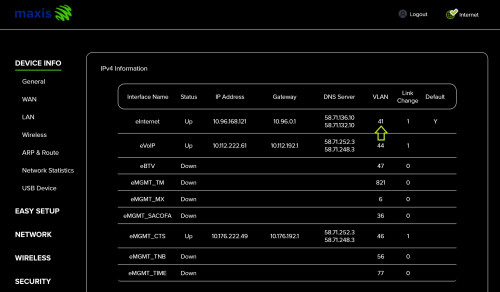
- Where do I find the VLAN number option in my previous router, an Asus RT-AX3000, which is the key component to enable the Maxis Home fibre service?
user posted image
- Any extra setup I should do for the Kaon AR2140 Wifi 6 router?
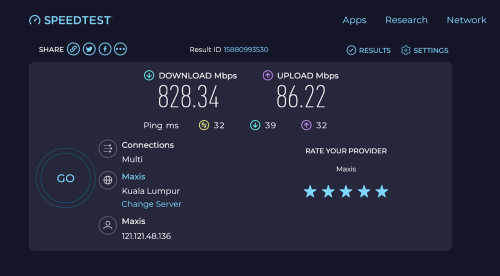
Current LAN connection speed via the Kaon AR2140 wifi 6 router. Notice the upload speed. o-0
user posted image
*
You want to use your old Asus in place of the Kaon?

LAN -> IPTV -> ISP Profile -> Manual
And for your setup
Then enter 41 into the internet section
Optionally, insert 44 into one of the other LAN ports if you intend to reuse the Kaon as a voip device

Your Infrastructure is kinda rare, Celcom Timur Sabah

2 Pages  1 2 >Top
 

Change to:
| Lo-Fi Version
0.0240sec    0.52    7 queries    GZIP Disabled
Time is now: 24th December 2025 - 12:07 PM