


Disney+Hotstar MY is AVAILABLE NOW!, On all supported platform
Disney+Hotstar MY is AVAILABLE NOW!, On all supported platform
|
|
 Jun 7 2021, 02:59 PM Jun 7 2021, 02:59 PM
|
 
Senior Member
7,740 posts Joined: Jun 2006 From: Some Yih  
|
from what i see in this thread, there are some serious fragmented region lock approach by Disney+
|
|
|
|
|
|
Jun 7 2021, 03:19 PM
Show posts by this member only | IPv6 | Post
#702
|

Junior Member
322 posts Joined: Jul 2011 From: Kuala Lumpur 
|
QUOTE(pikacu @ Jun 7 2021, 02:59 PM) from what i see in this thread, there are some serious fragmented region lock approach by Disney+ Only if you try getting into Disney+ Singapore when VPN will be blocked and you will be getting error 83. Anywhere else using VPN is no problem. For Singapore the best way is ask disney+ help centre to change your location account to Singapore based account. Once changed then use Cloudflare 1.1.1.1. This way you can get Singapore contents. No need to use VPN anymore. Use VPN only when you want to get Disney+ from other places. Thanks to knainiz94 This post has been edited by stormstrider: Jun 7 2021, 03:24 PM Attached thumbnail(s) 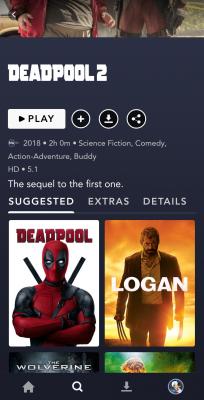
|
|
|
Jun 7 2021, 03:27 PM
Show posts by this member only | IPv6 | Post
#703
|

Senior Member
2,856 posts Joined: Mar 2012
|
QUOTE(pikacu @ Jun 7 2021, 02:59 PM) from what i see in this thread, there are some serious fragmented region lock approach by Disney+ It seems like that.But do remember Star tab is only offered in other countries besides the US. So the content filter will stuck at PG13 in MY standard or TV14 in US standard. |
|
|
Jun 7 2021, 03:28 PM
Show posts by this member only | IPv6 | Post
#704
|
|
Senior Member
2,856 posts Joined: Mar 2012
|
QUOTE(stormstrider @ Jun 7 2021, 03:19 PM) Only if you try getting into Disney+ Singapore when VPN will be blocked and you will be getting error 83. Anywhere else using VPN is no problem. This one need to thank jimmychangas.For Singapore the best way is ask disney+ help centre to change your location account to Singapore based account. Once changed then use Cloudflare 1.1.1.1. This way you can get Singapore contents. No need to use VPN anymore. Use VPN only when you want to get Disney+ from other places. Thanks to knainiz94 Previously my D+ region is Australia. Thanks to him I can change to SG. joshhd and jimmychangas liked this post
|
|
|
Jun 7 2021, 03:33 PM
Show posts by this member only | IPv6 | Post
#705
|
|
Junior Member
322 posts Joined: Jul 2011 From: Kuala Lumpur
|
QUOTE(khainiz94 @ Jun 7 2021, 03:28 PM) This one need to thank jimmychangas. Kudos and thanks to jimmychangas Previously my D+ region is Australia. Thanks to him I can change to SG.  |
|
|
Jun 7 2021, 03:37 PM
Show posts by this member only | IPv6 | Post
#706
|
|
Senior Member
2,856 posts Joined: Mar 2012
|
Anyway just a small info for everyone.
For the steps jimmy just posted. I tried for the other apps like Peacock, Paramount+ and any other US apps, it does not show the RM price, only USD price but you can pay via your MY account. That means Disney+ International should be launched in MY due to price is available inside the app, but Disney made a stupid decision to launch D+H app. Oh well. P.S. Now all of you seen the loophole, now you can subscribe to US services directly via your BigPay card without having to go buy Google Play Gift Card or resort to iTunes Gift Card. But of course, paying in USD will depend on the current exchange rate of USD to MYR. This post has been edited by khainiz94: Jun 7 2021, 03:38 PM |
|
|
|
|
|
Jun 7 2021, 04:01 PM
|

Junior Member
149 posts Joined: Jul 2012
|
QUOTE(khainiz94 @ Jun 7 2021, 03:37 PM) Anyway just a small info for everyone. that means i'm the only one here who used my spare Google account (set to U.S.) to subscribe and pay using USD.For the steps jimmy just posted. I tried for the other apps like Peacock, Paramount+ and any other US apps, it does not show the RM price, only USD price but you can pay via your MY account. That means Disney+ International should be launched in MY due to price is available inside the app, but Disney made a stupid decision to launch D+H app. Oh well. P.S. Now all of you seen the loophole, now you can subscribe to US services directly via your BigPay card without having to go buy Google Play Gift Card or resort to iTunes Gift Card. But of course, paying in USD will depend on the current exchange rate of USD to MYR. What's left now is to see by end of the month, after using the same Google account to renew, let's see if that kicks my Disney+ account content ratings location back to U.S. or not. |
|
|
Jun 7 2021, 04:42 PM
Show posts by this member only | IPv6 | Post
#708
|

Junior Member
37 posts Joined: Dec 2011 From: Malaysia
|
Managed to get Disney+ SG. Paying thru primary Google Play MY account using Maxis/Hotlink. Thanks to @knainiz94 and @jimmychangas for the guides and steps. I don't have BigPay, so I used Public Bank debit card to link in the Google US account. After removing the US account to pay in RM, I had to add back the US account after payment. Then logout from Disney+ and login back, then only the app works. Streaming quality isn't good.. must be the VPN speed on the phone, I'll try on the computer later. This post has been edited by AppleChaz: Jun 7 2021, 04:44 PM jimmychangas liked this post
|
|
|
Jun 7 2021, 05:22 PM
|
|
Senior Member
7,614 posts Joined: Mar 2009
|
Is there any way to see what resolution the video is playing? The quality is already set to high but it doesn't even look like 1080p. Playing on my tablet
|
|
|
Jun 7 2021, 05:25 PM
|
|
Senior Member
2,856 posts Joined: Mar 2012
|
QUOTE(annoymous1234 @ Jun 7 2021, 05:22 PM) Is there any way to see what resolution the video is playing? The quality is already set to high but it doesn't even look like 1080p. Playing on my tablet Set to Auto and back to High again.D+H app? If it is so, that means the app server is having issues. Or maybe HD content is not a lot in the app. 😂😂😂 |
|
|
Jun 7 2021, 06:01 PM
|

Senior Member
5,886 posts Joined: Jan 2003 From: BM
|
QUOTE(jimmychangas @ Jun 7 2021, 11:48 AM) » Click to show Spoiler - click again to hide... « It keeps detecting my location saying service unavailable hence unable to create account Maybe I'll need to use another VPN Google Playstore on my phone didnt switch to US version even after switching to my spare google account with US billing address Had to install them manually via browser - https://play.google.com/store/apps/details?...&hl=en_US&gl=US |
|
|
Jun 7 2021, 06:08 PM
|
|
Senior Member
2,856 posts Joined: Mar 2012
|
QUOTE(evilhomura89 @ Jun 7 2021, 06:01 PM) Thanks for the tips but I'm having issue accessing Disney+ using WARP During setup must have a Google US account logged in.It keeps detecting my location saying service unavailable hence unable to create account Maybe I'll need to use another VPN Google Playstore on my phone didnt switch to US version even after switching to my spare google account with US billing address Had to install them manually via browser - https://play.google.com/store/apps/details?...&hl=en_US&gl=US Then the app will work. And in order for the US account fully works, you must activate the payment by inputting a debit/credit card that is compatible (BigPay) and VPN to US must be turned on. Do not use WARP because WARP only goes to SG server. Maybe can use Hotspot Shield which is free. This post has been edited by khainiz94: Jun 7 2021, 06:10 PM |
|
|
Jun 7 2021, 06:12 PM
|

Junior Member
63 posts Joined: Jan 2020
|
QUOTE(evilhomura89 @ Jun 7 2021, 06:01 PM) Thanks for the tips but I'm having issue accessing Disney+ using WARP Happened to me once, reconnect fix it.It keeps detecting my location saying service unavailable hence unable to create account Maybe I'll need to use another VPN Google Playstore on my phone didnt switch to US version even after switching to my spare google account with US billing address Had to install them manually via browser - https://play.google.com/store/apps/details?...&hl=en_US&gl=US Make sure the setting is on "WARP", this is the default if you didn't change it. Warp is basically a VPN as all our traffic is tunneled to Cloudflare servers, a free one. While 1.1 1 1 in setting only changes our DNS. 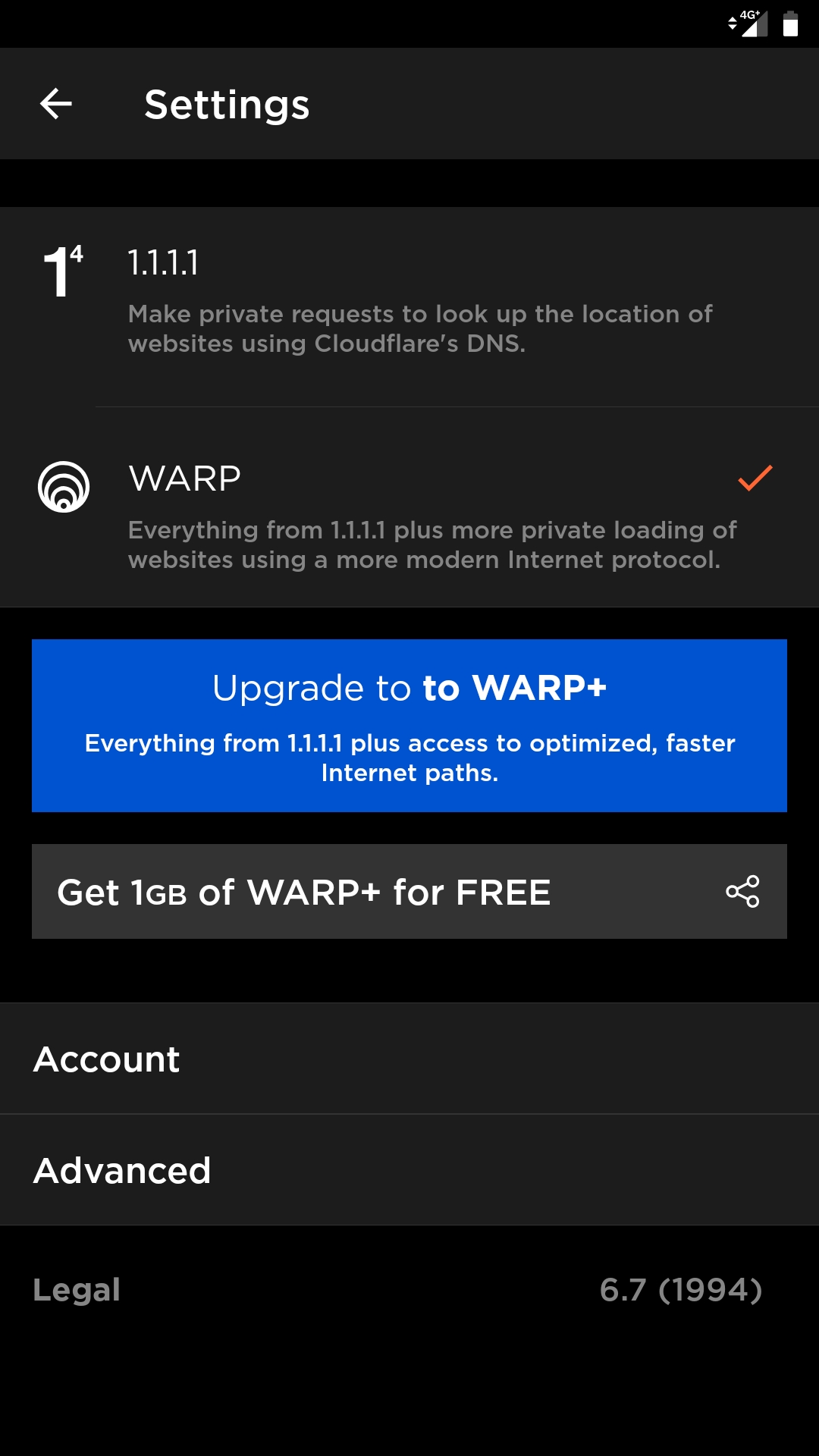 And keep in mind, if we create a Disney+ account using US VPN, we can never access the full library like discussed before. This post has been edited by ahemdolah: Jun 7 2021, 06:17 PM |
|
|
|
|
|
Jun 7 2021, 06:13 PM
Show posts by this member only | IPv6 | Post
#714
|
|
Junior Member
37 posts Joined: Dec 2011 From: Malaysia
|
QUOTE(evilhomura89 @ Jun 7 2021, 06:01 PM) Thanks for the tips but I'm having issue accessing Disney+ using WARP I don't know either how some here able to do it using WARP. I was having same issue as you. @khainiz94 had suggested me to use "Hotspot Shield" VPN app. It has 7 days free trial. You can use.. then access US streaming server. Then make sure you pay in RM if you want SG account. It keeps detecting my location saying service unavailable hence unable to create account Maybe I'll need to use another VPN Google Playstore on my phone didnt switch to US version even after switching to my spare google account with US billing address Had to install them manually via browser - https://play.google.com/store/apps/details?...&hl=en_US&gl=US After you install Hotsport Shield, reinstall the Disney+ app. khainiz94 liked this post
|
|
|
Jun 7 2021, 06:13 PM
|
|
Senior Member
5,886 posts Joined: Jan 2003 From: BM
|
QUOTE(khainiz94 @ Jun 7 2021, 06:08 PM) During setup must have a Google US account logged in. ok after several tries of clearing cache and app data for google play store and disney plus, it's finally working already Then the app will work. And in order for the US account fully works, you must activate the payment by inputting a debit/credit card that is compatible (BigPay) and VPN to US must be turned on. Do not use WARP because WARP only goes to SG server. Maybe can use Hotspot Shield which is free.  i was wondering should i subscribe one year or one month first...i was wondering if subsequent payment via bigpay is still possible  |
|
|
Jun 7 2021, 06:15 PM
Show posts by this member only | IPv6 | Post
#716
|
|
Junior Member
37 posts Joined: Dec 2011 From: Malaysia
|
By the way, this method doesn't work on AndroidTV because there is no WARP app for AndroidTV.
Hotspot Shield doesn't work on AndroidTV. When connected to US server, it shows blank screen and when it connected to Singapore, it detects VPN. Anyone knows workaround? This post has been edited by AppleChaz: Jun 7 2021, 06:16 PM |
|
|
Jun 7 2021, 06:18 PM
|
|
Senior Member
2,856 posts Joined: Mar 2012
|
QUOTE(AppleChaz @ Jun 7 2021, 06:13 PM) I don't know either how some here able to do it using WARP. I was having same issue as you. @khainiz94 had suggested me to use "Hotspot Shield" VPN app. It has 7 days free trial. You can use.. then access US streaming server. Then make sure you pay in RM if you want SG account. That is why I was confused.After you install Hotsport Shield, reinstall the Disney+ app. I was using US VPN to create a US Google Account and to activate payment. I only use WARP to create Disney+ account and to access to Disney+ SG. |
|
|
Jun 7 2021, 06:19 PM
|
|
Senior Member
2,856 posts Joined: Mar 2012
|
QUOTE(evilhomura89 @ Jun 7 2021, 06:13 PM) ok after several tries of clearing cache and app data for google play store and disney plus, it's finally working already Should be no issue at all. i was wondering should i subscribe one year or one month first...i was wondering if subsequent payment via bigpay is still possible As long your card is in Google Pay system, it will work as usual. |
|
|
Jun 7 2021, 06:19 PM
|

Senior Member
1,981 posts Joined: Jan 2003 From: Malaysia
|
If I never activate the Disney Hotstar+ account, will I still be charged the RM5 for the Astro Movies Pack?
|
|
|
Jun 7 2021, 06:20 PM
Show posts by this member only | IPv6 | Post
#720
|
|
Junior Member
122 posts Joined: Feb 2020
|
QUOTE(engseng @ Jun 7 2021, 06:19 PM) If I never activate the Disney Hotstar+ account, will I still be charged the RM5 for the Astro Movies Pack? Yes. That now assteruk milking customer |
| Change to: |  0.0344sec 0.0344sec
 0.56 0.56
 6 queries 6 queries
 GZIP Disabled GZIP Disabled
Time is now: 1st December 2025 - 04:41 PM |
 Quote
Quote