

QUOTE(vodoo88 @ Apr 16 2021, 02:33 AM)
poco certified also

Yours is 6GB or 8GB ?Mine 6GB still "to pack"
Xiaomi Redmi K40/POCO F3 Discussion
|
|
 Apr 16 2021, 07:14 AM Apr 16 2021, 07:14 AM
|
 
Junior Member
852 posts Joined: Jul 2009  
|
QUOTE(vodoo88 @ Apr 16 2021, 02:33 AM) poco certified also Yours is 6GB or 8GB ?Mine 6GB still "to pack" |
|
|
|
|
|
Apr 16 2021, 07:16 AM
|

Senior Member
2,774 posts Joined: Jun 2009
|
Anyone have problem with the google feed scrolling not smooth. The fps seems choppy. But if open google app, is smooth.
|
|
|
Apr 16 2021, 07:19 AM
|

Junior Member
346 posts Joined: Jul 2012
|
QUOTE(soulseeker6187 @ Apr 16 2021, 07:16 AM) Anyone have problem with the google feed scrolling not smooth. The fps seems choppy. But if open google app, is smooth. Same here, it seems the issue is with poco launcher implementation of google feed. Tried other launcher google feed is quite smooth |
|
|
Apr 16 2021, 07:37 AM
|
|
Senior Member
2,774 posts Joined: Jun 2009
|
QUOTE(wirelessbuyer @ Apr 16 2021, 07:19 AM) Same here, it seems the issue is with poco launcher implementation of google feed. Tried other launcher google feed is quite smooth Its quite annoying.Everything feels smooth but swipe right to google feed damn choppy. Disable it for now. |
|
|
Apr 16 2021, 08:47 AM
|

Junior Member
671 posts Joined: Jul 2015 From: Shah Alam
|
QUOTE(soulseeker6187 @ Apr 16 2021, 07:37 AM) Its quite annoying. You can try checking "Show refresh rate" in dev options then go to the google feed page. I think it drops down to 60hz in the google feed page that's why it feels so choppy. It does the same thing on some apps that has a lot of picturesEverything feels smooth but swipe right to google feed damn choppy. Disable it for now. This post has been edited by Skeuomorphic: Apr 16 2021, 08:51 AM |
|
|
Apr 16 2021, 09:05 AM
|

Junior Member
17 posts Joined: Jul 2014
|
Hey everyone, I just got my F3 a few days ago and I noticed that the standby battery life was mediocre. 20% overnight on first charge, 9% the next 2 nights on second and third charge respectively. Then there would be some weird drain on my fourth charge (5% in 30 mins idle!). After trying some things, I got my battery standby to drain just 2% over 9 hours (Wifi on, no AOD). Here's what I did:
1) Disable MSA (Settings > Password & Security > Authorization & Revocation) and any ads in the relevant app. 2) Disable Digital Wellbeing (Settings > Digital Wellbeing & Parental Controls > Upper right 3 dots > Manage your data > Uncheck Daily Device Usage). This one seems to affect battery the most from my testing. Maybe someone else can test it and report some results below. 3) Optimize any apps you can (Settings > Privacy protection > Special Permissions > Battery Optimization). For this step, I'd actually avoid optimizing apps where you rely on notifications such as Whatsapp or any kind of messaging app. I find that Xiaomi's app killing can be too aggressive which may result in delayed notifications on Whatsapp like what my F3 had right out of the box. 4) Manually adjust battery saver behavior for certain apps (Settings > Battery & Performance > Tap upper right gear icon > App battery saver). For all apps by default it's set to "Battery Saver (Recommended)" I believe. I suggest putting more important apps like any messaging/communication app to "No restrictions" while lesser important apps that don't need the background privilege like MySejahtera can be put to "Restrict Background Apps". If you're unsure, just leave it on Battery Saver. 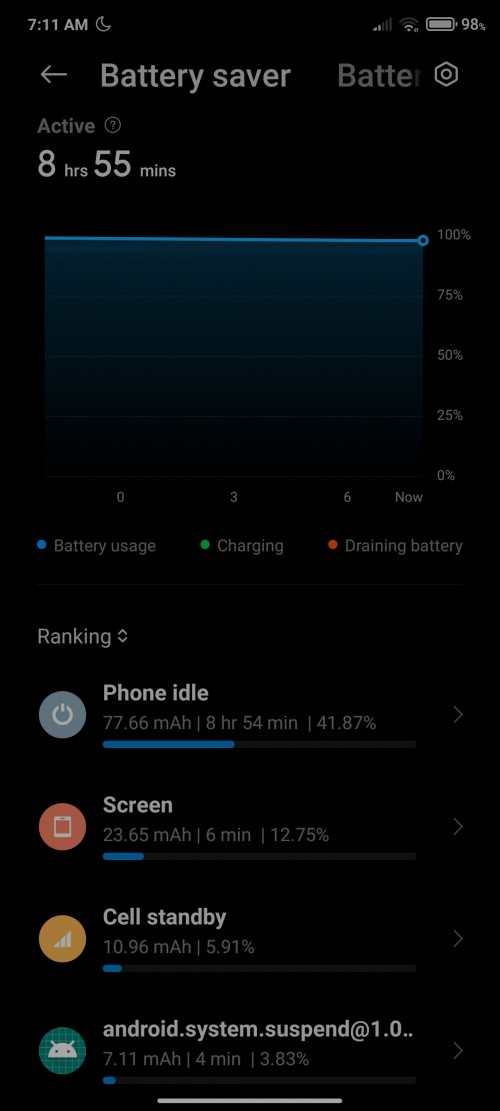 Hopefully this helped. I'll report back in a day or two after more observation on the battery. |
|
|
|
|
|
Apr 16 2021, 09:26 AM
|

Senior Member
3,839 posts Joined: Oct 2011
|
QUOTE(AzureYuki @ Apr 16 2021, 09:05 AM) Hey everyone, I just got my F3 a few days ago and I noticed that the standby battery life was mediocre. 20% overnight on first charge, 9% the next 2 nights on second and third charge respectively. Then there would be some weird drain on my fourth charge (5% in 30 mins idle!). After trying some things, I got my battery standby to drain just 2% over 9 hours (Wifi on, no AOD). Here's what I did: I've done everything above since day 2. When the battery is 100% or 99% full, it's standby battery is great (1-2% over 8 hours). But once it's start dropping to 95% and below, it will steadily drop 2-3% per hour at standby. » Click to show Spoiler - click again to hide... « Hopefully this helped. I'll report back in a day or two after more observation on the battery. At least that's my case. Skeuomorphic liked this post
|
|
|
Apr 16 2021, 09:30 AM
Show posts by this member only | IPv6 | Post
#2028
|

Junior Member
66 posts Joined: Mar 2012
|
QUOTE(AzureYuki @ Apr 16 2021, 09:05 AM) Hey everyone, I just got my F3 a few days ago and I noticed that the standby battery life was mediocre. 20% overnight on first charge, 9% the next 2 nights on second and third charge respectively. Then there would be some weird drain on my fourth charge (5% in 30 mins idle!). After trying some things, I got my battery standby to drain just 2% over 9 hours (Wifi on, no AOD). Here's what I did: Great tips bro. I follow all your steps.1) Disable MSA (Settings > Password & Security > Authorization & Revocation) and any ads in the relevant app. 2) Disable Digital Wellbeing (Settings > Digital Wellbeing & Parental Controls > Upper right 3 dots > Manage your data > Uncheck Daily Device Usage). This one seems to affect battery the most from my testing. Maybe someone else can test it and report some results below. 3) Optimize any apps you can (Settings > Privacy protection > Special Permissions > Battery Optimization). For this step, I'd actually avoid optimizing apps where you rely on notifications such as Whatsapp or any kind of messaging app. I find that Xiaomi's app killing can be too aggressive which may result in delayed notifications on Whatsapp like what my F3 had right out of the box. 4) Manually adjust battery saver behavior for certain apps (Settings > Battery & Performance > Tap upper right gear icon > App battery saver). For all apps by default it's set to "Battery Saver (Recommended)" I believe. I suggest putting more important apps like any messaging/communication app to "No restrictions" while lesser important apps that don't need the background privilege like MySejahtera can be put to "Restrict Background Apps". If you're unsure, just leave it on Battery Saver. Hopefully this helped. I'll report back in a day or two after more observation on the battery. I got 2 question, 1. for item no 2, only uncheck digital wellbeing or all item in the usage access setting? 2. Does AOD effect much on battery drain? milksoda liked this post
|
|
|
Apr 16 2021, 10:33 AM
|
|
Senior Member
1,402 posts Joined: Apr 2012
|
Tried Private DNS for ad-blocking on chrome, seems to work
 |
|
|
Apr 16 2021, 10:34 AM
|
|
Junior Member
671 posts Joined: Jul 2015 From: Shah Alam
|
QUOTE(SwarmTroll @ Apr 16 2021, 10:33 AM) Tried Private DNS for ad-blocking on chrome, seems to work What private dns did you use? |
|
|
Apr 16 2021, 10:37 AM
|
|
Senior Member
1,402 posts Joined: Apr 2012
|
QUOTE(Skeuomorphic @ Apr 16 2021, 10:34 AM) What private dns did you use? dns.adguard.com Skeuomorphic liked this post
|
|
|
Apr 16 2021, 10:59 AM
|

Senior Member
1,262 posts Joined: Oct 2009
|
Raya comes earlyyy  
bennedict82, Skeuomorphic, and 1 other liked this post
|
|
|
Apr 16 2021, 11:01 AM
|
|
Junior Member
852 posts Joined: Jul 2009
|
QUOTE(harizdesu @ Apr 16 2021, 10:59 AM) Raya comes earlyyy Haiz all 8GB model can get it, mine 6GB still "To PAck"
 |
|
|
|
|
|
Apr 16 2021, 11:05 AM
|
|
Junior Member
50 posts Joined: Nov 2014
|
QUOTE(AzureYuki @ Apr 16 2021, 09:05 AM) Hey everyone, I just got my F3 a few days ago and I noticed that the standby battery life was mediocre. 20% overnight on first charge, 9% the next 2 nights on second and third charge respectively. Then there would be some weird drain on my fourth charge (5% in 30 mins idle!). After trying some things, I got my battery standby to drain just 2% over 9 hours (Wifi on, no AOD). Here's what I did: Did the settings as suggested. My Idle has been pretty bad since i got the phone 2 days ago. Will keep an eye on how things go. Thanks for the help 1) Disable MSA (Settings > Password & Security > Authorization & Revocation) and any ads in the relevant app. 2) Disable Digital Wellbeing (Settings > Digital Wellbeing & Parental Controls > Upper right 3 dots > Manage your data > Uncheck Daily Device Usage). This one seems to affect battery the most from my testing. Maybe someone else can test it and report some results below. 3) Optimize any apps you can (Settings > Privacy protection > Special Permissions > Battery Optimization). For this step, I'd actually avoid optimizing apps where you rely on notifications such as Whatsapp or any kind of messaging app. I find that Xiaomi's app killing can be too aggressive which may result in delayed notifications on Whatsapp like what my F3 had right out of the box. 4) Manually adjust battery saver behavior for certain apps (Settings > Battery & Performance > Tap upper right gear icon > App battery saver). For all apps by default it's set to "Battery Saver (Recommended)" I believe. I suggest putting more important apps like any messaging/communication app to "No restrictions" while lesser important apps that don't need the background privilege like MySejahtera can be put to "Restrict Background Apps". If you're unsure, just leave it on Battery Saver. Hopefully this helped. I'll report back in a day or two after more observation on the battery.  |
|
|
Apr 16 2021, 11:12 AM
|

Junior Member
88 posts Joined: Jun 2006 
|
QUOTE(ehkay @ Apr 16 2021, 07:14 AM) Yours is 6GB or 8GB ? 6 alsoMine 6GB still "to pack" |
|
|
Apr 16 2021, 11:16 AM
|
|
Junior Member
852 posts Joined: Jul 2009
|
QUOTE(vodoo88 @ Apr 16 2021, 11:12 AM) 6 also Mine also bought on 8/4  |
|
|
Apr 16 2021, 11:36 AM
|

Senior Member
2,313 posts Joined: May 2009
|
QUOTE(lazyman@home @ Apr 16 2021, 07:09 AM) You are not alone bro. Mine also "to pack" Same here still at to pack zzzz |
|
|
Apr 16 2021, 11:36 AM
Show posts by this member only | IPv6 | Post
#2038
|
|
Junior Member
356 posts Joined: Jan 2020
|
When is the next flash sale coming ??
|
|
|
Apr 16 2021, 11:37 AM
|
|
Senior Member
2,313 posts Joined: May 2009
|
QUOTE(ehkay @ Apr 16 2021, 11:01 AM) Haiz all 8GB model can get it, mine 6GB still "To PAck" My is 8gb also still to pack zzz |
|
|
Apr 16 2021, 11:42 AM
|
|
Junior Member
671 posts Joined: Jul 2015 From: Shah Alam
|
QUOTE(Kelvin1_1 @ Apr 16 2021, 11:36 AM) When is the next flash sale coming ?? Probably 5/5 |
| Change to: |  0.0233sec 0.0233sec
 0.83 0.83
 6 queries 6 queries
 GZIP Disabled GZIP Disabled
Time is now: 20th December 2025 - 04:35 AM |
 Quote
Quote