Welcome Guest ( Log In | Register )

Outline · [ Standard ] · Linear+

 DIR-868L to ASUS RT-AC66U with AiMesh, Latest DIR-868L Migration Options

views
     
fisherman10
post Apr 3 2021, 02:35 PM

Regular
******
Senior Member
1,372 posts

Joined: Dec 2007


QUOTE(BTS1501 @ Apr 3 2021, 02:24 PM)
Yours is v2, as its 717kb, so must use step 9. Step 10 is for v1 and v3.

https://www.snbforums.com/threads/how-to-fl...-cfe-abc.20641/

Since you are using 68u in the cfe, that is why only 1 led will light up. If you want both leds to light up, then you need to change it to ac66u b1, and also bl_version.

The 2 lines below are also redundant, as there is no line in the cfe that specify pci/1/1 or pci/2/1 (these 2 are for older cfe generation/routers), but you can just leave it there if you want.

devpath0=pci/1/1
devpath1=pci/2/1
*
Okay I will edit it later when I get back home.

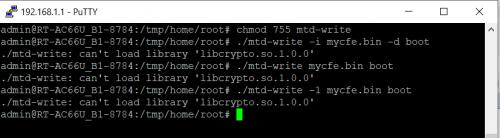
When I was doing on my side here, I must've use a different MTD-Write from different guides. Either Step 9 or 10 which I tried didn't work. So I just used both to be sure.
fisherman10
post Apr 4 2021, 08:12 PM

Regular
******
Senior Member
1,372 posts

Joined: Dec 2007


QUOTE(misk94 @ Apr 3 2021, 10:05 PM)
Dear fisherman10,

Stumble on the following error message.

user posted image

Still cannot figure out yet the cause of the problem.

Any ideas what's wrong?

Regards,
*
I've edited my post with new links and instructions. Please try again.

QUOTE(BTS1501 @ Apr 4 2021, 02:35 PM)
Ye, repeater mode the speedtest results are a lot better, around 10-20% higher when compared to mesh mode. Most likely some bandwidth of the cpu is reserved for mesh purpose, hence lower results.

If you want to reflash, you can download the mtd write from below. I tried it and it can work (using ./mtd-write cfe.bin boot)

https://github.com/RMerl/asuswrt-merlin.ng/...m/cfe/mtd-write

Also, two cons after flashing to ac68u :
1. no led
2. mesh node 2.4ghz speedtest is half of the main router when backhaul is wireless, ie, when test at main router, speedtest is 50/50 Mbps, while at node its 20/40Mbps. defeat the purpose of fixing the 2.4ghz. Set as repeater mode (using 5ghz as backhaul) might be better.

I also notice that the cpu utilisation is higher when doing speed test, maybe will monitor the stability of this for a few days and then flash back to ac66u and see the utilisation again.
*
Weirdly enough, now my Internet LED lights up green eventhough it's on AC68u. Seems to have fixed itself.
fisherman10
post Apr 4 2021, 09:40 PM

Regular
******
Senior Member
1,372 posts

Joined: Dec 2007


New firmware update for Asus Merlin. Now version 386.2.

https://sourceforge.net/projects/asuswrt-me...-AC68U/Release/
fisherman10
post Apr 4 2021, 09:47 PM

Regular
******
Senior Member
1,372 posts

Joined: Dec 2007


I've updated my guide to include both CFEs for 2.4g WiFi fix. OP, please test and you may add a link to it at the front page.

1 file for converting to AC68U, 1 file for remaining on AC66U_B1.

As for my usage, I don't find any much real life difference between both models.

https://forum.lowyat.net/index.php?act=ST&f...=5079525&st=80#
fisherman10
post Apr 5 2021, 02:45 PM

Regular
******
Senior Member
1,372 posts

Joined: Dec 2007


QUOTE(misk94 @ Apr 5 2021, 01:28 PM)
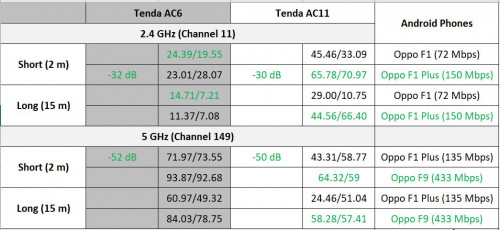
2.4 GHz WiFi performance Tenda 6 and Tenda 11.

In the past, I did not pay much attention to 2.4 GHz WiFi performance because I will always choose 5 GHz in my phone.

Based on what DIR-868L users saying about the 2.4 GHz mediocre performance, I decide to check other brand routers at my disposal in my workplace.

The results could be use as comparison with DIR-868L 2.4 GHz performance.

» Click to show Spoiler - click again to hide... «


Interestingly, Tenda AC11 are delivering better 2.4 GHz speeds at 2 m and 15 m.

Tenda AC6 2.4 GHz performance almost same like DIR-868L.

However, Tenda AC6 is better at 5 GHz.

DIR-868L 2.4 Ghz performance definitely mediocre.  sad.gif

Regards,
*
Seems like DIR-868L after the 2.4ghz fix is on par with the Tenda units. On the other hand, something is really wrong with the Tenda AC11 5ghz. It's like you're getting 2.4ghz speeds.


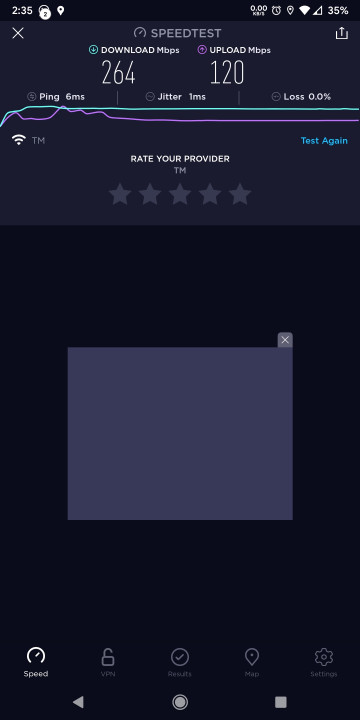
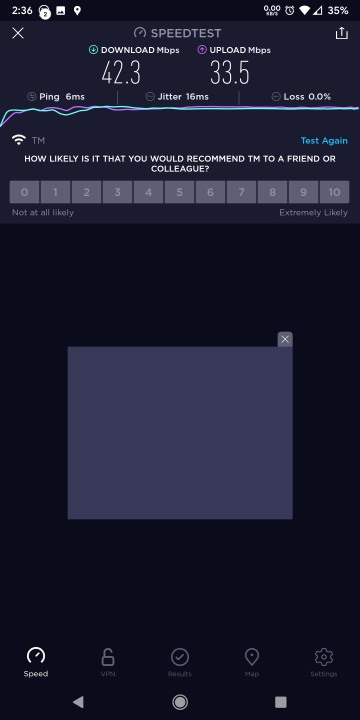
Here's my speedtests. I'm on Unifi 500down / 100 up. Test done 5m away from router. Direct line of sight.

» Click to show Spoiler - click again to hide... «


This post has been edited by fisherman10: Apr 5 2021, 02:46 PM
fisherman10
post Apr 5 2021, 05:02 PM

Regular
******
Senior Member
1,372 posts

Joined: Dec 2007


QUOTE(misk94 @ Apr 5 2021, 03:15 PM)
Thank you for the feedback.

Please disregard my earlier comments.

Just realized I was using the wrong speed test. The servers are in India. So the speed not reflective of Malaysian traffic.

I will update the results with OOKLA Speedtest.

Monday blues. doh.gif

Regards,
*
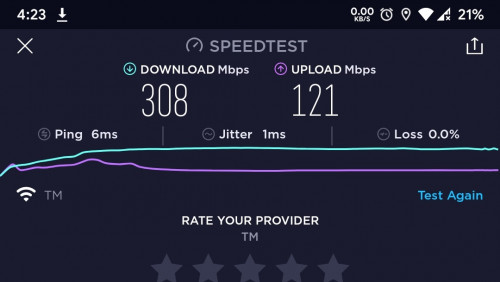
This is the best I can get using DIR-868L converted to AC68U on 5ghz. My phone is 1x1 antenna. So link rate is 433mbps.

Unifi 500 down | 100 up. Distance about 3m with 1 brick wall in between. Going nearer doesn't make much difference.

user posted image
fisherman10
post Apr 6 2021, 11:41 AM

Regular
******
Senior Member
1,372 posts

Joined: Dec 2007


QUOTE(misk94 @ Apr 6 2021, 11:33 AM)
Dear fisherman10,

Looks like DIR-868L could support maximum 300 DL/50 DL Mbps plan. Higher plans require better router.

Alternatively, you can get a higher plans but use the limitation as traffic bandwidth limiter from each node.

Basically, DIR-868L is good for 100 Mbps and 300 Mbps internet plans. Suitable for typical Malaysian families (4-6 people).

Regards,
*
I think the limitation is my phone. My phone is only 1x1 antenna. DIR-868L is 3x3 5g antenna. Max link rate of 1300mbps. Real life best speeds usually around 50% of 1300.

So technically it can max out my Unifi 500mbps if my phone/laptop/wifi adapter has 3x3 antenna config.
fisherman10
post Apr 6 2021, 07:33 PM

Regular
******
Senior Member
1,372 posts

Joined: Dec 2007


QUOTE(misk94 @ Apr 6 2021, 02:05 PM)
That is true too.

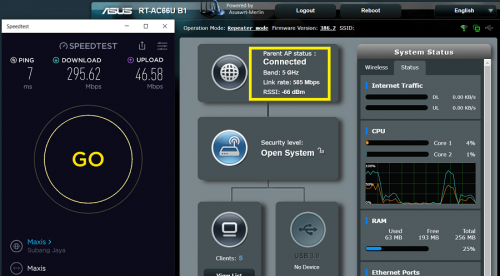
I remembered that AiMesh router and node is connected at close to 600 Mbps regardless AiMesh or Repeater mode.

user posted image

They are connected 3x3 @ 5 GHz channel 36.

But most everyday people are having 1x1 antenna phones.

Those can afford expensive phones surely will not even consider DIR-868L as their router. biggrin.gif

We are here in this forum to share our internet hardware experience, good and bad.

Just helping everyday people to get the most performance from their home internet hardware without spending too much money.

Regards,
*
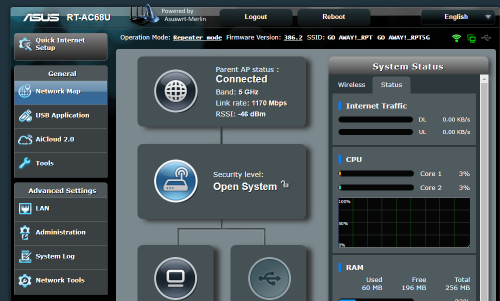
Looks like your repeater/node is placed a bit too far from the main router. My 2x2 repeater placed upstairs can maintain at the best theoretical rate 867mbps.


For my DIR-868L with 3x3, can't get max of 1300mbps. Can get 1000+ or around 900
user posted image


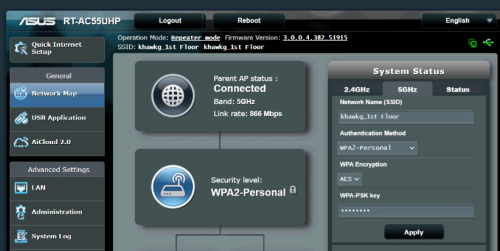
This is my previous setup. Asus AC55UHP as repeater. Since it's a 2x2 antenna WiFi, 867mbps is the best link rate.
user posted image

This post has been edited by fisherman10: Apr 6 2021, 08:58 PM
fisherman10
post Apr 11 2021, 11:39 PM

Regular
******
Senior Member
1,372 posts

Joined: Dec 2007


QUOTE(misk94 @ Apr 10 2021, 08:25 AM)
Dear members,

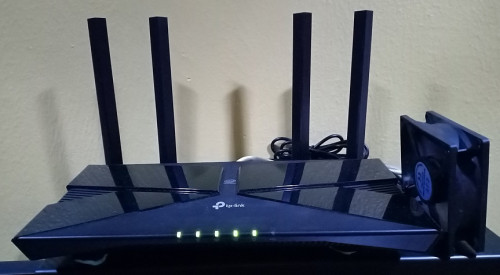
I finally managed to purchase a WiFI6 router during the Shopee 4.4 Megasale.

A TP-Link AX50 for less than RM250 after seller discounts (Regular price is RM299).

Initially I was thinking to get TP-Link AX20 (On sale for RM229) but during the sale the difference between them is not much, so AX50 it is.

TP-Link AP73 was also available at RM359. This model is overkill for my house.

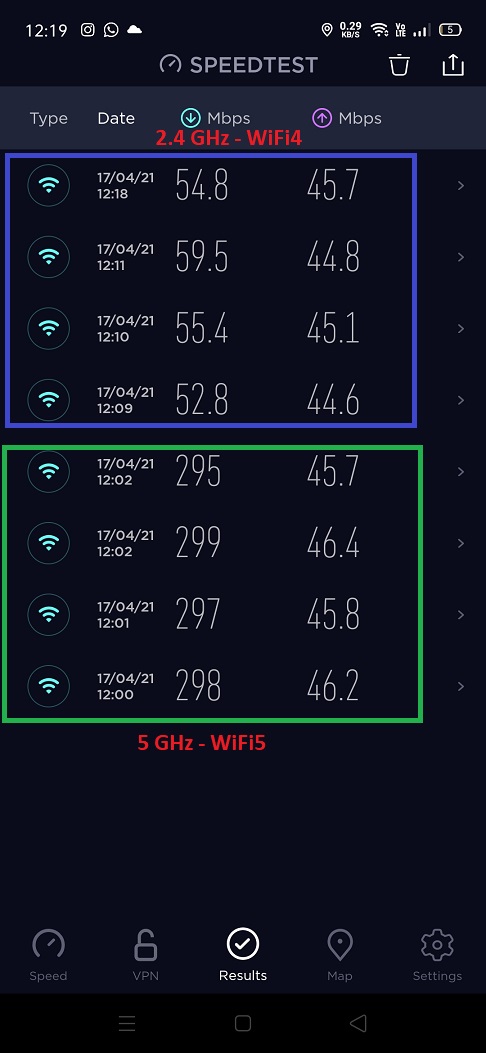
However, I do not have any WiFI6 devices yet so only WiFi4 and WIFi5 testing for now.

WiFi5 only marginal improvements. You really need WiFi6 devices to see a big difference.

WiFi4 is another story.

I can actually getting at least double (almost triple) on the second floor in comparison to DIR-868L(Asuswrt-Merlin firmware).

Now this is what you call progress!

BTW, it is true that AX50 is a little hot but not as hot as DIR-868L. So my AX50 is being cooled using my simple cooling setup.

Regards,
*
Can you see what's the link rate for WiFi4 on your device? Based on specs, AX50 is 2x2 antenna for WiFi4 whereas DIR-868L is 3x3 antenna for WiFi4.

And are you comparing with fixed DIR-868L or before the 2.4g fix?
fisherman10
post Apr 17 2021, 08:14 PM

Regular
******
Senior Member
1,372 posts

Joined: Dec 2007


QUOTE(misk94 @ Apr 17 2021, 06:23 PM)
TP-Link AX50 Updates:

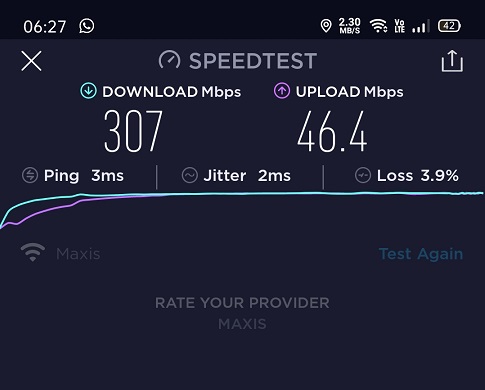
I managed to do some quick tests with my Oppo HP (1x1 radio). My internet is 300Mbps DL/ and 50Mbps UL.

Measurement taken from my kitchen blocked by one brick wall and partially blocked by a fridge. Distance about 5 metres.

The fastest speed so far. At least better then what I got from DIR-868L.

» Click to show Spoiler - click again to hide... «


Mixed reading for 2.4GHz and 5GHz. Link connection @ 5GHz = 433Mbps and Link connection @ 2.4GHz = 72Mbps.

OOKla Speedtest. Each from different server.

» Click to show Spoiler - click again to hide... «


I must admit, a bit disappointed with the 5 GHz performance.

I guest I have to wait when we upgrade to WiFi6 devices or to 500 Mbps DL/100 UL plan (overkill for our needs).

On the other hand, 2.4 GHz performance, improved a lot compared to DIR-868L. Can stream FHD at 2.4GHz.

BTW. The simple cooling setup (80x80mm USB cooler) worked well for the TP-Link AX50. No overheating.

» Click to show Spoiler - click again to hide... «


Regards,

Updated 17 April 2021
*
Comparing to my DIR868L after the 2.4g WiFi fix, I'm getting similar performance with yours on 2.4g WiFi.

However, seems like 5G on the AX50 is performing better than the DIR868L.

Tested on my Xiaomi Redmi Note 5 (1x1 antenna, 5g @ 433mbps, 2.4g @ 72mbps)
2.4g I'm getting same results as yours.
5g I'm getting at best 270mbps. Only reach 300 with line of sight of router. Your screenshot shows that you're maxing out your connection's 300mbps repeatedly on 5g 1x1.

Unfortunately I don't have other 1x1 433mbps devices to test whether the router is the limiting factor or perhaps my phone is old?

I know wireless device performance differs eventhough they may have the same antenna configuration. My TP-Link archer T4U WiFi adapter specs is 2x2 @ 866.7mbps but it can never get above 250mbps no matter what I try. On the other hand, my gaming laptop with 2x2 @ 866.7mbps WiFi, can reach up to 400mbps.


This post has been edited by fisherman10: Apr 17 2021, 08:19 PM
fisherman10
post Apr 20 2021, 12:10 PM

Regular
******
Senior Member
1,372 posts

Joined: Dec 2007


QUOTE(alucard89 @ Apr 20 2021, 11:25 AM)
I cleared a few times on the nvram (on the miniweb page)
Seems like timeout too soon before complete upload

Followed your second step with using asus firmware restore with ac68u first, later flashed with ac66u which worked for me.
If i use the ac66u firmware directly it just resets at 87% 😅

Another issue found

Nvm, physical nvram fixed the wifi issue
*
Next follow my guide at post #98 to fix 2.4G wifi. Choose the AC66U_B1 version

https://forum.lowyat.net/topic/5079525/+80#
fisherman10
post Apr 20 2021, 01:35 PM

Regular
******
Senior Member
1,372 posts

Joined: Dec 2007


QUOTE(alucard89 @ Apr 20 2021, 12:51 PM)
Thanks, gonna try each one for both routers
Which do you recommend more? Other than 68u able to see more client info
*
Both is fine. But just stick with AC66U_B1 so that LED works.
fisherman10
post Apr 20 2021, 02:55 PM

Regular
******
Senior Member
1,372 posts

Joined: Dec 2007


QUOTE(alucard89 @ Apr 20 2021, 01:46 PM)
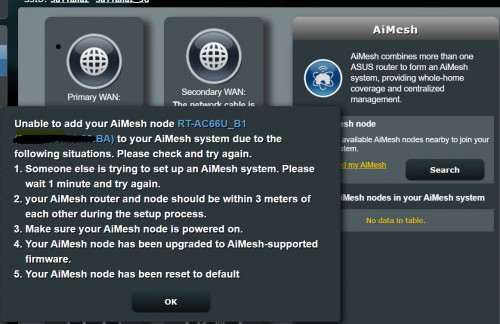
I'm using ac66u_b1 for both routers now, still can't get aimesh to work  sweat.gif
Once it reaches 100% it just give me this error, already 3 times and the router just next to each other

user posted image
*
Did you change all 3 mac addresses and Secret code in the CFE?
fisherman10
post Apr 20 2021, 02:56 PM

Regular
******
Senior Member
1,372 posts

Joined: Dec 2007


QUOTE(jonsalam @ Apr 20 2021, 02:15 PM)
So after fix 2.4ghz wifi how fast or max speed you guys reach?
*
Will be back to full speed as per before conversion.
fisherman10
post Apr 20 2021, 03:27 PM

Regular
******
Senior Member
1,372 posts

Joined: Dec 2007


QUOTE(alucard89 @ Apr 20 2021, 03:14 PM)
Yes, I have changed all 3 mac address,
Secret code is the WPS code correct?
I'm just using the default one from your instructions
I've updated both to latest firmware but doesn't look it's still working  sad.gif
*
You can't use the default one. Default one is 123456789. You must use back the WPS code written on the sticker under your unit. Then only AiMesh can work.
fisherman10
post Apr 20 2021, 07:13 PM

Regular
******
Senior Member
1,372 posts

Joined: Dec 2007


QUOTE(alucard89 @ Apr 20 2021, 06:56 PM)
Noted, i reupload cfe again with the secret code to the routers
But it's still the same problem error adding aimesh
Maybe have a look in the logs?

https://pastebin.com/HjwvsKzc
*
Are both routers using the correct mac address and WPS PIN as shown on their respective stickers?

For the 3 mac addresses, did you use the same address for all 3?
1:macaddr is supposed to be a bit different than 0:macaddr and et0macaddr.
fisherman10
post Apr 21 2021, 01:57 PM

Regular
******
Senior Member
1,372 posts

Joined: Dec 2007


QUOTE(alucard89 @ Apr 21 2021, 09:50 AM)
For the 3 mac addresses
I used the same mac address for all 3, after I verify using wifi app with the stock dlink firmware running (5ghz & 2.4ghz had the same mac address)
For example this one:

» Click to show Spoiler - click again to hide... «


Also, I finally got it working by just connecting lan cable from WAN port to LAN for the main router.
Once I disconnect the cable, it setups wifi connection to maintain the mesh
*
Cannot cannot. The MAC address has to be different.

Follow the initial guide in the first page when you're doing the conversion.

2 of the MAC address is same number. The 3rd one need to +4.

1:macaddr needs to plus 4 on the last number.

Otherwise your aimesh might not be using 5g backbone. Makes sense why LAN works because LAN is the correct macaddr.
fisherman10
post Apr 21 2021, 02:44 PM

Regular
******
Senior Member
1,372 posts

Joined: Dec 2007


QUOTE(alucard89 @ Apr 21 2021, 02:30 PM)
Router Sticker
x.x.x:29:B8

Wifi scanner app
x.x.x:29:BA (i use this one)

Did i even input the correct mac the first time?
*
0:macaddr change to x.x.x:29:B8
et0macaddr change to x.x.x:29:B8
1:macaddr change to x.x.x:29:BC

This post has been edited by fisherman10: Apr 21 2021, 02:45 PM
fisherman10
post Apr 22 2021, 03:33 PM

Regular
******
Senior Member
1,372 posts

Joined: Dec 2007


QUOTE(alucard89 @ Apr 22 2021, 12:53 PM)
Ok, I’ll try input this
Is there like naming rule for last digit?
And if i mess up the last digit it could brick the router?
*
The rule is follow your router's sticker but plus 4 numbers.
Convert the HEX number to decimal and then +4. Then convert back to hex number.

Yours is B8 is hex number. Convert to decimal is 184. Now we add 4 and it becomes 188. Convert 188 back to hex and it becomes BC.

0:macaddr change to x.x.x:29:B8 (Follow router sticker)
et0macaddr change to x.x.x:29:B8 (Follow router sticker)
1:macaddr change to x.x.x:29:BC (Convert to Decimal, +4, convert back to Hex)
fisherman10
post Apr 25 2021, 10:54 AM

Regular
******
Senior Member
1,372 posts

Joined: Dec 2007


QUOTE(alucard89 @ Apr 25 2021, 10:45 AM)
Thanks, now all can pair with aimesh wirelessly with no issues  rclxm9.gif
Ended up buying a few more, our sg neighbors sure are selling them cheap
4g usb modem seems to work better as WAN compared to using it on ws880 (assuwrt)
I do wonder how long we can continue getting OTA updates? Is it as long as long as asus continuously  support the router model firmware we're using?
*
Where are you buying yours from? Are you from Johor? I actually have 1 extra unit to let go. Still under D-Link warranty.


Since AC66U_B1 and AC68U using same firmware, as long as they keep supporting AC68U, we should be fine. Asus Merlin will also keep supporting as long as Asus supports.

3 Pages < 1 2 3 >Top
 

Change to:
| Lo-Fi Version
0.0444sec    0.77    7 queries    GZIP Disabled
Time is now: 16th December 2025 - 04:42 PM