Outline ·
[ Standard ] ·
Linear+
Expert come, Do you use fans on you router/modem?
|
SUSDezs
|
 Dec 20 2020, 04:54 PM Dec 20 2020, 04:54 PM
|

|
QUOTE(RallyNight @ Dec 20 2020, 03:13 PM) Do you use fans on your router/modem? Cause i saw some lazada on router has x number fans. I just put my modem and router on top of laptop cooler pad without turnon. Avoid the heat stuck under the table. Scare fire. Ayam actually curious if it helps to keep effiiency up for a small 3-5w fan on the side. Its always friggin hot when i touchy it. So far my testing is that yes, fans help keep it cool, but is it worth the power consumed by the fan? Hell knows. Same thing with the adapter, always warm also.. Well.. the fact all bigger switches screaming like hell into the night and in our server room should be the answer. But those are likely required cooling rather than a luxury. This post has been edited by Dezs: Dec 20 2020, 04:56 PM |
|
|
|
|
|
killerjeya
|
Dec 20 2020, 04:54 PM
|
Getting Started

|
Tp-link routers always run a bit hot (in my experience, at least). Used to have c1200, hot to the touch, but never had any issues. Recently switched to ax50, REALLY HOT, to the point of random reboots. Had a CM laptop cooler lying around. Got three fans that can be moved around. So I just put both modem and router on the cooler pad. Difference is night and day. Router is actually cool to the touch now, no more stability issues. This is with the cooler turned on. I think tplink routers are just poorly designed. It was my mistake getting the ax50 although I knew my old c1200 oso ran quite hot. Since that one had no stability issues, I thought why not? No more tplink for me after this.  This post has been edited by killerjeya: Dec 20 2020, 04:55 PM This post has been edited by killerjeya: Dec 20 2020, 04:55 PM |
|
|
|
|
|
y500
|
Dec 20 2020, 04:58 PM
|
|
|
QUOTE(asphiroth @ Dec 20 2020, 03:55 PM) mahal wei, any 5v usb fan will do  |
|
|
|
|
|
TSRallyNight
|
Dec 20 2020, 04:59 PM
|
|
|
QUOTE(netmatrix @ Dec 20 2020, 05:50 PM) I think no one realizes that routers/BTU (NAS) if turn on 24 hour everyday can heat up an average sized bedroom considerably. With fan on noticeable heat drop. |
|
|
|
|
|
ihavenoidea
|
Dec 20 2020, 04:59 PM
|
|
|
QUOTE(killerjeya @ Dec 20 2020, 04:54 PM) Tp-link routers always run a bit hot (in my experience, at least). Used to have c1200, hot to the touch, but never had any issues. Recently switched to ax50, REALLY HOT, to the point of random reboots. Had a CM laptop cooler lying around. Got three fans that can be moved around. So I just put both modem and router on the cooler pad. Difference is night and day. Router is actually cool to the touch now, no more stability issues. This is with the cooler turned on. I think tplink routers are just poorly designed. It was my mistake getting the ax50 although I knew my old c1200 oso ran quite hot. Since that one had no stability issues, I thought why not? No more tplink for me after this. well.. before too much heatsoak ruins the chip, just open it put a passive heatsink then drill more hole on top of it. |
|
|
|
|
|
brkli
|
Dec 20 2020, 05:00 PM
|
|
|
nope. use liquid cooling..  |
|
|
|
|
|
SUSDezs
|
Dec 20 2020, 05:01 PM
|
|
|
QUOTE(y500 @ Dec 20 2020, 04:58 PM) mahal wei, any 5v usb fan will do that deserves a friggin award hahahahaha - must as well put my floor fan there hahaha |
|
|
|
|
|
TSRallyNight
|
Dec 20 2020, 05:03 PM
|
|
|
QUOTE(killerjeya @ Dec 20 2020, 05:54 PM) Tp-link routers always run a bit hot (in my experience, at least). Used to have c1200, hot to the touch, but never had any issues. Recently switched to ax50, REALLY HOT, to the point of random reboots. Had a CM laptop cooler lying around. Got three fans that can be moved around. So I just put both modem and router on the cooler pad. Difference is night and day. Router is actually cool to the touch now, no more stability issues. This is with the cooler turned on. I think tplink routers are just poorly designed. It was my mistake getting the ax50 although I knew my old c1200 oso ran quite hot. Since that one had no stability issues, I thought why not? No more tplink for me after this. Same laptor cooler under it. Lols. |
|
|
|
|
|
bergstein
|
Dec 20 2020, 05:07 PM
|
|
|
imo if you realise some performance drop such as wifi suddenly stop working for short period of time or ocassionally drop packet,
and you touch it and feel it's hot, then such problem gone with fan blowing at it, then only you need to permanently setup a fan for this
most router should be ok to work properly even heat up a bit
|
|
|
|
|
|
SUSTheKingShark
|
Dec 20 2020, 05:09 PM
|
Getting Started
|
My router dunno how many years never shut down no use cooler fan pun, rosak ask your ISP to replace it la
|
|
|
|
|
|
TSRallyNight
|
Dec 20 2020, 05:10 PM
|
|
|
QUOTE(y500 @ Dec 20 2020, 05:58 PM) mahal wei, any 5v usb fan will do Lmao. This deserve award. |
|
|
|
|
|
SUSDezs
|
Dec 20 2020, 05:12 PM
|
|
|
Give it more engines and it will bring your wifi with you anywhere.. owai
|
|
|
|
|
|
katijar
|
Dec 20 2020, 05:12 PM
|
|
|
Air cond better
|
|
|
|
|
|
geelim77
|
Dec 20 2020, 05:12 PM
|
Getting Started
|
Put it in the fridge yoooooo
|
|
|
|
|
|
caksz
|
Dec 20 2020, 05:34 PM
|
New Member
|
Plug some cheap USB fan
|
|
|
|
|
|
olivur
|
Dec 20 2020, 05:48 PM
|
|
|
just placed a random corsair static pressure fan under my ac88u and it's been alright  |
|
|
|
|
|
ihm11
|
Dec 20 2020, 05:57 PM
|
Getting Started
|
put rubber feet prop it up setel lah
got gentle airflow over the housing can ady
put fan outside u r jes dissipating the heat buildup dat has found its way to the outside of the housing
u wan effective u drill sum vent holes n install the fan inside the housing directed @ the chipset/pcb
|
|
|
|
|
|
fireballs
|
Dec 20 2020, 06:01 PM
|
|
|
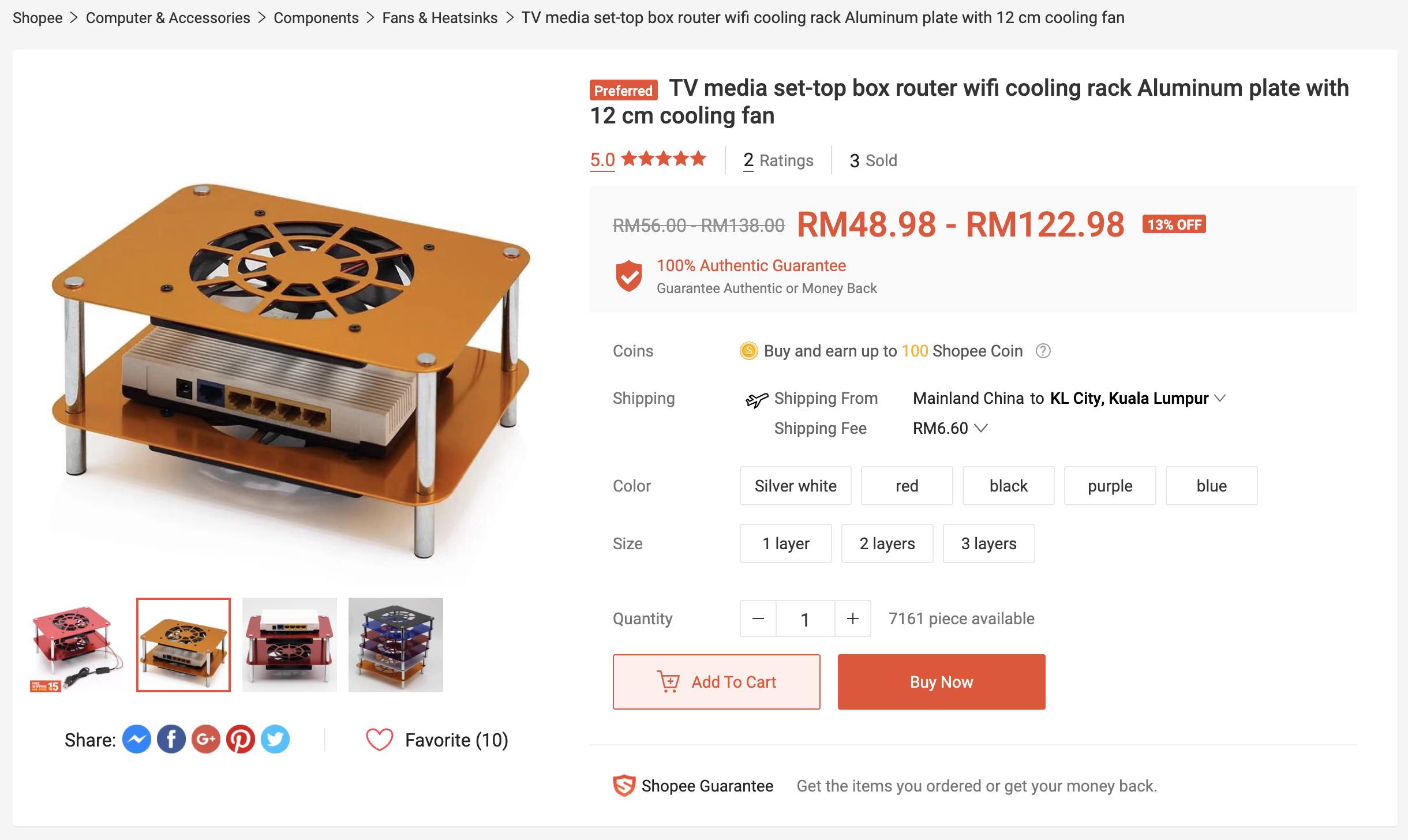
https://shopee.com.my/%E2%98%9EHot%E2%98%9C...7585.3751164890cheap and good. edit: haha same link as shared by taiko. mine cheaper by 45sen This post has been edited by fireballs: Dec 20 2020, 06:07 PM
|
|
|
|
|
|
dadurtyz
|
Dec 20 2020, 06:06 PM
|
|
|
Why would a router need a fan?
It design to withstand that, my old unifi router last me 7year and force to upgrade because of speed upgrade.
Dont waste ur thought by said it need that to prolong life or what so ever.
|
|
|
|
|
|
TSRallyNight
|
Dec 20 2020, 06:09 PM
|
|
|
QUOTE(dadurtyz @ Dec 20 2020, 07:06 PM) Why would a router need a fan? It design to withstand that, my old unifi router last me 7year and force to upgrade because of speed upgrade. Dont waste ur thought by said it need that to prolong life or what so ever. Nah, i ask ask only. I put an unused laptop cooler underneath it only. |
|
|
|
|



 Quote
Quote












 0.0169sec
 0.79
0.79
 5 queries
 GZIP Disabled