Outline ·
[ Standard ] ·
Linear+
Wi-Fi Calling on DIGI & Umobile, Solution = Enable IPSec Passthrough
|
beebee1314
|
 Nov 24 2020, 11:54 AM Nov 24 2020, 11:54 AM
|

|
QUOTE(MilesAndMore @ Nov 24 2020, 11:35 AM) I had no problem receiving promotional or banks SMS from the 5 digits number. Digi introduced VoWiFi in 2017 but disabled the use of VoWiFi during the early days. In early 2018, someone reported from Amsterdam that Digi VoWiFi worked there and he had used it to receive calls but was not charged a single cent. I tried it out myself in Kyoto and Osaka, Japan a few weeks after reading the post and it really worked. Since then I had used VoWiFi in Seoul, Hong Kong, Taipei, Taichung, Kaohsiung, Bangkok and multiple countries in Europe. Thanks so much. I used to buy packages for calls and data coz I may need to call back home. Good knowing vowifi is working. And thx for confirming those sms can receive. |
|
|
|
|
|
TOMEI-R
|
Nov 26 2020, 12:24 AM
|
|
|
Guys, issue solved. Apparently it was an issue with Digi's own servers.. They rectified it and VoWifi and VoLTE is working now.
Thanks to all who replied in this thread.
|
|
|
|
|
|
laihuhng
|
Apr 2 2021, 06:35 PM
|
|
|
Any specific phone to activate vowifi? Or, any phone will work?
|
|
|
|
|
|
yongtjunkit
|
Apr 2 2021, 07:14 PM
|
|
|
QUOTE(laihuhng @ Apr 2 2021, 06:35 PM) Any specific phone to activate vowifi? Or, any phone will work? Yes, there’s specific phone that is required to activate WiFi calling Check Umobile/ digi website( depending on which carrier you are using) for device compatibility |
|
|
|
|
|
Unknown50211
|
Jan 2 2022, 02:26 AM
|
Getting Started

|
Hi,
Once the Wifi Calling is enabled, does it mean that all Incoming and Outgoing calls will be using Wifi; even if the phone detected network coverage?
Thanks
|
|
|
|
|
|
Sam Leong
|
Jan 2 2022, 09:08 AM
|
|
|
QUOTE(Unknown50211 @ Jan 2 2022, 02:26 AM) Hi, Once the Wifi Calling is enabled, does it mean that all Incoming and Outgoing calls will be using Wifi; even if the phone detected network coverage? Thanks Yes , just ensure the WiFi Calling function is enabled , device is compatible with telco WiFi Calling services then enable flight mode and connect to WiFi , then your devices now is 100% relies on WiFi Calling 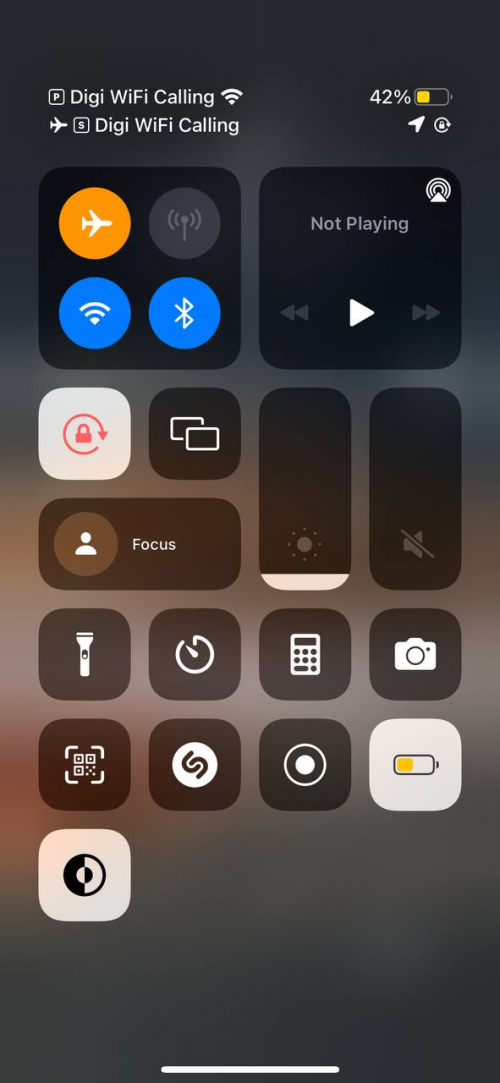 (Android devices : Call over WiFi , then even under network coverage it will uses WiFi Calling instead of VoLTE / network coverage) 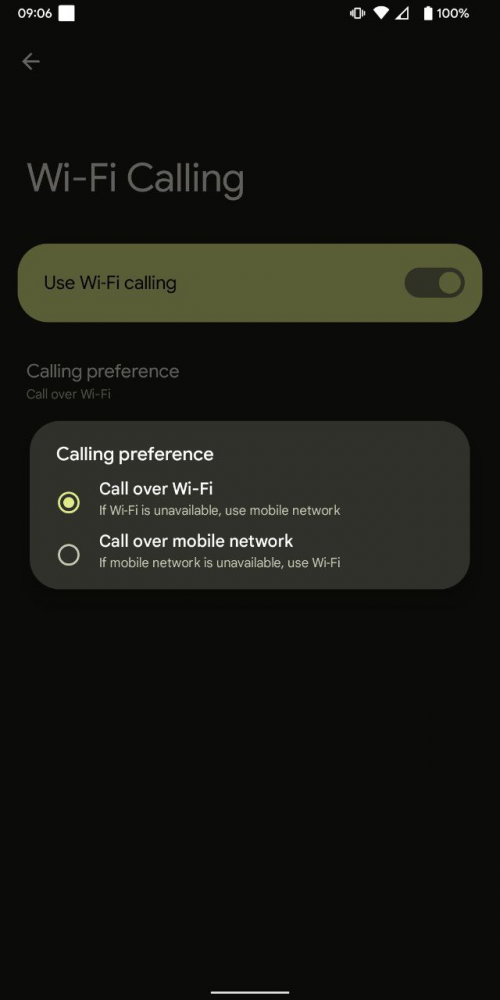 |
|
|
|
|
|
Unknown50211
|
Jan 2 2022, 03:45 PM
|
Getting Started
|
QUOTE(Sam Leong @ Jan 2 2022, 09:08 AM) Yes , just ensure the WiFi Calling function is enabled , device is compatible with telco WiFi Calling services
then enable flight mode and connect to WiFi , then your devices now is 100% relies on WiFi Calling Thanks for the info. Can we have both the network (without enabling airplane mode) and Wifi-Calling enabled at the same time? Is there a prioritization whereby it will first attempt the call (incoming/outgoing) using the mobile coverage? If failed then only use Wifi-Calling? Assuming if I have both enabled, and so happened I have walked into a location where the network coverage is weak. Will it switch to Wi-Fi-calling automatically? OR it won't, since it can still detect the network coverage? |
|
|
|
|
|
Sam Leong
|
Jan 2 2022, 06:00 PM
|
|
|
QUOTE(Unknown50211 @ Jan 2 2022, 03:45 PM) Thanks for the info. Can we have both the network (without enabling airplane mode) and Wifi-Calling enabled at the same time? Is there a prioritization whereby it will first attempt the call (incoming/outgoing) using the mobile coverage? If failed then only use Wifi-Calling? Assuming if I have both enabled, and so happened I have walked into a location where the network coverage is weak. Will it switch to Wi-Fi-calling automatically? OR it won't, since it can still detect the network coverage? iOS u can't do anything , level of WiFi Calling is higher , even with mobile coverage detected Android , choose prefer mobile network , then only when ur mobile network is dead only switch to wifi calling |
|
|
|
|



 Quote
Quote


 0.0172sec
 0.19
0.19
 5 queries
 GZIP Disabled