Welcome Guest ( Log In | Register )

Outline · [ Standard ] · Linear+

 Wi-Fi Calling on DIGI & Umobile, Solution = Enable IPSec Passthrough

views
     
TSJohnLai
post Nov 22 2020, 12:42 PM, updated 6y ago

Skeptical Cat
*******
Senior Member
3,669 posts

Joined: Apr 2006
Recently, uncle has been here and there helping co-workers (DIGI & Umobile) on enabling VoLTE.
For DIGI case, need to livechat with their agents and request them to enable VoLTE before Wifi Calling can be used. No luck on Umobile if phone is unsupported.

However, the signal strength inside the building is very low and most fallback to 2G/3G.
Since the office has wifi (fiber backend), uncle plans enable WiFi calling for them.
Unfortunately, when uncle enabled Wifi Calling and select it to be preferred option, it doesn't work.

Uncle logged into the router (Hmm, TP-Link router at workplace. rolleyes.gif ) and found out "IPSec Passthrough" at Application Layer Gateway (ALG, at the NAT Forwarding section) is disabled.
Once IPSec Passthrough is enabled, everyone phone VoWIFI (Digi & Umobile) logo popped up and it works.

Seem like it is their first time seeing that VoWIFI logo, I asked them if it ever work with the their wifi back at home.
To my surprise, they replied it never work.

Thus, for the next 11 co-workers, I logged into their home TP-Link router remotely (thanks teamviewer, they are unifi subscribers with C1200 router) and discovered IPSec Passthrough is disabled by default.

A simple checkbox and save, voila. VoWIFI works.


Hopefully, this simple advice can help those who never got their Wifi Calling work.

Wonder if IPSec is disable or enabled by default for Asus, DLink or any other brand router? hmm.gif
faizyunus
post Nov 22 2020, 01:08 PM

Casual
***
Junior Member
443 posts

Joined: Feb 2014
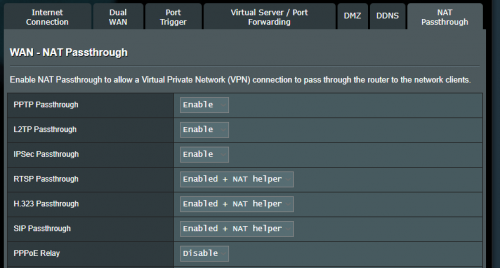
On Asus routers is enabled by default

user posted image
YoungMan
post Nov 22 2020, 02:42 PM

Look at all my stars!!
*******
Senior Member
6,806 posts

Joined: Oct 2008
From: Kuala Lumpur


I use to use Wifi calling at my former office with Unifi on TPlink C1200. No need to do any config, it just work. Really save battery as can just enable airplane mode.
Azusa_San
post Nov 22 2020, 03:56 PM

Casual
***
Junior Member
309 posts

Joined: Mar 2015
on my mikrotik, although IPSec is disable, the VoWIFI will still work as usual.

from your case, maybe it is a bug with tplink firmware laugh.gif

This post has been edited by Azusa_San: Nov 22 2020, 03:59 PM
TSJohnLai
post Nov 22 2020, 06:25 PM

Skeptical Cat
*******
Senior Member
3,669 posts

Joined: Apr 2006
QUOTE(faizyunus @ Nov 22 2020, 01:08 PM)
On Asus routers is enabled by default
*
Good to know that.

QUOTE(YoungMan @ Nov 22 2020, 02:42 PM)
I use to use Wifi calling at my former office with Unifi on TPlink C1200. No need to do any config, it just work. Really save battery as can just enable airplane mode.
*
Yup, I just ask them to use airplane mode and enable wifi only since switching between 4G to 3G/2G drains a lot of battery power.

QUOTE(Azusa_San @ Nov 22 2020, 03:56 PM)
on my mikrotik, although IPSec is disable, the VoWIFI will still work as usual.

from your case, maybe it is a bug with tplink firmware laugh.gif
*
Probably. hmm.gif


Anyone using the ancient cylinder D-Link can verify this IPSec Passthrough too?
shaktiv8
post Nov 22 2020, 11:04 PM

Casual
***
Junior Member
363 posts

Joined: Sep 2014


QUOTE(Azusa_San @ Nov 22 2020, 03:56 PM)
on my mikrotik, although IPSec is disable, the VoWIFI will still work as usual.

from your case, maybe it is a bug with tplink firmware laugh.gif
*
Uhh but VoWIFI uses IPSec, maybe your router is not blocking it properly lol


https://insinuator.net/2016/10/a-journey-in...%20uses%20IKEv2.

This post has been edited by shaktiv8: Nov 22 2020, 11:05 PM
junclj
post Nov 22 2020, 11:24 PM

Look at all my stars!!
*******
Senior Member
2,348 posts

Joined: Apr 2008


My Digi WiFi Calling is working in both home and office. My office is using a firewall as router, no issue for me even I can't log in to the firewall. At my home now, I also did not do anything about the settings in my router. I am using Asus router. My phone just straight switch to WiFi Calling as long as my phone is connected to WiFi. Even is on car, I'm using my TP-Link Mifi, when my phone connected to my car Mifi, it will straight switch to Digi WiFi Calling.
SUSnonamer
post Nov 23 2020, 10:20 AM

Getting Started
**
Junior Member
224 posts

Joined: Apr 2019
dont be so sure that is the default setting...i have reset and reconfigured the archer c1200 many times to know...have some common sense and u will know what should be the default setting...programmers are definately not as technically stupid as the sysadmins and technicians
beebee1314
post Nov 23 2020, 11:05 AM

Regular
******
Senior Member
1,683 posts

Joined: Sep 2018
Hi guys. Vowifi calling is one thing, how about sms? Like when bank send me sms, will I receive it?
MilesAndMore
post Nov 23 2020, 06:06 PM

Look at all my stars!!
Group Icon
Moderator
9,301 posts

Joined: Mar 2008


QUOTE(beebee1314 @ Nov 23 2020, 11:05 AM)
Hi guys. Vowifi calling is one thing, how about sms? Like when bank send me sms, will I receive it?
*
Yes you will still receive all SMS whilst on VoWiFi.
TSJohnLai
post Nov 23 2020, 07:04 PM

Skeptical Cat
*******
Senior Member
3,669 posts

Joined: Apr 2006
QUOTE(nonamer @ Nov 23 2020, 10:20 AM)
dont be so sure that is the default setting...i have reset and reconfigured the archer c1200 many times to know...have some common sense and u will know what should be the default setting...programmers are definately not as technically stupid as the sysadmins and technicians
*
TP-LINK programmers definitely don't have any common sense and I can be certain of their stupidity and ignorance of user complaints. dry.gif
beebee1314
post Nov 23 2020, 10:16 PM

Regular
******
Senior Member
1,683 posts

Joined: Sep 2018
QUOTE(MilesAndMore @ Nov 23 2020, 06:06 PM)
Yes you will still receive all SMS whilst on VoWiFi.
*
Really? I'm asking for digi. I remember a few mths back, they say cannot receive sms. Only phone calls. If really can receive sms, I'll set to airplane mode.
MilesAndMore
post Nov 23 2020, 10:28 PM

Look at all my stars!!
Group Icon
Moderator
9,301 posts

Joined: Mar 2008


QUOTE(beebee1314 @ Nov 23 2020, 10:16 PM)
Really? I'm asking for digi. I remember a few mths back, they say cannot receive sms. Only phone calls. If really can receive sms, I'll set to airplane mode.
*
110% positive. My VoWiFi is on all the time. So it will change from Kekal Selamat - Digi to Digi WiFi Calling whenever I’m connected to a WiFi automatically. It worked flawlessly when I was overseas too and this was tried and tested in multiple Asian and European countries.
TOMEI-R
post Nov 24 2020, 09:57 AM

Extraordinaire
*********
All Stars
24,219 posts

Joined: Mar 2007
From: Kuala Lumpur


Good job TS...
TOMEI-R
post Nov 24 2020, 09:59 AM

Extraordinaire
*********
All Stars
24,219 posts

Joined: Mar 2007
From: Kuala Lumpur


QUOTE(MilesAndMore @ Nov 23 2020, 10:28 PM)
110% positive. My VoWiFi is on all the time. So it will change from Kekal Selamat - Digi to Digi WiFi Calling whenever I’m connected to a WiFi automatically. It worked flawlessly when I was overseas too and this was tried and tested in multiple Asian and European countries.
*
This is something I have yet to try though I was using VoWfi on Digi for 2 years already because CS gave contradicting answers. When roaming, if you connect to a local wifi, will incoming and outgoing calls be charged at roaming rates ?
MilesAndMore
post Nov 24 2020, 10:23 AM

Look at all my stars!!
Group Icon
Moderator
9,301 posts

Joined: Mar 2008


QUOTE(TOMEI-R @ Nov 24 2020, 09:59 AM)
This is something I have yet to try though I was using VoWfi on Digi for 2 years already because CS gave contradicting answers. When roaming, if you connect to a local wifi, will incoming and outgoing calls be charged at roaming rates ?
*
Whenever you are successfully connected to a local WiFi and your phone mobile carrier network displayed as Digi WiFi Calling, incoming call, outgoing call and even SMS are all treated as usage within Malaysia, thus everything will count towards your local minutes/SMS quota. So if you’re on unlimited call plan, you do not have to pay anything extra. All you have to do is to make sure your mobile carrier network is on Digi WiFi Calling when you are making or answering the call overseas. Occasionally the network will drop and you’ll be connected to Digi’s roaming partner most likely due to unstable WiFi connection. But not to worry as the line will be automatically cut off when that happens. So you don’t have to worry about roaming fee bill-shock.

This post has been edited by MilesAndMore: Nov 24 2020, 10:24 AM
TOMEI-R
post Nov 24 2020, 11:12 AM

Extraordinaire
*********
All Stars
24,219 posts

Joined: Mar 2007
From: Kuala Lumpur


QUOTE(MilesAndMore @ Nov 24 2020, 10:23 AM)
Whenever you are successfully connected to a local WiFi and your phone mobile carrier network displayed as Digi WiFi Calling, incoming call, outgoing call and even SMS are all treated as usage within Malaysia, thus everything will count towards your local minutes/SMS quota. So if you’re on unlimited call plan, you do not have to pay anything extra. All you have to do is to make sure your mobile carrier network is on Digi WiFi Calling when you are making or answering the call overseas. Occasionally the network will drop and you’ll be connected to Digi’s roaming partner most likely due to unstable WiFi connection. But not to worry as the line will be automatically cut off when that happens. So you don’t have to worry about roaming fee bill-shock.
*
One thing weird though, when I was roaming in Japan early this year, I was using the roaming dongle from Roaming Man KLIA but VoWifi failed to connect when I reached Japan. Maybe Roaming Man disabled IPSec Passthrough like TS mentioned. There was no way to access the settings on the dongle because it was locked by the provider.

Off Topic, previously before this I was using Digi's 3 Day Roaming Pass, Rm25 for 2GB Data /30 mins Call or 4GB Data /60 mins call depending on country. With free calls, I didnt bother much about VoWifi. I find this to be the best value as I need to take in calls quiet frequently. My other backup data plan when roaming would be UMobile's Rm10/Day roaming pass.

Anyway, thanks for your explanation. Will try out VoWifi when I'm roaming next time when we could travel.
beebee1314
post Nov 24 2020, 11:33 AM

Regular
******
Senior Member
1,683 posts

Joined: Sep 2018
QUOTE(MilesAndMore @ Nov 23 2020, 10:28 PM)
110% positive. My VoWiFi is on all the time. So it will change from Kekal Selamat - Digi to Digi WiFi Calling whenever I’m connected to a WiFi automatically. It worked flawlessly when I was overseas too and this was tried and tested in multiple Asian and European countries.
*
Thanks so much. So can even receive sms from those 66666 special numbers right?
beebee1314
post Nov 24 2020, 11:35 AM

Regular
******
Senior Member
1,683 posts

Joined: Sep 2018
QUOTE(MilesAndMore @ Nov 24 2020, 10:23 AM)
Whenever you are successfully connected to a local WiFi and your phone mobile carrier network displayed as Digi WiFi Calling, incoming call, outgoing call and even SMS are all treated as usage within Malaysia, thus everything will count towards your local minutes/SMS quota. So if you’re on unlimited call plan, you do not have to pay anything extra. All you have to do is to make sure your mobile carrier network is on Digi WiFi Calling when you are making or answering the call overseas. Occasionally the network will drop and you’ll be connected to Digi’s roaming partner most likely due to unstable WiFi connection. But not to worry as the line will be automatically cut off when that happens. So you don’t have to worry about roaming fee bill-shock.
*
So cool? Then that's good. Can make free calls. I always assume need to pay. I don't think need to worry about network drop if we set airplane mode and connected to local WiFi. If anything, it'll just cut off.
MilesAndMore
post Nov 24 2020, 11:35 AM

Look at all my stars!!
Group Icon
Moderator
9,301 posts

Joined: Mar 2008


QUOTE(beebee1314 @ Nov 24 2020, 11:33 AM)
Thanks so much. So can even receive sms from those 66666 special numbers right?
*
I had no problem receiving promotional or banks SMS from the 5 digits number.


QUOTE(beebee1314 @ Nov 24 2020, 11:35 AM)
So cool? Then that's good. Can make free calls. I always assume need to pay. I don't think need to worry about network drop if we set airplane mode and connected to local WiFi. If anything, it'll just cut off.
*
Digi introduced VoWiFi in 2017 but disabled the use of VoWiFi during the early days. In early 2018, someone reported from Amsterdam that Digi VoWiFi worked there and he had used it to receive calls but was not charged a single cent. I tried it out myself in Kyoto and Osaka, Japan a few weeks after reading the post and it really worked. Since then I had used VoWiFi in Seoul, Hong Kong, Taipei, Taichung, Kaohsiung, Bangkok and multiple countries in Europe.

This post has been edited by MilesAndMore: Nov 24 2020, 11:41 AM

2 Pages  1 2 >Top
 

Change to:
| Lo-Fi Version
0.2331sec    0.47    5 queries    GZIP Disabled
Time is now: 11th December 2025 - 12:53 AM