Welcome Guest ( Log In | Register )

Outline · [ Standard ] · Linear+

 Gamer's network most important thing is...

What matters most for you gamers?
 
Super low latency! The lower the better!! [ 53 ] ** [49.53%]
High speed - for all the streaming and twitching. [ 2 ] ** [1.87%]
Stable connectivity [ 28 ] ** [26.17%]
Awesome device (e.g. Netgear Nighthawk, etc.) [ 0 ] ** [0.00%]
All of the above - and I'm willing to pay! pay!! pay!!! [ 24 ] ** [22.43%]
Total Votes: 107
Guests cannot vote 
views
     
Anime4000
post Jul 24 2020, 01:05 PM

Look at all my stars!!
*******
Senior Member
2,400 posts

Joined: Jul 2009
From: /dev/null


QUOTE(junclj @ Jul 24 2020, 10:54 AM)
I don't think Unifi is capped speed base on ONT, my Unifi upgrade from 30mbps -> 50mbps -> 500mbps. Last time during 30mbps, TM capped my speed to 27mbps only. After they offer 50mbps free upgrade, my speed can get 52mbps but they never come to my home to replace new ONT. Later that, TM free upgrade my Unifi to 500mbps again, I just need to restart my ONT to get 500mbps. No technicians come to replace my ONT, still remain the same old ONT.
*
ONT can be configured and provision by OLT to enforce speed limit, for Unifi User on Unifi Network seen has no speed limit, the speed limit was on Account, that's is why you get extra speed, software defined is not hard as Hardware Level.

because of this, TM can exactly speed cap on other competitors riding on Unifi Network.

ONT speed limit is like physical link speed, so can't get real speed since TCP/IP Overhead!

Way Unifi Provisioning Maxis for example, they cap exactly 300mbps (Internet + VoIP + Management), this very reason when having heavy traffic, VoIP calls can't get through.

during MCO, my VoIP have issue, Maxis login into my Router and they can't get in, so I need stop internet for a while.

I trying to hack Unifi ONT via TTL to RS232, it can be done, just need time to find out.
SUSCandy12
post Jul 24 2020, 01:20 PM

Regular
******
Senior Member
1,878 posts

Joined: Apr 2019
QUOTE(Anime4000 @ Jul 24 2020, 01:05 PM)
ONT can be configured and provision by OLT to enforce speed limit, for Unifi User on Unifi Network seen has no speed limit, the speed limit was on Account, that's is why you get extra speed, software defined is not hard as Hardware Level.

because of this, TM can exactly speed cap on other competitors riding on Unifi Network.

ONT speed limit is like physical link speed, so can't get real speed since TCP/IP Overhead!

Way Unifi Provisioning Maxis for example, they cap exactly 300mbps (Internet + VoIP + Management), this very reason when having heavy traffic, VoIP calls can't get through.

during MCO, my VoIP have issue, Maxis login into my Router and they can't get in, so I need stop internet for a while.

I trying to hack Unifi ONT via TTL to RS232, it can be done, just need time to find out.
*
True, Maxis and the other ISPs riding on TM Wholesale HSBB should bring this up and sue TM Wholesale for this double level capping(bufferfloat) making competitors look bad.

On the account side already capped accordingly, why must cap the ONT as well and make it exactly the same speed as the soft side? (Example cap the ONT exactly at 30M, 50M, 100M, 300M,500M..etc).

That way the customer will always made to absorb the extra TCP/IP overhead getting less.
(Example subscribe 30M only get 28M max, 100M get only 95M, etc.)

They do this on their competitors but they don't do it on their own ISP? That is DOUBLE standard!

It's time Maxis, DiGi and even Celcom who ride on the HSBB network to sue TM for this anti-competition dirty move.
TSrivacordex
post Jul 28 2020, 12:21 PM

New Member
*
Junior Member
44 posts

Joined: Apr 2005
QUOTE(Candy12 @ Jul 24 2020, 01:20 PM)
True, Maxis and the other ISPs riding on TM Wholesale HSBB should bring this up and sue TM Wholesale for this double level capping(bufferfloat) making competitors look bad.

On the account side already capped accordingly, why must cap the ONT as well and make it exactly the same speed as the soft side? (Example cap the ONT exactly at 30M, 50M, 100M, 300M,500M..etc).

That way the customer will always made to absorb the extra TCP/IP overhead getting less.
(Example subscribe 30M only get 28M max, 100M get only 95M, etc.)

They do this on their competitors but they don't do it on their own ISP? That is DOUBLE standard!

It's time Maxis, DiGi and even Celcom who ride on the HSBB network to sue TM for this anti-competition dirty move.
*
I do wonder - from an end user's perspective, does it matter so much that for e.g. this overhead may be reducing the "full" speed of the network?

I'm just questioning, because, generally, under most scenarios, whether downloading, or streaming stuffs - we generally can't utilize the full speed anyways, and often times, are hampered by the server side who most often times cannot deliver such performances also?

This post has been edited by rivacordex: Jul 28 2020, 12:23 PM
TSrivacordex
post Jul 28 2020, 12:22 PM

New Member
*
Junior Member
44 posts

Joined: Apr 2005
I'm curious to know if anyone knows about "Gamers Private Network" - e.g. wtfast and if anyone is using the service.

Does it actually work? smile.gif
Alpha_Tay
post Jul 28 2020, 01:52 PM

Beware The Spammer Star!
******
Senior Member
1,725 posts

Joined: Jan 2003
unifi home install at end of 2017 for unifi Bonanza RM139 30Mbps, FiberHome ONU, tested with other account confirmed that ONU was Capped at 100Mbps, SpeedTest 96Mbps. Receive 10x free speed upgrade at October 2018, Speedtest around 310Mbps, SpeedTest with other account would get abit more. recently, SpeedTest with both accounts would get same SpeedTest result, not abit more anymore. there is single port out of 1-65535 port open at the FiberHome ONU, but not sure when, all ports was closed out of 1-65535 port. unifi installer Didn't provide unifi fibre port password, unifi username, unifi password, unifi phone number, unifi phone number password.

unifi biz install at September 2019, right before 2019 free 3 Months 2 Years Contracts Year End Promo, did subscribe and received YEP after install, Huawei HG8240H5 Universal ONU, Modem Webpages can login with Default Admin and User Password, unifi installer even write down unifi fibre port password, unifi username, unifi password, unifi phone number, unifi phone number password at the fibre modem box. Huawei HG8240H5 Universal ONU is uncapped or maxcapped, confirmed by testing with other account.

remember that alot of, huge percentage of, but not every streamyx 1Mbps account is capped 1.5Mbps at account level?

QUOTE(Anime4000 @ Jul 24 2020, 01:05 PM)
ONT can be configured and provision by OLT to enforce speed limit, for Unifi User on Unifi Network seen has no speed limit, the speed limit was on Account, that's is why you get extra speed, software defined is not hard as Hardware Level.

because of this, TM can exactly speed cap on other competitors riding on Unifi Network.

ONT speed limit is like physical link speed, so can't get real speed since TCP/IP Overhead!

Way Unifi Provisioning Maxis for example, they cap exactly 300mbps (Internet + VoIP + Management), this very reason when having heavy traffic, VoIP calls can't get through.

during MCO, my VoIP have issue, Maxis login into my Router and they can't get in, so I need stop internet for a while.

I trying to hack Unifi ONT via TTL to RS232, it can be done, just need time to find out.
*
QUOTE(Alpha_Tay @ Oct 29 2019, 05:04 AM)
unifi installation around 2 years ago, the installer cut the fibre and connect the fibre connector by hand, without install Fibre Wall Socket, there's no Soft Yellow Fibre Cable, Black Fibre Cable Straight into FIBERHOME ONU, it's still working today, without any issue.

unifi installation last month, at the same taman, before connect the Fibre Cable to the Distribution Point On TM Pole, unifi installer Fusion splicing the Fibre Cable with a Factory Packaged few Meter Fibre Cable with Fibre Connector Pre-installed, after pulling the Fibre Cable to the Destination, unifi installer Fusion splicing again the Fibre Cable with a Factory Packaged few Meter Fibre Cable with Fibre Connector Pre-installed, both cable are Black, have Steel wire Support, without install Fibre Wall Socket, there's no Soft Yellow Fibre Cable, Black Fibre Cable Straight into Huawei HG8240H5 claim to be Universal ONU Fibre modem, while the whole city unifi and other HSBB Provider was using FIBERHOME ONU. same taman few months ago new unifi installation still receive FIBERHOME ONU, just the new unifi branding at the plastic cover instead of older TM branding. this taman still has plenty of port left during 1st installation of unifi Distribution Point, not yet receive 2nd installation of unifi Distribution Point, while some other area of this city has receive it recently some months ago.

unifi installer write down unifi fibre port password, unifi username, unifi password, unifi phone number, unifi phone number password at the fibre modem box.

Huawei HG8240H5 can login with Default Username Password, Web GUI still Enabled.

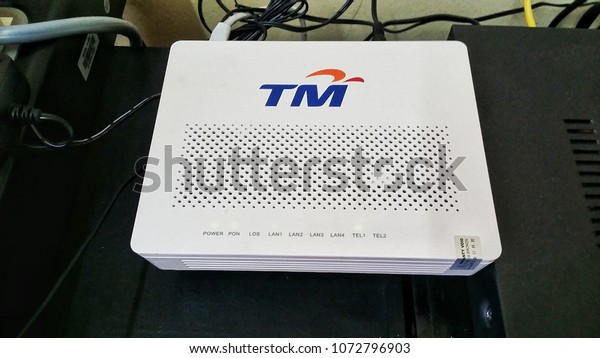
at the same city, just saw a maxis fibre 30Mbps customer at Shop Lot Biz Area with Huawei HG8240H ONU Fibre modem that has TM Logo. he claim install it around Years ago.

» Click to show Spoiler - click again to hide... «


https://www.shutterstock.com/image-photo/ma...odem-1072796903

there is at least 2 case i have seen with my own eye, that unifi installation at different Shop Lot Biz Area, Black fibre cable was coming from front Entrance through wall, but before the fibre cable through the wall, there's 2 fibre cable Connector to connect both fibre cable, i would provide the photo later if i found it.

Photo Uploaded
[attachmentid=10343807]

*
SUSCandy12
post Jul 28 2020, 02:05 PM

Regular
******
Senior Member
1,878 posts

Joined: Apr 2019
QUOTE(rivacordex @ Jul 28 2020, 12:21 PM)
I do wonder - from an end user's perspective, does it matter so much that for e.g. this overhead may be reducing the "full" speed of the network?

I'm just questioning, because, generally, under most scenarios, whether downloading, or streaming stuffs - we generally can't utilize the full speed anyways, and often times, are hampered by the server side who most often times cannot deliver such performances also?
*
Depends on the speed plan you're purchasing. Of course for 1Gbps plan, even many 3rd party local servers won't be able to reach anything near but it depends on the user needs and requirements.

The overheads might not be significant, 1Mbps-5Mbps in accounted for but why isn't the ISP/wholesale provider TM being the generous one to absorb it instead using a false adverts which in the end the customer has to give in to the reality that TCP overheads that is preventing them from getting the full advertised speed they were lied to.

It's all about ethics and honesty. My 30Mbps certainly has no issues getting full speed around the world since it's just peanuts to what fibre is capable of in excess of gigabits, for those with packages above 100Mbps that one we can't guarantee lah.
SUSCandy12
post Jul 28 2020, 02:15 PM

Regular
******
Senior Member
1,878 posts

Joined: Apr 2019
QUOTE(Alpha_Tay @ Jul 28 2020, 01:52 PM)
unifi home install at end of 2017 for unifi Bonanza RM139 30Mbps, FiberHome ONU, tested with other account confirmed that ONU was Capped at 100Mbps, SpeedTest 96Mbps. Receive 10x free speed upgrade at October 2018, Speedtest around 310Mbps, SpeedTest with other account would get abit more. recently, SpeedTest with both accounts would get same SpeedTest result, not abit more anymore. there is single port out of 1-65535 port open at the FiberHome ONU, but not sure when, all ports was closed out of 1-65535 port. unifi installer Didn't provide unifi fibre port password, unifi username, unifi password, unifi phone number, unifi phone number password.

unifi biz install at September 2019, right before 2019 free 3 Months 2 Years Contracts Year End Promo, did subscribe and received YEP after install, Huawei HG8240H5 Universal ONU, Modem Webpages can login with Default Admin and User Password, unifi installer even write down unifi fibre port password, unifi username, unifi password, unifi phone number, unifi phone number password at the fibre modem box. Huawei HG8240H5 Universal ONU is uncapped or maxcapped, confirmed by testing with other account.

remember that alot of, huge percentage of, but not every streamyx 1Mbps account is capped 1.5Mbps at account level?
*
About the bolded part, "same result not a bit more anymore".

The problem is other ISPs on TM HSBB such as Maxis is getting "LESS" even on telco's own speed test servers even on the lowest tiered plans.

30M plan you get max 28Mbps(6.7% loss)
100M plan you only get max 95Mbps(5% loss)

Should we get 6% and 5% discounts on our bill because of getting lesser than as advertised? Such low tiered plan is no excuse when doing in house speed servers considering fibre can provide speeds in excess of >2Gbps.

You want to sell best effort and no guarantee 1Gbps plans it's fine by me, but even 30M/100M plans you want to shortchange your customers? doh.gif
Alpha_Tay
post Jul 28 2020, 02:37 PM

Beware The Spammer Star!
******
Senior Member
1,725 posts

Joined: Jan 2003
QUOTE(Candy12 @ Jul 28 2020, 02:15 PM)
About the bolded part, "same result not a bit more anymore".

The problem is other ISPs on TM HSBB such as Maxis is getting "LESS" even on telco's own speed test servers even on the lowest tiered plans.

30M plan you get max 28Mbps(6.7% loss)
100M plan you only get max 95Mbps(5% loss)

Should we get 6% and 5% discounts on our bill because of getting lesser than as advertised? Such low tiered plan is no excuse when doing in house speed servers considering fibre can provide speeds in excess of >2Gbps.

You want to sell best effort and no guarantee 1Gbps plans it's fine by me, but even 30M/100M plans you want to shortchange your customers? doh.gif
*
i do know such situation, just that i am reporting another situation.
TSrivacordex
post Aug 28 2020, 02:44 AM

New Member
*
Junior Member
44 posts

Joined: Apr 2005
Just wondering if anybody's using wtfast (GPN - Gamer's Private Network)?

Does it do wonders?

Seems like ASUS uses it in their solution with their gaming routers
Chengi
post Apr 14 2024, 02:57 PM

Getting Started
**
Junior Member
215 posts

Joined: Oct 2012
i got bufferbloat B and i'm on time

https://www.waveform.com/tools/bufferbloat?...68-420d74c7a21f
OlgaC4
post Apr 16 2024, 11:55 AM

Look at all my stars!!
*******
Senior Member
5,296 posts

Joined: Nov 2006
Is the respond time the 2nd thing is ping not more then 40.


Change to:
| Lo-Fi Version
0.0444sec    1.63    8 queries    GZIP Disabled
Time is now: 19th December 2025 - 07:45 AM