Welcome Guest ( Log In | Register )

8 Pages « < 3 4 5 6 7 > » Bottom

Outline · [ Standard ] · Linear+

 Huawei WiFi AX3 3000 Mbps router

views
     
Alpha_Tay
post Jul 16 2020, 01:10 PM

Beware The Spammer Star!
******
Senior Member
1,725 posts

Joined: Jan 2003
according to china end user review, Xiaomi AloT Router AX3600 by default has IPv6 Inbound Firewall Turn on and no user configurable at Router Webpages or Apps YET, maybe available in future firmware updates, something like TP-Link Deco Series. china end user there also mention Huawei but didn't mention Model. the next generation of WiFi Chipset firmware has alot of setting turn on by default and no user configurable at Router Webpages or Apps YET.

https://www.acwifi.net/9478.html

https://www.acwifi.net/9665.html

QUOTE(Alpha_Tay @ Jun 15 2020, 05:31 PM)
tried TP-Link M4 Mesh Router v2 Latest Firmware 190917, PPPoE MTU was hardcoded 1480 and not configurable, same as alot of other setting, like UPnP, etc, all are default enable and currently not configurable via Apps or router web interface, while router web interface has a System Log and other simple diagram, the configurable option maybe release in future firmware and Apps update.

the ipv6 dns would stuck at google ipv6 dns, no matter what user set it to be.

set it to router mode with PPPoE and all other setting is working, then change to AP mode still working, then change back to Router Mode would stuck at PPPoE no connect bug, have to reset and reconfig.
*
SUSnonamer
post Jul 16 2020, 01:22 PM

Getting Started
**
Junior Member
224 posts

Joined: Apr 2019
QUOTE(Crystal2 @ Jul 16 2020, 10:33 AM)
Is it advisable to enable IPv6 on this HW AX3 Quad-Core router?

The TM technicians, who installed my previous TP-Link Archer C1200, advised me not to but that  was done years ago.

Any difference in speed or range compared to IPv4 only?
*
ipv6 will result in noticeably faster surfing speed but the problem i faced was every time router reboot or change wan ip the win7 pc need to manually perform disable and re-enable back the network adapter to refresh the ipv6 assigned ips maybe people with good knowledge of ipv6 or windows knows how to overcome it but i couldnt


This post has been edited by nonamer: Jul 16 2020, 01:39 PM
Alpha_Tay
post Jul 16 2020, 01:58 PM

Beware The Spammer Star!
******
Senior Member
1,725 posts

Joined: Jan 2003
that is getting confuse,

China Version of AX3 is Dual-Core,

China Version of AX3 Pro is Quad-Core,

Malaysia Official Stock of AX3 is Quad-Core,

there is no Malaysia Official Stock of AX3 Pro yet,


the Graph of Malaysia Official Stock of AX3 Quad-Core list Ax3 Pro

300 AC1200

574 AX3 Pro

2.4 GHz

867 AC1200

2402 AX3 Pro

5 GHz

1167 AC1200

2976 AX3 Pro

Total

https://consumer.huawei.com/my/routers/ax3-quad-core/


Huawei Global has both AX3 Dual-Core and Quad-Core listed.

https://consumer.huawei.com/en/routers/ax3-quad-core/

https://consumer.huawei.com/en/routers/ax3-dual-core/

QUOTE(Crystal2 @ Jul 16 2020, 12:56 PM)
Only Quad Core Malaysian (& Global) version has the firmware to support VLAN.
*
QUOTE(rkwan67 @ Jul 16 2020, 12:58 PM)
Crystal is right.
Don't confuse spec and firmware, it's different.

Only Malaysian unit Ax3 can do native vlan for unifi.
Taobao unit Ax3 pro / Ax3 still no native vlan pppoe for unifi.
*
daifanshu
post Jul 17 2020, 08:08 PM

New Member
*
Junior Member
8 posts

Joined: Nov 2007
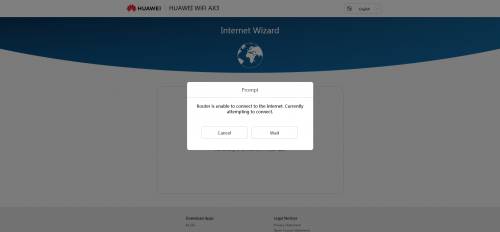
user posted image

just bought one AX3 today , wanted to set up, but pop out this .
and limited internet access .
the existing tenda router works just perfectly.

does anyone have this problem?
Crystal2
post Jul 17 2020, 10:50 PM

Casual
***
Junior Member
450 posts

Joined: Mar 2011
QUOTE(daifanshu @ Jul 17 2020, 08:08 PM)
user posted image

just bought one AX3 today , wanted to set up, but pop out this .
and limited internet access .
the existing tenda router works just perfectly.

does anyone have this problem?
*
Please give more details:
1) your ISP
2) router from Malaysia or China firmware
HG8240HMaxis P
post Jul 18 2020, 09:20 AM

New Member
*
Probation
10 posts

Joined: Jul 2020
Don't even buy any "Wifi 6" routers now.
The standard hasn't even been established yet. lagipun a few months after the standard is officially established, Wifi 6e standard is right around the corner. You're wasting money for something that isn't even official yet
xCryptik
post Jul 18 2020, 12:18 PM

On my way
****
Junior Member
584 posts

Joined: May 2013
QUOTE(HG8240HMaxis @ Jul 18 2020, 10:20 AM)
Don't even buy any "Wifi 6" routers now.
The standard hasn't even been established yet. lagipun a few months after the standard is officially established, Wifi 6e standard is right around the corner. You're wasting money for something that isn't even official yet
*
Means?
HG8240HMaxis P
post Jul 18 2020, 01:14 PM

New Member
*
Probation
10 posts

Joined: Jul 2020
QUOTE(xCryptik @ Jul 18 2020, 12:18 PM)
Means?
*
AX is what they're using to say Wifi 6 capable. marketing stunts.
But wifi 6 isn't an official thing *yet*. Later in 2020 it will properly be announced. Then you have to wait for routers to properly implement it.
But there's also the upcoming wifi 6e thats gonna be a standard soon in 2021.

Like you bought this new shit hitting the town, the mcflurry. Then next day you wanna see how other people feel about that mcflurry, so you waltz into the shop again; and you got fucking scammed cause mcd realize that the machine should be outputting more oreos and youre like wtf, mine didnt have this much oreos yesterday.
But you know what, you're so good with money that you have exactly enough money left for one more mcflurry, so you buy another mcflurry, "yum, delicious mcflurry with more oreos?!! woo! i gotta comeback here next month when i get paid again"
Then you come back in like a week to tell your friends they gotta try the mcflurry, surprise surprise, mcd officially states the cup was too small, it should have at least been 2x as large all for the same price, your friends get to enjoy that 2x more mcflurry with more oreos. What did you get? You spent twice as much as them, for the same volume, and less oreos. You got scammed.
Morpheus2be
post Jul 18 2020, 03:10 PM

Casual
***
Junior Member
464 posts

Joined: Mar 2005


https://wi-fi.org/discover-wi-fi/wi-fi-certified-6
daifanshu
post Jul 18 2020, 06:00 PM

New Member
*
Junior Member
8 posts

Joined: Nov 2007
QUOTE(Crystal2 @ Jul 17 2020, 10:50 PM)
Please give more details:
1) your ISP
2) router from Malaysia or China firmware
*
Malaysia model ,
i have solved the problem by using phone to connect , in 3 mins
instead of using pc to setup.
Crystal2
post Jul 19 2020, 07:57 PM

Casual
***
Junior Member
450 posts

Joined: Mar 2011
Is there a setting for auto reboot every few days?
Alpha_Tay
post Jul 20 2020, 11:25 AM

Beware The Spammer Star!
******
Senior Member
1,725 posts

Joined: Jan 2003
IEEE 802.11ax, marketed as Wi-Fi 6 by Wi-Fi Alliance,[1][2] is a draft Wi-Fi specification standard, and the proposed successor to Wi-Fi 5.[3] The 802.11ax standard is expected to become an official IEEE specification in September 2020.[4]

https://en.wikipedia.org/wiki/IEEE_802.11ax
shah6287
post Jul 25 2020, 02:58 PM

New Member
*
Junior Member
21 posts

Joined: Mar 2010
From: Ipoh, Perak


How to change dns?cant find the setting
frozzbyte
post Jul 26 2020, 12:21 AM

Feeling butthurt lately? Like I care
*******
Senior Member
3,657 posts

Joined: May 2005
QUOTE(shah6287 @ Jul 25 2020, 02:58 PM)
How to change dns?cant find the setting
*
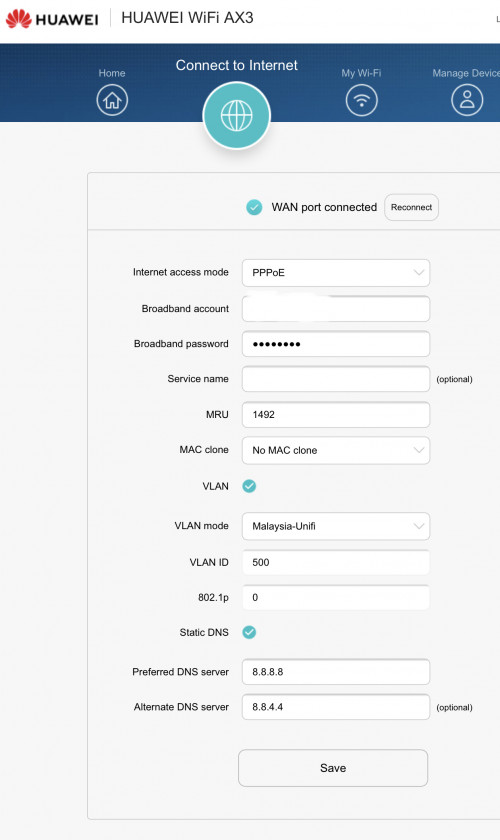
Go to the web interface -> Connect to Internet -> Tick the static DNS

user posted image
Crystal2
post Jul 26 2020, 09:55 AM

Casual
***
Junior Member
450 posts

Joined: Mar 2011
QUOTE(frozzbyte @ Jul 26 2020, 12:21 AM)
Go to the web interface -> Connect to Internet -> Tick the static DNS

user posted image
*
Is it necessary to enable Static DNS? I didn't and the internet speed seems OK & stable.
TSamir.asyraf
post Jul 26 2020, 10:01 AM

On my way
****
Junior Member
504 posts

Joined: Oct 2012
From: It's all relative


QUOTE(Crystal2 @ Jul 26 2020, 09:55 AM)
Is it necessary to enable Static DNS? I didn't and the internet speed seems OK & stable.
*
It's not necessary. However, compared to the default (provided by ISP), they're usually a bit faster and more reliable. Also you can get around basic site blocking (which checks domain name).
Crystal2
post Jul 26 2020, 11:07 AM

Casual
***
Junior Member
450 posts

Joined: Mar 2011
QUOTE(amir.asyraf @ Jul 26 2020, 10:01 AM)
It's not necessary. However, compared to the default (provided by ISP), they're usually a bit faster and more reliable. Also you can get around basic site blocking (which checks domain name).
*
Noted, TQ.

I will try the static DNS.

Crystal2
post Jul 26 2020, 11:08 AM

Casual
***
Junior Member
450 posts

Joined: Mar 2011
[deleted]

This post has been edited by Crystal2: Jul 26 2020, 11:09 AM
shah6287
post Jul 26 2020, 07:37 PM

New Member
*
Junior Member
21 posts

Joined: Mar 2010
From: Ipoh, Perak


QUOTE(frozzbyte @ Jul 26 2020, 12:21 AM)
Go to the web interface -> Connect to Internet -> Tick the static DNS

user posted image
*
Ok thanks..how about dns setting for ipv6..
frozzbyte
post Jul 26 2020, 08:38 PM

Feeling butthurt lately? Like I care
*******
Senior Member
3,657 posts

Joined: May 2005
QUOTE(shah6287 @ Jul 26 2020, 07:37 PM)
Ok thanks..how about dns setting for ipv6..
*
No idea. I’m not using ipv6

8 Pages « < 3 4 5 6 7 > » Top
 

Change to:
| Lo-Fi Version
0.0210sec    0.98    6 queries    GZIP Disabled
Time is now: 24th December 2025 - 05:06 AM