Outline ·
[ Standard ] ·
Linear+
Huawei WiFi AX3 3000 Mbps router
|
Crystal2
|
 Jul 16 2020, 10:33 AM Jul 16 2020, 10:33 AM
|

|
Is it advisable to enable IPv6 on this HW AX3 Quad-Core router?
The TM technicians, who installed my previous TP-Link Archer C1200, advised me not to but that was done years ago.
Any difference in speed or range compared to IPv4 only?
|
|
|
|
|
|
Crystal2
|
Jul 16 2020, 12:56 PM
|
|
|
QUOTE(Alpha_Tay @ Jul 16 2020, 12:35 PM) so is it Official Malaysia Stock of AX3 and Official China Stock of AX3 Pro has PPPoE Vlan Support with Default Firmware? Only Quad Core Malaysian (& Global) version has the firmware to support VLAN. |
|
|
|
|
|
Crystal2
|
Jul 17 2020, 10:50 PM
|
|
|
QUOTE(daifanshu @ Jul 17 2020, 08:08 PM) 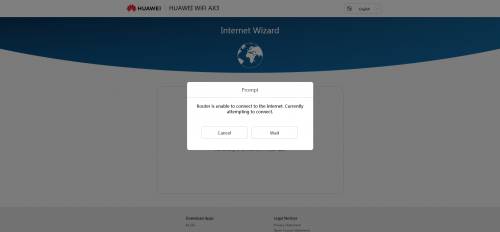 just bought one AX3 today , wanted to set up, but pop out this . and limited internet access . the existing tenda router works just perfectly. does anyone have this problem? Please give more details: 1) your ISP 2) router from Malaysia or China firmware |
|
|
|
|
|
Crystal2
|
Jul 19 2020, 07:57 PM
|
|
|
Is there a setting for auto reboot every few days?
|
|
|
|
|
|
Crystal2
|
Jul 26 2020, 09:55 AM
|
|
|
QUOTE(frozzbyte @ Jul 26 2020, 12:21 AM) Go to the web interface -> Connect to Internet -> Tick the static DNS 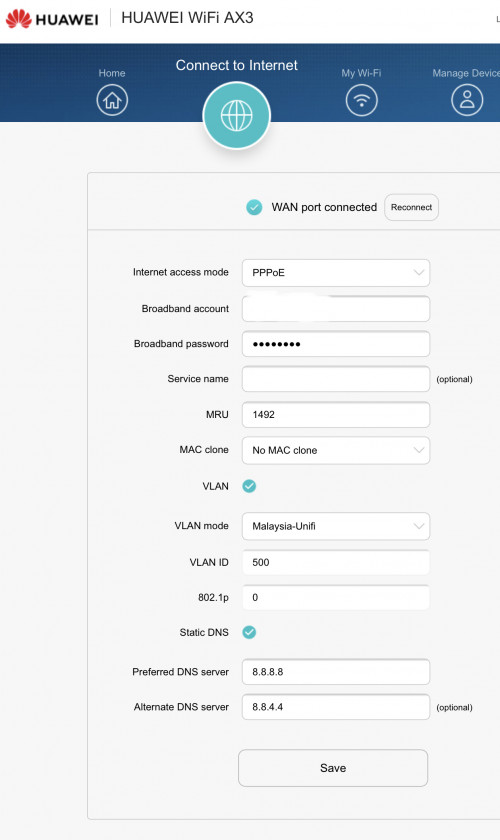 Is it necessary to enable Static DNS? I didn't and the internet speed seems OK & stable. |
|
|
|
|
|
Crystal2
|
Jul 26 2020, 11:07 AM
|
|
|
QUOTE(amir.asyraf @ Jul 26 2020, 10:01 AM) It's not necessary. However, compared to the default (provided by ISP), they're usually a bit faster and more reliable. Also you can get around basic site blocking (which checks domain name). Noted, TQ. I will try the static DNS. |
|
|
|
|
|
Crystal2
|
Jul 26 2020, 11:08 AM
|
|
|
[deleted]
This post has been edited by Crystal2: Jul 26 2020, 11:09 AM
|
|
|
|
|
|
Crystal2
|
Jul 28 2020, 01:09 PM
|
|
|
QUOTE(jimmy.soo @ Jul 27 2020, 06:48 PM) I don't think there's a setting to change the DNS setting for ipv6 unfortunately. Yeah, I too can't find the DNS setting for IPv6. Anyway, when you can find the settings in AX3, below is the public DNS for IPv6. https://developers.google.com/speed/public-dns/docs/using"...Google Public DNS IP addresses The Google Public DNS IP addresses (IPv4) are as follows: 8.8.8.8 8.8.4.4 The Google Public DNS IPv6 addresses are as follows: 2001:4860:4860::8888 2001:4860:4860::8844 You can use either address as your primary or secondary DNS server..." This post has been edited by Crystal2: Jul 28 2020, 07:50 PM |
|
|
|
|
|
Crystal2
|
Jul 28 2020, 08:59 PM
|
|
|
QUOTE(Crystal2 @ Jul 28 2020, 01:09 PM) Yeah, I too can't find the DNS setting for IPv6. Anyway, when you can find the settings in AX3, below is the public DNS for IPv6. https://developers.google.com/speed/public-dns/docs/using"...Google Public DNS IP addresses The Google Public DNS IP addresses (IPv4) are as follows: 8.8.8.8 8.8.4.4 The Google Public DNS IPv6 addresses are as follows: 2001:4860:4860::8888 2001:4860:4860::8844 You can use either address as your primary or secondary DNS server..." I found the settings at 192.168.3.1 router page: More Functions/Network Settings/IPv6. Anyone knows the prefix for the IPv6 Google Public DNS without which it can't save/update the changes. I daren't experiment. This post has been edited by Crystal2: Jul 28 2020, 10:41 PM Attached thumbnail(s)
|
|
|
|
|
|
Crystal2
|
Jul 30 2020, 07:23 AM
|
|
|
QUOTE(jacktiew @ Jul 29 2020, 10:45 PM) 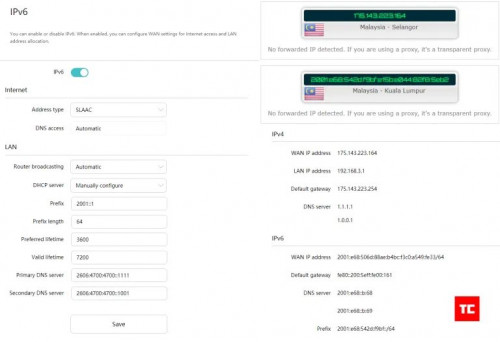 Credit to Arun from TechCyn Thanks so much. I put 2001:1 as prefix and it works when I tested it with http://ip6.me in browser. |
|
|
|
|
|
Crystal2
|
Aug 9 2020, 10:14 PM
|
|
|
QUOTE(peter32 @ Aug 8 2020, 11:51 AM) Does the software comes with parental control in place? Yes Attached thumbnail(s)
|
|
|
|
|



 Quote
Quote

 0.0237sec
 0.61
0.61
 7 queries
 GZIP Disabled