

QUOTE(jimmy.soo @ Aug 25 2020, 09:48 AM)
Nothing so far
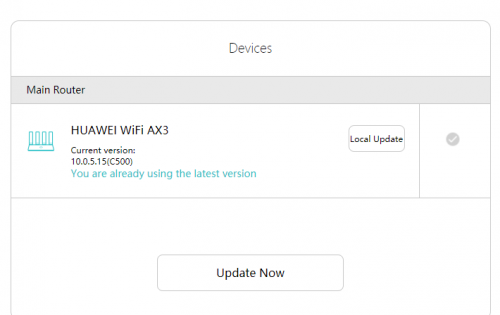

this firmware version 10.0.5.41 is for AX3 Pro chinese version onlyHuawei WiFi AX3 3000 Mbps router
|
|
 Aug 26 2020, 12:36 AM Aug 26 2020, 12:36 AM
|
 
Probation
8 posts Joined: Aug 2020 
|
QUOTE(jimmy.soo @ Aug 25 2020, 09:48 AM) Nothing so far this firmware version 10.0.5.41 is for AX3 Pro chinese version only |
|
|
|
|
|
Sep 1 2020, 12:54 AM
|
|
Junior Member
649 posts Joined: Jan 2011
|
QUOTE(jacktiew @ Jul 29 2020, 10:45 PM) 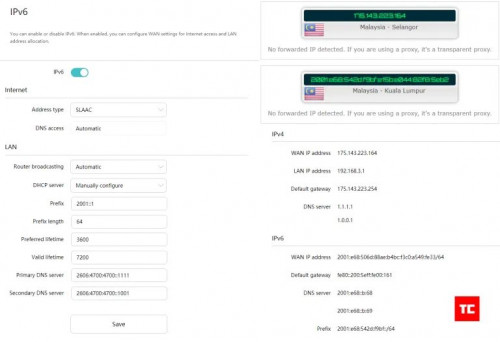 Credit to Arun from TechCyn Anyone with the same issue and how to overcome? |
|
|
Sep 1 2020, 10:44 AM
Show posts by this member only | IPv6 | Post
#123
|
|
Junior Member
289 posts Joined: Sep 2012
|
QUOTE(ceras @ Sep 1 2020, 12:54 AM) Tried the above settings for IPv6, but at About Router page, IPv6 says Prefix and DNS server - Unable to obtain Are you using Maxis fibre? Do you have a public IP address?Anyone with the same issue and how to overcome? Disclaimer: I do not own any Huawei AX3. The picture is for unifi setting. I just share the pic and the settings below are just my guessing. If both of above are true, try this. Type: SLAAC, if cannot then use DHCPv6 or 6to4 This post has been edited by jacktiew: Sep 1 2020, 11:30 AM |
|
|
Sep 1 2020, 09:05 PM
|
|
Junior Member
649 posts Joined: Jan 2011
|
QUOTE(jacktiew @ Sep 1 2020, 10:44 AM) Are you using Maxis fibre? Do you have a public IP address? I'm using UnifiDisclaimer: I do not own any Huawei AX3. The picture is for unifi setting. I just share the pic and the settings below are just my guessing. If both of above are true, try this. Type: SLAAC, if cannot then use DHCPv6 or 6to4 Can only use SLACC option , DHCPv6 does not work. Filled in the followings: - 2001::1 as prefix - DNS : 2001:4860:4860::8888 2001:4860:4860::8844 Result shows: prefix - unable to obtain. Any ideas on how to resolve? This post has been edited by ceras: Sep 1 2020, 09:26 PM Attached thumbnail(s) 
|
|
|
Sep 3 2020, 10:34 AM
Show posts by this member only | IPv6 | Post
#125
|
|
Junior Member
289 posts Joined: Sep 2012
|
QUOTE(ceras @ Sep 1 2020, 09:05 PM) I'm using Unifi Then just use SLAAC.Can only use SLACC option , DHCPv6 does not work. Filled in the followings: - 2001::1 as prefix - DNS : 2001:4860:4860::8888 2001:4860:4860::8844 Result shows: prefix - unable to obtain. Any ideas on how to resolve? |
|
|
Sep 3 2020, 07:12 PM
|
|
Junior Member
649 posts Joined: Jan 2011
|
QUOTE(jacktiew @ Sep 3 2020, 10:34 AM) Then just use SLAAC. using SLACC but result still showing: prefix - unable to obtain. |
|
|
|
|
|
Sep 7 2020, 12:11 AM
|
|
Senior Member
1,471 posts Joined: Apr 2019
|
guy, currently my house use 1 router (asus 55uhp) + 3 repeater .....
if i do mesh setup, i just buy 4 mesh and set it up (drop asus router) or do i need anything ? Current Router and modem at 2 1/2 floor back (room) One repeater at 1 floor front. (room) One repeater at ground floor middle (main hall and sub hall) One repeater at 1/2 floor back (dinning and kitchen) * my house have some odds design,it split to front and back part, middle part is high roof front ground to third floor. current fibre speed is 300mbps. should i go for this or xiaomi mesh ? me ok with both device. |
|
|
Sep 9 2020, 12:09 PM
|

Senior Member
1,058 posts Joined: Nov 2009 
|
Hi Sifus, I just bought a AX3 local unit. Can I connect a AX3 China to it as Mesh? lygsl liked this post
|
|
|
Sep 10 2020, 10:26 PM
|
|
Senior Member
1,058 posts Joined: Nov 2009
|
Walao, just finished setting up. The WiFi speed is much slower than my previous free WiFi d'link ac1200 from unifi?? Any idea why?
|
|
|
Sep 11 2020, 01:11 AM
|

Senior Member
3,008 posts Joined: Sep 2005 From: T.T.D.I, Bukit Damansara
|
QUOTE(eugenecctan @ Sep 10 2020, 10:26 PM) Walao, just finished setting up. The WiFi speed is much slower than my previous free WiFi d'link ac1200 from unifi?? Any idea why? I saw 1 review on youtube, the guy compared it with his TIME fibre tplink router (looked like a C6) results were not impressive at all, minor improvement and in some spots the stock router was faster.He tested on a 100Mbps account though |
|
|
Sep 11 2020, 12:54 PM
|
|
Senior Member
1,058 posts Joined: Nov 2009
|
QUOTE(cannavaro @ Sep 11 2020, 01:11 AM) I saw 1 review on youtube, the guy compared it with his TIME fibre tplink router (looked like a C6) results were not impressive at all, minor improvement and in some spots the stock router was faster. AX3000 slower than AC1200. Something is not right.He tested on a 100Mbps account though |
|
|
Sep 11 2020, 03:49 PM
|
|
Senior Member
3,008 posts Joined: Sep 2005 From: T.T.D.I, Bukit Damansara
|
QUOTE(eugenecctan @ Sep 11 2020, 12:54 PM) AX3000 slower than AC1200. Something is not right. here's a screenshot from the review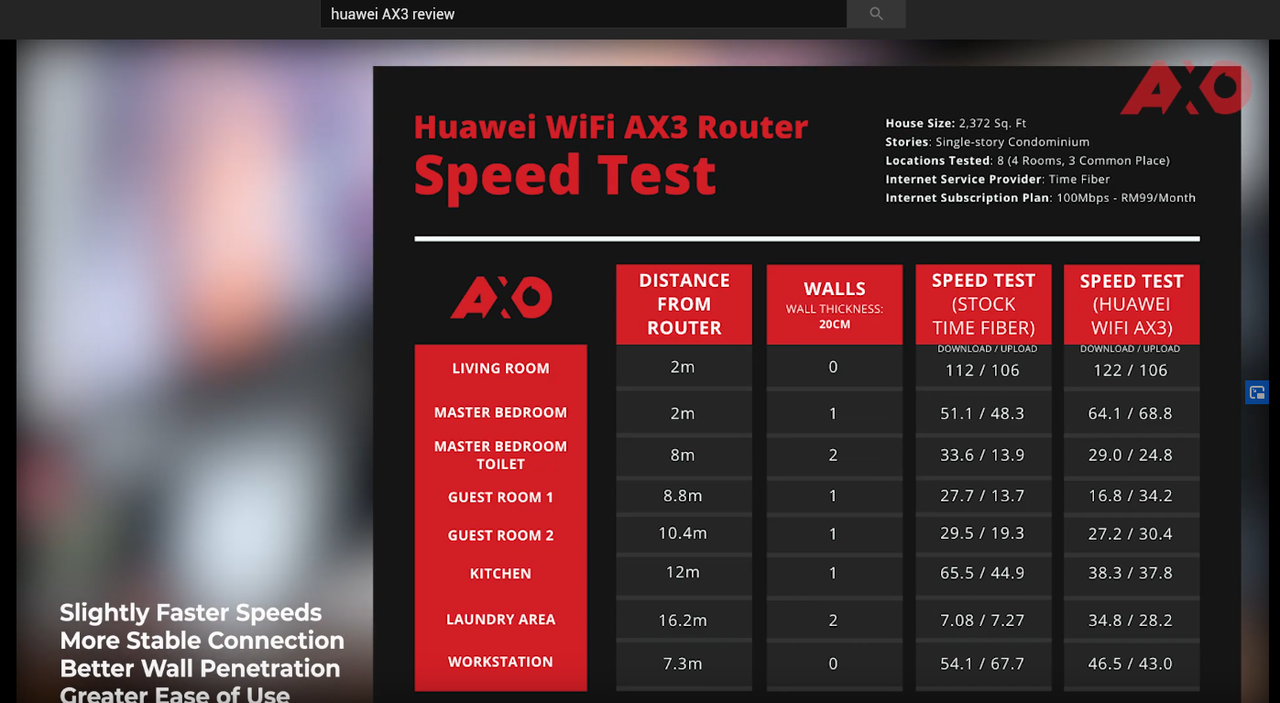 not much of an improvement if you ask me  full video |
|
|
Sep 11 2020, 06:08 PM
|
|
Senior Member
1,058 posts Joined: Nov 2009
|
QUOTE(cannavaro @ Sep 11 2020, 03:49 PM) here's a screenshot from the review not much of an improvement if you ask me full video 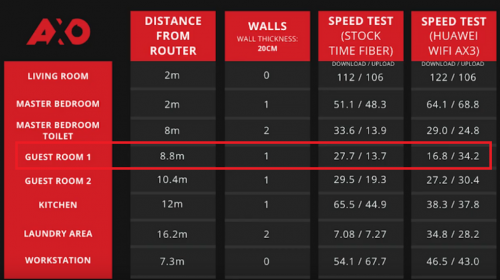 Same issue that I am facing now. Constantly drop below 20mbps even within 10m. |
|
|
|
|
|
Sep 12 2020, 12:29 PM
|
|
Senior Member
1,058 posts Joined: Nov 2009
|
After restart, reset, called Unifi to reset port. Everything still the same. (try all available settings on first day). But after 2 days using it. Today the speed is very good and stable. I have no idea why but will just continue to monitor.
This post has been edited by eugenecctan: Sep 12 2020, 12:30 PM |
|
|
Sep 15 2020, 01:08 PM
Show posts by this member only | IPv6 | Post
#135
|

Junior Member
91 posts Joined: Mar 2008 From: Selangor 
|
Dear sifu here
Plan buy 2Unit ax3 To setup mesh WiFi Upstairs Unifi UNO and 1 AX3 as based Downstairs another AX3 To increase WiFi coverage and connect my old pc with Lan cable. This old pc will connected with internet? |
|
|
Sep 18 2020, 11:49 PM
|
|
Senior Member
1,471 posts Joined: Apr 2019
|
QUOTE(eugenecctan @ Sep 9 2020, 12:09 PM) Hi Sifus, is that any different local vs china unit ? I just bought a AX3 local unit. Can I connect a AX3 China to it as Mesh? plan to get 3 unit ax3 pro from china for my house, just not sure abt it now. |
|
|
Sep 19 2020, 01:11 AM
|
|
Junior Member
224 posts Joined: Apr 2019
|
QUOTE(XXXOOOXXXOOO @ Sep 18 2020, 11:49 PM) is that any different local vs china unit ? if vlan support not required then better get china unit as msian firmware unlikely to keep up with latest versionplan to get 3 unit ax3 pro from china for my house, just not sure abt it now. XXXOOOXXXOOO liked this post
|
|
|
Oct 19 2020, 12:24 PM
|

Senior Member
1,487 posts Joined: Dec 2005
|
hi, plan buy 1 Unit ax3 To setup mesh WiFi (to another room) with time fiber router wifi connect on another room
is it likely? some say "yes", some told me "no, at least 2 units" pls advice...thank you |
|
|
Oct 19 2020, 07:22 PM
|

Senior Member
7,740 posts Joined: Jun 2006 From: Some Yih 
|
QUOTE(asiatrader98 @ Oct 19 2020, 12:24 PM) hi, plan buy 1 Unit ax3 To setup mesh WiFi (to another room) with time fiber router wifi connect on another room u need to be in same brand to use mesh wifi.is it likely? some say "yes", some told me "no, at least 2 units" pls advice...thank you or i got it wrong? asiatrader98 liked this post
|
|
|
Oct 19 2020, 09:35 PM
|

Junior Member
504 posts Joined: Oct 2012 From: It's all relative
|
QUOTE(asiatrader98 @ Oct 19 2020, 12:24 PM) hi, plan buy 1 Unit ax3 To setup mesh WiFi (to another room) with time fiber router wifi connect on another room is it likely? some say "yes", some told me "no, at least 2 units" pls advice...thank you QUOTE(pikacu @ Oct 19 2020, 07:22 PM) u need to be in same brand to use mesh wifi. The AX3 isn't a mesh-capable router. And yeah, I believe all mesh routers are model/brand specific.or i got it wrong? You can extend normally by making the second router as an access point by connecting the cable from the main router. Or use the second router as a wireless repeater, but only as a last resort because wireless repeater speed, latency, and stability sucks. This post has been edited by amir.asyraf: Oct 19 2020, 09:35 PM asiatrader98 liked this post
|
| Change to: |  0.0284sec 0.0284sec
 1.15 1.15
 6 queries 6 queries
 GZIP Disabled GZIP Disabled
Time is now: 23rd December 2025 - 08:08 PM |
 Quote
Quote