Outline ·
[ Standard ] ·
Linear+
Huawei WiFi AX3 3000 Mbps router
|
jacktiew
|
 Jul 29 2020, 10:45 PM Jul 29 2020, 10:45 PM
|
Getting Started


|
QUOTE(Crystal2 @ Jul 28 2020, 08:59 PM) I found the settings at 192.168.3.1 router page: More Functions/Network Settings/IPv6. Anyone knows the prefix for the IPv6 Google Public DNS without which it can't save/update the changes. I daren't experiment. 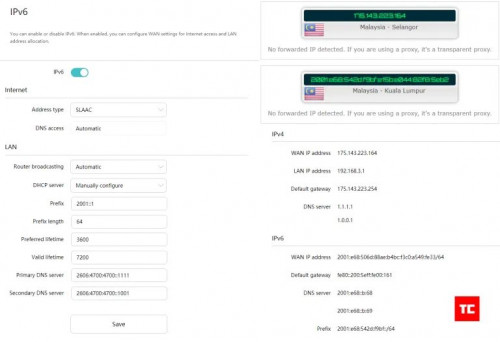 Credit to Arun from TechCyn |
|
|
|
|
|
jacktiew
|
Sep 1 2020, 10:44 AM
|
Getting Started
|
QUOTE(ceras @ Sep 1 2020, 12:54 AM) Tried the above settings for IPv6, but at About Router page, IPv6 says Prefix and DNS server - Unable to obtain Anyone with the same issue and how to overcome? Are you using Maxis fibre? Do you have a public IP address? Disclaimer: I do not own any Huawei AX3. The picture is for unifi setting. I just share the pic and the settings below are just my guessing. If both of above are true, try this. Type: SLAAC, if cannot then use DHCPv6 or 6to4 This post has been edited by jacktiew: Sep 1 2020, 11:30 AM |
|
|
|
|
|
jacktiew
|
Sep 3 2020, 10:34 AM
|
Getting Started
|
QUOTE(ceras @ Sep 1 2020, 09:05 PM) I'm using Unifi Can only use SLACC option , DHCPv6 does not work. Filled in the followings: - 2001::1 as prefix - DNS : 2001:4860:4860::8888 2001:4860:4860::8844 Result shows: prefix - unable to obtain. Any ideas on how to resolve? Then just use SLAAC. |
|
|
|
|



 Quote
Quote
 0.0190sec
 0.58
0.58
 7 queries
 GZIP Disabled