Welcome Guest ( Log In | Register )

Outline · [ Standard ] · Linear+

Home Networking Ditch ONU, use GPON SFP on Business Grade Router, 2.5G ONU for Unifi & Maxis, NO NEED VLAN

views
     
kwss
post Sep 26 2024, 08:08 AM

Regular
******
Senior Member
1,208 posts

Joined: Aug 2018
QUOTE(ShaolinTiger @ Sep 25 2024, 11:09 PM)
I wanted to check if I have a router without SFP/SFP+ but I have a switch that has a 10Gb SFP port and a regular router would that work with the GPON stick? How would the router know where to get the PPoE via the GPON?
*
It will work as long as you configure the VLAN properly, either tagged or untagged at the access port.

During PADI, the message is send to the Ethernet Broadcast address ff:ff...ff so it will get sent to all the ports for that VLAN.

PON is pure L2 network, with signalling and encapsulation on top. Just treat it like any other L2 network.
kwss
post Sep 26 2024, 02:17 PM

Regular
******
Senior Member
1,208 posts

Joined: Aug 2018
QUOTE(ShaolinTiger @ Sep 26 2024, 02:13 PM)
Ah got it, so means would need a managed switch I assume to setup the VLAN correctly for the WAN port?
*
Yes that's correct. The PON stick just act as a trucking port with termination for whatever VLAN dictated by PPTP or VEIP.
The switch will just send the broadcast to it during PADI.
kwss
post Oct 18 2024, 05:09 PM

Regular
******
Senior Member
1,208 posts

Joined: Aug 2018
Anime4000, can try:
DHCP Option 120: Enable
Primary Outbound Server: 10.225.15.220
Secondary Outbound Server: 10.225.17.220
Audio Codec Type 4: G.722

This post has been edited by kwss: Oct 18 2024, 05:09 PM
kwss
post Mar 26 2025, 05:20 PM

Regular
******
Senior Member
1,208 posts

Joined: Aug 2018
QUOTE(Anime4000 @ Mar 25 2025, 10:11 PM)
Realtek V2 SoC with DDM
The Intel Lantiq SoC no more new, also have issue with FHTT which I still haven't figure it out,
but for Realtek V2, still active and has year March 2025 firmware which need extended test
*
It's nice to know you have access to the latest SDK.

Given vulnerability like this:
https://isc.sans.edu/diary/28940

It's best to always update. However, it also means that using any device with MTK chip with unknown SDK version will makes you vulnerable.

Since all TM ONR are using MTK chip, user simply won't know.

This post has been edited by kwss: Mar 26 2025, 05:21 PM
kwss
post Apr 28 2025, 01:19 PM

Regular
******
Senior Member
1,208 posts

Joined: Aug 2018
QUOTE(Anime4000 @ Apr 24 2025, 02:33 PM)
Indeed, many cheap ONT now use Realtek
also D-Link base board, with secureboot keys
user posted image

I try with White D-Link ONR if can really pair with OpenWRT
*
Not sure what do you mean by pairing. There is a directory under /etc/ that contains all the hardcoded keys and password for all D-Link customers. This includes the mesh key, TR069 as well.
kwss
post May 5 2025, 01:35 AM

Regular
******
Senior Member
1,208 posts

Joined: Aug 2018
I have the ZTE F620
Hardware Version: V7.0
Software Version: V9.0.10P4N2
Boot Version: V9.0.10P4N2

It is not possible to view password from WebUI. The web app never send the password back for display.
I also don't have the DefAESCBCIV to decrypt the backup config and don't have the equipment to dump the firmware from the board. It uses none of the leaked or known key, at least not those I found.

However, if you just want to check which OLT you are using, you can use the MAC address as proxy:
Go to "Management & Diagnostic" on the top.
Click "Diagnostic" on the left pane.
Click the arrow on the top pane to scroll all the way to the right.
Click "MAC Table"

One of the "Bridge_Default" is the OLT port MAC address.
Just lookup the MAC address for manufacturer name.

EDIT:
You can give this tool a go and see if it works for your ONU:
https://github.com/douniwan5788/zte_modem_tools

I roughly went thru the code for zte_factroymode.py. No malware, no fishy encoding, no backdoor.
Third party library in requirements.txt looks safe too.
But still no warranty. Use at your own risk.

This post has been edited by kwss: May 5 2025, 01:50 AM
kwss
post May 5 2025, 06:03 PM

Regular
******
Senior Member
1,208 posts

Joined: Aug 2018
QUOTE(mhwee @ May 5 2025, 02:59 PM)
hi, sorry to interrupt, can i know what is the purpose of you guys doing this? i meant all the hacking... to get ploam password or voip password? All the passwords can easily get from during TM installation. i meant all those useful info like LOID, Poam/SN, voip user and password etc.

I got both old BTU extra siting in store room, almost want to throw already. sweat.gif

user posted image

If the purpose is to get some settings to push to 2Gbps, then normal combo also can get easily max speed as long as NIC card, switch, PC is correct.

user posted image
*
Same reason why people look at the sky and want to become astronaut.
Same reason for the existence of NASA and CERN.

It's fine if you are not an explorer. Just the same as not everyone is interested to know how their aircond works.

Why even bother to know the password when you can just call TM to fix it for you? Knowing the password don't get you higher speed.
kwss
post Jul 18 2025, 09:12 PM

Regular
******
Senior Member
1,208 posts

Joined: Aug 2018
QUOTE(boringz @ Jul 18 2025, 03:17 PM)
Hi sifus, I need some pointers thats related to GPON ONU.

I have signed up Digi fiber (2gb dl and 1gb ul) a month ago but I notice during certain usage periods eg: evening to midnight - high usage periods, websites stop working, certain apps such as wechat don't work, and sites like speedtest and fast.com tend to show unstable or incomplete tests. Of course if I restart both the ONU and the router (mikrotik) it goes back to normal, but after some time (maybe high usage? maybe Digi fiber FUP? maybe ONU problem? maybe wrong config for 2gb for mikrotik rb5009?) it will get laggy/have intermittent network connections especially during night periods of high usage.
Before you might point out that it is mainly due to high usage, I have gone through all sorts of checks to figure out what are the issues; because most importantly, on another property in the same location, I am using Maxis fiber 1gb package (1gb dl 500mb ul) under the exact same conditions (same hardware, wiring, and users) and I don't have such issue even with very high concurrent device usage.

Used under maxis fiber 1gb plan (public wan usage, very high number of concurrent users during peak hours evening-night with no issue on internet connectivity):
- Mikrotik RB4011 as core router - with settings, handling probably 120 devices combined (mobile/computer)
- Skyworth GPON GN630E
- Subsequent APs are either asus or tenda routers catering up to max 10 devices at a time.
The above setup did not give me any problems at all. All internet usage is smooth like butter.

But as I was setting up digi fiber at another property (just behind, it uses the same TM pole even!) and signed up with Digi Fiber, and I tried:
- Mikrotik RB5009 first, then swap RB4011 to see if RB5009 is faulty (but outcome the same)
- Skyworth GPON GN630E - speedtest does give me 2gb dl/1gb ul if I connect to the provided tplink digi router if i use 1 to 1 eth connection (right now I am testing an older fiberhome ONU that goes up to 800mbps to see if the GN630E is causing the issue? although TM contractor says its not the issue)
- Same subsequent APs are either asus or tenda routers catering up to max 10 devices at a time.
- mikrotik firewall configs are the same as the ones used under maxis fiber 1gb plan. so i presume it shouldnt be affecting this.

For this particular network I only have usage up to probably 15-20 devices before the network goes bonkers, compared to the one right behind which goes up to on average 120 devices with no issue.
There were other multiple problems with Digi fiber initially:
problems with TM dl & ul settings on backend that they did not open to 2gb dl and 1gb ports and had to contact "FTC" to open it. Then there was the PPPOE repeated disconnections which I think is because digi fiber uses ipv6, and the disconnections stop after I disabled ipv6 in mikrotik.
Other things that were done were:
- redoing of pigtail fiber cable by TM
- changing eth cables to confirm its not the cable issues. (confirm 1gbps/2.5gbps shown on mikrotik)
- using older backup RB4011 as end APs to confirm if its the tenda/asus router issue (same)

My location is at Kampar (Perak) - so the infra is under TM.

So my remaining steps I can figure out on:
1) change the ONU to the SFP type presumably sold here? Or the ONU bridge? Would it be the problem you think?
2) maybe somehow there's someone hogging the bandwidth very badly in this particularly property compared to the other one? (detailed traffic monitoring)
3) give up about Digi fiber? Maybe its their FUP?

Thanks for your advice. I'm keen to try if its the ONU problem, or whether its some other settings problem..
*
I really don't think it's an IPv6 causing disconnection. Can you enable it and try again?
How do you configure it by the way.

If it's a layer 2 problem aka the PON network, then it won't disconnect from the fact that it's on IPv6. PON only speak frame and encapsulation of packet, it doesn't know if you are sending TCP UDP IPv4 IPv6.

I suspect Digi put a cap on how many concurrent session a subscriber can open on the CGNAT. Either they do it because they lack IPv4 address or due to abuse prevention.

You can verify how many seasons you are holding by logging into the Mikrotik. If this is the case IPv6 should help you.

You mention you face the problem at night, how about heavy usage in the morning? Like 2am? Or 9am?

It could simply be due to congestion in the evening. Or their CGNAT really ran out of IPv4 address and starts dropping session.

EDIT:
Check out another thread:
Celcom Messed Up Its Japan DataPacket Route?, All Other Local Telcos Just Fine
https://forum.lowyat.net/topic/5526337

Is yours Digi ASN or Celcom ASN?

It could also be that to conserve their IPv4 address, they set a very aggressive timeout on their NAT session. You can sort of workaround this by setting an even more aggressive timeout in Mikrotik. However, not all app will work. So this is not an actual solution.

This post has been edited by kwss: Jul 18 2025, 09:25 PM
kwss
post Jul 19 2025, 10:59 PM

Regular
******
Senior Member
1,208 posts

Joined: Aug 2018
QUOTE(boringz @ Jul 19 2025, 02:33 PM)
1) I didn't do any config. thats the thing. Just normal stock setup with some minor firewall config. Skyworth modem connect into rb5009 port.
2) before this it had the same issue even with their stock tplink router, I saw frequent disconnections until I think they did something from the backend to update/close the issue.
3) okay let me see how to track the sessions and see how it works.
4) morning probably unable to replicate because concurrent real user sessions lesser. mikrotik has tools to replicate this? let me research.
5) possible you mention congestion (from my end), I did, but I also isolated each end AP to just 100mbps to limit (6 APs) that totals up to 600mbps ul dl max concurrent, same thing.
6) not 100% sure what ASN means, but since I sign under digi so I think Digi ASN.

I'm going to order 1 SFP from @anime4000 to try, and conclude if its the PON unit issue.

Otherwise I will conclude its either as you mention: digi putting a cap on how many concurrent session a subscriber can open.

But quick update: I found a spare fiberhome ONU and currently testing it (old version caps to 800mbps dl speed), so far no weird issues last night! (of course if congestion type of surfing then unavoidable). Will do stress testing next few days when user session capacity comes in on weekday to see what happens. cross fingers.
*
If you re-enable IPv6 and there is no more frequent disconnection then they most likely quietly fixed it.

You can check the number of session in IP > Firewall > Connections > Tracking.
Scroll all the way down and you should see the number.

It is difficult to replicate actual internet traffic. No synthetic tool exist as far as I know. First you need to simulate the IMIX packet profile. Then you must simulate not only traffic from multiple source address, but to multiple destination address as well, over different ASN. This is what burns up IPv4 address / port in a NAT pool. CGNAT or your own NAT.

You can enable graphing in Mikrotik, internally it basically read SNMP data and put it into a graph. From here you can see CPU usage, RAM usage and each of your interface usage. You can quickly judge if something is saturated at a high level. However, since rb5009 is a non-ASIC router, the graph cannot tell you if one of your CPU core is pegged. Not all RouterOS process do multi-core properly.

Most of the time it is the ISP having congestion, not your network, but wth a simple monitoring setup I mentioned above, you can quickly rule out problem of your own.

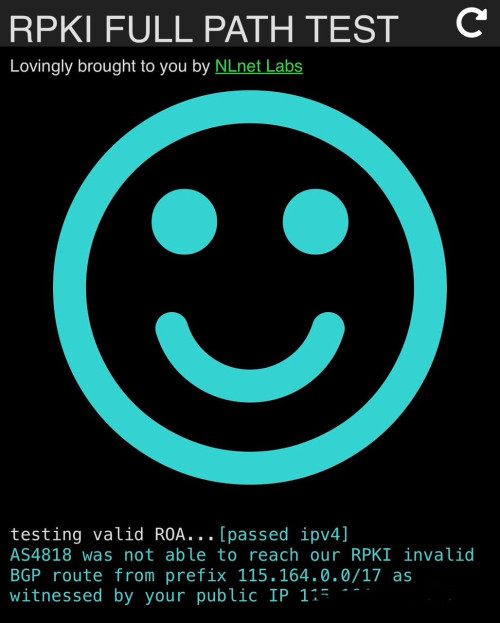
Go to this website: https://rpkitest.nlnetlabs.net/
Screenshot me the top part which shows the ASxxxx

If you buy the SPF module knowing that it might not fix your problem then it is fine. You do get better security using the module compared to TM's ONU / ONR.

You can just run the Fiberhome and see how it goes. If it is really OK, then I don't know what is wrong already. Maybe overheat or this Skyworth really have a firmware bug. Their previous D-Link ONR also has a bug where it will drop your speed to 300Mbps when you turn on VPN, even if you are in bridge mode
kwss
post Jul 21 2025, 11:31 PM

Regular
******
Senior Member
1,208 posts

Joined: Aug 2018
QUOTE(boringz @ Jul 21 2025, 09:54 AM)
Based on my checks last night, using the fiber home modem option does not work as well. I now believe as you suggest, that under a certain maximum number of connections as you have pointed out, they start to fail (blocking by Digi fiber). Normal web surfing, WeChat, Microsoft teams, shopee app failed to load/lag/need to keep refreshing during the down time(meaning it did not load right away on the first time) - approx 10pm onward range.

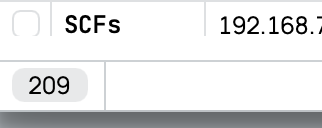
I haven't tracked it onsite at night yet(I am away from the site at night) - but currently during daytime it's between 300-700 range.

This is what you meant right? the 209 number.
user posted image

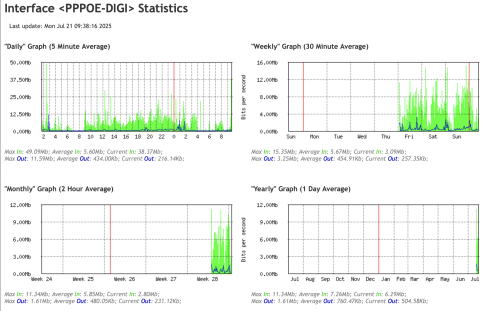
I have enabled graphing also to see the data usage.

user posted image

And as per the rpki test result:
user posted image
Is there a way/script I can enable tracking for number of open sessions in logging? *nevermind - I setup a script to log active connections every minute.

And is there a way I can use the remote DNS to login to mikrotik? I enabled Cloud > DDNS enabled but it writes: Router is behind a NAT. Remote connection might not work. *nevermind - I found the way to get this to work with zerotier.

I will do a remote login and do a comparison on the number of active connections to see what's the limitation.
*
There are a few things you can do to confirm and alleviate the issue:
Enable IPv6
I see that it is disabled. IPv6 don't do NAT and hence won't count to the cap.

Use Mikrotik to perform DNS
Instead of pointing to third-party DNS server inside your DHCP or RA, point them to your Mikrotik instead. This will allow caching and reduces connection from all the devices burning up NAT entry just for DNS.

My own assumption and question:
You mentioned you changed from Maxis to Digi. I assumed everything else is the same, including the number of devices and usage pattern.

I assumed you are using the exact same hardware, including your Mikrotik, switch and AP. Except the ONU.

I also assume you just change the PPPoE and maybe the VLAN tagging in your Mikrotik and nothing else.

Is my assumption correct?

How are those devices connected to your network? Wired or WiFi?

Some other things you can try to confirm if it is Digi problem:
Upgrade to the latest RouterOS
I think in the recent version they mention something about improve stability under heavy usage. The description is vague and I am not sure if it apply to you. Just upgrade and try it out.

Swap you ONU + Router with your Maxis account
You mentioned you have another location just behind using Maxis.
Just move the Maxis Skyworth + rb4011 over and swap with your Digi Skyworth + rb5009

Now you can test at night if your Digi setup is still having issue. This will directly tell if Digi network is having a congestion in general or is it a NAT session issue.

Disconnect PPPoE for 2 minutes and reconnect when problem occur (if you are on site)
The 2 minutes is sufficient for NAT session to timeout if they use an aggressive setting.
If you reconnect and suddenly everything is fast again, this is a big indicator you are hitting the NAT limit.
You obviously cannot do this remotely cos you will lock yourself out.
kwss
post Jul 22 2025, 08:24 AM

Regular
******
Senior Member
1,208 posts

Joined: Aug 2018
QUOTE(boringz @ Jul 21 2025, 11:49 PM)
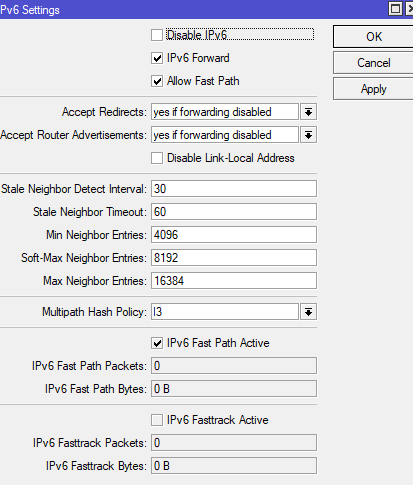
Are there some specific settings I should do to enable ipv6? Since I did not "Disable Ipv6" i just run it as it is.
user posted image

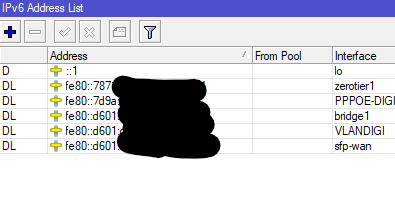
This is what I see in Addresses in IPV6:
user posted image

I am pointing it to 8.8.8.8 and 8.8.4.4, any pointers on how to point them to mikrotik? (i will search online in the meantime).

Your assumption is correct - and actually it is not a swap, it is a different site, but it is at the same area. The devices are essentially the same except the ISP is digi fiber.

Devices are connected via wifi, however me personally connecting via wired gives the same outcome.

Strangely: I have setup the SFP by @anime4000 today following his configurations, and using RB5009. Although I hit the speeds of 2gb dl and 1gb ul from speedtests, the outcome seem to be far worse than using the fiberhome + rb4011. Far worse meaning all attempts to try using fast.com usually fail, most attempts to open websites fail, and all forms of apps such as wechat, etc fail. funnily the speedtest I did lead me to attempt to do it with kuching isp, even though I am located in perak. But then again rb4011 and fiberhome also gives problems sporadically, during certain time/usage patterns. Even the RPKI website you shared cannot be loaded.

From remote monitoring into the routers I confirm: there is no overusage - the speeds are well below the 2gb/1gb provided. I don't think users ever get a chance to even surf the speeds.

To answer your questions:

1) they are the latest versions. 7.19.3 For the routers handling maxis fiber & digi fiber.
2) Yes they are swapped. As mentioned funnily fiberhome seem to work better. I have not swap the skyworth yet due to avoiding any disruption. But, testing anime4000's SFP ONU unit proves that either my RB5009 is giving problems, or that after a certain number of connections (as you mention about NAT limit), then maybe packets start to get lost.
3) Yes, if I disconnect and reconnect it usually gets fast again, but only for a short time during peak periods, as the connections quickly rush back in.

So you reckon the "NAT limit' is something imposed by digi fiber correct? And there's nothing I can do to bypass this limit or I can mitigate this by setting up queues/etc?

These are the number of connections i logged using digi fiber. For maxis fiber it is at least 5 times higher, and no issues.
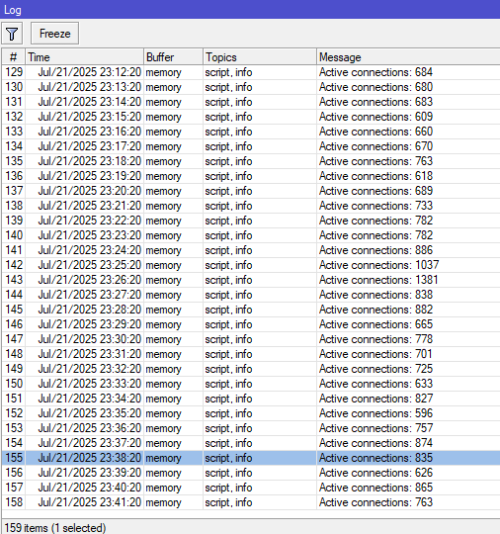
user posted image
*
Regarding the PON stick, it is best you test it independently like during afternoon when you normally don't face problem. It is hard to know if it is a PON stick problem or not when the failure mode is the same.

For now I will focus on your Layer 3 problem and not introduce too much variable.

That IPv6 setting is to enable / disable the IPv6 stack in RouterOS, it won't get you any IPv6 address.

Here is how to configure IPv6:
Go to IPv6 > DHCP Client.
Add new.
Interface: PPPOE-DIGI
Request: Select only Prefix
Pool name: You can put anything you want


Go to IPv6 > Address.
Add new.
Address: ::1/64
That's colon colon one slash sixty four

From pool: The name of the pool from previous step
Interface: bridge1


Go to IPv6 > ND.
Add new.
Interface: bridge1
MTU: 1480
DNS Server: 2001:4860:4860::8888


Go to IPv6 > Firewall
Check if there exist Action = fasttrack connection
If exist, skip.
If doesn't exist, add new.
Chain: Forward
Click Action.
Action: fasttrack connection
Move the fasttrack rule to the top! This is a must!


Verify IPv6 is working by visiting:
https://whatismyipaddress.com/
https://rpkitest.nlnetlabs.net/

Both should show IPv6 section.
If it doesn't work, you might need to disconnect / reconnect your WiFi / wired and wait like a minute for the RA to distribute the address.


After you verified IPv6 is working, setup IPv4 DNS resolution with Mikrotik
Go to IP > DNS
Servers: 2001:4860:4860::8888
Remove all IPv4 addresses here as you want DNS resolution to use IPv6 only to avoid using up NAT session.

Allow Remote Requests: Enabled


Go to IP > DHCP Server.
Click on the "Network" tab on top.
Click defconf.
DNS Server: 192.168.88.1
If you changed your Mikrotik IP address then adjust accordingly.


Once this is done, disconnect / reconnect your WiFi and verify your laptop is getting the correct DNS information for both IPv4 and IPv6.

Once they are correct, reboot all AP and switch to force reconnect all the client to use you newly configured settings.

Yes this limit is imposed by Digi. You can either request a public IP or ask them to raise the limit. I can already imagine what is in their mind when you talk about NAT session limit.

No amount of queue will fix this. It is not a bandwidth problem.

Anyway I check CelcomDigi website and they don't seems to have business plan. Is this a consumer plan?

This post has been edited by kwss: Jul 22 2025, 08:27 AM

kwss
post Jul 22 2025, 02:04 PM

Regular
******
Senior Member
1,208 posts

Joined: Aug 2018
QUOTE(boringz @ Jul 22 2025, 11:34 AM)
I have done as you mentioned, and I saw that I do not get any ipv6 at all.

Then I reconnected back the tplink digi modem provided, and its the same outcome even enabling ipv6. I reckon after the previous complaint to them, they have disabled ipv6 and hence "quietly solved" the pppoe disconnect issue previously.

Okay so I guess I'm stuck with the current configuration. Done all including setting up ipv6 on all APs but same. mikrotik and tplink does not show the ipv6 through the websites you provided.

Thanks kwss for your advice. I learned alot through this process. I will probably just move on and get another telco.

And yes as to your last question, yes this is a consumer plan, no business plan. Any idea whether signing up for business plan will remove the CGNAT session limit for any/all providers? Is Unifi business good for this?
*
No harm calling Digi and complain about the lack of IPv6 and ask them to enable again.
If IPv6 is enough to get by CGNAT cap then you do save money.

If you are not in contract and can cancel, all Unifi Biz come with public IPv4 and /56 IPv6 prefix. This is enough for you to create 256 networks internally via VLAN or routed port.

The IPv4 address is enough for 65000 NAT session.

Not sure about other telco.
kwss
post Aug 9 2025, 09:14 PM

Regular
******
Senior Member
1,208 posts

Joined: Aug 2018
QUOTE(Anime4000 @ Aug 9 2025, 08:36 PM)
Today I do something crazy

CCR2004 act like OLT
user posted image

user posted image

user posted image

the SFP range is 8KM, to reduce power by mis-match UPC APC
user posted image

No need set RG Mode
user posted image

LAN Speedtest Results
user posted image

the OLT support only 1:16

I went to Jabodetabek, meet my GPON team and got this

the OLT act like L2 Switch, simple, auto registration

Now, can create own FTTR
*
Very nice setup yo. Did you use inline attenuator? I didn't see any. Don't burn your laser module.
The RX is borderline high.
kwss
post Aug 10 2025, 11:46 PM

Regular
******
Senior Member
1,208 posts

Joined: Aug 2018
QUOTE(Anime4000 @ Aug 10 2025, 11:27 PM)
today I tried with old Unifi ONU, Huawei HG8420H5 with OLT SFP

without changing any settings, stock Unifi HWTC Firmware, untagged traffic work just fine!

This mean, I can turn HG8420H5 like Media Converter + Switch!
user posted image

I tried Nokia ONU, it didn't allow untagged traffic,
I haven't tried ZTE, and Fiberhome ONU yet
*
What if you use the classic Priority Tagged VLAN 0 trick?
Just tag it as VLAN 0.
kwss
post Aug 11 2025, 12:00 AM

Regular
******
Senior Member
1,208 posts

Joined: Aug 2018
QUOTE(Anime4000 @ Aug 10 2025, 11:53 PM)
based on ME 84 and 171, it pass as is and no VLAN entry on the table

ME 84, just 0x00 FwdOp with zero Entry
ME 171, just 0x1000 Filter (Wildcards = any VLAN) pair with RemoveTags 0 (no tag rewrite/stripping)

The OLT just push very basic and user side managed

on Huawei, I not configure anything, it just works! I think Unifi Firmware that Huawei made are bridge mode as always...
*
Okay. I suspect the OLT don't support priority tagged VLAN.
In Australia NBN, this is the exact trick being used to do untagged VLAN and they are all Nokia ONU.
kwss
post Aug 11 2025, 12:06 AM

Regular
******
Senior Member
1,208 posts

Joined: Aug 2018
Oh wait.
Is there a way you can set the OLT port as trunk in Mikrotik?
I suspect it's Mikrotik that chew the tag.
At least on Cisco they chew the tag if it's not trunk port
kwss
post Aug 11 2025, 03:10 AM

Regular
******
Senior Member
1,208 posts

Joined: Aug 2018
QUOTE(Anime4000 @ Aug 11 2025, 02:35 AM)
If you see the D-Link ONR B1, the VLAN also works.

at Mikrotik, just add VLAN as usual,
the OLT, just pass traffic as is (VLAN Aware)
at ONT, traffic come as Raw Layer 2.

the OMCI ME 171 didn't push any VLAN Entry, and ME 84 just simple 0x00 FwdOp
*
What I meant was Nokia ONU must use Priority Tagged method to do untagged VLAN. I know you can make it work on D-Link and Huawei without tagged VLAN.

The thing with priority vlan is that the switch chip will automatically untag it if it's not a trunk port.

Looking at:
https://help.mikrotik.com/docs/spaces/ROS/p...d+VLAN+priority

It seems like Mikrotik has some very weird method of doing it. So there's a high chance tagged VLAN 0 never make it to your OLT, that's why you never see it in ME.
kwss
post Aug 18 2025, 01:32 AM

Regular
******
Senior Member
1,208 posts

Joined: Aug 2018
QUOTE(ZJL @ Aug 17 2025, 09:39 PM)
I bought an Ubiquiti router. Correct GPON SFP from few laying around earlier. The webui IP 192.168.1.1 for router and stick is the same . How to access the Stick GUI ? How to setup the Ubiquiti like static routing needed? The GPON doesn't go UP if fiber not connected ?
*
You must change your Ubiquiti to use another subnet. Then you must NAT the interface to your SFP.
You cannot configure static routing now because for static route to work, you must configure it at both the router and the SFP. Not even sure if your SFP firmware can do L3.

You have 2 ways:
1. Configure your SFP to not toggle the LOS pin when there's no signal. For some firmware like 8311 you can do it in the UI in recent release. For others you need to write a specific location in EEPROM.
2. Configure your router to ignore the LOS pin of the SFP. Mikrotik can do this. I don't think Ubiquiti can but don't quote me on this.

Or just plug it into the network like 3 - 4 am and see what happens.

But seriously, your question is really very the super basic. You really want to start with PON when there are so many things you can do?

EDIT:
I just want to clarify that I am all for freedom of experimentation and do not support any form of knowledge gatekeeping. Just keep in mind PON is very much a fragile, shared network.

I personally don't think anything bad will happen if you plug in the stick, as long as there is no firmware mod.

But if you are interested in networking, I can tell you upfront there's no money in this, unless you want to work for PON vendors, who are all in China and have a long queue of people trying to get a job there.

Sure there's a lot of niche and specialist role in networking, but I still think there's very little money in this unless you are the equipment vendor.

This post has been edited by kwss: Aug 18 2025, 01:44 AM
kwss
post Sep 4 2025, 04:20 PM

Regular
******
Senior Member
1,208 posts

Joined: Aug 2018
QUOTE(Anime4000 @ Sep 2 2025, 08:45 PM)
another Nijika Stick update, 10 stick in action, 10 pppoe for now

user posted image

speedtest for now

user posted image

https://www.speedtest.net/result/c/a05d054b...72-8045df2e0b34

managed to split different OLT Port
Maxis 1+1
Unifi 2G (1,2,3,4,5,8)
Unifi 2G (6 & 7)

thus ~6Gbps, the rest of id share OLT Port, like id 6 and 7, will be 1+1 on each ONR, this already limitations of GPON

I try propose to install own OLT, maybe using TP-LINK XGSPON for this client, so, can reduce number of fiber
*
I got so many questions with this setup.
He could have cancel 1 Maxis account and 8 Unifi account.

The two CRS309 are basically redundant.
- or -
He can just use 1 CRS309 to achieve the same speed if he cancelled all the useless accounts.
kwss
post Sep 4 2025, 10:42 PM

Regular
******
Senior Member
1,208 posts

Joined: Aug 2018
QUOTE(Anime4000 @ Sep 4 2025, 10:07 PM)
my client target to have 40Gbps
he found me from overseas forum, luckily in same country, nearby states, hire me for this project

now, Unifi need split all current 8 account to different OLT port, meaning FDP that did not share same root.

first, Unifi pull out id 6 and 7 and use different FDP, show same results 1+1 from different ONR

report to upper management, didn't work...

now planning moving out id 8 alone.

like this, my client wants 40Gbps, (20x Unifi Ultra), I told Unifi Elite need to accelerate 10G/XGS-PON deployment here

instead having 20 unifi fiber, use 10G PON just need 4, then ditch CRS309 out of picture...

Unifi upper management acknowledged, but still many bureaucracy need to follow,

Unifi told me, once Unifi Ultimate (10G) exist, this might compete with Metro-E especially at price point...

of course Metro-E have big leverage and 99.7% SLA
and PON is best-effort...

I have told my client that 40G Metro-E pricing would bankrupt him, he accepted "best-effort" internet instead.

---

in meantime, Unifi have acknowledged my NIJIKA PON Stick, use my client to test the stability and compliance 🤗

waiting good news from them, so I can less to worry about incompatible that I modified, as I can see OLT side, this good time to fully sure that my firmware is approved
*
I suggest he just cancel them all.
First of all, the OLT still need an uplink. I do not think TM have 40gig for it. Even if they have, it would be for the whole shelf.

Then for XGSPON. Assume TM rollout, I suspect they will use the least possible port, meaning they will chain all the ODN together. So at that time, 8.5gig will still be the max speed.

For now, he is paying for CoS that compete with himself.

If he really need 40gig, he won't be doing this kind of stunt. Metro-E connects directly to the ring network, bypassing all the last mile component like ODN, OLT, BNG. It's a totally different product category.
It's like AWS Malaysia trying to save money by signing up for Unifi.

What he need that 40gig for? Might as well be just signup for wavelength services or dark fiber to AIMS or whatever location.

I seriously doubt anyone need 40gig DIA.

3 Pages < 1 2 3 >Top
 

Change to:
| Lo-Fi Version
0.0763sec    0.67    7 queries    GZIP Disabled
Time is now: 11th December 2025 - 11:02 PM