

Yes, u will get DD+ / Atmos with Netflix
This post has been edited by dex-brz: Sep 9 2020, 08:47 PM
SONY TV 2020 available for order
SONY TV 2020 available for order
|
|
 Sep 9 2020, 08:46 PM Sep 9 2020, 08:46 PM
Return to original view | IPv6 | Post
#21
|
 
Junior Member
126 posts Joined: Oct 2014 
|
Yes, u will get DD+ / Atmos with Netflix
This post has been edited by dex-brz: Sep 9 2020, 08:47 PM |
|
|
|
|
|
Sep 14 2020, 10:52 AM
Return to original view | Post
#22
|
|
Junior Member
126 posts Joined: Oct 2014
|
QUOTE(norazwan79 @ Sep 12 2020, 05:27 PM) Looking for bigger tv with hdmi 2.1 very good black levels...good for dark room So far sony 85" x90h met my expectation But worried about the hdr brightness in bright room Lower than x95g iinm... Any owner of x90h can share the experience?  estimated 700 nits +/-...decent enough for HDR movies. imho, its very bright now...i lowered the brightness to 20 (from 50max) with 85 inch size, its gona be awesome, go for it!  size matters!  This post has been edited by dex-brz: Sep 14 2020, 10:55 AM |
|
|
Sep 15 2020, 05:06 PM
Return to original view | IPv6 | Post
#23
|
|
Junior Member
126 posts Joined: Oct 2014
|
QUOTE(norazwan79 @ Sep 15 2020, 02:46 PM) Did u face any blooming issues? Especially when turn on subtitles. Some blooming on certain scenes only..not all the time.You can play around with the settings, to minimize it. At the end of the day, it is what is it...its FALD LCD TV. If you want zero blooming, get an OLED I dont see any other FALD TV can compete with x90h for now...(in Malaysia market) This post has been edited by dex-brz: Sep 15 2020, 05:08 PM |
|
|
Sep 15 2020, 08:12 PM
Return to original view | IPv6 | Post
#24
|
|
Junior Member
126 posts Joined: Oct 2014
|
QUOTE(norazwan79 @ Sep 15 2020, 06:45 PM) I owned LG OLED TV and definitely zero blooming issue. But for 85 inch TV with budget less than 15k, X90H is the best option for me right now. Oh yeah. For me..i will also go for 85inch x90h vs 65inch oled.As i said before..size matters! This post has been edited by dex-brz: Sep 15 2020, 08:13 PM |
|
|
Sep 22 2020, 01:57 PM
Return to original view | IPv6 | Post
#25
|
|
Junior Member
126 posts Joined: Oct 2014
|
QUOTE(timeonce @ Sep 22 2020, 12:53 PM) Anyone manage get atmos with X900h. I just got mine but when i connect to my Sonos ARC - i get ARC connection only and no earc and sound output is DD and no atmos in any film in netflix. TT yes, this TV can get Vision and Atmos on Netflix (tv app)good thing about sony is you can install express VPN to it. you will need to output DD+ to get Atmos (explore the SOUND settings menu) example of movies with both Vision+Atmos is The Old Guard, Project Power and Da 5 Bloods This post has been edited by dex-brz: Sep 22 2020, 01:58 PM |
|
|
Sep 22 2020, 03:59 PM
Return to original view | IPv6 | Post
#26
|
|
Junior Member
126 posts Joined: Oct 2014
|
QUOTE(bb.supplements @ Sep 22 2020, 03:02 PM) X8000H 65" VS X9000H 55" depends on your "use case"If its the same price,which would u guys choose. casual users can go for X8000H if u need the dark room performance/FALD, go for X9000H This post has been edited by dex-brz: Sep 22 2020, 04:01 PM |
|
|
|
|
|
Sep 23 2020, 05:21 PM
Return to original view | IPv6 | Post
#27
|
|
Junior Member
126 posts Joined: Oct 2014
|
QUOTE(derravile @ Sep 23 2020, 05:17 PM) i went for size, no regrets so far.... effectively u getting 30% more screen area as compare to 55" sure..always go for bigger screen size.65inch = living area 55inch = room, etc after awhile...65inch also seems "small"....exploring 75/85 inch  flee93 liked this post
|
|
|
Oct 19 2020, 01:19 PM
Return to original view | IPv6 | Post
#28
|
|
Junior Member
126 posts Joined: Oct 2014
|
I off my MotionFlow in the settings.
But it seems it automatically kick in back to the TV, after using the TV for awhile / on standby. (i will have to manually off it again) Anyone experience this? This post has been edited by dex-brz: Oct 19 2020, 01:20 PM |
|
|
Oct 19 2020, 02:29 PM
Return to original view | IPv6 | Post
#29
|
|
Junior Member
126 posts Joined: Oct 2014
|
QUOTE(WhitE LighteR @ Oct 19 2020, 02:03 PM) its a known bug. they promise to fix in the next update.  else my 4K UHD movie looks crappy...lotsa motion artifacts else my 4K UHD movie looks crappy...lotsa motion artifacts |
|
|
Oct 19 2020, 03:05 PM
Return to original view | IPv6 | Post
#30
|
|
Junior Member
126 posts Joined: Oct 2014
|
QUOTE(WhitE LighteR @ Oct 19 2020, 02:53 PM) Yea. The motion part is one of my biggest disappointment. It can't handle different types of media without the need to constantly change the motion setting. Auto setting is hit n miss. Setting cinemotion off seems to have the biggest effect to avoid all this motion artifact issue in 1080p shows n below. I did try Custom (minimum 1 for both). Seems ok for the time being. (Better than Auto On)This post has been edited by dex-brz: Oct 19 2020, 03:05 PM |
|
|
Oct 19 2020, 09:33 PM
Return to original view | IPv6 | Post
#31
|
|
Junior Member
126 posts Joined: Oct 2014
|
QUOTE(tony_mw @ Oct 19 2020, 06:57 PM) Any x90h user experienced random self reboot issue here? Mine having this issue very irregularly lately (I think 4-5 times since last week). This morning i can’t switch back on without unplug the power plug. Complaint to the Sony CS and they say this might be caused by external devices(Astro) and asked me to perform a hard reset and see how it goes... never experience this before. check your connected devices/settings related to the CEC/HDMIs (better disable CEC) i believe when we press POWER OFF on the remote control, the TV actually turn off and go to standby/sleep mode (apps seems suspended in the background/running) i wonder is there a way to really POWER OFF the TV, not standby mode (via TV menu/Remote Control)...any idea? This post has been edited by dex-brz: Oct 19 2020, 09:36 PM |
|
|
Oct 28 2020, 01:37 PM
Return to original view | IPv6 | Post
#32
|
|
Junior Member
126 posts Joined: Oct 2014
|
QUOTE(WhitE LighteR @ Oct 28 2020, 12:06 AM) Overseas received latest update for x90h showing support for tv-led dolby vision support. First for any sony tv. Any msia owners got the latest firmware update?This post has been edited by dex-brz: Oct 28 2020, 01:37 PM |
|
|
Oct 28 2020, 02:46 PM
Return to original view | IPv6 | Post
#33
|
|
Junior Member
126 posts Joined: Oct 2014
|
QUOTE(kezman @ Oct 28 2020, 10:38 AM) do your x90h produce any electric static along it metal bezel if plug in hdmi? mine does it, and im sked it might damage the TV Yup. Got abit static..when u touch the bezel. (When TV is ON) |
|
|
|
|
|
Oct 28 2020, 06:41 PM
Return to original view | IPv6 | Post
#34
|
|
Junior Member
126 posts Joined: Oct 2014
|
QUOTE(fufu_80 @ Oct 28 2020, 03:17 PM) Sorry to say Asia Pacific Region Firmware is still not updated... 😔 QUOTE(WhitE LighteR @ Oct 28 2020, 04:09 PM) ps5 coming soon already in few more days, still no update. how la Well..i guess we r not priority. ps5 also no news la 😅 |
|
|
Oct 29 2020, 12:33 AM
Return to original view | IPv6 | Post
#35
|
|
Junior Member
126 posts Joined: Oct 2014
|
QUOTE(andrewtho @ Oct 28 2020, 11:26 PM) There’s links on Reddit to update manually. yeah saw that direct link. better dont take risk for now... At your own risk of course.  |
|
|
Nov 28 2020, 09:00 AM
Return to original view | IPv6 | Post
#36
|
|
Junior Member
126 posts Joined: Oct 2014
|
QUOTE(J_T @ Nov 27 2020, 11:02 AM) 65’ now rm9,134. well..basically a standard discount 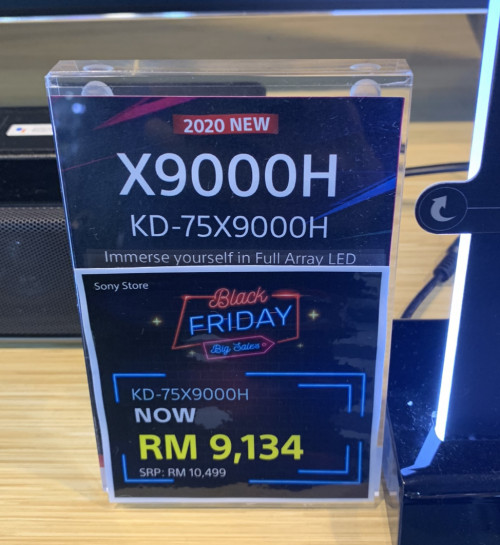  not BF level kind of sale... |
|
|
Dec 3 2020, 07:09 PM
Return to original view | IPv6 | Post
#37
|
|
Junior Member
126 posts Joined: Oct 2014
|
QUOTE(WhitE LighteR @ Dec 2 2020, 07:07 PM) Security Patch Sept 1st 2020 Build 190515.001.S52 604141 Kernel version 4.9.125 #1 Wed Nov 18 04:10:45 JST 2020 QUOTE(-oc-gassa @ Dec 3 2020, 10:33 AM) mine also got updated.. din check version... will check on later.. QUOTE(fufu_80 @ Dec 3 2020, 11:31 AM) Haha... Finally TV firmware updated... waited until neck also long.. 🤣 so far, any issues with this firmware?This post has been edited by dex-brz: Dec 3 2020, 07:13 PM |
|
|
Dec 3 2020, 07:57 PM
Return to original view | IPv6 | Post
#38
|
|
Junior Member
126 posts Joined: Oct 2014
|
QUOTE(WhitE LighteR @ Dec 3 2020, 07:36 PM) The interface feels a little bit laggy. I did not install any new app since update. I wonder why. there is a notice that the TV functionality will be slow for a limited period of time. maybe will need 1-2 days for changes... im quite skeptical about this update...read some issues like TV will auto reboot, clicking sound, etc This post has been edited by dex-brz: Dec 3 2020, 08:00 PM Attached thumbnail(s) 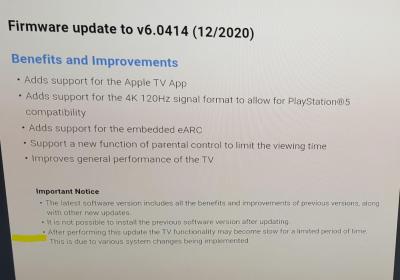
WhitE LighteR liked this post
|
|
|
Dec 6 2020, 04:43 PM
Return to original view | IPv6 | Post
#39
|
|
Junior Member
126 posts Joined: Oct 2014
|
QUOTE(-oc-gassa @ Dec 4 2020, 04:38 PM) nothing that obvious...seems same.. maybe din have a look on the eARC update effect... other than that.. I just found that cant activate microphone to speak to the TV.... the remote can't enable Bluetooth for a reason... as a no big deal(speak features)...still wait to try other improvement... cant use voice feature via remote..kinda big deal QUOTE(yarusaru @ Dec 4 2020, 10:27 PM) how to test, no ps5 well not only for PS5, its the overall performance of the TV, features, etc apple tv need to self download isit? QUOTE(fufu_80 @ Dec 5 2020, 08:29 PM) so far i have just tested the eARC upgrade.. So far works.. good to hear thatOther than that.. no issue at the moment hope it fix the motionflow auto enable issue...this is the main annoyance for me will be holding off the update since i dont need hdmi 2.1 for now... This post has been edited by dex-brz: Dec 6 2020, 06:09 PM |
| Change to: |  0.0687sec 0.0687sec
 0.64 0.64
 7 queries 7 queries
 GZIP Disabled GZIP Disabled
Time is now: 5th December 2025 - 03:03 AM |
 Quote
Quote