

I want to connect PC to Unifi's supplied modem with ethernet cable, but don't want to connect cable through router. Can it be done? How to do it?
How to connect PC to Unifi modem with ethernet cab
How to connect PC to Unifi modem with ethernet cab
|
|
 Feb 14 2020, 06:22 PM, updated 6y ago Feb 14 2020, 06:22 PM, updated 6y ago
Show posts by this member only | IPv6 | Post
#1
|
 
Junior Member
77 posts Joined: Apr 2011 
|
I want to connect PC to Unifi's supplied modem with ethernet cable, but don't want to connect cable through router. Can it be done? How to do it?
|
|
|
|
|
|
Feb 14 2020, 06:51 PM
Show posts by this member only | IPv6 | Post
#2
|
|
Junior Member
120 posts Joined: Oct 2007
|
you can connect but it dont work only
|
|
|
Feb 14 2020, 06:52 PM
Show posts by this member only | Post
#3
|

Senior Member
1,206 posts Joined: Dec 2007 From: Kuala Lumpur
|
You have to know how to connect to TM using PPPoE protocol and split the VLAN .... if you know what Im talking about, you are 95% there.
|
|
|
Feb 14 2020, 06:55 PM
Show posts by this member only | IPv6 | Post
#4
|
|
Junior Member
77 posts Joined: Apr 2011
|
QUOTE(WongGei @ Feb 14 2020, 06:52 PM) You have to know how to connect to TM using PPPoE protocol and split the VLAN .... if you know what Im talking about, you are 95% there. I have no idea at all. Can tell me? Or point me to some webpage that shows how to do it? |
|
|
Feb 14 2020, 07:01 PM
Show posts by this member only | Post
#5
|

Junior Member
451 posts Joined: Apr 2013 From: Meow City 
|
QUOTE(rjmsfire @ Feb 14 2020, 06:22 PM) I want to connect PC to Unifi's supplied modem with ethernet cable, but don't want to connect cable through router. Can it be done? How to do it? is there any diff by connecting directly to modem compared to the normal router? quite interested to know also.. |
|
|
Feb 14 2020, 07:21 PM
Show posts by this member only | IPv6 | Post
#6
|
|
Junior Member
77 posts Joined: Apr 2011
|
QUOTE(RoyRF @ Feb 14 2020, 07:01 PM) is there any diff by connecting directly to modem compared to the normal router? quite interested to know also.. I'm trying to find a way to do the modem-PC connection on my father's request. He doesn't want a router switched on in his house. He believes wifi signals will give him cancer. I know it doesn't but he is set in his beliefs and cannot be convinced otherwise. Anyway from my point of view, if not having wifi gives him peace of mind and makes him happy, then that's what matters. |
|
|
|
|
|
Feb 14 2020, 08:49 PM
Show posts by this member only | Post
#7
|

All Stars
11,836 posts Joined: Mar 2011 From: Kota Kinabalu, Sabah
|
QUOTE(rjmsfire @ Feb 14 2020, 07:21 PM) I'm trying to find a way to do the modem-PC connection on my father's request. He doesn't want a router switched on in his house. He believes wifi signals will give him cancer. I know it doesn't but he is set in his beliefs and cannot be convinced otherwise. Anyway from my point of view, if not having wifi gives him peace of mind and makes him happy, then that's what matters. put a router, switch off wifi, remove wifi antenna, done |
|
|
Feb 14 2020, 09:44 PM
Show posts by this member only | IPv6 | Post
#8
|
|
Junior Member
77 posts Joined: Apr 2011
|
QUOTE(noobandroid @ Feb 14 2020, 08:49 PM) put a router, switch off wifi, remove wifi antenna, done My router has no antenna that sticks out |
|
|
Feb 14 2020, 09:53 PM
Show posts by this member only | Post
#9
|

Junior Member
224 posts Joined: Nov 2019
|
QUOTE(rjmsfire @ Feb 14 2020, 09:44 PM) My router has no antenna that sticks out  first is ur modem or router? so u have 2 different devices or 1 we call gateway(if it's have modem+wifi function) ? What is the model name From what I understand so far, u want PC to have internet via wired ethernet to the gateway, while wifi disabled? |
|
|
Feb 14 2020, 10:27 PM
|

Senior Member
5,714 posts Joined: Mar 2007 
|
QUOTE(rjmsfire @ Feb 14 2020, 07:21 PM) I'm trying to find a way to do the modem-PC connection on my father's request. He doesn't want a router switched on in his house. He believes wifi signals will give him cancer. I know it doesn't but he is set in his beliefs and cannot be convinced otherwise. Anyway from my point of view, if not having wifi gives him peace of mind and makes him happy, then that's what matters. That’s complete BS, but I do understand the older generation. You can turn off WiFi in your router, and just connect directly via Ethernet. |
|
|
Feb 14 2020, 10:59 PM
Show posts by this member only | IPv6 | Post
#11
|
|
Junior Member
77 posts Joined: Apr 2011
|
QUOTE(Agsx @ Feb 14 2020, 09:53 PM) first is ur modem or router? so u have 2 different devices or 1 we call gateway(if it's have modem+wifi function) ? What is the model name From what I understand so far, u want PC to have internet via wired ethernet to the gateway, while wifi disabled? So I'd like to find a way to connect PC to either the Huawei or Netis device via ethernet cable without having to turn on wifi. The Netis device has no visible stick antenna, so can't use the remove antenna method. If I've got the modem and router terminology wrong, my apologies. I'm not very familiar with these things. |
|
|
Feb 14 2020, 11:01 PM
Show posts by this member only | IPv6 | Post
#12
|
|
Junior Member
77 posts Joined: Apr 2011
|
QUOTE(SilentVampire @ Feb 14 2020, 10:27 PM) You can turn off WiFi in your router, and just connect directly via Ethernet. Please tell me how to do that. |
|
|
Feb 14 2020, 11:04 PM
|
|
Junior Member
451 posts Joined: Apr 2013 From: Meow City
|
QUOTE(SilentVampire @ Feb 14 2020, 10:27 PM) That’s complete BS, but I do understand the older generation. You can turn off WiFi in your router, and just connect directly via Ethernet. QUOTE(rjmsfire @ Feb 14 2020, 10:59 PM) The fibre optic line comes into the house and connects to a Huawei Echolife HG8240H5 GPON Terminal. I called this the modem. An ethernet cable connects this to a Netis DL4480V1 AC1200 wireless dual band VDSL2 Gigabit VoIP IAD. I called this the router. Currently the PC is connected to this device through an ethernet cable. I think this one makes more practical sense..i'm not a network guy but as far as i know, if you concern on the wifi connectivity at your home, can just switch it off via the settings at 192.168.0.1 (for maxis), then buy a long cat6 cable to connect directly to your device (ie, smart tv, pc, etc..)So I'd like to find a way to connect PC to either the Huawei or Netis device via ethernet cable without having to turn on wifi. The Netis device has no visible stick antenna, so can't use the remove antenna method. If I've got the modem and router terminology wrong, my apologies. I'm not very familiar with these things. just my opinion.. |
|
|
|
|
|
Feb 14 2020, 11:12 PM
|

Junior Member
452 posts Joined: Dec 2007 From: Celle, Germany
|
RJMSFIRE - go to router setup page using its IP address. Something like: http://192.168.0.1 (see router manual). Type it in your browser and press enter. Then you'll be prompted to login. If nobody has change the login credential, it should be factory default: again, see the router's manual. After logging in, there should be a page (you'll have to find) on Wireless settings. There, you can select to turn off wireless radio altogether.
|
|
|
Feb 14 2020, 11:15 PM
|
|
Junior Member
224 posts Joined: Nov 2019
|
QUOTE(rjmsfire @ Feb 14 2020, 11:01 PM) Please tell me how to do that. Unplug ur ethernet cable from Netis, plug it to Huawei Any LAN PORT. Power off Netis.If ur huawei have wifi on, u need to login to it either 192.168.8.1 or 192.168.1.1 if none work look under the modem or manual Search for WPS/Wifi setting simply disable it This post has been edited by Agsx: Feb 14 2020, 11:16 PM |
|
|
Feb 15 2020, 12:43 AM
Show posts by this member only | IPv6 | Post
#16
|

Senior Member
2,348 posts Joined: Apr 2008
|
QUOTE(rjmsfire @ Feb 14 2020, 06:22 PM) I want to connect PC to Unifi's supplied modem with ethernet cable, but don't want to connect cable through router. Can it be done? How to do it? First you need to know your Unifi pppoe user and password. Then follow the steps belowGo to Dial-up and setup new connection 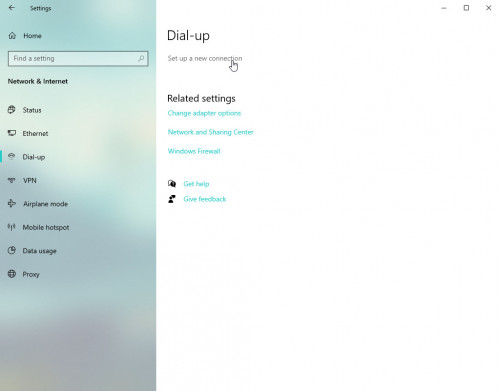 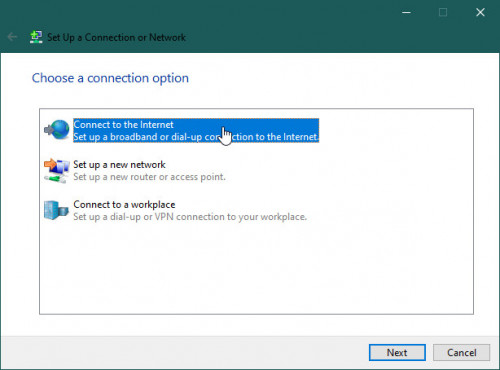 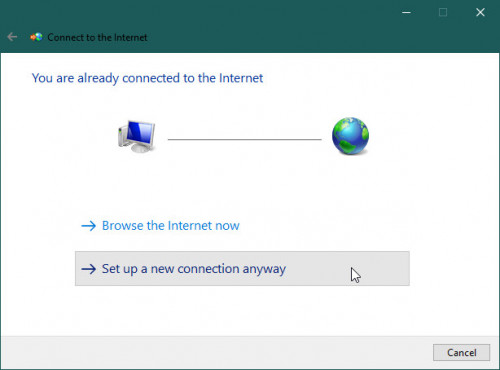 Choose Broadband (PPPOE) 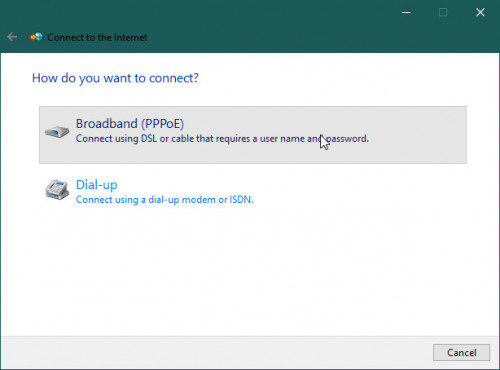 Login your router, go to the WAN settings in your router. Then copy your PPPOE username and password into here. 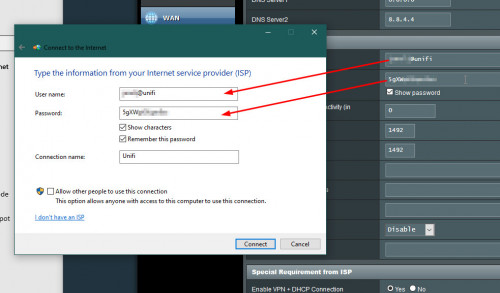 Now you can unplug your router, then connect the Unifi modem (BTU) directly to your PC. Then click "Connect". 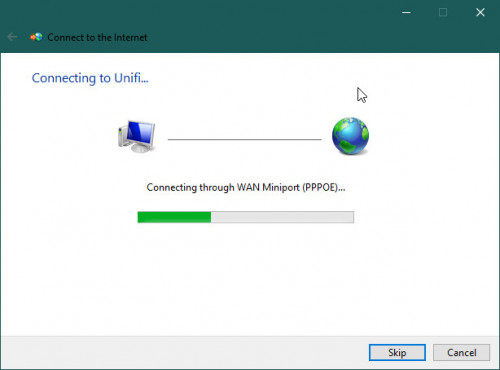 |
|
|
Feb 15 2020, 12:53 AM
Show posts by this member only | IPv6 | Post
#17
|
|
Junior Member
77 posts Joined: Apr 2011
|
Thanks a lot everyone!
|
|
|
Feb 15 2020, 07:52 AM
|
|
Senior Member
2,516 posts Joined: Mar 2016
|
QUOTE(junclj @ Feb 15 2020, 12:43 AM) First you need to know your Unifi pppoe user and password. Then follow the steps below What about vlan? Unifi uses VlanGo to Dial-up and setup new connection Choose Broadband (PPPOE) Login your router, go to the WAN settings in your router. Then copy your PPPOE username and password into here. Now you can unplug your router, then connect the Unifi modem (BTU) directly to your PC. Then click "Connect". Only streamyx, time fiber doesn’t use Vlan This post has been edited by yongtjunkit: Feb 15 2020, 07:55 AM |
|
|
Feb 15 2020, 08:53 AM
|
|
Senior Member
5,714 posts Joined: Mar 2007
|
QUOTE(rjmsfire @ Feb 14 2020, 11:01 PM) Please tell me how to do that. Log into your router, and turn it off manually. It's very easy to do, and you can Google the manual for your router. There will be step by step instructions on how to do it. |
|
|
Feb 15 2020, 11:53 AM
Show posts by this member only | IPv6 | Post
#20
|
|
Senior Member
2,348 posts Joined: Apr 2008
|
QUOTE(yongtjunkit @ Feb 15 2020, 07:52 AM) What about vlan? Unifi uses Vlan Go to your current network card, through control panel or device manager. Go to configure your network card. In the advanced tab, there have VLAN ID in the property (some network card may not have this function, so I can't help you). Change VLAN ID as 500.Only streamyx, time fiber doesn’t use Vlan 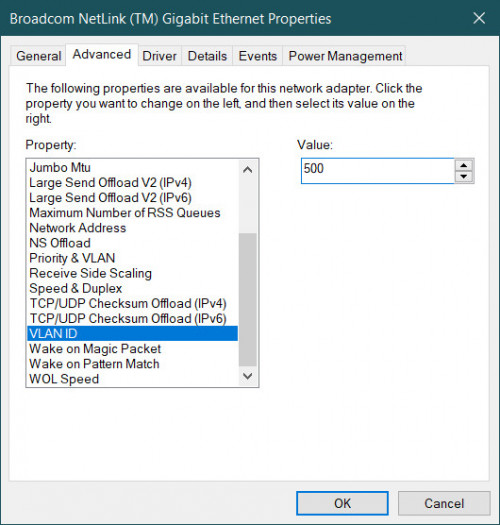 If your PC network card, such as Realtek don't have this option. You need search for solution from Google. One video I was found here. This post has been edited by junclj: Feb 15 2020, 12:02 PM |
|
|
Feb 15 2020, 01:38 PM
|

All Stars
10,476 posts Joined: Jan 2003 From: Sarawak
|
QUOTE(junclj @ Feb 15 2020, 12:43 AM) First you need to know your Unifi pppoe user and password. Then follow the steps below Wow. Thanks.Go to Dial-up and setup new connection Choose Broadband (PPPOE) Login your router, go to the WAN settings in your router. Then copy your PPPOE username and password into here. Now you can unplug your router, then connect the Unifi modem (BTU) directly to your PC. Then click "Connect". |
|
|
Feb 15 2020, 04:59 PM
Show posts by this member only | IPv6 | Post
#22
|

Junior Member
45 posts Joined: Dec 2019
|
QUOTE(rjmsfire @ Feb 14 2020, 09:44 PM) My router has no antenna that sticks out Hello rjmsfire, you can try to wrap the router in tin foil. |
|
|
Feb 17 2020, 04:27 PM
|

Junior Member
309 posts Joined: Jul 2012 
|
Another way but not recommended because need more time to setup and add more bucks for another hardware but it's an alternative way.
Turn any PC become router This post has been edited by misspinky: Feb 17 2020, 04:28 PM |
|
|
Mar 7 2020, 10:44 AM
Show posts by this member only | IPv6 | Post
#24
|
|
Junior Member
77 posts Joined: Apr 2011
|
QUOTE(kslee79 @ Feb 14 2020, 11:12 PM) RJMSFIRE - go to router setup page using its IP address. Something like: http://192.168.0.1 (see router manual). Type it in your browser and press enter. Then you'll be prompted to login. If nobody has change the login credential, it should be factory default: again, see the router's manual. After logging in, there should be a page (you'll have to find) on Wireless settings. There, you can select to turn off wireless radio altogether. Thanks for your suggestion. I successfully turned off the Netis router's wifi signals, while still having my PC connected to the router with a LAN cable.Using my browser, I went to 192.168.1.1 and logged in with the default username and password. Clicked WLAN tab, went to WLAN0 (2.4 GHz) > Basic setting > Enable WLAN interface > Off. Then repeated the same thing at WLAN1(5 GHz). |
|
|
Mar 10 2020, 04:51 AM
|

Senior Member
1,039 posts Joined: Oct 2006
|
Just wondering your father only use pc to connect Internet. No smartphone?
|
|
|
Mar 10 2020, 09:09 PM
Show posts by this member only | IPv6 | Post
#26
|
|
Junior Member
77 posts Joined: Apr 2011
|
QUOTE(jetblast @ Mar 10 2020, 04:51 AM) Just wondering your father only use pc to connect Internet. No smartphone? Smartphone just use data |
|
|
Mar 24 2020, 07:52 PM
|
|
Junior Member
276 posts Joined: May 2012
|
QUOTE(junclj @ Feb 15 2020, 11:53 AM) Go to your current network card, through control panel or device manager. Go to configure your network card. In the advanced tab, there have VLAN ID in the property (some network card may not have this function, so I can't help you). Change VLAN ID as 500. Thanks for the great instructions, it works.If your PC network card, such as Realtek don't have this option. You need search for solution from Google. One video I was found here. My router gg Maxis can only only send replacement post MRO. Am using this method to setup a temp pc router with ICS  |
|
|
Jan 17 2021, 10:57 PM
|

Junior Member
365 posts Joined: Oct 2010
|
QUOTE(junclj @ Feb 15 2020, 11:53 AM) Go to your current network card, through control panel or device manager. Go to configure your network card. In the advanced tab, there have VLAN ID in the property (some network card may not have this function, so I can't help you). Change VLAN ID as 500. Sorry bumping up this old thread.If your PC network card, such as Realtek don't have this option. You need search for solution from Google. One video I was found here. As far as I being informed, we can't have internet access by connecting PC to the BTU Huawei (optical modem) ethernet ports unless we connect to the wifi router LAN. I have similar situation where I need to shift my wifi router to upstairs through a long LAN cable that connected to BTU Huawei. This is because I want to cover the upstairs wifi signal temporary. In fact, I can have balance wifi signal for both upstair and downstairs after I shift wifi router to upstairs. I know you would suggest wifi extender / powerline but I need some time since we are having MCO now... I wish I can connect my downstairs desktop directly to BTU Huawei through LAN cable. So, this method above would work, while maintaining the same working condition for upstairs wifi router? |
|
|
Jan 18 2021, 10:16 AM
|
|
Senior Member
2,348 posts Joined: Apr 2008
|
QUOTE(Holyjolly @ Jan 17 2021, 10:57 PM) Sorry bumping up this old thread. I'm not sure what is your condition. This method only works for one PC only when you don't have router. You are now asking for connect downstairs desktop PC directly to BTU, yes it may works. However, nope for the wifi router for upstairs. I guess your current situation is BTU to wifi router, this is the only best situation, so please avoid BTU to desktop PC method. As far as I being informed, we can't have internet access by connecting PC to the BTU Huawei (optical modem) ethernet ports unless we connect to the wifi router LAN. I have similar situation where I need to shift my wifi router to upstairs through a long LAN cable that connected to BTU Huawei. This is because I want to cover the upstairs wifi signal temporary. In fact, I can have balance wifi signal for both upstair and downstairs after I shift wifi router to upstairs. I know you would suggest wifi extender / powerline but I need some time since we are having MCO now... I wish I can connect my downstairs desktop directly to BTU Huawei through LAN cable. So, this method above would work, while maintaining the same working condition for upstairs wifi router? You still need to pull a long LAN cable to upstairs and buy a new wifi router (not shift your current router to upstairs) to put at upstairs. So you can connect the upstairs wifi router to your downstairs main router to get access to the internet on wifi. |
|
|
Jan 18 2021, 12:44 PM
Show posts by this member only | IPv6 | Post
#30
|
|
Junior Member
422 posts Joined: Mar 2010
|
QUOTE(Holyjolly @ Jan 17 2021, 10:57 PM) Sorry bumping up this old thread. Just need to extend the fiber cable to upstair.As far as I being informed, we can't have internet access by connecting PC to the BTU Huawei (optical modem) ethernet ports unless we connect to the wifi router LAN. I have similar situation where I need to shift my wifi router to upstairs through a long LAN cable that connected to BTU Huawei. This is because I want to cover the upstairs wifi signal temporary. In fact, I can have balance wifi signal for both upstair and downstairs after I shift wifi router to upstairs. I know you would suggest wifi extender / powerline but I need some time since we are having MCO now... I wish I can connect my downstairs desktop directly to BTU Huawei through LAN cable. So, this method above would work, while maintaining the same working condition for upstairs wifi router? The fiber patch cable selling quite cheap on shopee malaysia. Need to add one more male coupler for fiber patch cable so that it can connect to the tm ready made fiber female connector. U have good wifi coverage at upstair now. But u still need one long run cat6 lan cable to go downstair to connect to ur desktop pc. This post has been edited by cba5566: Jan 18 2021, 01:00 PM |
|
|
Jan 18 2021, 02:38 PM
|
|
Junior Member
365 posts Joined: Oct 2010
|
QUOTE(junclj @ Jan 18 2021, 10:16 AM) I'm not sure what is your condition. This method only works for one PC only when you don't have router. You are now asking for connect downstairs desktop PC directly to BTU, yes it may works. However, nope for the wifi router for upstairs. I guess your current situation is BTU to wifi router, this is the only best situation, so please avoid BTU to desktop PC method. Yes, you understand it correctly. You still need to pull a long LAN cable to upstairs and buy a new wifi router (not shift your current router to upstairs) to put at upstairs. So you can connect the upstairs wifi router to your downstairs main router to get access to the internet on wifi. I planning to reuse another old wifi router (if I am able to find it back) and connect to downstairs BTU's 2nd ethernet port and remain it at downstairs, so that I can connect desktop to this old router. If I get you right, you say that the upstairs (current) wifi router need to be connected to downstairs (extra) old wifi router through LAN cable, to function and act as 2nd access point? |
|
|
Jan 20 2021, 09:53 AM
|

Senior Member
3,000 posts Joined: Aug 2008 From: PeeJay
|
your modem is downstairs right?
so from modem to router, short LAN cable like normal. Then LAN 2 or 3 to your PC using short LAN cable. Then LAN 2 or 3 to another router using long LAN cable to upstairs and set the router as AP. all done |
| Change to: |  0.0252sec 0.0252sec
 0.55 0.55
 5 queries 5 queries
 GZIP Disabled GZIP Disabled
Time is now: 14th December 2025 - 04:41 AM |
 Quote
Quote